


Introduction: Why Every Student, Teacher, and Lifelong Learner Needs This Tool
Let’s be honest—whether you’re a high school student writing a history paper, a teacher preparing lesson materials, or just someone who loves learning new things online, the web can feel overwhelming. You find a great article, highlight a few sentences, maybe copy a quote into a document… and then what? Weeks later, you’re scrambling to remember where that perfect statistic came from, or why you saved that paragraph in the first place.
I’ve been there. As someone who spends hours researching topics for work and personal projects, I used to juggle a dozen browser tabs, scattered notes apps, and endless screenshot folders. It was messy, time-consuming, and frankly, frustrating.

That’s why I was excited to try Visual Paradigm FREE Annotator—a browser extension that promises to turn your chaotic web browsing into a streamlined, organized knowledge-building experience. After testing it for several weeks across different use cases (from academic research to lesson planning), I’m ready to share my honest, beginner-friendly review. This isn’t just for “researchers” in lab coats—it’s for anyone who wants to get more value from the time they spend online.
The Everyday Challenge: Why Web Research Feels So Hard (Even for Beginners)
You don’t need to be a professional academic to feel the pain of fragmented research. Maybe you’re:
-
A student gathering sources for a term paper, losing track of which quote came from which website
-
A teacher curating resources for a new unit, struggling to organize links and notes in one place
-
A hobbyist learning about gardening or coding, wanting to save helpful tutorials without drowning in bookmarks
-
A team member trying to give clear feedback on a shared document without endless email threads
The problem isn’t your skill—it’s the tools. Copying, pasting, switching tabs, and trying to reconnect ideas to their sources creates mental friction. You spend more time managing information than actually learning from it.
What if you could highlight, note, and organize insights right where you find them—without leaving the webpage? That’s exactly what Visual Paradigm Annotator aims to do.
First Impressions: What Is Visual Paradigm Annotator, Really?
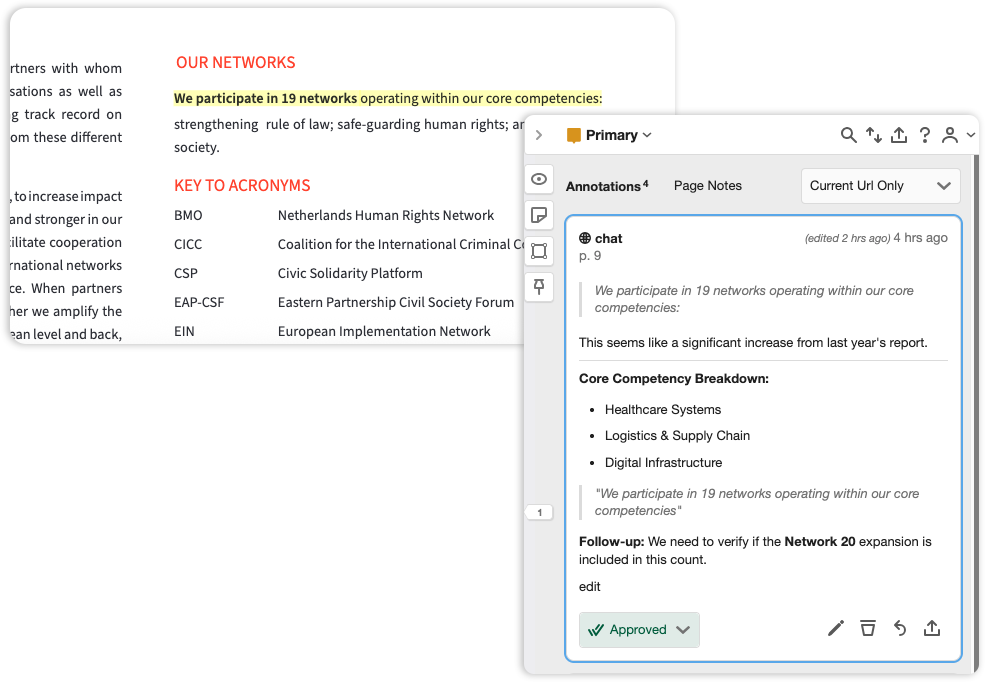
Visual Paradigm Annotator is a free browser extension (available for Chrome and Firefox) that lets you highlight text, add notes, and organize findings directly on any website or PDF—without switching apps. Think of it as a digital highlighter with superpowers: your annotations stay anchored to the exact text you marked, even if you close the tab or come back months later.
Why It Stands Out for Beginners
While many tools let you “save” web content, Annotator is designed for active learning. It doesn’t just store links—it helps you process, connect, and revisit ideas in context. Here’s what caught my attention:
 Built for Learning, Not Just Saving
It encourages you to add notes and tags as you highlight, turning passive reading into active understanding.
 Remembers Context Automatically
No more “Where did I see that?” Your highlights stay linked to the original source, preserving the “why” behind your notes.
 Organize by Topic, Not Just by URL
Group findings from different websites into collections like “History Project” or “Lesson Plan Ideas”—making review and retrieval effortless.
Features That Actually Matter (Especially If You’re New to This)
You don’t need to be tech-savvy to benefit from Annotator. Here are the features I found most helpful as a beginner:
Smart Highlighting That Sticks
Highlight any text on a webpage or PDF, and it stays highlighted—even after you refresh or revisit later. No more losing your place.
Simple Tagging for Easy Organization
Add tags like #essay-source, #vocabulary, or #to-discuss to categorize your notes. Later, you can filter by tag to find all related insights instantly.
Collaborate Without the Chaos
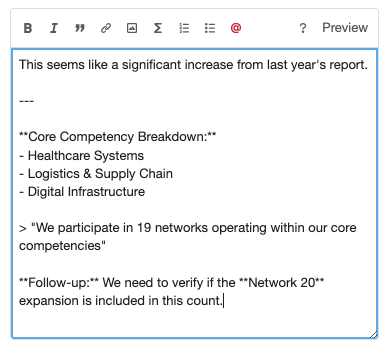
Invite classmates, colleagues, or students to a private group. Discuss annotations directly on the source page—no more screenshot emails or confusing comment threads.
Your Data, Your Privacy
Keep sensitive notes private (“Only Me”), share selectively with a group, or make them public. You control visibility at every step.
PDF Support Included
Annotate online PDFs just like web pages—perfect for research papers, textbooks, or handouts.
Access From Anywhere
Log in from any device, and your annotations sync automatically. Start on your school computer, continue on your laptop at home.
Getting Started: My Simple 3-Step Workflow (Tested by a Real Beginner)
One of the best things about Annotator is how quickly you can start using it. Here’s the workflow I followed—and recommend to others:
 Step 1: Capture
Install the extension, browse to any webpage or PDF, and start highlighting. When you select text, a small popup appears—click “Highlight” to save the snippet or “Annotate” to add a note.
 Step 2: Synthesize
Add tags, cross-references, or longer notes to connect ideas. I loved creating a “Climate Change Unit” collection and pulling relevant highlights from news sites, academic journals, and educational videos—all in one place.
 Step 3: Export
When you’re ready to write or share, export your annotations as JSON, plain text, CSV, or HTML. I exported my research notes directly into a draft essay outline—saving hours of reformatting.
Solving Real Problems: How Annotator Changed My Workflow
Before Annotator, my research process looked like this: find source → copy quote → paste into doc → forget which tab it came from → panic later. Sound familiar?
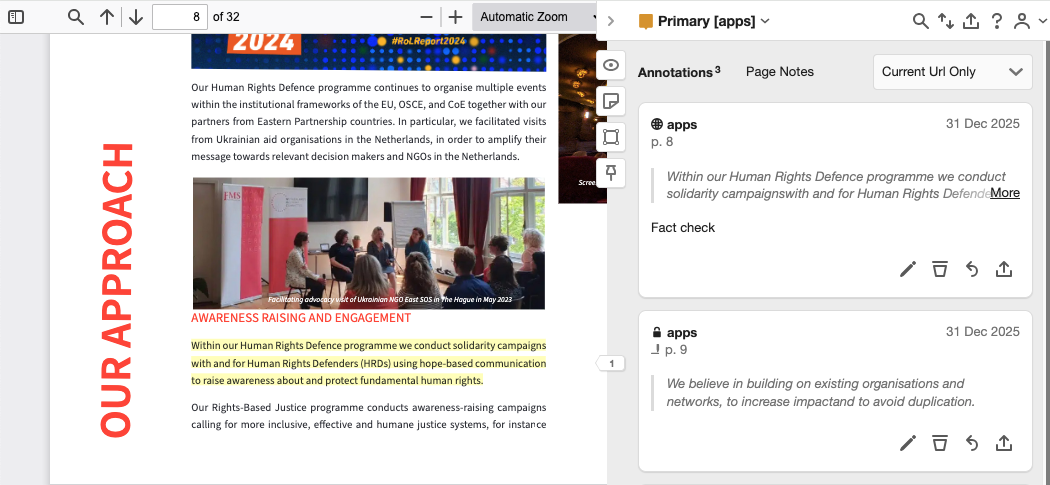
With Annotator, the process became seamless:
-
Context stays intact: Every note is anchored to the exact sentence or paragraph, so I never lose the source.
-
Collaboration feels natural: When working with a study group, we could discuss a shared article right on the page—no more “Can you screenshot that part?” messages.
-
Review becomes efficient: Filtering by tags or collections let me quickly pull all sources for a specific topic when drafting my paper.
For teachers, this could mean curating annotated resource lists for students. For students, it could mean building a personal knowledge library that grows with every assignment. The flexibility is what makes it powerful.
How to Get Started (No Experience Needed)
The best part? Visual Paradigm Annotator is free and beginner-friendly. Here’s how to start in under 5 minutes:
-
Install the Extension: Visit the Chrome Web Store or Firefox Add-ons page and add Annotator to your browser.
-
Create a Free Account: Use your email or log in with an existing Visual Paradigm account. No payment info required.
-
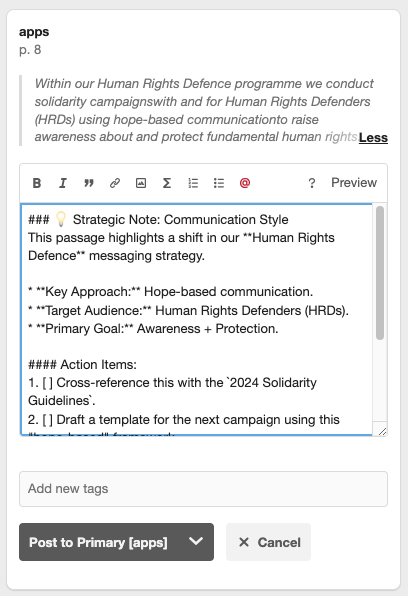
Start Annotating: Browse to any webpage or online PDF. Select text, click the Annotator popup, and add your first highlight or note.
-
Organize as You Go: Add tags like #biology or #project-ideas to keep things sorted. Create collections for different subjects or projects.
-
Collaborate (Optional): Invite peers to a private group to share annotations and discuss sources together.
Pro tip: Start small. Try annotating just one article this week. Notice how much easier it is to revisit your notes later. Then expand from there.
Questions I Had as a Beginner (And Their Answers)
Is this really free?
Yes! The core annotation, highlighting, and organization features are available in the free edition. No hidden paywalls for basic use.
Do I need a Visual Paradigm account?
You can create a free account in seconds, or log in with an existing one. It’s quick and secure.
Can my teacher or classmates see my notes?
Only if you choose to share them. Annotations are private by default (“Only Me”). You can share selectively with a group or make them public—your call.
What’s a “Group,” and why would I use one?
A Group is a private space for collaboration. Perfect for study groups, class projects, or team assignments. Only members see the annotations shared there.
How is this different from bookmarks or saving PDFs?
Bookmarks save a link. Annotator saves your interaction with the content—your highlights, notes, and tags—right where they matter. It’s the difference between saving a recipe and actually writing notes in the margins about what to try first.
Can I edit or delete my annotations later?
Absolutely. You have full control. Edit, delete, or reorganize your notes anytime via the sidebar.
New Conclusion: Your Knowledge, Organized—Starting Today
If you’ve ever felt overwhelmed by the sheer volume of information online—or frustrated by how hard it is to turn browsing into real learning—Visual Paradigm Annotator offers a refreshing solution. It’s not about adding another tool to your stack; it’s about transforming how you engage with the web itself.
As a beginner, I appreciated how intuitive the interface felt. There’s no steep learning curve, no complex setup. Just install, highlight, and start building your personal knowledge library. Whether you’re a student tackling your first research paper, a teacher designing engaging lessons, or simply a curious mind exploring new topics, Annotator meets you where you are.
What impressed me most wasn’t just the features—it was the mindset shift. By anchoring notes to their source context, Annotator encourages deeper thinking: Why did I save this? How does it connect to what I already know? That active processing is where real learning happens.
The web doesn’t have to be a place of distraction. With the right tools, it can become your most powerful classroom, library, and collaboration space—all in one. Visual Paradigm Annotator helps make that vision a reality, one highlighted sentence at a time.
Ready to try it? Start with one article. Highlight one insight. Add one note. You might be surprised how quickly those small steps add up to a smarter, more organized way of learning.
Download for Chrome
Download for Firefox
References
-
Master Web Research with Visual Paradigm Annotator: Official release announcement detailing the launch and core capabilities of Visual Paradigm Annotator, including feature highlights and integration guidance for researchers and teams.
-
Visual Paradigm Annotator – AI-Powered Web & PDF Annotation Tool: Product landing page providing comprehensive overview of Annotator’s features, use cases, pricing, and download options for Chrome and Firefox browsers.
This post is also available in Deutsch, Español, فارسی, Français, English, Bahasa Indonesia, 日本語, Polski, Portuguese, Ру́сский, Việt Nam, 简体中文 and 繁體中文.
Related posts:
 How to Localize Technical Manuals: Translate Text in Image Files for Global Teams
 🚀 Simplify Complex Workflows with Visual Paradigm AI Sequence Diagram Tool!
 AI Animated Banner Generator Review: The Ultimate Tool for Instant Marketing Visuals
 Comprehensive Guide: Developing As-Is and To-Be Business Processes with BPMN