


Executive Summary
The C4 model is a lightweight, hierarchical framework for visualizing software architecture. Created by Simon Brown, it replaces complex, monolithic diagrams with four nested “zoom levels” that cater to different audiences. By focusing on abstraction over notation, the C4 model bridges the communication gap between technical teams, product managers, and business stakeholders, making architectural documentation both accessible and actionable.
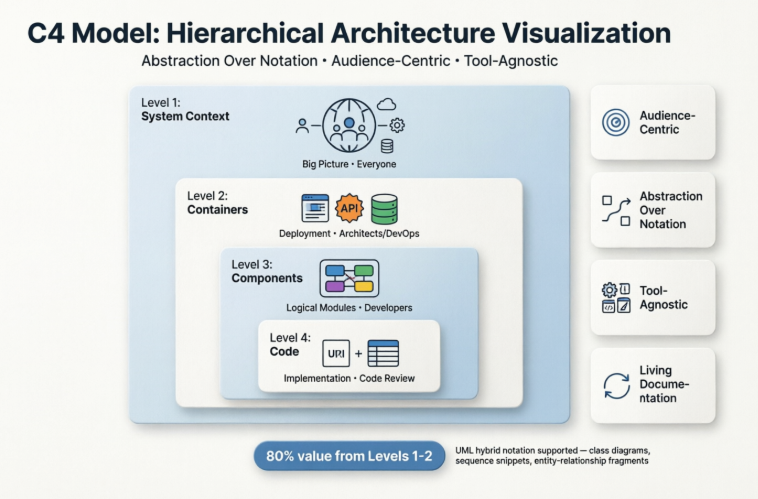
1. What Is the C4 Model?
The C4 model treats architecture like a map: you don’t show every street, building, and utility line on a single page. Instead, you start with a country view, zoom into a city, then a neighborhood, and finally a single building. Each level answers a specific set of questions without overwhelming the viewer.
Core Principles:
-
Audience-Centric: Each diagram targets a specific group (executives, architects, developers).
-
Abstraction Over Notation: Uses simple boxes and arrows instead of rigid, standardized symbols.
-
Tool-Agnostic: Can be drawn on whiteboards, in draw.io, Structurizr, PlantUML, or any diagramming tool.
-
Living Documentation: Designed to be lightweight, iterative, and easy to maintain alongside code.
2. The Four Levels of Abstraction
| Level | Name | Purpose | What It Shows | Primary Audience |
|---|---|---|---|---|
| 1 | System Context | Big-picture boundary | Your system as a single box, plus users and external systems it interacts with | Everyone (technical & non-technical) |
| 2 | Containers | High-level deployment | Separately deployable units: web apps, mobile apps, APIs, databases, message brokers | Architects, Developers, DevOps |
| 3 | Components | Logical organization | Internal modules within a container: services, repositories, controllers, plugins | Developers, Tech Leads |
| 4 | Code | Implementation details | Classes, interfaces, database tables, or ER diagrams. Often auto-generated. | Developers, Code Reviewers |
💡 Key Insight: Levels 1 and 2 deliver ~80% of the communication value. Levels 3 and 4 are optional and should only be used when they solve a specific documentation need.
3. The “Russian Doll” Decomposition Model
The C4 levels are not standalone diagrams; they form a strict parent-child hierarchy. Each level decomposes the one above it while preserving external context.
| Transition | Structural Change | Consistency Rule |
|---|---|---|
| System → Container | The single “System” box expands into a boundary containing all deployable units. External actors remain identical. | Connections from external systems now point to specific containers instead of the whole system. |
| Container → Component | One container is selected and opened. Its internal logical modules are revealed. | Container-to-container interactions become component-to-component or component-to-external. |
| Component → Code | A component is mapped to actual implementation: classes, tables, or packages. | Reflects the real file/folder structure in your IDE. Often mirrors UML Class or ER diagrams. |
This zooming mechanism ensures that every diagram tells a complete story at its chosen level of detail, without losing traceability.
4. Step-by-Step: Building Your First C4 Model
-
Define the System Boundary (Level 1)
-
Place your system in the center.
-
Identify all user roles (e.g., Customer, Admin, Support Agent).
-
List external dependencies (e.g., Stripe, AWS S3, Legacy CRM, SMTP service).
-
Draw directional arrows labeled with protocols or data exchanged (e.g.,
HTTPS / JSON,SFTP / Daily CSV).
-
-
Identify Containers (Level 2)
-
Ask: What are the independently deployable/runtime units?
-
Map: Web frontend, mobile app, REST API, background worker, primary database, cache, message queue.
-
Assign each container a technology stack (e.g.,
React SPA,Node.js API,PostgreSQL 15).
-
-
Decompose into Components (Level 3)
-
Pick one container from Level 2.
-
Group related functionality into logical components (e.g.,
Auth Service,Order Processor,Payment Gateway Adapter). -
Show how components interact internally and with other containers.
-
-
Document Code (Level 4) – Optional
-
Only create if manual documentation adds value beyond auto-generated diagrams.
-
Use UML Class diagrams, ERDs, or package diagrams to clarify complex inheritance, data models, or design patterns.
-
Pro Tip: Always label relationships with technology/protocol and direction. Example: Frontend → API: REST/HTTPS (GET /orders)
5. C4 vs. UML: Understanding the Differences
| Feature | C4 Model | UML (Unified Modeling Language) |
|---|---|---|
| Philosophy | Abstraction-driven. Optimized for audience-specific “zoom levels”. | Standardization-driven. Optimized for precise structural & behavioral modeling. |
| Notation | Flexible: simple boxes, arrows, and colors. No strict syntax rules. | Rigid: 14 diagram types with formal semantics for every symbol and connector. |
| Learning Curve | Low. Master in hours. Focuses on communication. | High. Requires weeks/months to use effectively. Focuses on specification. |
| Primary Audience | Stakeholders, PMs, Architects, Developers. | Engineers, Architects, Technical Writers. |
| Strengths | Quick onboarding, cross-team alignment, lean documentation, agile-friendly. | Behavioral modeling, state transitions, inheritance, concurrency, formal validation. |
| Ideal Use Case | System overviews, onboarding docs, architecture decision records, team syncs. | Complex logic mapping, API contracts, design reviews, compliance documentation. |
6. The Hybrid Approach: Combining C4 & UML
Modern engineering teams rarely choose one over the other. Instead, they layer them strategically:
-
C4 Levels 1 & 2 → Provide the architectural map and deployment topology.
-
UML Sequence Diagrams → Illustrate complex runtime flows, message passing, or error handling between C4 containers/components.
-
UML Activity/State Diagrams → Model business workflows, order lifecycles, or state machines that C4 doesn’t capture natively.
-
UML Class/ER Diagrams → Serve as Level 4 when auto-generation isn’t enough or when domain complexity requires explicit modeling.
This hybrid keeps high-level documentation lean while preserving technical precision where it matters.
7. Best Practices & Common Pitfalls
✅ Do
-
Start at Level 1. Never skip context. If stakeholders don’t understand the boundary, deeper diagrams fail.
-
Keep it current. Treat diagrams as code. Update them in PRs or via CI/CD documentation pipelines.
-
Use consistent naming. Container and component names should match real code repositories or services.
-
Automate Level 4. Use tools like Structurizr, PlantUML, or code analyzers to generate class/ER diagrams from source.
-
Version your diagrams. Store them alongside architecture decision records (ADRs) in your repo.
❌ Don’t
-
Create “screaming architecture.” Overcrowded diagrams defeat the purpose. Split, zoom, or simplify.
-
Mix levels in one diagram. A diagram showing users, containers, and database tables simultaneously breaks the C4 contract.
-
Over-invest in Level 3 & 4. They decay quickly in agile environments. Only document components that are complex, shared, or frequently misunderstood.
-
Ignore relationship labels. Arrows without protocols or data descriptions provide zero architectural value.
-
Treat C4 as a one-time deliverable. Architecture evolves. Documentation must evolve with it.
8. When to Use Which Framework
| Scenario | Recommended Approach |
|---|---|
| Onboarding new engineers or aligning cross-functional teams | C4 Level 1 & 2 |
| Pitching architecture to executives or product leadership | C4 Level 1 |
| Designing microservice boundaries or deployment topology | C4 Level 2 |
| Documenting complex API flows, retries, or async messaging | C4 Level 2 + UML Sequence |
| Modeling business workflows, state transitions, or compliance processes | UML Activity/State Diagrams |
| Clarifying domain models, inheritance, or database schemas | UML Class/ER Diagrams (C4 Level 4) |
| Maintaining lightweight, living architecture docs in agile teams | C4 Primary, UML as needed |
9. Tooling: Visual Paradigm for C4 Model Implementation
Visual Paradigm offers one of the most comprehensive ecosystems for implementing the C4 model, combining traditional modeling precision with cutting-edge AI-powered automation. Whether you’re an enterprise architect needing rigorous documentation or an agile team prototyping quickly, Visual Paradigm provides flexible workflows that scale with your needs.
9.1 Platform Overview: Choose Your Workflow
| Platform | Best For | Key Strengths | Deployment |
|---|---|---|---|
| Visual Paradigm Desktop | Enterprise architects, complex systems, offline work | Full C4 modeling suite, deep customization, code engineering, team collaboration | Native application (Windows/macOS/Linux) |
| Visual Paradigm Online | Agile teams, PMs, rapid prototyping | Cloud-based, AI-driven generation, real-time collaboration, zero install | Browser-based SaaS |
| AI Chatbot | Brainstorming, quick iterations, learning | Conversational diagram creation, instant feedback, natural language interface | Web or integrated in Desktop |
| C4 PlantUML Studio | Developers, code-centric teams | Text-to-diagram via PlantUML, version-control friendly, CI/CD integration | Browser-based web app |
💡 Pro Tip: Desktop users with active maintenance licenses get integrated access to Online features, Chatbot, and PlantUML Studio—creating a seamless hybrid workflow [[1]].
9.2 Traditional C4 Modeling Features (Desktop & Online)
✅ Full C4 Diagram Suite
Visual Paradigm supports all six C4 diagram types, covering the four core levels plus specialized views [[1]][[2]]:
| Diagram Type | C4 Level | Purpose |
|---|---|---|
| System Context | Level 1 | Show system boundary, users, and external dependencies |
| Container | Level 2 | Map deployable units: apps, databases, microservices |
| Component | Level 3 | Decompose a container into logical modules |
| System Landscape | Level 1+ | Show multiple systems and their relationships |
| Dynamic | Cross-level | Illustrate runtime interactions and flows |
| Deployment | Level 2+ | Map containers to infrastructure nodes |
✅ Model-Driven Architecture (Not Just Drawing)
-
Sub-diagram Drill-Down: Click any container to auto-generate its Component diagram; click any component to link to Code-level views. Maintains traceability across all levels [[4]].
-
Custom Attributes & Stereotypes: Add metadata like
technology: Node.js,owner: Team Alpha, orsla: 99.9%to any element for richer documentation. -
Smart Connectors: Relationships auto-label with protocols (
HTTPS/JSON,gRPC,SQL/TLS) and support bidirectional flow notation.
✅ Professional Polish & Maintenance
-
Smart Sweeper: One-click layout optimization automatically aligns, distributes, and routes connectors for clean, presentation-ready diagrams [[4]].
-
Resource-Centric UI: Drag-and-drop elements with intelligent magnets reduce manual positioning effort by ~70%.
-
Doc. Composer: Generate living architecture documentation (PDF/HTML) directly from your model, with auto-updating diagrams and element descriptions.
-
Project Publisher: Publish your entire C4 model as an interactive, navigable website for stakeholder review.
✅ Team Collaboration
-
Version Control Integration: Store models in Git/SVN; track changes alongside code.
-
Threaded Comments & Reviews: Annotate diagrams for asynchronous feedback; resolve discussions inline.
-
Role-Based Access: Control who can edit vs. view specific diagram levels.
9.3 AI-Powered C4 Features: Accelerate from Idea to Architecture
Visual Paradigm’s AI capabilities transform C4 modeling from a manual documentation task into an interactive design partner [[3]][[11]].
🤖 AI Diagram Generator (Desktop & Online)
Prompt → Professional C4 Diagram in Seconds
-
Navigate to Tools > AI Diagram Generation
-
Select C4 Model → Choose diagram type (Context, Container, Component, etc.)
-
Describe your system in plain English:
"An e-commerce platform with mobile app users, React frontend, Node.js API, PostgreSQL database, Stripe payment gateway, and AWS S3 for product images" -
Click Generate → Review, refine, and export [[25]]
Supported Outputs: All six C4 diagram types, with audience-aware abstraction (e.g., simpler labels for Context diagrams, technical details for Component views) [[3]].
💬 AI Visual Modeling Chatbot
Conversational Architecture Design
Access via web at chat.visual-paradigm.com or integrated directly in Desktop [[11]].
Example Workflow:
You: "Create a C4 System Context diagram for a telehealth app"
AI: [Generates diagram with Patient, Doctor, Video Service, EHR System, Payment Gateway]

You: "Add HIPAA compliance service as an external system"
AI: [Updates diagram with new element and secure data flow labels]

You: "Explain the boundary between internal and external systems"
AI: [Provides textual summary + highlights key trust boundaries]
Capabilities:
-
Generate, modify, or explain any C4/UML/SysML diagram via natural language
-
Suggest architectural improvements or identify missing dependencies
-
Export diagrams to PNG, SVG, PlantUML, or embed in documentation [[14]]
🌐 AI-Powered C4 PlantUML Studio (Web App)
Text-to-Code-to-Diagram for Developer Workflows
Ideal for teams that prefer infrastructure-as-code practices [[4]][[25]]:
-
Describe: Enter your system description or problem statement
-
Select: Choose C4 level + parent element (for nested diagrams)
-
Generate: AI outputs valid PlantUML code + live preview side-by-side
-
Iterate: Edit code or description; preview updates instantly
-
Export: Download JSON for version control, CI/CD integration, or team sharing
Key Benefits:
-
PlantUML output is human-readable and diff-friendly in Git
-
Supports hierarchical generation: generate a Container diagram, then auto-scaffold its Component sub-diagram
-
No learning curve for PlantUML syntax—AI handles the code generation
9.4 Hybrid Workflow: Combining Traditional + AI for Maximum Impact
The most effective teams use Visual Paradigm’s ecosystem strategically:
graph LR
    A[Brainstorm with AI Chatbot] --> B[Refine in VP Desktop]
    B --> C[Generate Docs with Doc.Composer]
    C --> D[Share via Project Publisher]
    E[Prototype in PlantUML Studio] --> F[Import to Desktop for polish]
    F --> B
Recommended Pattern for Agile Teams
-
Sprint Planning: Use Chatbot to rapidly prototype C4 Context/Container diagrams from user stories
-
Architecture Review: Import AI-generated diagrams into Desktop; add traceability links, custom attributes, and compliance metadata
-
Development: Export Component diagrams to PlantUML; developers reference or extend in code comments
-
Documentation: Use Doc.Composer to auto-generate stakeholder reports with embedded, up-to-date diagrams
-
Maintenance: Update diagrams in Desktop; changes propagate to published docs and PlantUML exports
Enterprise Governance Pattern
-
Template Library: Pre-define C4 stereotypes, color schemes, and relationship labels in Desktop
-
AI Guardrails: Configure AI Generator to enforce naming conventions and required metadata fields
-
Review Workflow: Require architecture sign-off via threaded comments before publishing
-
Audit Trail: Version-control all diagrams; generate compliance reports showing architectural evolution
9.5 Getting Started: Quick Setup Guide
For Visual Paradigm Desktop
-
Download and install from visual-paradigm.com/download
-
Create new project → Diagram > C4 Model → Select diagram type
-
Enable AI: Tools > AI Diagram Generation (requires internet + valid license)
-
Optional: Link to Git/SVN for team collaboration
For Visual Paradigm Online / AI Tools
-
Visit online.visual-paradigm.com or chat.visual-paradigm.com
-
Sign up for free tier (limited diagrams) or start trial
-
For PlantUML Studio: Go to https://online.visual-paradigm.com/diagrams/features/c4-model-tool/visual-paradigm.com/app/c4-plantuml-studio
-
Start prompting: “Generate a C4 Container diagram for [your system]”
Pro Tips for Better AI Results
-
Be specific: Include technology choices, user roles, and key external dependencies in your prompt
-
Iterate: Generate a Context diagram first, then prompt “Now create the Container diagram for the API system above”
-
Refine manually: AI provides a strong starting point; use Desktop tools to polish layout and add domain-specific metadata
-
Validate: Always review AI output for architectural accuracy—AI assists, but humans decide [[13]]
9.6 Limitations & Considerations
| Consideration | Mitigation Strategy |
|---|---|
| AI may oversimplify complex domains | Use AI for initial scaffolding; rely on human expertise for nuanced decomposition |
| PlantUML export requires basic syntax knowledge for advanced edits | Start with AI-generated code; learn incrementally via VP’s PlantUML documentation |
| Enterprise features require paid licenses | Begin with free Online/Chatbot tier; upgrade as team adoption grows |
| Offline AI generation not supported | Use Desktop for offline modeling; sync AI features when connected |
🎯 Bottom Line: Visual Paradigm uniquely bridges the gap between rapid AI-assisted prototyping and rigorous, maintainable architecture documentation. By supporting the full C4 hierarchy with both traditional precision and AI acceleration, it empowers teams to keep architectural diagrams living artifacts—not forgotten deliverables.
Ready to see it in action? Try generating a C4 System Context diagram for your current project using the AI Chatbot at chat.visual-paradigm.com, or download the Desktop trial to explore the full modeling suite. [[35]]
Conclusion
The C4 model isn’t a replacement for traditional modeling; it’s a communication framework. By embracing hierarchical abstraction, teams can eliminate architectural ambiguity, accelerate onboarding, and keep documentation aligned with rapidly changing codebases. Paired strategically with UML, it forms a complete toolkit for both high-level alignment and low-level precision.
🛠️ Want to See It in Action?
Reply with a simple application idea (e.g., E-commerce checkout, Real-time chat app, Weather dashboard, Task management system), and I’ll generate a complete C4 breakdown: System Context → Containers → Components, with relationship labels and technology recommendations.
This post is also available in Deutsch, Español, فارسی, Français, English, Bahasa Indonesia, 日本語, Polski, Portuguese, Ру́сский, Việt Nam, 简体中文 and 繁體中文.