


Introduction
In today’s fast-paced software development landscape, the ability to rapidly translate ideas into clear, structured models is more critical than ever. Visual Paradigm redefines this workflow by embedding artificial intelligence across its entire ecosystem—transforming how teams create, refine, and share UML diagrams.
Gone are the days of manually drawing every class, sequence, or use case from scratch. With Visual Paradigm’s AI-driven tools, you can now:
🔹 Describe your system in plain language and watch as intelligent agents generate accurate UML diagrams in seconds
🔹 Iterate conversationally, refining models through natural dialogue rather than complex menu navigation
🔹 Seamlessly move between quick prototyping in the chatbot, detailed modeling in Desktop, collaborative editing in Online, and polished documentation in OpenDocs
🔹 Automate the busywork—from diagram generation to documentation scaffolding—so you can focus on architecture and design decisions
Whether you’re a solo developer sketching a microservice interaction, a product team aligning on requirements, or an enterprise architect governing complex systems, Visual Paradigm’s unified AI pipeline ensures consistency, accelerates delivery, and elevates model quality.
In the sections below, we break down exactly how AI support manifests across each platform in the ecosystem—from the conversational chatbot interface to the advanced Desktop modeling suite—and how the integrated pipeline turns isolated diagrams into living, versioned artifacts that power your entire development lifecycle.
Let’s explore how AI isn’t just assisting your modeling—it’s reimagining it. 🚀
🤖 AI Chatbot (Conversational Interface)
Location: chat.visual-paradigm.com | Integrated into Desktop [[11]]
| Feature | Description |
|---|---|
| Natural Language Generation | Type prompts like “Create a use case diagram for an online shopping system” to generate diagrams instantly [[1]] |
| Iterative Refinement | Refine diagrams conversationally: “Add payment gateway” or “Rename Customer to Buyer” [[13]] |
| Supported UML Types | All 14 UML 2.x diagrams: Class, Use Case, Sequence, Activity, State Machine, Deployment, Component, Package, Object, Timing, Communication, Interaction Overview, Composite Structure, Profile [[1]] |
| Intelligent Analysis | Ask questions like “What are the main use cases?” for design insights and best practice suggestions [[13]] |
| Export Options | Export to PNG, SVG, or directly import to Desktop/Online projects [[3]] |
🌐 Visual Paradigm Online (Web-Based)

Location: online.visual-paradigm.com
| Feature | Description |
|---|---|
| AI-Assisted Class Diagram Wizard | Interactive 10-step guided process for generating class diagrams from ideas [[5]] |
| Text-to-Diagram Engine | Paste system descriptions or requirements to auto-generate structured UML diagrams [[28]] |
| PlantUML Integration | Export AI-generated diagrams to PlantUML code for version control [[2]] |
| Cloud Sync | Diagrams created via AI Chatbot sync automatically to your VP Online workspace [[22]] |
| Collaboration | Share AI-generated diagrams with team members for real-time feedback [[21]] |
💻 Visual Paradigm Desktop (Professional/Enterprise)
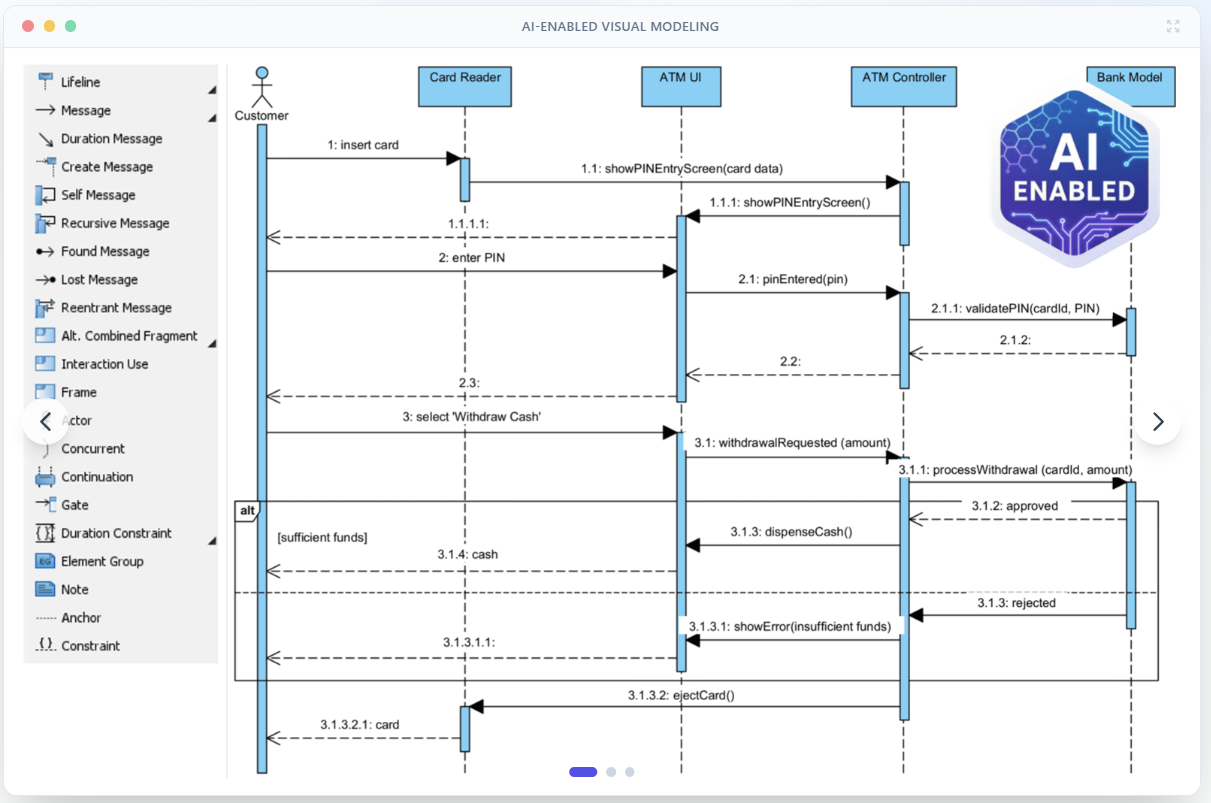
Location: Native desktop application
| Feature | Description |
|---|---|
| Native AI Integration | Access AI Chatbot directly within Desktop interface without switching apps [[46]] |
| AI Activity Diagram Generator | Transform text prompts into UML activity diagrams with control flows and decisions [[7]] |
| AI Profile Diagram Support | Generate domain-specific UML Profile diagrams via AI (added 2026) [[8]] |
| Advanced Refinement Tools | Full modeling toolkit to edit, validate, and extend AI-generated diagrams [[48]] |
| Enterprise Features | ArchiMate, SysML, and C4 diagram AI support (Enterprise Edition) [[4]] |
📥 Import Feature (Cross-Platform Workflow)
Bridge between Chatbot → Desktop/Online
| Feature | Description |
|---|---|
| One-Click Import | Press “Import to Visual Paradigm” button to move chatbot-generated diagrams into Desktop projects [[3]] |
| Format Preservation | Imported diagrams retain full editability: elements, relationships, and styling [[47]] |
| License Requirements | Professional Edition required for Desktop import; ArchiMate requires Enterprise [[11]] |
| Bidirectional Sync | Changes in Desktop can be re-exported to cloud workspace for team access [[39]] |
📚 OpenDocs (AI-Powered Knowledge Management)
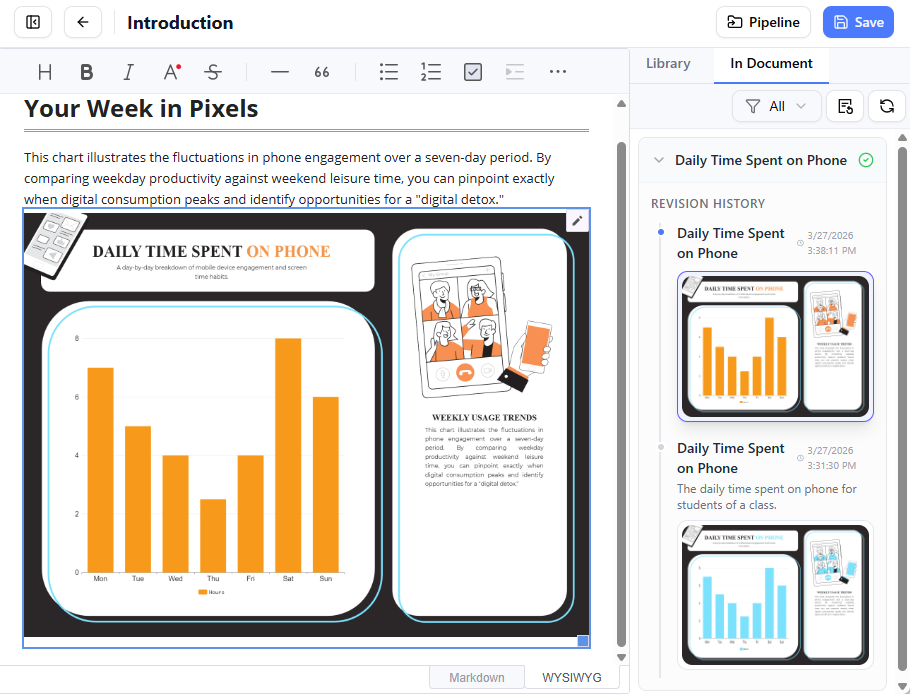
Location: Integrated documentation platform
| Feature | Description |
|---|---|
| Live Diagram Embedding | Insert AI-generated UML diagrams directly into documentation pages with re-edit capability [[33]] |
| AI Context Generation | Auto-generate explanatory text, summaries, and technical descriptions for embedded diagrams [[36]] |
| Pipeline Integration | Receive diagrams exported from Desktop/Chatbot via the centralized Artifact Pipeline [[39]] |
| Version Control | Track diagram revisions and swap to latest versions without re-uploading [[39]] |
| Stakeholder Views | Generate simplified diagram views or reports for non-technical audiences [[35]] |
🔗 AI Pipeline (Ecosystem Integration Layer)
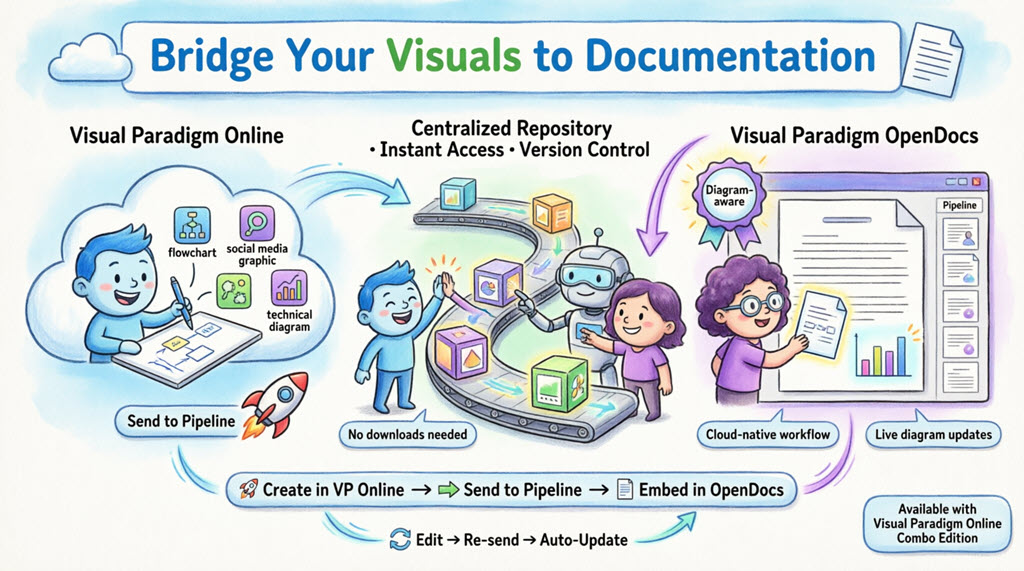
The “Concept-to-Docs” Workflow Connector
[AI Chatbot] → [Pipeline Artifact] → [OpenDocs / Desktop / Online]
| Component | Function |
|---|---|
| Artifact Repository | Centralized cloud storage for AI-generated diagrams, models, and documentation assets [[39]] |
| Cross-Tool Transfer | Move outputs from one tool (e.g., Chatbot sequence diagram) as inputs to another (e.g., OpenDocs technical spec) [[42]] |
| Revision Management | Automatic versioning when diagrams are re-exported; easy “swap to latest” in documentation [[39]] |
| Metadata & Comments | Attach context, purpose notes, or stakeholder feedback to pipeline artifacts [[39]] |
| Security & Access Control | Enterprise-grade permissions for artifact sharing across teams and projects [[39]] |
✅ Supported UML 2.x Diagram Types (All Platforms)
Visual Paradigm’s AI engine supports intelligent generation and refinement for all 14 standard UML diagrams [[1]][[28]]:
-
Use Case Diagram
-
Class Diagram (with step-by-step AI wizard) [[5]]
-
Sequence Diagram
-
Activity Diagram
-
State Machine Diagram
-
Object Diagram
-
Deployment Diagram
-
Component Diagram
-
Package Diagram
-
Composite Structure Diagram
-
Profile Diagram (new AI support 2026) [[8]]
-
Timing Diagram
-
Communication Diagram
-
Interaction Overview Diagram
💡 Pro Tip: Start with the AI Chatbot for rapid prototyping, refine in Desktop for technical depth, and publish via OpenDocs for stakeholder alignment—all connected through the Pipeline for seamless workflow [[28]][[39]].
For the latest feature updates, visit Visual Paradigm AI or check the Release Notes.
Reference
-
Visual Paradigm AI Chatbot: Transform Your Modeling Workflow: An overview of how Visual Paradigm’s integrated AI chatbot assists users in generating diagrams, explaining concepts, and accelerating the software modeling process through natural language interactions.
-
Fast-Track Use Case Diagrams with Visual Paradigm AI Chatbot: A guide detailing how developers and analysts can utilize the AI chatbot to rapidly draft and refine use case diagrams, reducing manual effort and improving requirement analysis efficiency.
-
Import AI Activity Diagrams into Visual Paradigm Desktop: Release notes announcing a new feature that allows users to generate activity diagrams directly from AI prompts and import them seamlessly into the Visual Paradigm desktop environment for further editing.
-
AI Diagram to OpenDocs Pipeline Integration: Documentation on the new pipeline enabling automated conversion of AI-generated diagrams into OpenDocs formats, facilitating better documentation sharing and version control across teams.
-
Import AI Activity Diagrams into Visual Paradigm Desktop: Duplicate entry – See Reference #3 for details on importing AI-generated activity diagrams directly into the desktop application for enhanced modeling workflows.
This post is also available in Deutsch, Español, فارسی, Français, English, Bahasa Indonesia, 日本語, Polski, Portuguese, Ру́сский, Việt Nam, 简体中文 and 繁體中文.