


Enterprise architecture can often feel like navigating a complex maze without a map. When terms like “layers,” “motivation elements,” and “relationships” are thrown around, it is easy to lose the thread. However, understanding the core structure of an organization is critical for modern businesses. ArchiMate provides a standardized language to visualize, analyze, and communicate this structure. This guide focuses specifically on the Application and Data layers, stripping away unnecessary complexity to help you build clear, functional models.
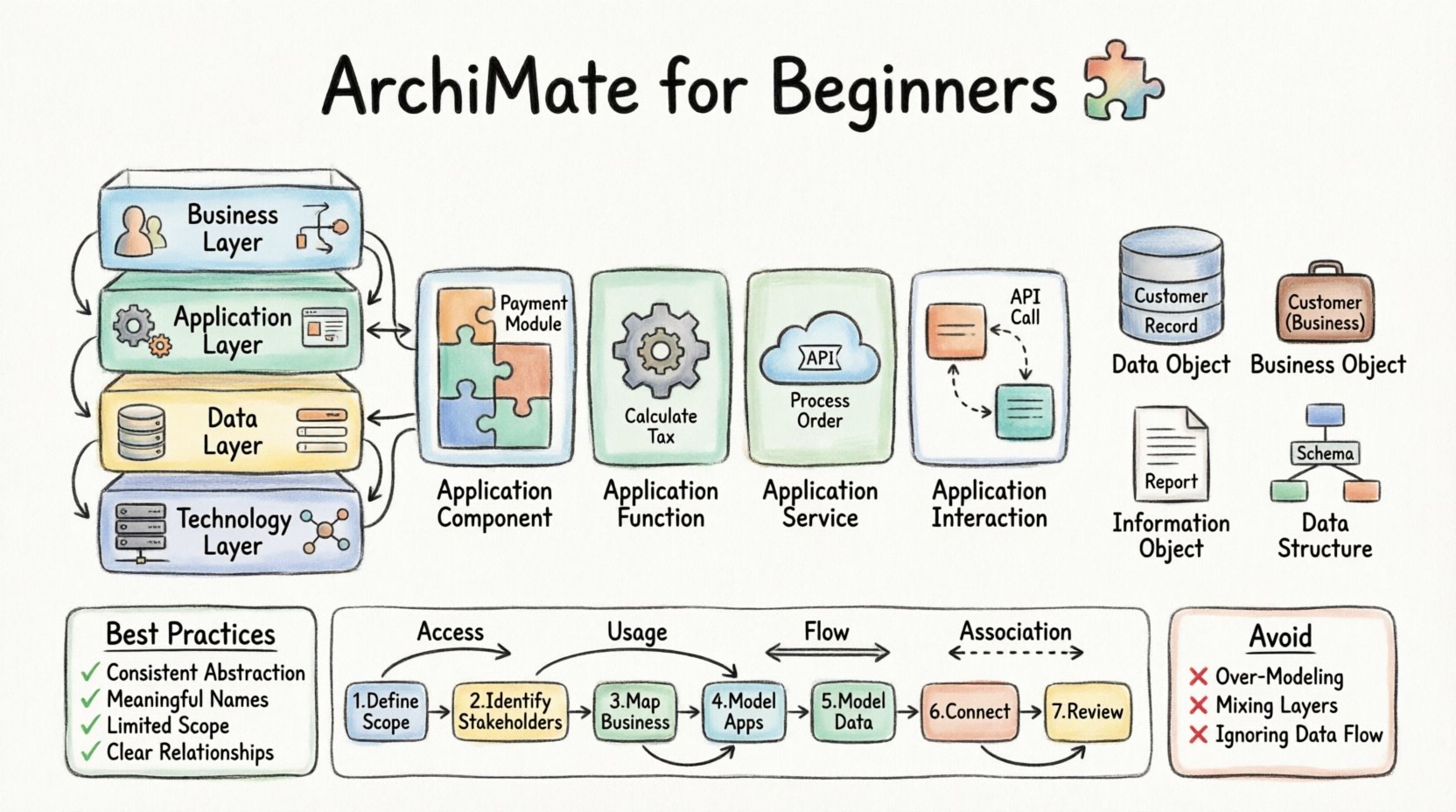
Why Standardize Your Architecture? 🧩
Before diving into the specific elements, it is important to understand why a common language matters. In many organizations, IT teams speak one language, business stakeholders speak another, and data architects speak a third. These silos create friction. When a business requirement changes, the IT team might implement a different solution than the data team expects. ArchiMate bridges these gaps.
By using a standard notation, you ensure that:
- Clarity is Achieved: Everyone understands the meaning of the symbols.
- Impact Analysis is Possible: You can trace how a change in one area affects others.
- Communication is Streamlined: Stakeholders can review diagrams without needing a translator.
This standardization is not about bureaucracy; it is about precision. It allows you to describe the reality of your systems without the confusion that comes from ambiguous terminology.
Understanding the Core Layers 🏛️
ArchiMate organizes architecture into distinct layers. Each layer represents a different abstraction of the enterprise. While there are six primary layers, this guide will focus heavily on the middle two, which are central to your request: the Application Layer and the Data Layer. However, understanding the surrounding context is vital.
| Layer | Focus | Key Elements |
|---|---|---|
| Business Layer | Business processes, organizational structure, roles. | Process, Role, Function, Business Object |
| Application Layer | Software applications, services, and their capabilities. | Application Component, Application Function, Application Service |
| Data Layer | Information structures and data objects. | Data Object, Data Structure, Information Object |
| Technology Layer | Hardware, network, and system software. | Device, System Software, Network |
The Application and Data layers often sit in the middle of this stack. The Application layer acts as the bridge between the abstract business needs and the concrete technology that supports them. The Data layer ensures that information flows correctly through these applications.
Deep Dive: The Application Layer 🖥️
The Application layer describes the software systems that support the business. It is where the logic of the enterprise resides. When modeling this layer, you are essentially describing what the software does, not necessarily how it is coded. This abstraction allows you to focus on functionality rather than implementation details.
1. Application Component
An Application Component is a modular, replaceable part of a system. Think of it as a distinct piece of software that performs a specific set of tasks. It is the most common element in the application layer.
- Characteristics: It has a well-defined interface and can be developed or replaced independently.
- Example: A “Payment Processing Module” within a larger E-commerce platform.
2. Application Function
An Application Function describes a specific capability of the application. It is often more granular than a component. While a component is the physical or logical container, a function is what it actually does.
- Characteristics: It represents a unit of functionality.
- Example: The “Calculate Tax” function inside the Payment Processing Module.
3. Application Service
An Application Service is an encapsulation of a set of functions. It is what the application offers to other parts of the architecture. Services are the interface through which other layers interact with the application layer.
- Characteristics: It defines the behavior exposed to the outside world.
- Example: “Process Order Service” which might be called by a Web Front-end.
4. Application Interaction
This element describes the communication between two application components. It focuses on the data exchange that happens when two pieces of software talk to each other.
- Characteristics: It represents the flow of data or control.
- Example: An API call between the Inventory System and the Shipping System.
Deep Dive: The Data Layer 🗃️
The Data layer is often overlooked, yet it is the backbone of modern enterprise architecture. Data does not just exist; it is structured, accessed, and transformed. Modeling this layer ensures that information integrity is maintained across the application landscape.
1. Data Object
A Data Object represents a physical or logical representation of data. It is the most fundamental element in the data layer. It describes the structure of the data itself.
- Characteristics: It holds state and attributes.
- Example: A “Customer Record” containing name, address, and ID.
2. Business Object
A Business Object represents the same concept but from the perspective of the business domain. It is often used to align the data layer with the business layer.
- Characteristics: It is a specialized type of data object with business semantics.
- Example: A “Customer” in the business sense, which might map to multiple data objects in the IT system.
3. Information Object
An Information Object is a broader concept that encompasses both data and information. It is used when the distinction between raw data and processed information is blurred.
- Characteristics: It represents information in a generic sense.
- Example: A “Report” or a “Document”.
4. Data Structure
This element defines the structural relationships between data objects. It describes how data is organized, such as hierarchies or database schemas.
- Characteristics: It provides the blueprint for data organization.
- Example: A database schema showing tables and foreign keys.
Connecting the Dots: Relationships 🕸️
Elements are useless without connections. Relationships define how the elements interact. In the context of Application and Data modeling, understanding these connections is crucial for tracing data flow and dependencies.
| Relationship | Description | Direction |
|---|---|---|
| Access | An application component accesses a data object. It implies a read or write operation. | From App to Data |
| Usage | One element uses another to perform its function. It is a general dependency. | From User to Used |
| Flow | Data flows from one element to another. It implies a transfer of information. | From Source to Target |
| Association | A general semantic relationship without a specific direction or flow. | Bi-directional |
Let us look at a specific scenario. A “Payment Service” (Application Service) needs to update a “Transaction Record” (Data Object). The relationship here is Access. The service accesses the data to modify it. If a “Front-end Application” sends data to the “Payment Service,” the relationship is Flow, as information moves between them.
It is important not to overuse relationships. Every line you draw adds complexity. Only draw lines where there is a meaningful dependency. If two components simply coexist in the same network without interacting, do not connect them.
The Motivation Layer: Why Does This Data Exist? 🎯
While the Application and Data layers describe what exists, the Motivation layer explains why it exists. This layer is critical for beginners because it prevents building systems that solve the wrong problems.
The Motivation layer includes elements like:
- Stakeholder: Who cares about this architecture?
- Goal: What are we trying to achieve?
- Principle: What rules must we follow?
- Requirement: What must the architecture do?
For example, a Goal might be “Improve Customer Data Accuracy.” This Goal drives a Requirement for a “Data Validation Service” in the Application Layer. This Service then Accesses a “Customer Data Object” in the Data Layer. Without the Motivation layer, you might build a validation service that does not actually solve the business problem.
Best Practices for Clean Models 🧹
To avoid confusion, follow these guidelines when constructing your models. These practices ensure that your diagrams remain readable and useful over time.
1. Maintain Consistent Abstraction Levels
Do not mix high-level business concepts with low-level technical details in the same diagram. If you are modeling the Application Layer, keep the focus on software capabilities. Do not introduce specific database tables unless they are critical to the logic being shown.
2. Use Meaningful Names
Avoid generic names like “Component A” or “Data B.” Use names that describe the function or content. For example, use “Order Management System” instead of “OMS1.” Clear naming reduces the need for legends and annotations.
3. Limit the Scope of Viewpoints
A viewpoint is a perspective on the architecture tailored for a specific audience. Do not try to show everything in one view. Create a specific view for Developers, another for Business Managers, and another for Data Architects. Each view should highlight the elements relevant to that group.
4. Document Relationships Clearly
Ensure that every relationship has a label if the type is not obvious. While “Access” is a standard relationship, sometimes the direction or the specific nature of the access (Read vs. Write) matters. Documenting this prevents misinterpretation.
Common Pitfalls to Avoid 🚫
Even experienced practitioners make mistakes. Being aware of common traps can save you significant time.
- Over-Modeling: Trying to model every single field in a database. This creates clutter and makes the diagram unreadable. Focus on the logical structure, not the physical implementation.
- Mixing Layers: Drawing a line from a Business Process directly to a Database without going through the Application layer. While sometimes valid, it often skips the logic layer where the actual business rules reside.
- Ignoring Data Flow: Modeling components that exist but do not communicate. If an application does not interact with the data layer, it serves no purpose in the architecture.
- Static Thinking: Treating the model as a snapshot rather than a living document. Architecture changes. Ensure your model can be updated as the enterprise evolves.
Integrating Application and Data Models 🔄
The true power of ArchiMate lies in the integration of these layers. The Application layer is useless without data, and data is useless without applications to process it. When you model them together, you reveal the true capability of the organization.
Consider the relationship between an Application Function and a Data Object. An Application Function Accesses a Data Object. This creates a traceable link. If the Data Object structure changes, you can immediately identify which Application Functions are impacted. This is the essence of impact analysis.
Similarly, consider the Technology layer. An Application Component runs on a Device. This connection is defined by a Realization relationship. The Device realizes the Application Component. This helps in capacity planning and infrastructure management.
Step-by-Step Modeling Workflow 🛠️
If you are starting a new modeling project, follow this workflow to ensure a structured approach.
- Define the Scope: Decide which parts of the enterprise you are modeling. Is it the whole company or just the Finance Department?
- Identify Stakeholders: Who will use this model? This determines the level of detail required.
- Map the Business Layer: Understand the processes and goals first. The IT systems support the business, not the other way around.
- Model the Application Layer: Identify the systems and functions that support the business processes.
- Model the Data Layer: Define the data objects that these applications create, read, update, or delete.
- Define Relationships: Connect the elements using standard relationships like Access, Flow, and Usage.
- Review and Refine: Check for consistency, naming conventions, and clarity.
Final Thoughts on Architecture Modeling 🌟
Building an architecture model is not a one-time task. It is an ongoing process of understanding and documenting the enterprise. By focusing on the Application and Data layers, you address the core engines of modern business operations. Remember that the goal is not to create a perfect diagram, but to create a useful communication tool.
Keep your models simple. Focus on the relationships that drive value. Ensure that the data structures support the business goals. When you do this, you create an architecture that is resilient, understandable, and capable of supporting change.
Start small. Model a single process and its supporting data. Expand from there. With patience and adherence to the standards, you can build a robust view of your enterprise that stands the test of time.
This post is also available in Deutsch, Español, فارسی, Français, English, Bahasa Indonesia, 日本語, Polski, Portuguese, Ру́сский, Việt Nam, 简体中文 and 繁體中文.