


Enterprise Architecture (EA) is the discipline of aligning business strategy with technology execution. For those entering this field, selecting the right modeling language and framework is critical. It dictates how you communicate complex organizational structures, how you document change, and how you ensure long-term agility. Among the various standards available, ArchiMate stands out as a specialized modeling language, often compared against broader frameworks like TOGAF or distinct structures like Zachman.
This guide provides a practical comparison to help new architects understand where ArchiMate fits within the broader landscape. We will explore the technical nuances, the scope of application, and the practical implications of choosing one over the other. No specific software is required to understand these concepts; the focus remains on the theoretical and structural integrity of the frameworks themselves.
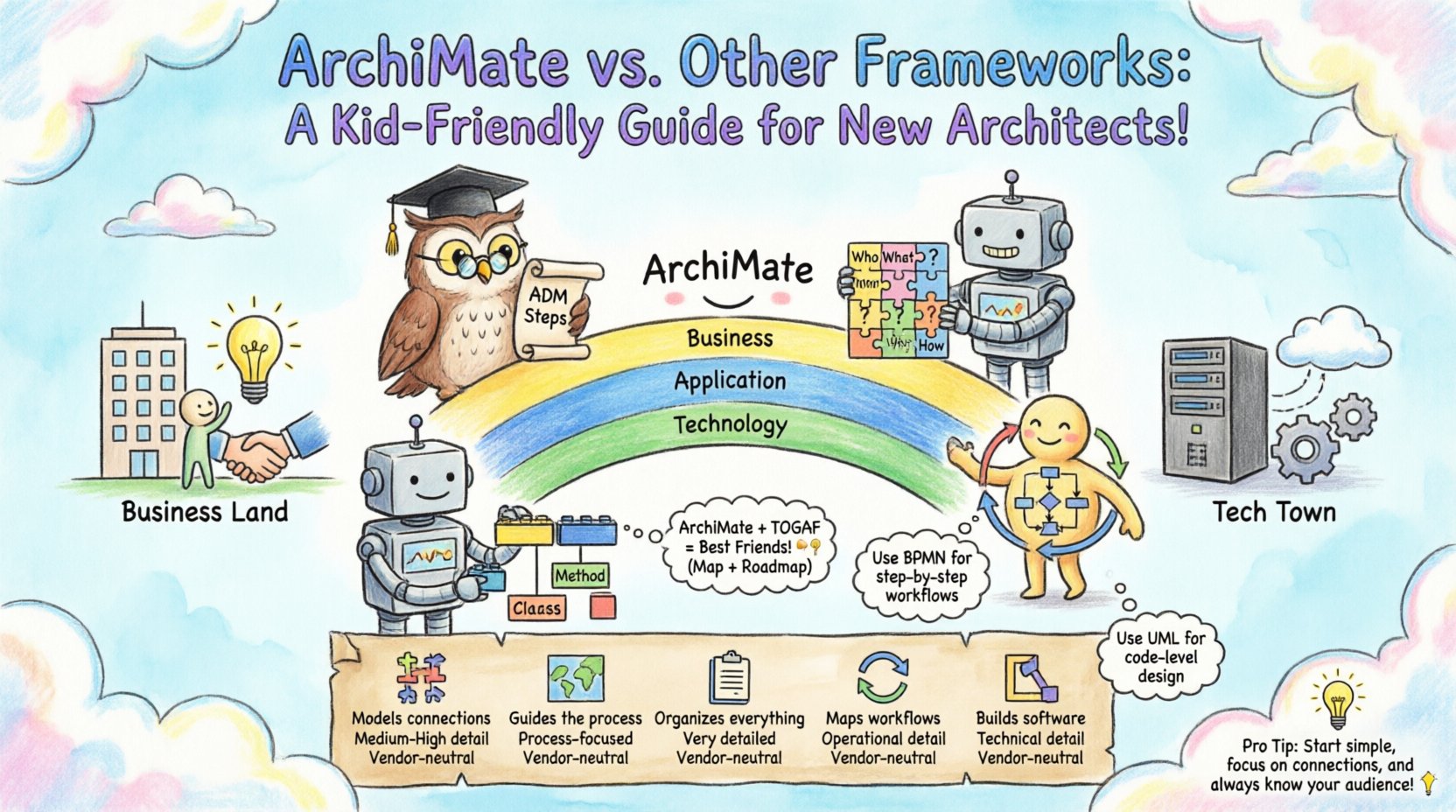
What is ArchiMate? 🧩
ArchiMate is an open and independent enterprise architecture modeling language. It provides a structured method for describing, analyzing, and visualizing business and IT architecture. Unlike general-purpose modeling languages, ArchiMate is specifically designed to bridge the gap between business and IT.
Key characteristics include:
- Layered View: It separates concerns into distinct layers such as Business, Application, Technology, and Physical.
- Relationships: It defines specific relationships between elements, such as “serves,” “accesses,” “realizes,” and “aggregates.”
- Standardization: It is maintained by The Open Group, ensuring vendor neutrality.
- Integration: It is designed to work alongside other standards, particularly TOGAF.
The language allows architects to create consistent diagrams that stakeholders across the organization can understand. By standardizing the visual syntax, it reduces ambiguity in communication.
The Major Competitors in the Landscape 🌍
To understand ArchiMate fully, one must understand its peers. Enterprise Architecture is not a monolith; it is a collection of tools and methodologies. The primary frameworks and languages you will encounter include:
1. TOGAF (The Open Group Architecture Framework) 🏛️
TOGAF is arguably the most widely recognized enterprise architecture framework in the world. It provides a high-level methodology for designing, planning, implementing, and governing an enterprise information architecture.
- Focus: Process and methodology.
- Core Component: The Architecture Development Method (ADM).
- Role: It tells you how to do architecture, whereas ArchiMate tells you what to model.
2. Zachman Framework 📋
The Zachman Framework is an ontology for enterprise architecture. It organizes information into a matrix of six perspectives (Who, What, Where, When, Why, How) and six levels of detail (Planner, Owner, Designer, Builder, Subcontractor, Functioning).
- Focus: Classification of artifacts.
- Structure: A 6×6 matrix.
- Role: It acts as a taxonomy for organizing architectural information rather than a modeling language.
3. BPMN (Business Process Model and Notation) 🔄
BPMN is a standard for business process modeling. It focuses heavily on workflows, tasks, and decision points within a process.
- Focus: Process flow and logic.
- Usage: Often used for operational details rather than strategic alignment.
- Role: Describes how work gets done at a granular level.
4. UML (Unified Modeling Language) 📐
UML is a general-purpose modeling language used primarily in software engineering. It describes the static and dynamic structure of software systems.
- Focus: Software components and interactions.
- Usage: Detailed system design and coding specifications.
- Role: Technical implementation details.
Comparative Analysis Table 📊
The following table summarizes the core distinctions between ArchiMate and the other major frameworks and languages. This aids in quick reference when determining the appropriate tool for a specific architectural task.
| Framework / Language | Primary Focus | Best Used For | Granularity | Vendor Neutrality |
|---|---|---|---|---|
| ArchiMate | Enterprise Architecture Modeling | Strategic alignment between Business and IT | Medium to High | Yes (The Open Group) |
| TOGAF | Architecture Methodology | Managing the architecture development process | Process Oriented | Yes (The Open Group) |
| Zachman | Information Classification | Organizing and inventorying architectural assets | High to Very High | Yes (Private Foundation) |
| BPMN | Business Processes | Workflow optimization and automation | High (Operational) | Yes (OMG) |
| UML | Software Systems | Software design and system architecture | Very High (Technical) | Yes (OMG) |
Deep Dive: ArchiMate vs. TOGAF 🤝
This is the most common comparison. They are not competitors; they are complementary. TOGAF provides the roadmap, while ArchiMate provides the map.
The Relationship
TOGAF’s Architecture Development Method (ADM) is a cyclic process. It has phases ranging from Preliminary to Requirements Management. Within these phases, you need to document the architecture. This is where ArchiMate comes in. TOGAF defines the content framework for what should be captured, and ArchiMate defines the visual syntax for how it is captured.
Practical Implications
- Process vs. Content: If your organization lacks a standard way to organize meetings, define stakeholders, and manage the architecture lifecycle, you need TOGAF. If you need a standard way to draw the diagrams that result from those meetings, you need ArchiMate.
- Adoption: Many organizations adopt TOGAF first to establish governance. Once the process is established, they introduce ArchiMate to standardize the output.
- Flexibility: You can use ArchiMate without TOGAF. You can use TOGAF with UML or custom diagrams. However, using them together creates a robust ecosystem.
Deep Dive: ArchiMate vs. Zachman 🧱
While TOGAF is a process, Zachman is a taxonomy. Comparing ArchiMate to Zachman is like comparing a specific drawing style to a filing system.
The Difference
Zachman organizes information based on interrogatives (Who, What, Where, When, Why, How). It ensures that no perspective is missing. For example, a “Who” view might list actors, while a “What” view lists data entities.
ArchiMate, conversely, focuses on the relationships between these entities across different layers. It is dynamic rather than static.
When to Use Zachman
- Inventory Management: When you need to catalog all existing assets without necessarily modeling their interactions.
- Comprehensive Audits: When you need to ensure every aspect of the enterprise is documented according to the six interrogatives.
- Legacy Analysis: When dealing with complex legacy systems where understanding the classification of data is more important than the flow.
When to Use ArchiMate
- Change Management: When you need to visualize the impact of a change from one layer to another (e.g., how a new technology affects business processes).
- Communication: When presenting to stakeholders who need to understand the logical flow rather than just a list of components.
- Integration: When mapping how business capabilities rely on application services.
Deep Dive: ArchiMate vs. BPMN & UML 🔄
BPMN and UML are often used for technical implementation details. ArchiMate operates at a higher level of abstraction.
Business Process Context
BPMN excels at describing the sequence of activities. It handles decision gates, loops, and parallel flows exceptionally well. ArchiMate can model business processes, but it does not handle the detailed logic of a workflow engine.
- ArchiMate: Shows that a process exists and which capability supports it.
- BPMN: Shows exactly how the process executes step-by-step.
New architects often confuse these. Use ArchiMate to show the organizational structure and high-level value chains. Use BPMN when you are designing the actual workflow for a specific system.
Software Design Context
UML is the standard for software developers. It defines classes, interfaces, inheritance, and object interactions. ArchiMate includes an Application Layer, but it is distinct from UML Class Diagrams.
- ArchiMate Application: Treats software as a service or function. It asks: “What function does this application provide to the business?”
- UML: Treats software as code. It asks: “What are the methods and attributes of this class?”
The decision here is about the audience. Architects speak to CIOs and Business Leaders using ArchiMate. Developers speak to other Developers using UML.
Choosing the Right Framework for New Architects 🎯
For a new architect entering the field, the choice can feel overwhelming. Here is a practical approach to selecting the right standards.
1. Assess the Organizational Maturity
If your organization is just starting with Enterprise Architecture, a full TOGAF implementation might be too heavy. You might start with a simplified ArchiMate model to demonstrate value.
- Low Maturity: Focus on ArchiMate for visualization. Keep the process simple.
- Medium Maturity: Integrate TOGAF ADM phases to structure the work.
- High Maturity: Use Zachman for inventory and ArchiMate for integration.
2. Identify the Primary Goal
What problem are you trying to solve?
- Cost Reduction: Use ArchiMate to map capabilities to applications and identify redundancies.
- Transformation: Use ArchiMate to visualize the target state versus the current state.
- Compliance: Use TOGAF to ensure the process meets governance requirements.
- System Design: Use BPMN or UML for the detailed technical specs.
3. Consider the Stakeholders
Who will read your models?
- Business Stakeholders: Prefer ArchiMate Business Layer diagrams. They understand “Processes” and “Capabilities” better than “Classes” or “Interfaces”.
- IT Stakeholders: Prefer ArchiMate Application and Technology layers.
- Developers: Require UML or specific API documentation.
Implementation Considerations 🛠️
Adopting these frameworks requires more than just learning the diagrams. It requires a shift in thinking.
Data Consistency
One of the biggest challenges is maintaining consistency. If you have a “Customer” entity in the Business Layer, it must align with the “Customer” entity in the Application Layer. Without a central repository or strict governance, these models drift apart over time.
Tooling Neutrality
While the models are standard, the tools used to create them vary. It is essential to choose tools that support the export and import of standard formats. This prevents vendor lock-in and ensures that models can be shared across different platforms.
Training and Culture
Frameworks fail when people do not understand them. New architects should invest time in training their teams. A diagram that only one person understands is not an architecture artifact; it is a secret.
- Standardization: Define a library of standard shapes and colors.
- Templates: Create templates for common scenarios to speed up modeling.
- Governance: Establish a review process to ensure models meet quality standards.
Common Pitfalls to Avoid 🚫
New architects often make specific mistakes when comparing and applying these frameworks. Awareness of these pitfalls can save significant time.
- Over-Modeling: Trying to model every single detail immediately. Start with the high-level layers and drill down only when necessary.
- Mixing Layers: Putting technical details in the Business Layer. Keep the Business Layer focused on value and capabilities.
- Ignoring Relationships: Focusing on the boxes and not the lines. The value of ArchiMate lies in the relationships (e.g., “serves,” “realizes”).
- Confusing Process with Model: Thinking that creating a diagram is the end goal. The diagram is a means to facilitate discussion and decision-making.
- Ignoring TOGAF Content: ArchiMate does not tell you what to model in terms of business strategy. You need a content framework (like TOGAF or Zachman) to guide what goes into the layers.
Future Trends and Evolution 🚀
The landscape of Enterprise Architecture is evolving. While the core principles of ArchiMate remain stable, the context in which they are used is shifting.
Cloud and Agility
Traditional frameworks were designed for on-premise, monolithic systems. Modern architectures are cloud-native and distributed. ArchiMate 3.0 introduced the Cloud extension to address this. It allows for the modeling of cloud services, virtualization, and containerization within the existing layer structure.
DevOps Integration
There is a growing push to integrate EA with DevOps pipelines. The goal is to make architecture visible and accessible throughout the development lifecycle. This requires models that can be updated frequently, rather than static documents created once a year.
Business-IT Alignment
The demand for tighter alignment between business and IT is increasing. ArchiMate’s strength is its ability to span this gap. As organizations become more digital, the need to visualize how a business capability relies on a specific digital service will become more critical.
Final Thoughts for the Practitioner 💡
Selecting a framework is not about finding the “best” one; it is about finding the right tool for the job. ArchiMate offers a powerful, standardized way to visualize the connections between business and technology. However, it works best when paired with a robust process like TOGAF and a clear taxonomy like Zachman.
For new architects, the path forward involves:
- Understanding the core concepts of ArchiMate layers and relationships.
- Recognizing the role of TOGAF in guiding the development process.
- Knowing when to switch to BPMN or UML for specific technical needs.
- Maintaining discipline in modeling to ensure long-term utility.
By mastering the distinctions and synergies between these frameworks, you can build a career grounded in structure, clarity, and effective communication. The goal is not to create perfect diagrams, but to create understanding.
This post is also available in Deutsch, Español, فارسی, Français, English, Bahasa Indonesia, 日本語, Polski, Portuguese, Ру́сский, Việt Nam, 简体中文 and 繁體中文.