


Enterprise architecture serves as the blueprint for organizational change. When utilizing the ArchiMate modeling language, precision is paramount. New practitioners often struggle with the balance between abstraction and detail. This guide outlines frequent errors encountered during modeling and provides actionable strategies to correct them.
The goal is not merely to create diagrams, but to facilitate communication across business and IT domains. Missteps in modeling can lead to confusion, misaligned expectations, and ineffective transformation initiatives. By understanding these pitfalls, architects can build more robust and meaningful representations of their enterprise.
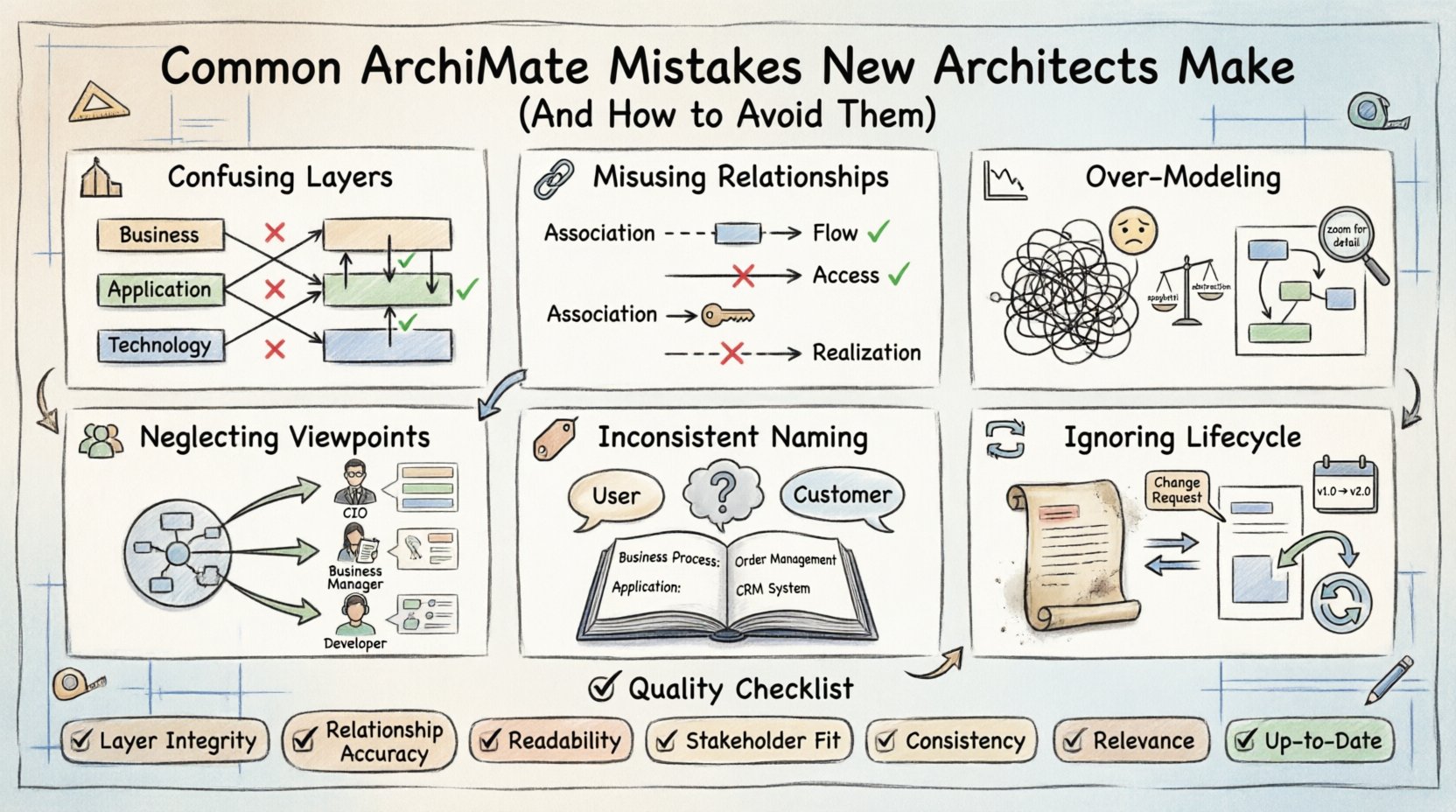
1. Confusing Architectural Layers 🏗️
One of the most prevalent errors involves the mixing of layers. ArchiMate defines three core layers: Business, Application, and Technology. Each layer represents a specific viewpoint on the enterprise.
- Business Layer: Focuses on business processes, roles, and organizational structures.
- Application Layer: Covers software components, data objects, and services.
- Technology Layer: Represents hardware, networks, and physical infrastructure.
New architects often create connections that violate layer boundaries. For instance, linking a Business Process directly to a Server without an Application layer intermediary can obscure the flow of data and functionality.
Why This Matters
When layers are mixed, the model loses its structural integrity. Stakeholders in the business domain may not understand the technical implications, while technical teams may miss the business context. A clear separation ensures that each group can focus on their area of expertise while understanding the dependencies.
How to Avoid It
- Review Layer Boundaries: Before drawing a line, check which layer the source and target elements belong to.
- Use Appropriate Relationships: Ensure the relationship type matches the layers involved. For example, use Realization to show how an Application Process realizes a Business Process.
- Validate with Peers: Have a colleague review the diagram specifically for layer consistency.
2. Misusing Relationship Semantics 🔗
ArchiMate provides a rich set of relationship types. Using them interchangeably is a common mistake. The difference between Association, Flow, and Access is subtle but significant.
Common Relationship Errors
- Association vs. Flow: Association implies a static link, such as a role playing a process. Flow implies the movement of information or material. Using Flow for a static hierarchy creates semantic confusion.
- Access vs. Realization: Access describes a resource being accessed. Realization describes one element implementing another. Confusing these leads to incorrect dependency chains.
- Triggering Events: New architects often ignore triggering events. Without them, the model does not show how one process activates another.
The Impact of Incorrect Relationships
If a model implies a flow where only an association exists, stakeholders might assume data is moving when it is merely linked. This can lead to incorrect assumptions about data governance and security requirements. Similarly, misusing realization can hide the fact that a business function is actually supported by a specific software module.
Correcting the Approach
- Define Relationship Rules: Create a glossary of relationships within the project. Define when Flow is appropriate versus Association.
- Focus on Meaning: Ask what the line represents physically or logically. Is it data moving? Is it a function calling another? Is it a role performing a task?
- Adhere to the Metamodel: Strictly follow the metamodel constraints regarding which elements can be connected by which relationship types.
3. Over-Modeling and Granularity Issues 📉
There is a tendency to model every single detail immediately. This results in a “spaghetti diagram” that is difficult to read and maintain. Enterprise architecture requires abstraction.
The Granularity Trap
Creating a model that details every single database field or every single button click defeats the purpose of high-level architecture. The model should answer strategic questions, not operational ones.
- Too Detailed: Hard to maintain, loses the big picture, overwhelms stakeholders.
- Too Abstract: Lacks actionable detail, leaves implementation teams guessing.
Strategies for Balance
- Define Scope Early: Determine the questions the architecture must answer. Model only what is necessary to answer those questions.
- Use Views and Viewpoints: Different stakeholders need different views. Do not try to show everything on one canvas. Use specific viewpoints for business stakeholders versus IT developers.
- Iterative Refinement: Start high-level. Add detail only when specific decisions require it.
4. Neglecting Viewpoints and Stakeholders 👥
Architects often build a single “God Model” that attempts to satisfy everyone. This rarely works. Different audiences require different perspectives.
Why Viewpoints Matter
A CIO needs to see technology consolidation and risk. A Business Manager needs to see process efficiency and cost. A Developer needs to see service interfaces and data structures. Presenting all this on one diagram creates noise.
Best Practices for Viewpoints
- Identify Stakeholders: List who will read the architecture. Group them by interest.
- Map Viewpoints: Assign a specific viewpoint to each group. Ensure the content of the diagram matches their needs.
- Link Views: Ensure that different views are consistent with each other. If a process is simplified in the business view, it should not contradict the technical view.
5. Inconsistent Naming Conventions 🏷️
Clarity in naming is essential for maintainability. Inconsistent naming leads to ambiguity. For example, using “User” in one diagram and “Customer” in another for the same concept creates confusion.
Common Naming Pitfalls
- Abbreviations: Overusing acronyms without definitions.
- Generic Terms: Using “System” or “Process” without specific context.
- Language Mixing: Mixing English and local language terms in the same model.
Establishing a Standard
- Create a Glossary: Maintain a central list of approved terms.
- Follow a Pattern: Use a consistent naming pattern, such as “Business Process: Order Management” or “Application: CRM System”.
- Regular Audits: Periodically review the model for naming inconsistencies.
6. Ignoring the Lifecycle and Dynamics 🔄
Enterprise architecture is not static. Organizations change. New mistakes occur when models are treated as static snapshots rather than evolving artifacts.
Static vs. Dynamic Modeling
A model created once and never updated becomes obsolete quickly. It fails to reflect the current state of the enterprise. This leads to decision-making based on outdated information.
Maintenance Strategies
- Version Control: Treat models like code. Use versioning to track changes.
- Change Management: Link architecture changes to business change requests. If a business process changes, the model must be updated.
- Review Cycles: Schedule regular reviews to ensure the model reflects reality.
Summary of Common Errors 📊
The table below summarizes the key mistakes, their impacts, and the corrective actions.
| Mistake | Impact | Correction |
|---|---|---|
| Layer Confusion | Unclear dependencies between business and IT | Enforce strict layer boundaries and relationship rules |
| Wrong Relationships | Misunderstood data flow and logic | Define relationship semantics clearly in a glossary |
| Over-Modeling | Diagram becomes unreadable and unmaintainable | Focus on abstraction and relevant scope |
| Single View Approach | Stakeholders cannot find relevant information | Create multiple viewpoints for different audiences |
| Inconsistent Naming | Confusion and ambiguity in the model | Establish and enforce a naming convention |
| Static Modeling | Model becomes obsolete quickly | Implement change management and versioning |
Checklist for Quality Architecture ✅
Before finalizing a model, run through this checklist to ensure quality and clarity.
- Layer Integrity: Are all layers distinct and correctly connected?
- Relationship Accuracy: Do the connectors accurately represent the interaction (Flow vs Association)?
- Readability: Is the diagram easy to understand without excessive annotation?
- Stakeholder Fit: Does the view address the needs of the intended audience?
- Consistency: Are names and styles consistent throughout the model?
- Relevance: Does every element add value to the architectural decision-making process?
- Up-to-Date: Does the model reflect the current state of the enterprise?
Final Considerations 🎯
Building effective architecture is a skill developed through practice and reflection. Avoiding common pitfalls requires discipline and a deep understanding of the modeling language. By focusing on clarity, consistency, and stakeholder needs, architects can deliver value beyond the diagram itself.
The journey involves continuous learning. As the enterprise evolves, so must the architecture. Embrace the iterative nature of the work. Focus on communication and alignment rather than just technical perfection. This approach ensures that the architecture remains a living asset that drives successful transformation.
This post is also available in Deutsch, Español, فارسی, Français, English, Bahasa Indonesia, 日本語, Polski, Portuguese, Ру́сский, Việt Nam, 简体中文 and 繁體中文.