


Business Process Model and Notation (BPMN) serves as the universal language for process modeling. It bridges the gap between technical IT requirements and business operations. However, as processes grow in complexity, diagrams often degrade into tangled webs of lines and symbols. This phenomenon is widely known as the "Spaghetti Diagram" syndrome. When a BPMN model becomes unreadable, the value of the process documentation collapses. Stakeholders cannot verify logic, developers cannot implement automation, and auditors cannot ensure compliance.
This guide explores the structural and visual strategies required to maintain clarity. We will examine how to manage complexity without sacrificing detail. The goal is sustainable process architecture that scales alongside the organization. By adhering to established modeling principles, you can ensure your diagrams remain functional assets rather than visual noise.
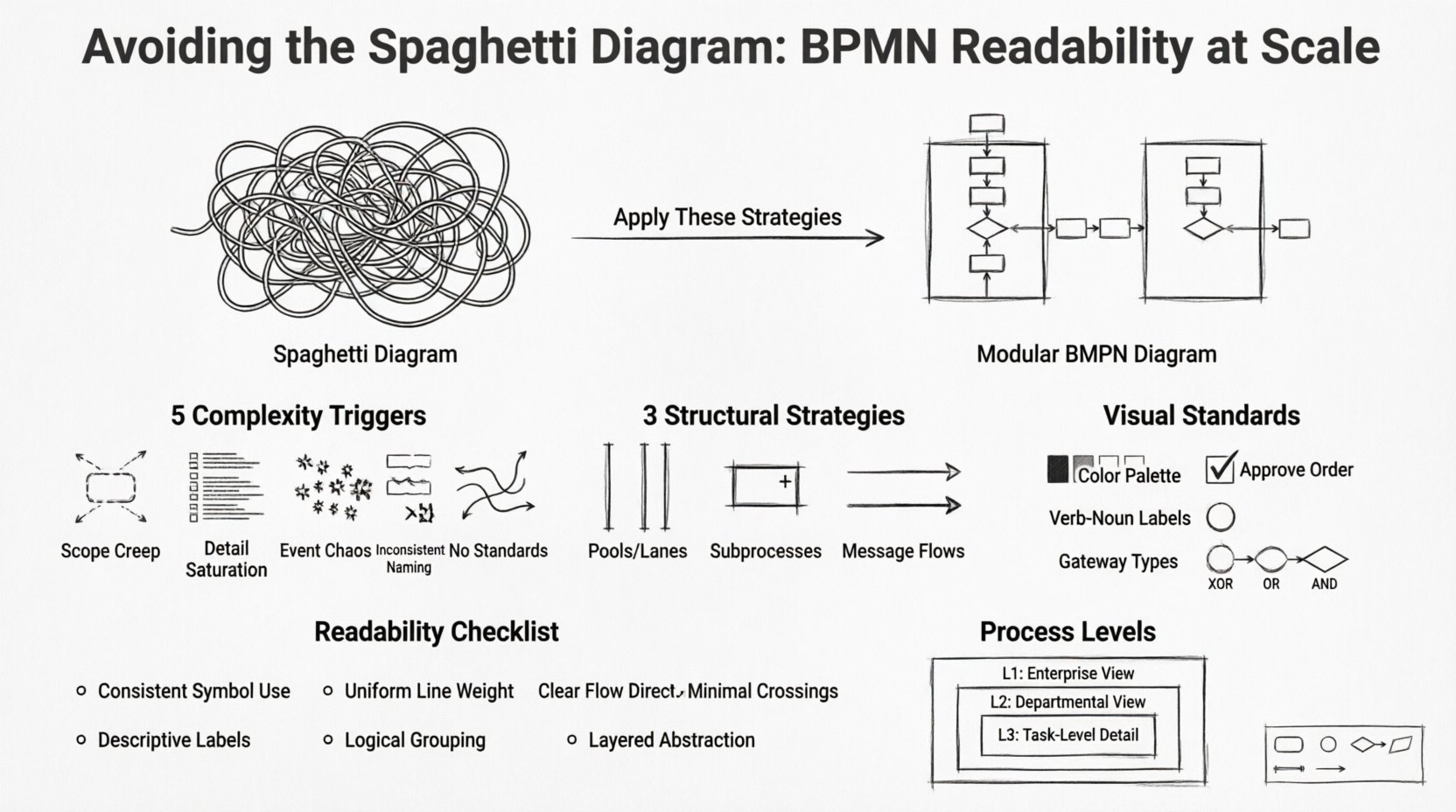
Understanding the Spaghetti Diagram Phenomenon 🕸️
A spaghetti diagram is characterized by excessive crossing lines, ambiguous flow, and a lack of visual hierarchy. In BPMN terms, this usually manifests as:
- Overcrowded Pools: Multiple organizations or systems represented in a single lane without separation.
- Deep Nesting: Subprocesses containing other subprocesses without clear boundaries.
- Cross-Lane Complexity: Message flows and sequence flows that crisscross without logical grouping.
- Event Clustering: Too many start, intermediate, and end events in a single view.
The root cause is rarely a lack of knowledge. It is often a failure to apply abstraction. Modelers attempt to capture every single step in one view to ensure completeness. This approach ignores the cognitive load required to interpret the diagram. Humans can only process a limited amount of information at once. When that limit is exceeded, the diagram loses its communicative power.
Common Triggers for BPMN Complexity 🚦
Identifying why diagrams become cluttered is the first step toward prevention. Several factors contribute to the degradation of BPMN readability:
- Scope Creep: The model expands to include edge cases that do not belong in the primary flow.
- Detail Saturation: Including data attributes or system actions directly in the process flow instead of external documentation.
- Event-Driven Chaos: Using too many event-based gateways without clear conditions.
- Inconsistent Naming: Using different terms for the same activity across the diagram.
- Lack of Standardization: No agreed-upon rules for how lanes, pools, or connectors should be used.
When these triggers occur, the diagram shifts from a high-level map to a technical implementation plan. This shift creates confusion for business stakeholders who need to understand the "what" and "why", not necessarily the "how".
Structural Strategies for Scalability 🏗️
To combat complexity, you must adopt structural strategies that enforce modularity. Modularity allows you to break a large process into manageable chunks. This approach aligns with the concept of separation of concerns.
1. Utilizing Pools and Lanes Effectively
Pools represent distinct participants in a process. Lanes represent roles within those participants. A common mistake is creating a single pool for an entire organization. This creates a vertical wall of activity that is impossible to navigate.
- Limit Pool Count: Keep the number of participating pools manageable. Typically, 3 to 5 pools are optimal for a single view.
- Refine Lanes: Each lane should represent a specific function or role. If a lane contains too many activities, consider splitting it.
- Boundary Events: Use boundary events to handle exceptions without cluttering the main sequence flow.
2. Embracing Subprocesses
Subprocesses are the primary tool for abstraction. They allow you to hide detail until it is needed. There are two main types of subprocesses:
- Collapsed Subprocesses: Displayed as a single task box with a plus icon. This is ideal for high-level views.
- Expanded Subprocesses: Displayed with internal flow visible. Use this when the internal logic is critical for the current context.
When modeling, ask yourself: "Is this detail necessary for the reader right now?" If the answer is no, encapsulate it in a collapsed subprocess. Create a separate diagram for the detailed logic. Link these diagrams using Call Activities.
3. Managing Message Flows
Message flows represent communication between participants. Unlike sequence flows, they cannot cross lane boundaries within the same pool. However, they often create visual clutter when crossing multiple lanes.
- Minimize Crossing: Arrange lanes logically so that message flows travel in a consistent direction.
- Group Messages: If multiple messages are exchanged in a sequence, consider grouping them into a single interaction or using a message event.
- Clear Labels: Every message flow must have a label describing the data or signal being exchanged.
Visual Consistency and Standards 🎨
Even a logically sound diagram can be unreadable if it lacks visual consistency. Standards reduce the cognitive effort required to interpret the symbols.
Color Coding Strategy
Color can convey semantic meaning without adding text. However, overuse of color creates distraction. Use a limited palette:
- Standard Colors: Keep default BPMN colors for standard events and tasks.
- Highlight Colors: Use one accent color for exceptions or critical paths.
- Group Colors: Use background shading to group related subprocesses.
Font and Labeling Rules
Text is often the most time-consuming element to read. Ensure labels are concise and consistent.
- Verb-Noun Structure: Use active verbs followed by nouns (e.g., "Approve Request" instead of "Request Approval").
- Maximum Length: Keep task labels under 5 words where possible. If more detail is needed, use annotations.
- Event Naming: Name events based on what happened (e.g., "Invoice Received") rather than the action taken (e.g., "Process Invoice").
Handling Exceptions and Complex Logic ⚖️
Complex logic is the biggest driver of diagram clutter. Gateways and conditions create branching paths that can spiral out of control.
Gateway Discipline
Gateways control flow divergence and convergence. Using the wrong gateway type confuses the reader.
- Exclusive Gateway (XOR): Use when only one path is taken. Label the outgoing sequence clearly with conditions.
- Inclusive Gateway (OR): Use when multiple paths may be taken simultaneously. Ensure all potential paths are accounted for.
- Parallel Gateway (AND): Use for splitting work into parallel tasks. Ensure all parallel branches converge before continuing.
- Event-Based Gateway: Use sparingly. These represent waiting for events rather than decisions.
Event Subprocesses
Event subprocesses allow you to attach a secondary flow to a specific event within a parent process. This is useful for handling interrupts like errors or timeouts.
- Keep Them Simple: Event subprocesses should handle specific scenarios, not entire workflows.
- Clear Entry Points: Ensure the triggering event is obvious.
- Termination: Define how the subprocess ends. Does it return control to the parent, or does it replace the parent flow?
Comparison of Best Practices vs. Common Pitfalls 📊
The following table summarizes the difference between effective modeling and practices that lead to spaghetti diagrams.
| Aspect | Best Practice ✅ | Pitfall to Avoid ❌ |
|---|---|---|
| Scope | One diagram per major process step. | One diagram for the entire enterprise workflow. |
| Detail | Use Call Activities for deep detail. | Expand all subprocesses in one view. |
| Lanes | Group by functional role or system. | Group by individual employee names. |
| Gateways | Label conditions clearly. | Assume conditions are obvious without text. |
| Flow | Top-down or Left-right direction. | Random zig-zagging lines. |
| Exceptions | Use Boundary Events. | Draw lines back to the start for errors. |
Governance and Maintenance 🛡️
A clean diagram is not a one-time achievement. It requires ongoing governance to maintain readability as the business evolves.
Version Control
Process models change over time. Without version control, stakeholders may reference outdated logic. Maintain a clear history of changes.
- Version Numbers: Use semantic versioning (e.g., v1.0, v1.1) on diagrams.
- Change Logs: Document what changed, when, and why in the process metadata.
- Deprecation: Archive old versions rather than deleting them to preserve context.
Review Cycles
Regular reviews ensure the model remains accurate. Schedule periodic audits of the process repository.
- Technical Review: Check for modeling syntax errors and standard compliance.
- Business Review: Verify that the process matches current operational reality.
- Readability Check: Ask a new stakeholder to interpret the diagram without training.
Checklist for Process Model Readability ✅
Before publishing a BPMN diagram, run it through this checklist to ensure it meets readability standards.
- Flow Direction: Does the primary flow move logically from start to end without excessive backtracking?
- Label Clarity: Are all tasks labeled with a Verb-Noun structure?
- Gateway Conditions: Are all outgoing paths from a gateway labeled with their conditions?
- Event Coverage: Does every task have an associated input and output event where appropriate?
- Visual Balance: Is the white space distributed evenly, avoiding dense clusters?
- Modularity: Are complex sections encapsulated in subprocesses or separate diagrams?
- Consistency: Are symbols, fonts, and colors consistent with organizational standards?
Advanced Techniques for Large Scale 📈
For enterprise-level modeling, additional techniques can help manage scale without losing clarity.
Process Maps vs. Flowcharts
Distinguish between high-level maps and detailed flowcharts. A Process Map (Level 1) shows major phases. A Flowchart (Level 3) shows specific tasks. Do not mix these levels in the same diagram.
- Level 1: Strategic overview. Focus on departments and handoffs.
- Level 2: Departmental view. Focus on roles and systems.
- Level 3: Task level. Focus on individual actions and decisions.
Call Activities
Call Activities allow one process to invoke another. This is the modern equivalent of linking documents. It allows you to maintain a library of reusable process fragments.
- Standardize Fragments: Create standard subprocesses for common scenarios (e.g., "Login", "Approve", "Notify").
- Reuse: Call these fragments across multiple diagrams to reduce duplication.
- Update Centralized: When a standard fragment changes, update it once, and all references reflect the change.
Data and Context Separation 📄
A frequent source of clutter is mixing data definitions with process logic. BPMN focuses on flow. Data belongs in separate artifacts.
- Information Requirements: Use Information Requirements to link data objects to tasks.
- Data Models: Keep entity-relationship diagrams separate from process flows.
- Annotations: Use annotations for data context, not sequence flows.
By separating the "flow" from the "data", you reduce the number of lines on the canvas. This separation allows the reader to focus on the logic without being distracted by data attributes.
Final Considerations for Modelers 🎯
Maintaining readable BPMN diagrams is an iterative discipline. It requires constant attention to structure and a willingness to simplify. As processes evolve, the diagrams must evolve with them. Do not be afraid to delete unnecessary details. A diagram that is too detailed is often as useless as one that is too vague.
Focus on the audience. Who is reading this? If it is a business user, prioritize flow and roles. If it is a developer, prioritize logic and data flow. Tailoring the model to the audience ensures the diagram remains a tool for communication, not a barrier to understanding.
By following these guidelines, you can build a process repository that stands the test of time. Clarity is not just an aesthetic choice; it is a strategic necessity for digital transformation. Keep the lines clean, the labels clear, and the scope focused.
This post is also available in Deutsch, Español, فارسی, Français, English, Bahasa Indonesia, 日本語, Polski, Portuguese, Ру́сский, Việt Nam, 简体中文 and 繁體中文.