Introduction to BPMN
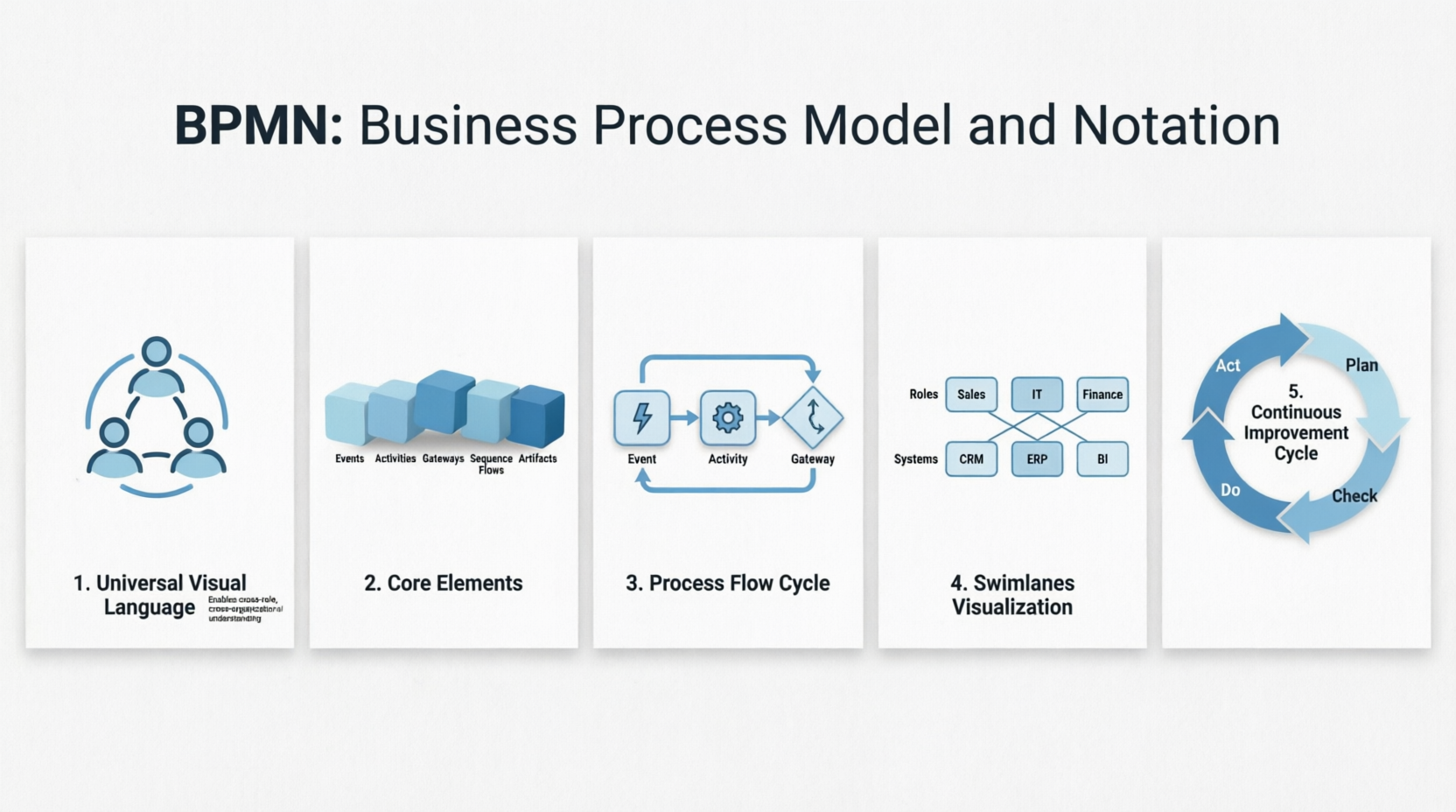
Business Process Model and Notation (BPMN) is a visual modeling language designed for business analysis applications and specifying enterprise process workflows. As an open standard notation for graphical flowcharts, BPMN is used to define business process workflows in a way that is both popular and intuitive. Its graphical nature makes it easily understandable by all business stakeholders, including business users, business analysts, software developers, and data architects.
History of BPMN
BPMN emerged from the synthesis of multiple business modeling notations. Originally published by the Business Process Management Initiative (BPMI) in 2004, BPMN is now maintained by the Object Management Group (OMG) following the merger of the two organizations in 2005.
Key milestones in BPMN’s evolution include:
-
February 2006: OMG released the first BPMN Specification document
-
2010: Version 2.0 of BPMN was developed
-
December 2013: The actual version of the specification was released
-
Current Version: BPMN 2.0.2, formally published by ISO as the 2013 edition standard (ISO/IEC 19510)
Benefits of BPMN
BPMN offers numerous advantages for organizations seeking to improve their business processes:
-
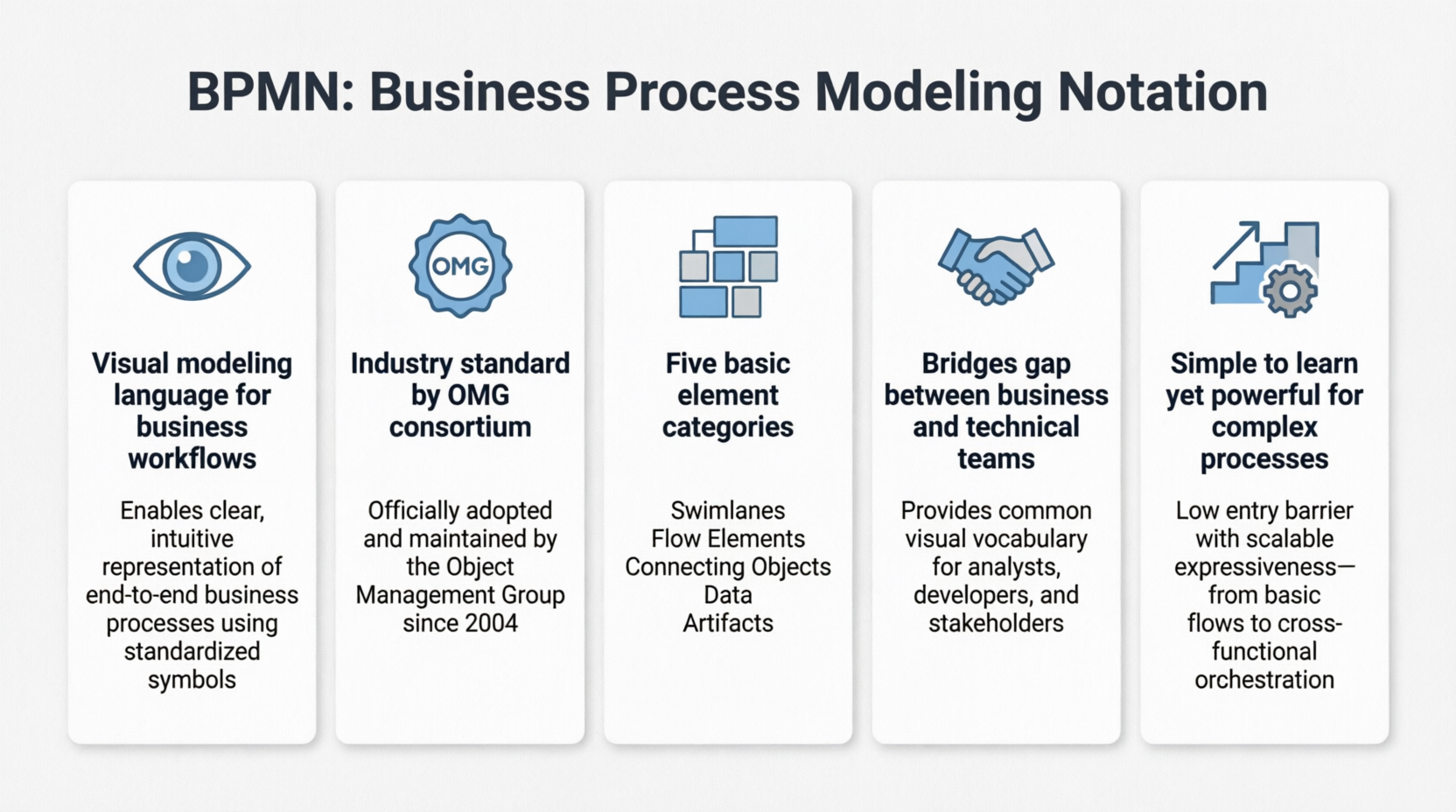
Industry Standard: Developed by the OMG consortium, a not-for-profit industry group
-
Clear Documentation: Provides businesses with the capability to define and understand their procedures through Business Process Diagrams
-
Universal Understanding: Offers a standard notation readily understandable by all business stakeholders
-
Bridges Communication Gaps: Connects business process design with implementation effectively
-
Balanced Complexity: Simple to learn yet powerful enough to depict the potential complexities of a business process
BPMN enables organizations to capture and document business processes clearly and consistently, ensuring that relevant stakeholders—such as process owners and business users—are involved in the process. This collaborative approach allows teams to respond more effectively to any issues identified in the processes.
The Goal of BPMN
BPMN serves three primary audiences:
-
Technical experts responsible for process implementation
-
Business analysts who create and improve the processes
-
Managers who monitor and control the processes
Overview of BPMN
Understanding how a business operates is the first and most critical step in business process improvement. BPMN provides a graphical representation of business workflows that anyone—from business analysts to stakeholders—can easily understand, aiding in business process analysis and improvements.
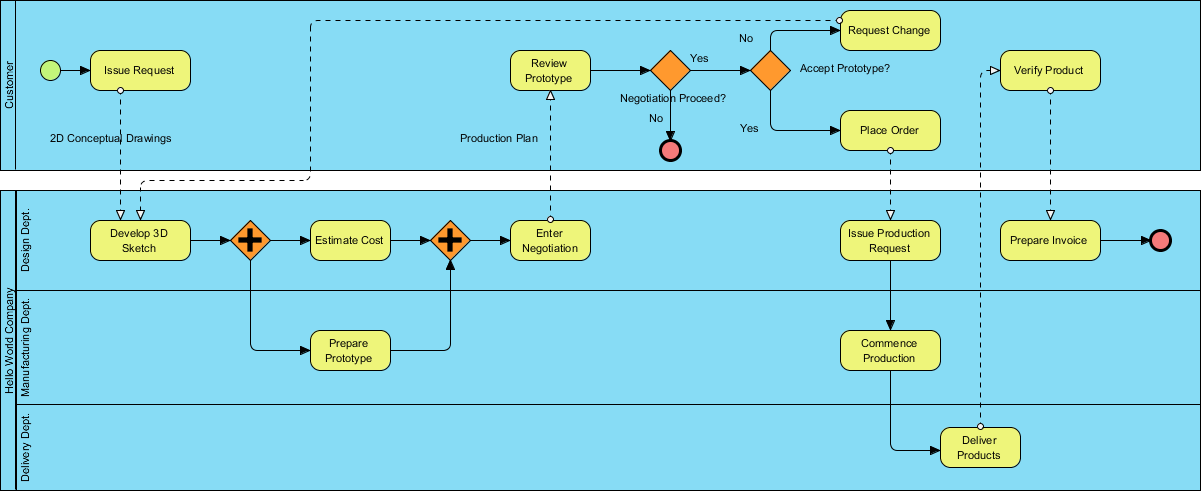
Any process described with BPMN is represented as a series of steps (activities) performed consequently or simultaneously according to certain business rules. Consider the “Place Order Online” process used in an online store:
BPMN Notation Elements
In BPMN, processes are described using diagrams with a series of graphic elements. This visual presentation makes it easy for users to understand the logic of a process. BPMN has been primarily developed to design and read both simple and complex diagrams of business processes. The BPMN standard classifies graphic elements into categories, making them easily recognizable to users working with business process diagrams.
Basic Constructs
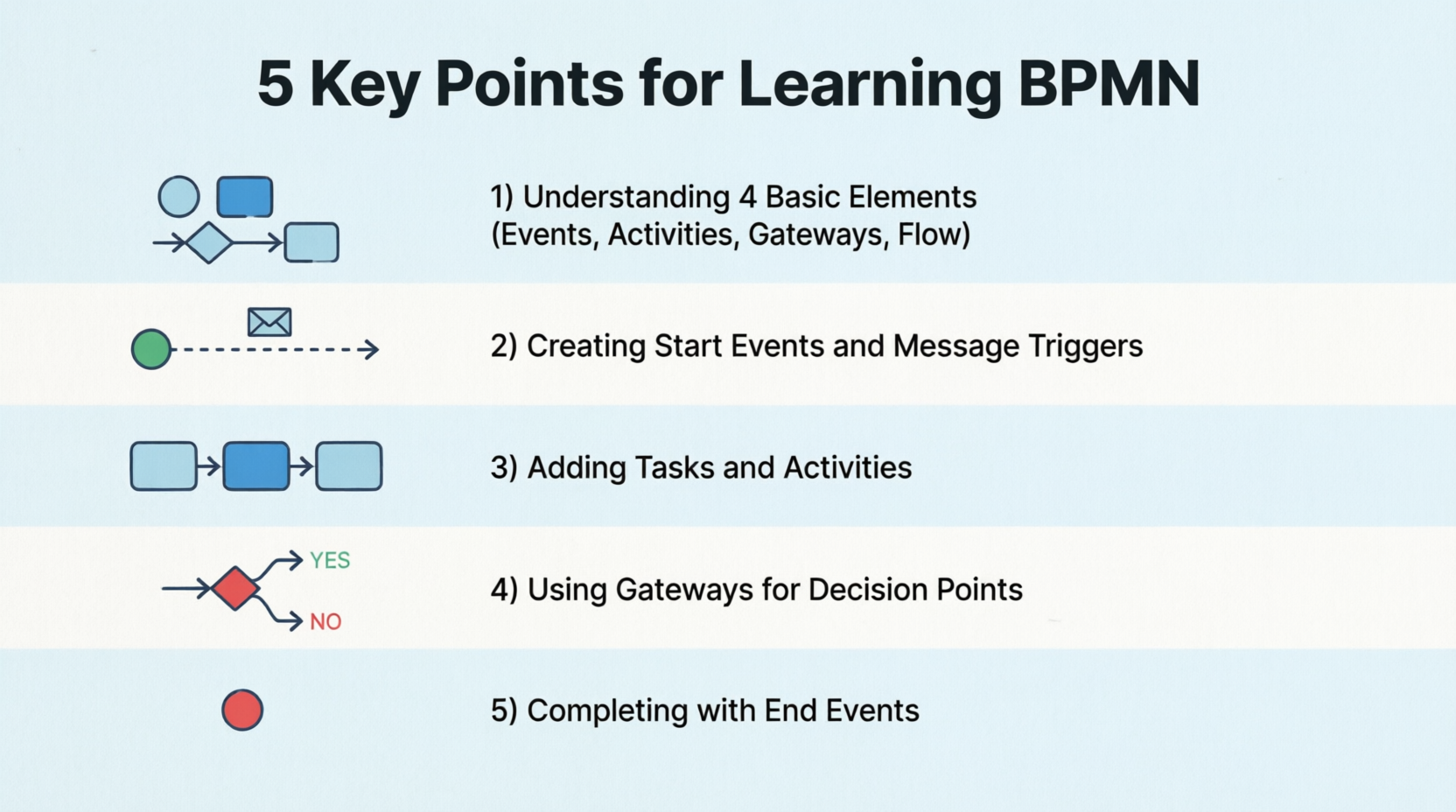
There are five basic categories of BPMN elements, each representing a unique aspect of business processes.
Swimlanes
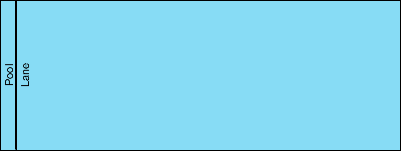
Swimlanes are graphical containers that represent participants in a process. There are two types of swimlanes: pools and lanes.
Flow Elements
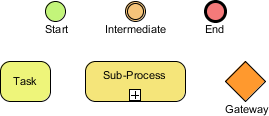
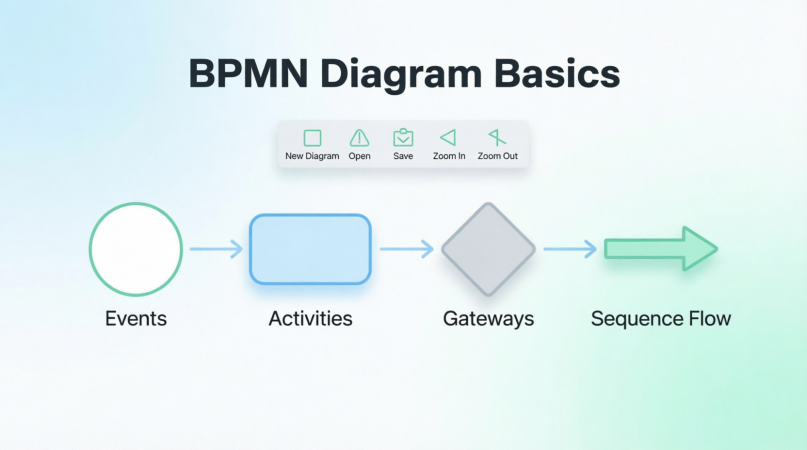
Flow elements connect with each other to form business workflows. They are the primary elements that define the behavior of a process. There are three kinds of flow elements:
-
Events
-
Activities
-
Gateways
Connecting Objects

Flow objects are not isolated but connected to form a flow. The connectors that link flow objects are called connecting objects. There are four kinds of connecting objects:
-
Sequence flows
-
Message flows
-
Associations
-
Data associations
Data
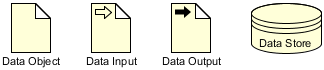
Data represents information needed or produced when executing a business process. There are four kinds of data:
-
Data objects
-
Data inputs
-
Data outputs
-
Data stores
Detailed BPMN Elements
BPMN Swimlanes
Swimlane objects (also known as Swimlanes) in BPMN are rectangular boxes that represent participants in a business process. A swimlane may contain flow objects performed by that lane (participant), except for black boxes that must have an empty body. Swimlanes may be arranged horizontally or vertically—they are semantically the same but differ in representation. For horizontal swimlanes, processes flow from left to right, while processes in vertical swimlanes flow from top to bottom.
Examples of swimlanes include: Customer, Account Department, Payment Gateway, and Development Team.
There are two kinds of swimlanes: Pools and Lanes.
Pools
Pools represent participants in a business process. They can be specific entities (e.g., a department) or roles (e.g., assistant manager, doctor, student, vendor).
Inside a pool, there are flow elements representing the work that the pool needs to perform under the process being modeled. However, there is one kind of pool that has no content at all, known as the blackbox pool. Blackbox pools are often used when modeling entities external to the business process. Since they are external, their internal flow does not impact the process being modeled and can be skipped, producing a blackbox.
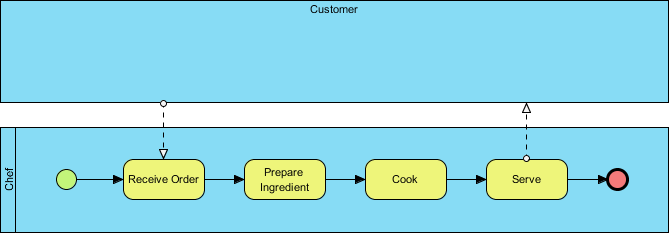
The example above shows a blackbox pool where the Customer is a blackbox. Since the process focuses on how the chef prepares a meal, what the customer does is not the process’s interest. The use of a blackbox depends on the perspective the process takes. If you need to model the process of how a customer places an order, the flow of Customer will be modeled, making the Chef pool a blackbox.
Lanes
Lanes are sub-partitions of pools. For instance, when you have a pool “Department,” you may have “Department Head” and “General Clerk” as lanes. Like pools, you can use lanes to represent specific entities or roles involved in the process.
Lanes may contain other lanes to form a nested structure when needed. However, BPMN primarily helps you model business processes. Do not build nested lanes just for modeling your organization’s structure. If you want to model organizational structure, use an organization chart instead.
Activities
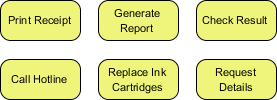
Activities are works performed within a business process. They are shown as rounded rectangles with names describing the work to perform.
There are two types of activities:
1. Task: When we want to model an atomic work that cannot be further broken down or makes no sense to break down, we use a task.
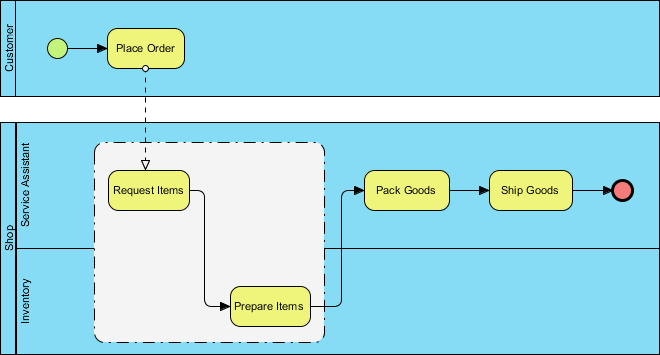
2. Sub-Process: When we want to model a non-atomic, complex work that can be elaborated into smaller works, we use a sub-process. A sub-process can be broken down into another level of detail and usually contains another BPD modeling its details.
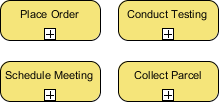
Key Concept: The selection of task or sub-process is not just about how complex a work can be but also about how detailed you need to know about the work. If you are a customer, you probably don’t want to know how your payment is being processed. However, if you are the shop, how to process the customer’s payment becomes important.
Events
Events are something that happens and may impact a business process. An event can be either external or internal. As long as they can influence the process being modeled, they should be modeled. Events are shown as circles, and in some cases, there are icons within the circles to represent the type of event trigger.
There are three types of events:
-
Start Event: Every process should have a start event to show the beginning of the business process. It allows readers to locate where the process begins in a BPD.
-
Intermediate Event: Responsible for driving business flow based on the event it specifies. Intermediate events can be attached to an activity for modeling an event that may happen DURING the execution of that activity, or connected by a connecting object for modeling an event that may happen AFTER the execution of the preceding flow element.
-
End Event: Used to indicate where a business process completes.
Triggers can be specified for each event type to indicate under what condition an event is triggered.
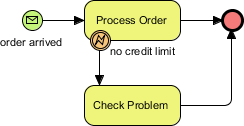
The example above demonstrates: When we receive an order, we begin to process it. If and only if there is no credit limit remaining, we check on the problem. The process ends when the order has been processed or the problem has been identified.
Gateways
Gateways are responsible for controlling how a business process flows. They are shown as diamond shapes. In a process, the work to do and the output may vary under different external or internal conditions. For example, a discount will only be offered to a VIP buyer but not to anyone else. Gateways are where conditions are evaluated and decisions are made.
Here are the typical types of gateways:
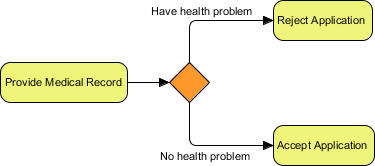
1. Data-Based Exclusive Gateway (Exclusive Gateway): Used to control process flow based on given process data. Each outgoing flow connected from the gateway corresponds to a condition. The flow with the satisfied condition is traversed. Only one flow will be traversed.
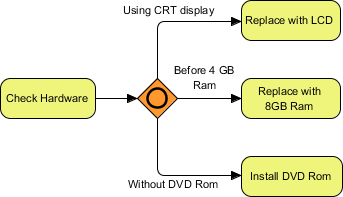
2. Inclusive Gateway: Can be used to create parallel paths. The conditions of all outgoing flows are evaluated. All flows with positive results will be traversed, which may result in executing multiple flows if multiple conditions are satisfied.
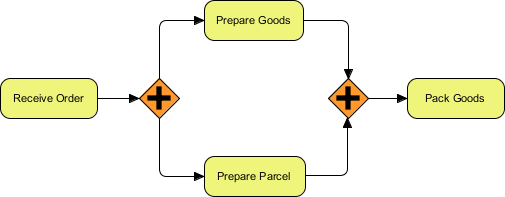
3. Parallel Gateway: Used to model the execution of parallel flows without the need to check any conditions. In other words, all outgoing flows must be executed at the same time.
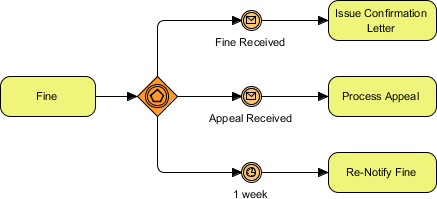
4. Event-Based Gateway: Used to model alternative paths based on events. For example, to wait for someone’s reply, either Yes or No is needed to determine the path to traverse. The gateway is followed by two connected intermediate events with message triggers—one representing a Yes message and another for No. When any ONE of the events is triggered, the flow that follows that event will be taken. All other events and their followed flows will no longer be valid.
Sequence Flows
Sequence flow is used to connect flow elements. It is shown as a solid line with an arrowhead and shows the order of flow elements.

Important Rule: You can only use sequence flow to connect flow elements within the same pool—either within the same pool/lane or across lanes in the same pool. If you want to connect elements across pools, you cannot use sequence flow but must use message flow instead.
Message Flows
In BPMN, communication between pools is achieved through the use of messages. Message flow is used to show the flow of messages between pools or flow elements between pools. A message flow is shown as a dotted line with an arrowhead.
Examples of messages that flow between pools include: fax, telephone, email, letter, notice, and command.
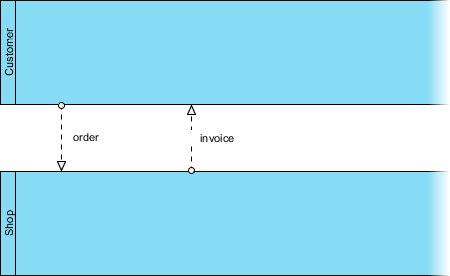
Important Rule: You can only use sequence flow to connect flow elements within the same pool. If you want to connect elements across pools, you cannot use sequence flow but must use message flow instead.
Data
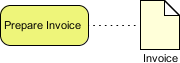
Very often, when executing a business process, data may be produced either during or after the end of the process. For example, a successful execution of the “Place Order” task will produce data like purchase orders, invoices, receipts, etc.
In BPMN, data can be modeled by several types of ‘data’ objects:
-
Data objects
-
Data inputs
-
Data outputs
-
Data stores
There is a well-defined way to manage the states of data, such as instantiation, completed, deleted, etc.
Groups
A group is a box with a dotted line border, providing modelers a mechanism to group shapes by different categories.
Text Annotations
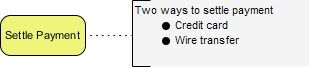
A text annotation can be used to add extra detail to flow objects in a BPD. It does not affect the flow but gives details about objects within a flow.
BPMN – A Complete Example
Case Study: True Aqua Distilled Water Company
The True Aqua Distilled Water Company is a young distilled water supplier in the city, selling distilled water for both business and home use. The company aims to increase its market share from 5% to 10% in the next 12-18 months. To reach this objective, they are seeking ways to increase operating efficiency and fulfill higher levels of customer satisfaction.
As a result, True Aqua Distilled Water Company decided to improve their distilled water ordering process. As a business analyst responsible for this mission, after meeting with the company, you have collected the following information about the ordering process.
Process Analysis:
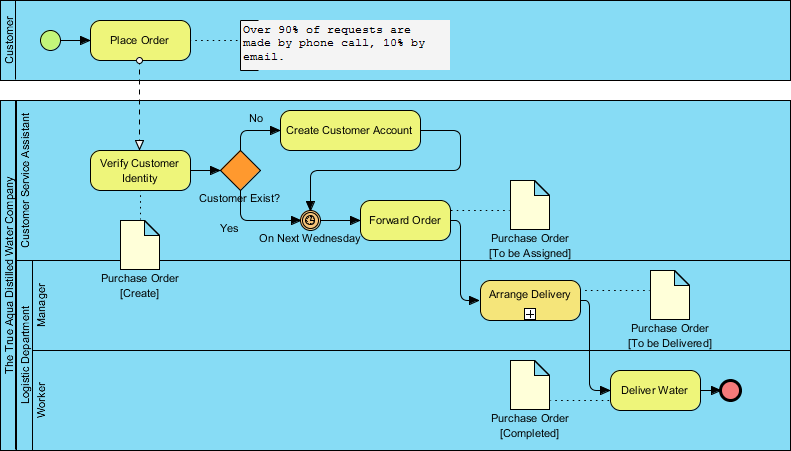
According to the diagram, customers can either:
-
Call the ordering hotline, or
-
Send an email to order distilled water
Current Statistics:
-
90% of orders come from phone calls
-
10% of orders are placed by email
Process Flow:
-
Order Reception: The customer service assistant receives the order and checks whether the customer is an existing customer or a new one.
-
Customer Verification: If the customer has never placed an order before, the customer service assistant creates a customer account for them prior to processing the order.
-
Delivery Schedule: The delivery of distilled water is carried out once a week, every Wednesday. On every Wednesday morning, the customer service assistant forwards orders to the Logistics Department for delivery.
-
Logistics Management: Once the manager in the Logistics Department receives the orders, they arrange the delivery by:
-
Assigning workers to manage different orders
-
Printing and posting the schedule
-
-
Delivery Execution: The workers receive the calls and deliver water to the customer accordingly.
This example demonstrates how BPMN can effectively model a real-world business process, showing the interaction between different participants (Customer, Customer Service Assistant, Logistics Manager, Workers) and the flow of activities from order placement to delivery.
Key Concepts for Beginners
-
Start Simple: Begin with basic elements (tasks, events, gateways) before moving to complex constructs
-
Focus on Flow: Always think about the sequence and logic of your process
-
Use Swimlanes Wisely: Clearly define who does what in your process
-
Choose the Right Gateway: Understand when to use exclusive, inclusive, or parallel gateways
-
Document with Annotations: Use text annotations to clarify complex elements
-
Validate Your Model: Ensure your process has a clear start and end
-
Iterate and Improve: BPMN models should evolve as your understanding of the process deepens
Best Practices
-
Keep diagrams readable and avoid overcrowding
-
Use consistent naming conventions
-
Group related activities logically
-
Document assumptions and business rules
-
Validate models with stakeholders
-
Use sub-processes to manage complexity
-
Test your processes against real scenarios
Reference List
Business Process Model and Notation (BPMN) Official Site: Official website for BPMN standard information and resources
Object Management Group (OMG): The organization that maintains and develops the BPMN standard
BPMN 2.0.2 Specification: Official BPMN 2.0.2 specification document from OMG
ISO/IEC 19510:2013 Standard: International standard for BPMN 2.0 published by ISO
Professional BPMN Process Modeling Tool: Visual Paradigm’s professional BPMN diagram and modeling tools
Try Visual Paradigm FREE: Download and try Visual Paradigm’s BPMN modeling software for free
Conclusion
BPMN is a powerful yet accessible notation for modeling business processes. By providing a standardized visual language, it bridges the gap between business stakeholders and technical teams, enabling better communication, analysis, and improvement of organizational processes. Whether you’re a business analyst, process owner, or IT professional, mastering BPMN will enhance your ability to document, analyze, and optimize business processes effectively.
Start with simple processes, practice regularly, and gradually incorporate more advanced elements as your understanding grows. With BPMN, you have a universal language that can transform how your organization understands and improves its operations.
Summary
• BPMN is a universal visual language for modeling business processes that bridges communication gaps between business stakeholders and technical teams through standardized graphical notation
• Five core element categories form the foundation: Swimlanes (participants), Flow Elements (events, activities, gateways), Connecting Objects (sequence and message flows), Data objects, and supporting elements like groups and annotations
• Events, Activities, and Gateways drive process logic—events trigger or conclude processes, activities represent work performed, and gateways control decision points and parallel flows based on conditions
• Swimlanes organize responsibilities using pools (external participants) and lanes (internal roles), clearly showing who performs each task while maintaining process flow across organizational boundaries
• BPMN enables continuous improvement by providing clear, standardized documentation that helps organizations analyze current processes, identify inefficiencies, and implement optimized workflows for better operational performance
Complete Beginner’s Guide to Business Process Model and Notation (BPMN)
Introduction to BPMN
Business Process Model and Notation (BPMN) is a visual modeling language designed for business analysis applications and specifying enterprise process workflows. As an open standard notation for graphical flowcharts, BPMN is used to define business process workflows in a way that is both popular and intuitive. Its graphical nature makes it easily understandable by all business stakeholders, including business users, business analysts, software developers, and data architects.
History of BPMN
BPMN emerged from the synthesis of multiple business modeling notations. Originally published by the Business Process Management Initiative (BPMI) in 2004, BPMN is now maintained by the Object Management Group (OMG) following the merger of the two organizations in 2005.
Key milestones in BPMN’s evolution include:
-
February 2006: OMG released the first BPMN Specification document
-
2010: Development of BPMN Version 2.0 began
-
December 2013: The actual version of the specification was released
-
Current Version: BPMN 2.0.2 has been formally published by ISO as the 2013 edition standard (ISO/IEC 19510)
Benefits of BPMN
BPMN enables organizations to capture and document business processes in a clear and consistent manner, ensuring that relevant stakeholders—such as process owners and business users—are actively involved. This collaborative approach allows teams to respond more effectively to issues identified in processes.
Key Advantages:
-
Industry Standard: Developed by the OMG consortium, a not-for-profit industry group
-
Process Clarity: Provides businesses with the capability to define and understand their procedures through Business Process Diagrams
-
Universal Understanding: Offers a standard notation readily understandable by all business stakeholders
-
Bridges Communication Gaps: Connects business process design with implementation teams
-
Balanced Complexity: Simple to learn yet powerful enough to depict the potential complexities of business processes
The Goals of BPMN
BPMN serves three primary stakeholder groups:
-
Technical Experts: Professionals responsible for process implementation
-
Business Analysts: Individuals who create and improve processes
-
Managers: Leaders who monitor and control processes
Overview of BPMN
Understanding how a business operates is the first and most critical step in business process improvement. BPMN provides a graphical representation of business workflows that anyone—from business analysts to stakeholders—can easily understand, aiding in both business process analysis and improvement initiatives.
In BPMN, any process is represented as a series of steps (activities) performed consecutively or simultaneously according to specific business rules. Consider the “Place Order Online” process used in an online store:
BPMN Notation Elements
BPMN describes processes through diagrams composed of various graphic elements. This visual presentation makes it easy for users to understand process logic. The BPMN standard classifies graphic elements into categories, making them easily recognizable for users working with business process diagrams.
Basic Constructs
There are five basic categories of BPMN elements, each representing a unique aspect of business processes.
1. Swimlanes
Swimlanes are graphical containers representing participants in a process. There are two types: pools and lanes.
2. Flow Elements
Flow elements connect with each other to form business workflows. They are the primary elements defining process behavior and include three types: Events, Activities, and Gateways.
3. Connecting Objects
Flow objects connect to form a flow through connecting objects. There are four types: Sequence flows, Message flows, Associations, and Data associations.
4. Data
Data represents information needed or produced during business process execution. There are four types: Data objects, Data inputs, Data outputs, and Data stores.
Detailed Element Guide
BPMN Swimlanes
Swimlane objects are rectangular boxes representing participants in a business process. A swimlane may contain flow objects performed by that participant, except for black boxes, which must have an empty body. Swimlanes can be arranged horizontally or vertically—they are semantically identical but differ in representation:
-
Horizontal swimlanes: Process flows from left to right
-
Vertical swimlanes: Process flows from top to bottom
Examples of swimlanes include Customer, Account Department, Payment Gateway, and Development Team.
Pools
Pools represent participants in a business process and can be:
-
A specific entity (e.g., department)
-
A role (e.g., assistant manager, doctor, student, vendor)
Inside a pool are flow elements representing the work that pool performs under the modeled process. However, there’s one special type: the blackbox pool, which has no content at all.
Blackbox pools are used when modeling entities external to the business process. Since they’re external, their internal flow doesn’t impact the modeled process and can be skipped.
In the example above, “Customer” is a blackbox. Since the process focuses on how the chef prepares a meal, what the customer does is outside the process’s scope. The use of blackboxes depends on the process perspective. If you were modeling how a customer places an order, the Customer flow would be modeled, making the Chef pool a blackbox.
Lanes
Lanes are sub-partitions of pools. For instance, within a “Department” pool, you might have “Department Head” and “General Clerk” as lanes. Like pools, lanes represent specific entities or roles involved in the process.
Important Note: Lanes may contain other lanes to form nested structures when needed. However, BPMN is primarily designed for modeling business processes, not organizational structures. If you want to model organizational hierarchy, use an organization chart instead.
Activities
Activities represent work performed within a business process. They appear as rounded rectangles with names describing the work to be performed.
There are two types of activities:
Tasks
When modeling atomic work that cannot be further broken down (or makes no sense to do so), use a task.
Sub-Processes
When modeling non-atomic, complex work that can be elaborated into smaller components, use a sub-process. A sub-process can be broken down into another level of detail and usually contains another Business Process Diagram (BPD) modeling its details.
Key Concept: The selection between task and sub-process isn’t just about complexity—it’s about the level of detail needed. For example, as a customer, you probably don’t need to know how your payment is processed. However, for the shop, payment processing details become crucial.
Events
Events are occurrences that may impact a business process. They can be external or internal—as long as they influence the modeled process, they should be included. Events are shown as circles, sometimes with icons inside representing the event trigger type.
Three Types of Events:
-
Start Event: Shows the beginning of a business process, allowing readers to locate where the process begins
-
Intermediate Event: Drives business flow based on the specified event
-
End Event: Indicates where a business process completes
Each event can have triggers specified to indicate the conditions under which it’s activated.
Intermediate Events can be:
-
Attached to an activity: Modeling an event that may happen DURING the execution of that activity
-
Connected by a connecting object: Modeling an event that may happen AFTER the execution of the preceding flow element
Consider this example:
This diagram illustrates: When we receive an order, we begin processing it. If and only if there’s no credit limit remaining, we check the problem. The process ends when the order has been processed or the problem has been identified.
Gateways
Gateways control how a business process flows. Displayed as diamond shapes, they’re where conditions are evaluated and decisions are made. In any process, the work and output may vary under different external or internal conditions. For example, a discount might only be offered to VIP buyers, not to everyone else.
Typical Gateway Types:
1. Data-Based Exclusive Gateway (Exclusive Gateway)
Used to control process flow based on given process data. Each outgoing flow from the gateway corresponds to a condition. The flow with the satisfied condition is traversed—only one flow will be traversed.
2. Inclusive Gateway
Used to create parallel paths. The conditions of all outgoing flows are evaluated, and all flows with positive results will be traversed. This may result in executing multiple flows if multiple conditions are satisfied.
3. Parallel Gateway
Used to model the execution of parallel flows without checking any conditions. All outgoing flows must be executed simultaneously.
4. Event-Based Gateway
Used to model alternative paths based on events. For example, waiting for someone’s reply—either “Yes” or “No”—determines the path to traverse. The gateway is followed by two connected intermediate events with message triggers (one for “Yes,” one for “No”). When any ONE of the events is triggered, the flow following that event is taken, and all other events and their flows become invalid.
Sequence Flows
Sequence flows connect flow elements, showing their order. They’re displayed as solid lines with arrowheads.
Important Rule: You can only use sequence flows to connect flow elements within the same pool—either within the same pool/lane or across lanes in the same pool. To connect elements across pools, you must use message flows instead.
Message Flows
In BPMN, communication between pools is achieved through messages. Message flows show the flow of messages between pools or flow elements across pools. They’re displayed as dotted lines with arrowheads.
Examples of messages flowing between pools include: fax, telephone, email, letter, notice, and command.
Key Distinction:
-
Use sequence flows for connections within the same pool
-
Use message flows for connections across different pools
Data
During business process execution, data is often produced—either during or after the process ends. For example, successfully executing a “Place Order” task produces data like purchase orders, invoices, and receipts.
In BPMN, data can be modeled using several types of data objects:
-
Data Objects
-
Data Inputs
-
Data Outputs
-
Data Stores
BPMN provides a well-defined way to manage data states, such as instantiation, completion, deletion, etc.
Groups
A group is a box with a dotted line border, providing modelers a mechanism to group shapes by different categories. Groups help organize diagram elements visually without affecting the process flow.
Text Annotations
Text annotations add extra detail to flow objects in a BPD. They don’t affect the flow but provide additional information about objects within the flow.
Practical Example: True Aqua Distilled Water Company
Business Context
The True Aqua Distilled Water Company is a young distilled water supplier serving both businesses and homes. Their strategic goal is to increase market share from 5% to 10% within 12-18 months. To achieve this, they’re focusing on:
-
Increasing operating efficiency
-
Fulfilling higher levels of customer satisfaction
As a business analyst responsible for improving their distilled water ordering process, you’ve collected the following information:
Process Analysis
According to the diagram:
Order Channels: Customers can either:
-
Call the ordering hotline (90% of orders)
-
Send an email (10% of orders)
Customer Service Process:
-
The customer service assistant receives the order
-
Checks whether the customer is existing or new
-
If the customer has never placed an order before, creates a customer account prior to processing the order
Delivery Process:
-
Deliveries occur once a week, every Wednesday
-
Wednesday morning: Customer service assistant forwards orders to the Logistics Department
-
Logistics Department manager receives orders and:
-
Arranges delivery by assigning workers to manage different orders
-
Prints and posts the schedule
-
-
Workers receive assignments and deliver water to customers accordingly
Key BPMN Elements in This Example:
-
Pools: Customer, Customer Service, Logistics Department
-
Events: Order received, Order forwarded, Delivery scheduled
-
Activities: Check customer status, Create account, Assign workers, Print schedule
-
Gateways: Decision point for new vs. existing customer
-
Sequence Flows: Order of activities within each pool
-
Message Flows: Communication between Customer and Customer Service, and between Customer Service and Logistics
Key Concepts for Beginners
1. Start Simple
Begin with basic elements: Start Event → Activities → End Event. Add complexity (gateways, intermediate events) as needed.
2. Choose the Right Perspective
Decide whose perspective you’re modeling from. This determines which participants are modeled in detail and which are blackboxes.
3. Maintain Consistency
Use consistent naming conventions for activities and maintain uniform levels of detail throughout your diagram.
4. Validate with Stakeholders
Regularly review diagrams with business users, analysts, and technical teams to ensure accuracy and shared understanding.
5. Balance Detail and Clarity
Include enough detail to be useful, but avoid overwhelming complexity. Use sub-processes to hide detail when appropriate.
6. Follow BPMN Standards
Adhere to BPMN notation standards to ensure your diagrams are universally understandable.
Common BPMN Patterns
Sequential Flow
Activities performed one after another in a specific order.
Parallel Execution
Multiple activities performed simultaneously using parallel gateways.
Decision Points
Branching paths based on conditions using exclusive or inclusive gateways.
Event-Driven Processes
Processes triggered by specific events (messages, timers, errors).
Exception Handling
Managing errors and exceptions using boundary events attached to activities.
Best Practices
-
Use Descriptive Names: Clearly label all elements with meaningful names
-
Minimize Crossing Lines: Arrange elements to reduce flow line crossings
-
Logical Grouping: Use swimlanes to clearly show responsibilities
-
Consistent Layout: Maintain consistent direction (left-to-right or top-to-bottom)
-
Document Assumptions: Use text annotations to clarify business rules
-
Version Control: Maintain versions as processes evolve
-
Test Your Models: Walk through scenarios to validate logic
Summary
BPMN is a powerful, standardized visual language for modeling business processes. By mastering its core elements—swimlanes, flow objects (events, activities, gateways), connecting objects, and data—you can create clear, effective process diagrams that bridge the gap between business and technical stakeholders.
Remember:
-
Start with the basics and add complexity as needed
-
Focus on clarity and stakeholder understanding
-
Follow standards to ensure universal comprehension
-
Iterate and improve based on feedback
With practice, BPMN becomes an invaluable tool for analyzing, documenting, and improving business processes across your organization.
References
BPMN Official Website: Official resource for Business Process Model and Notation standards and information
Object Management Group (OMG): The not-for-profit industry consortium that maintains BPMN specifications
BPMN 2.0.2 Specification: Official OMG specification document for BPMN version 2.0.2
ISO/IEC 19510:2013 Standard: International Organization for Standardization formal publication of BPMN 2.0.2
Professional BPMN Process Modeling Tool: Visual Paradigm’s comprehensive BPMN diagram and modeling tools
Try Visual Paradigm FREE: Download and try Visual Paradigm’s free version for BPMN modeling
5-Point Summary
• Universal Visual Language: BPMN provides a standardized graphical notation that bridges communication gaps between business stakeholders, analysts, and technical teams, making complex processes easily understandable across all organizational levels
• Five Core Element Categories: BPMN diagrams are built from swimlanes (pools/lanes), flow elements (events, activities, gateways), connecting objects (sequence/message flows), data objects, and artifacts (groups/annotations)
• Process Flow Control: Events trigger processes, activities represent work performed, and gateways control decision-making and branching logic through exclusive, inclusive, parallel, or event-based routing
• Clear Role Definition: Swimlanes visually organize responsibilities by participant, department, or system, with pools representing major participants and lanes showing sub-partitions within organizational units
• Continuous Improvement Tool: BPMN enables organizations to document, analyze, and optimize business processes systematically, supporting operational efficiency gains and enhanced customer satisfaction through visual process modeling
This post is also available in Deutsch, Español, فارسی, Français, English, Bahasa Indonesia, 日本語, Polski, Portuguese, Ру́сский, Việt Nam, 简体中文 and 繁體中文.