


Purpose of the System Landscape Diagram (C4 Level 0 / Landscape)
The System Landscape diagram is the widest view in the C4 model family.
It sits above the System Context diagram and shows:
- All major software systems that are important from the perspective of the organisation / business unit / product line / team
- How those systems interact at a very high level
- Which systems are internal, external, legacy, strategic, being replaced, being built, etc.
- Often includes people / actor groups only when they are central to multiple systems
It answers questions such as:
- “What does our entire digital estate look like today?”
- “Which systems talk to our core banking mainframe?”
- “Where are the biggest integration pain points?”
- “Which new initiatives are touching many existing systems?”
It is not focused on one single software system — it is the organisation-wide / department-wide big picture.
Good Titles for a System Landscape Diagram
Choose a title that clearly communicates the scope and perspective. Some strong, commonly used examples:
- Big Bank plc – Enterprise / Core Banking Landscape 2025
- Personal & Small Business Banking – System Landscape
- Retail Banking Division – Major Systems & Integrations
- Internet Banking Programme – Surrounding Ecosystem (2025)
- End-to-End Customer Journey – Banking Systems Landscape
- Strategic Systems Landscape – Big Bank plc (focus on Customer-Facing Channels)
- Current State Architecture – Retail & Digital Banking Portfolio
Recommended title for this case study (broad but focused):
Big Bank plc – Retail & Digital Banking System Landscape (2025 Target State)
When to Create / Update a Landscape Diagram
- During early discovery / architecture runway phase
- When doing portfolio rationalization or legacy modernisation planning
- As part of quarterly / annual architecture review
- When onboarding senior leaders or regulators who need the 30,000 ft view
- Before starting a large programme that touches many systems
PlantUML / C4-PlantUML Example – System Landscape Diagram
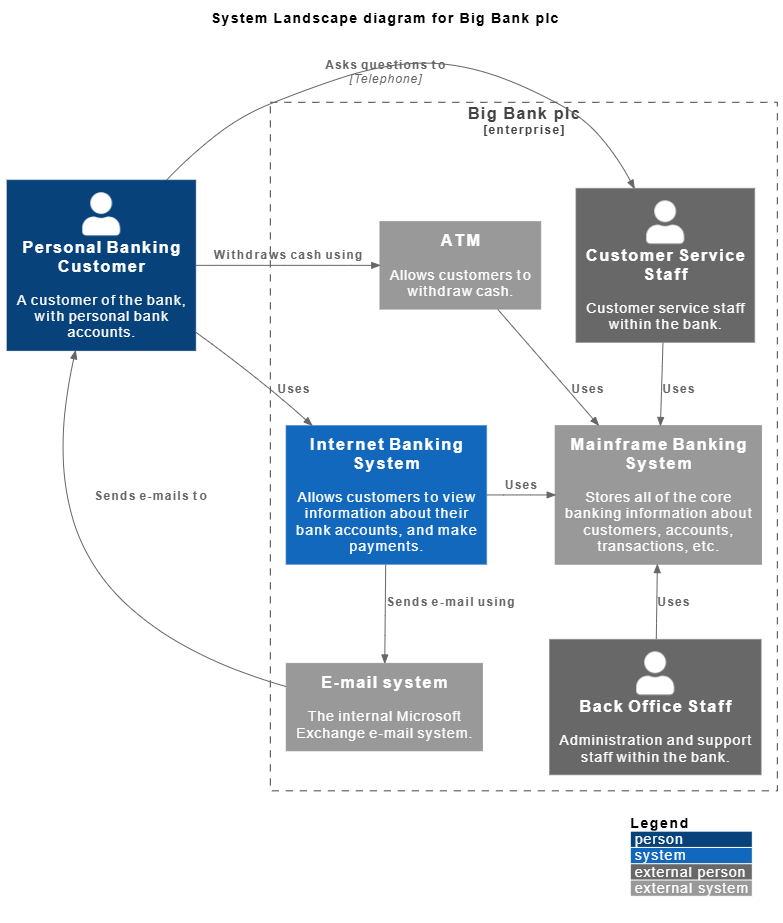
@startuml
!include https://static.visual-paradigm.com/plantuml-stdlib/C4-PlantUML/master/C4_Context.puml

LAYOUT_TOP_DOWN()
LAYOUT_WITH_LEGEND()

title System Landscape diagram for Big Bank plc

Person(customer, "Personal Banking Customer", "A customer of the bank, with personal bank accounts.")

Enterprise_Boundary(c0, "Big Bank plc") {
System(banking_system, "Internet Banking System", "Allows customers to view information about their bank accounts, and make payments.")

System_Ext(atm, "ATM", "Allows customers to withdraw cash.")
System_Ext(mail_system, "E-mail system", "The internal Microsoft Exchange e-mail system.")

System_Ext(mainframe, "Mainframe Banking System", "Stores all of the core banking information about customers, accounts, transactions, etc.")

Person_Ext(customer_service, "Customer Service Staff", "Customer service staff within the bank.")
Person_Ext(back_office, "Back Office Staff", "Administration and support staff within the bank.")
}

Rel_Neighbor(customer, banking_system, "Uses")
Rel_R(customer, atm, "Withdraws cash using")
Rel_Back(customer, mail_system, "Sends e-mails to")

Rel_R(customer, customer_service, "Asks questions to", "Telephone")

Rel_D(banking_system, mail_system, "Sends e-mail using")
Rel_R(atm, mainframe, "Uses")
Rel_R(banking_system, mainframe, "Uses")
Rel_D(customer_service, mainframe, "Uses")
Rel_U(back_office, mainframe, "Uses")

Lay_D(atm, banking_system)

Lay_D(atm, customer)
Lay_U(mail_system, customer)
@enduml
Quick Interpretation Guide
- Left side — mostly new/cloud/modern initiatives
- Centre / right — legacy core and heavyweight integration hubs
- External systems marked with
_Ext - Legend automatically generated thanks to
LAYOUT_WITH_LEGEND() - Boundaries used only where helpful (here around the new digital channels)
This diagram type is intentionally coarse-grained — it usually does not show containers or components, databases, protocols, etc. Those details belong in System Context and Container diagrams of the individual systems.
Would you like to:
- Extend this into a current state vs target state comparison?
- Add colour coding (legacy = orange, strategic = green, etc.)?
- Focus on a smaller scope (e.g. only payments landscape)?
- Convert this example to Mermaid instead?
Let me know how you’d like to adapt it.
- Ultimate Guide to C4 Model Visualization Using Visual Paradigm’s AI Tools: This guide explains how to leverage AI-powered tools to automate and enhance C4 model visualization for faster software architecture design.
- Leveraging Visual Paradigm’s AI C4 Studio for Streamlined Architecture Documentation: This article details using an AI-enhanced studio to create clean, scalable, and maintainable software architecture documentation.
- The Ultimate Guide to C4-PlantUML Studio: Revolutionizing Software Architecture Design: This resource explores combining AI-driven automation, the C4 model’s clarity, and PlantUML’s flexibility into a single powerful tool.
- A Comprehensive Guide to Visual Paradigm’s AI-Powered C4 PlantUML Studio: This guide describes a purpose-built tool released in late 2025 that transforms natural language prompts into layered C4 diagrams.
- C4-PlantUML Studio | AI-Powered C4 Diagram Generator: This feature overview highlights an AI-driven tool designed to generate C4 software architecture diagrams from simple text descriptions.
- Generating and Modifying C4 Component Diagrams with Visual Paradigm AI Chatbot: This tutorial demonstrates using an AI-powered chatbot to iteratively create and refine component-level architecture for complex systems.
- AI-Powered C4 Diagram Generator: Core Levels and Supporting Views: This page explains how the AI generator supports the four core levels of the C4 model—Context, Container, Component, and Deployment—to provide comprehensive documentation.
- AI Diagram Generator: Complete C4 Model Support Release: This update details the integration of AI-powered features for the automated creation of hierarchical C4 model diagrams.
- C4 Model AI Generator: Automating the Full Modeling Lifecycle: This resource highlights how a specialized AI chatbot uses conversational prompts to ensure consistency across architecture documentation for DevOps teams.
- Comprehensive Review: Generic AI Chatbots vs. Visual Paradigm’s C4 Tools: This comparison explains why specialized tools like the C4 PlantUML Studio provide more structured and professional-grade results than general-purpose language models.
This post is also available in Deutsch, Español, فارسی, Français, English, Bahasa Indonesia, 日本語, Polski, Portuguese, Ру́сский, Việt Nam, 简体中文 and 繁體中文.