
🔍 Introduction: Why Requirement Modeling Matters
Requirements define what the system must do. Poorly defined or ambiguous requirements lead to:
-
Scope creep
-
Rejected features
-
Cost overruns
-
Delayed delivery
-
Poor user satisfaction
Effective requirement modeling ensures:
✅ Clarity
✅ Testability
✅ Traceability
✅ Collaboration
✅ Compliance (especially in regulated domains)
🎯 Goal: Transform stakeholder needs into structured, actionable, and verifiable inputs for design and development.
📌 Core Concepts Across All Three Techniques
| Concept | Role |
|---|---|
| Stakeholders | People or systems affected by or interacting with the system (e.g., Customer, Bank, ATM). |
| Functional Requirements | What the system does (e.g., “dispense cash”). |
| Non-Functional Requirements | How well the system performs (e.g., “responds in <2 seconds”, “secure against fraud”). |
| Traceability | Linking requirements to design, tests, and implementation to ensure completeness and verification. |
| Verification vs. Validation | Verification: Are we building the product right? Validation: Are we building the right product? |
💡 Note: While all three techniques support these concepts, they differ in how they express them.
✅ 1. Use Cases (UML – Unified Modeling Language)
“Describe what the system does from the user’s point of view.”
🎯 Primary Focus
-
System behavior and interactions between actors and the system.
-
Emphasis on step-by-step workflows and edge cases.
🛠 How It Works
-
Start with a Use Case Diagram – Visual overview of actors and goals.
-
Write detailed textual specifications for each use case (main success, alternatives, exceptions).
-
Use in requirements analysis, design, and testing.
🧩 Key Concepts
| Term | Description |
|---|---|
| Actor | External entity that interacts with the system (e.g., Customer, Bank Server). |
| Use Case | A goal-oriented interaction (e.g., “Withdraw Cash”) represented as an oval. |
| Relationships | «include» (mandatory), «extend» (optional), generalization (inheritance). |
| Scenarios | Concrete paths through the use case (main flow, alternative flows, exception flows). |
| Preconditions | What must be true before the use case starts. |
| Postconditions | What must be true after completion. |
| Trigger | Event that starts the use case (e.g., card inserted, login successful). |
📚 Example: ATM System – “Withdraw Cash”
Use Case Diagram (Visual Overview)
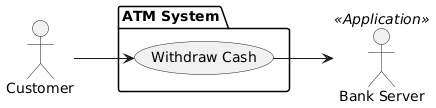
Arrows show interaction.
«extend»could link to “Check Balance” or “Request Receipt”.
Textual Specification: “Withdraw Cash”
-
Actor: Customer
-
Precondition: Customer is authenticated (valid card + correct PIN).
-
Main Success Scenario:
-
Customer selects “Withdraw Cash”.
-
System prompts: “Enter amount (multiple of $20).”
-
Customer enters $100.
-
System checks balance: ≥ $100 → dispenses cash.
-
Prints receipt, ejects card.
-
-
Alternative Flow (Insufficient Funds):
-
Step 4: Balance < requested amount → display error: “Insufficient funds.”
-
Return to main menu.
-
-
Exception Flow (Invalid PIN after 3 tries):
-
After 3 failed attempts → card retained.
-
System logs incident and alerts bank.
-
-
Postcondition: Account balance reduced by amount; cash dispensed; receipt printed.
✅ Strengths
-
Excellent for complex behaviors and edge cases.
-
Strong traceability to design and testing.
-
Ideal for regulatory compliance and formal verification.
-
Supports modular design via
«include»and«extend».
❌ Weaknesses
-
Can become very verbose and hard to manage at scale.
-
Less flexible in Agile environments where change is constant.
-
Focus on how may obscure why.
🔄 Best for: Waterfall projects, regulated industries (banking, healthcare), large enterprise systems.
📝 2. User Stories (Agile / Scrum)
“Small, valuable, and user-centric — delivered fast.”
🎯 Primary Focus
-
User value, collaboration, and iterative delivery.
-
Emphasis on what users want and why.
🛠 How It Works
-
Written on index cards, digital tools (Jira, Trello), or backlog items.
-
Placed in product backlog.
-
Refined during backlog grooming with acceptance criteria.
-
Developed via conversations (the “3 C’s”: Card, Conversation, Confirmation).
-
Estimated in story points, broken into tasks during sprint planning.
🧩 Key Concepts
| Concept | Description |
|---|---|
| Format | “As a [role], I want [goal] so that [benefit].” |
| INVEST Criteria | Independent, Negotiable, Valuable, Estimable, Small, Testable. |
| Acceptance Criteria | Conditions that must be met for the story to be accepted. Often written in Gherkin (Given, When, Then). |
| Epics & Themes | Large stories broken into smaller, manageable ones. |
| Conversation-Driven | Details emerge through team discussions, not upfront documentation. |
📚 Example: ATM System – Withdraw Cash
User Story Card
As a bank customer,
I want to withdraw cash from an ATM,
so that I can access my money quickly without visiting a branch.
Acceptance Criteria (Gherkin Style)
Given my account has sufficient funds and my card is valid
When I enter a valid amount (multiple of $20)
Then cash should be dispensed, a receipt printed, and my balance updated

Given my account has insufficient funds
When I request a withdrawal
Then an error message should appear and no cash should be dispensed

Rule: Maximum withdrawal amount per transaction is $500
✅ Strengths
-
Promotes collaboration and shared understanding.
-
Prioritizes user value and fast feedback.
-
Fits perfectly with Agile/Scrum/Kanban.
-
Lightweight and easy to manage in backlogs.
❌ Weaknesses
-
Lacks built-in detail for complex flows or non-functional requirements.
-
Traceability is manual unless linked via tools.
-
Risk of incomplete acceptance criteria leading to bugs.
🔄 Best for: Agile teams, startups, fast-moving projects, MVPs.
🧱 3. Requirement Diagrams (SysML – Systems Modeling Language)
“Model the requirements themselves — not just their behavior, but their structure and traceability.”
🎯 Primary Focus
-
Structured modeling of requirements with full traceability, verification, and satisfaction relationships.
-
Used in Model-Based Systems Engineering (MBSE).
🛠 How It Works
-
Requirements are first-class elements represented as rectangles with:
-
ID (e.g., REQ-001)
-
Text
-
Type (Functional, Performance, Design Constraint, etc.)
-
Priority (High, Medium, Low)
-
-
Connected via relationships to other elements:
-
«satisfy»→ design element (e.g., a block or component) -
«verify»→ test case -
«deriveReqt»→ derived from another requirement -
«trace»/«refine»/«copy»
-
🧩 Key Concepts
| Term | Description |
|---|---|
| «requirement» | Stereotype for a requirement element. |
| Hierarchy | Parent → child (refinement) via «refine». |
| Derivation | «deriveReqt» shows logical derivation (e.g., “Withdrawal limit” derived from “Security” requirement). |
| Satisfaction | «satisfy» links a requirement to a design element (e.g., ATM module satisfies withdrawal rule). |
| Verification | «verify» links a requirement to a test case. |
| Non-Functional Support | Explicitly models performance, safety, security, usability, etc. |
📚 Example: ATM System – Security & Withdrawal Requirements
Requirement Diagram (Conceptual)
[Req1: Login] ────«satisfy»───> [Login System Block]
                     └───«verify»───> [Test Case: Valid Login]
                     └───«trace»────> [Stakeholder: Customer]

[Req2: Withdrawal Limit] ──«deriveReqt»───> [Req1]
                             └───«satisfy»───> [ATM Software Module]
                             └───«verify»────> [Test Case: Max $500]

[Req3: Balance Check] ────«satisfy»───> [Balance Inquiry Module]
                           └───«verify»────> [Test Case: Balance Update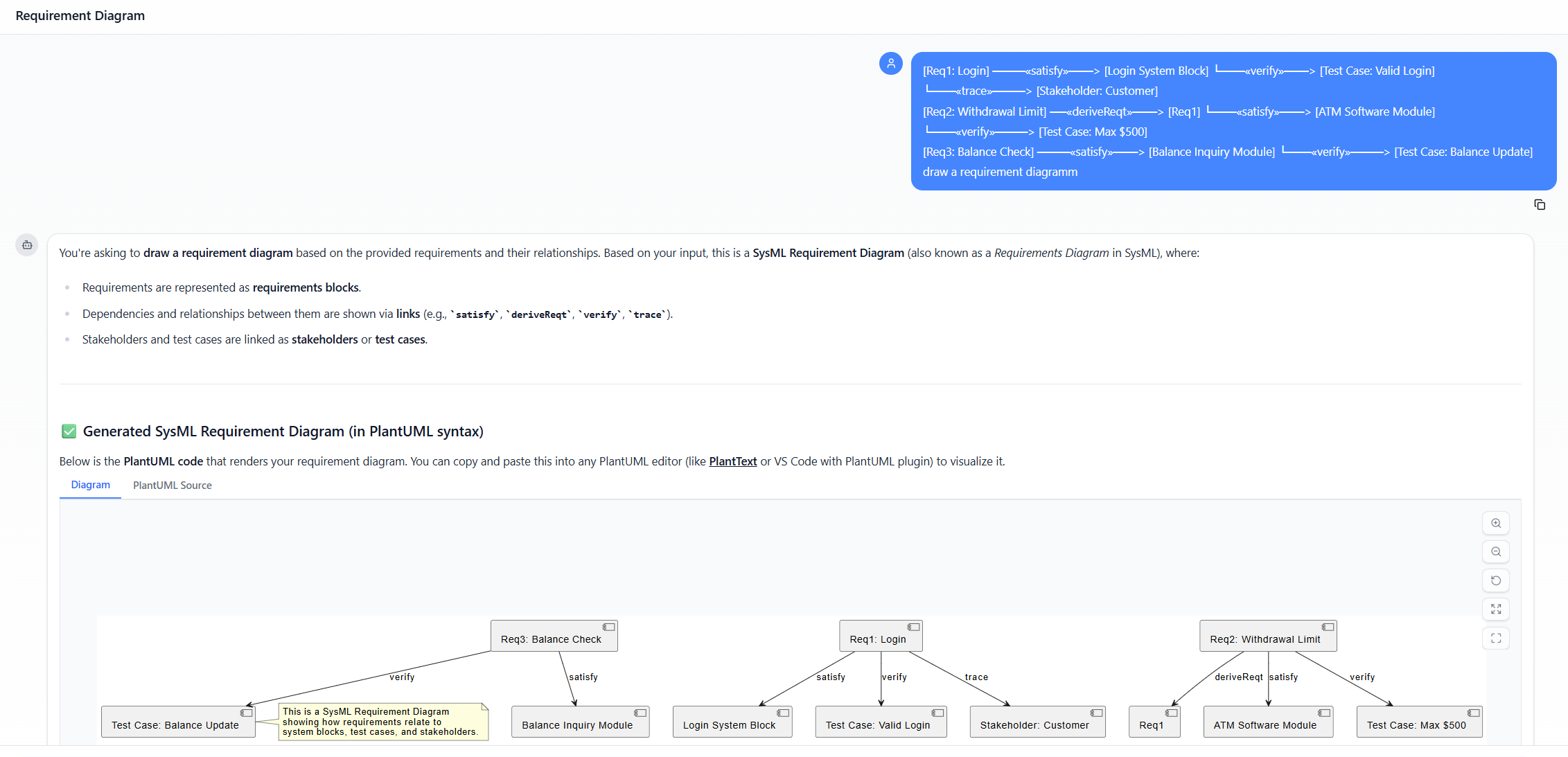
All requirements are explicitly linked to design and test artifacts.
✅ Strengths
-
Superior traceability across all lifecycle phases.
-
Excellent for non-functional requirements (security, performance, reliability).
-
Enables automated compliance checks and audit readiness.
-
Ideal for large, safety-critical systems (e.g., aerospace, automotive, medical devices).
❌ Weaknesses
-
Steep learning curve and requires SysML tools (e.g., MagicDraw, Cameo, Sparx EA).
-
Overkill for simple applications or small Agile teams.
-
Less intuitive for non-technical stakeholders.
🔄 Best for: Complex systems engineering, regulated industries, MBSE practices, large-scale enterprise systems.
🔍 Side-by-Side Comparison Table
| Aspect | Use Cases (UML) | User Stories (Agile) | Requirement Diagrams (SysML) |
|---|---|---|---|
| Primary Focus | System behavior & interactions (“how”) | User value & goals (“what & why”) | Requirements structure & traceability |
| Format | Diagram + detailed text (scenarios) | Short card + acceptance criteria | Visual diagram with boxes & arrows |
| Detail Level | High (step-by-step flows) | Low-to-medium (conversation-driven) | Variable (can be detailed) |
| Visualization | Use Case Diagram (actors + ovals) | Usually none (cards or backlog) | Requirement boxes with labeled arrows |
| Methodology Fit | Waterfall, structured, traditional | Agile/Scrum/Kanban | Model-Based Systems Engineering (MBSE) |
| Best For | Complex flows, testing, compliance | Fast iteration, user focus, MVPs | Traceability, non-functional reqs, regulated systems |
| Handles Non-Functional? | Yes (in text) | Limited (in acceptance criteria) | Excellent (dedicated types) |
| Traceability | Moderate (to design/tests) | Low (manual) | High (built-in relationships) |
| Tooling | UML tools (StarUML, Enterprise Architect) | Jira, Trello, Azure DevOps | SysML tools (MagicDraw, Cameo) |
| Ease of Use | Medium | High | Low (for non-engineers) |
🔄 Choosing the Right Technique (or Combining Them)
🎯 No single technique fits all. The key is to use them strategically — often together.
✅ Recommended Hybrid Approach (Best Practice)
@startuml
skinparam ActivityBackgroundColor #ECEBFF
skinparam ActivityBorderColor #A18EE3
skinparam ActivityFontSize 14
skinparam ArrowColor #666666
skinparam DiamondBackgroundColor #ECEBFF
skinparam DiamondBorderColor #A18EE3
start
:High-Level Needs;
:User Stories;
if (Complex or Critical?) then (Yes)
:Refine into Use Cases;
else (No)
:Proceed with Acceptance\nCriteria;
endif
:Model in Requirement\nDiagram;
:Link to Design, Tests, and\nValidation;
stop
@enduml
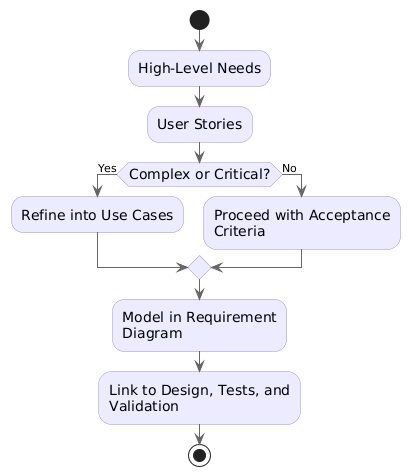
🧩 Step-by-Step Integration Strategy
-
Start with User Stories
-
Capture user needs in simple, value-driven language.
-
Prioritize in the product backlog.
-
-
Refine Complex Stories into Use Cases
-
For stories involving complex logic (e.g., withdrawal with limits, multi-step authentication).
-
Use use cases to document full scenarios, exception handling, and triggers.
-
-
Model Everything in a Requirement Diagram (SysML)
-
Convert all user stories and use cases into formal requirements.
-
Assign IDs, types (functional/performance), and priorities.
-
Link to:
-
Design blocks (via
«satisfy») -
Test cases (via
«verify») -
Stakeholders (via
«trace») -
Other requirements (via
«deriveReqt»,«refine»)
-
-
-
Maintain Traceability Matrix (RTM)
-
Use the diagram to generate a Requirements Traceability Matrix (RTM).
-
Ensure every requirement is verified and validated.
-
🏁 Final Thoughts: Choosing Your Approach
| Project Type | Recommended Technique(s) | Why |
|---|---|---|
| Agile Startup / MVP | User Stories + Acceptance Criteria | Fast delivery, collaboration, minimal overhead |
| Enterprise Banking App | User Stories → Use Cases → Requirement Diagrams | Balance agility with traceability and compliance |
| Medical Device / Aerospace | Requirement Diagrams (SysML) | Regulatory compliance, safety-critical, full traceability |
| Government / Defense System | Requirement Diagrams (SysML) + Use Cases | Formal verification, audit readiness |
| Small Team, Rapid Prototyping | User Stories with lightweight acceptance criteria | Speed and simplicity |
📌 Summary: The Big Picture
| Technique | Strengths | Weaknesses | Ideal For |
|---|---|---|---|
| Use Cases | Detailed behavior, edge case handling, testable | Verbose, less agile-friendly | Complex systems, testing, documentation |
| User Stories | Agile, collaborative, user-focused | Lacks detail, poor traceability | Fast iteration, MVPs, Scrum teams |
| Requirement Diagrams | Full traceability, supports non-functional, MBSE-ready | Steep learning curve, tooling needed | Regulated, large-scale, safety-critical systems |
✅ Pro Tip: Use User Stories to start, Use Cases to deepen complexity, and Requirement Diagrams to ensure compliance, traceability, and verifiability.
📚 Further Reading & Resources
-
Books:
-
User Stories Applied – Mike Cohn
-
Use Case Modeling: A Practical Approach – Paul C. J. H. M. van der Aalst
-
Applying UML and Patterns – Craig Larman
-
Systems Engineering with SysML – John A. McDermott
-
-
Tools:
-
Jira / Azure DevOps – User stories & backlog management
- Visual Paradigm Desktop
-
-
Standards:
-
ISO/IEC/IEEE 29148:2018 – Systems and software engineering — Life cycle processes
-
IEEE 830 – Standard for Software Requirements Specifications
-
DO-178C (Aviation), IEC 61508 (Functional Safety)
-
🎯 Conclusion
Requirement modeling is not about choosing one method — it’s about choosing the right tool for the job.
-
Use Cases teach us how the system behaves.
-
User Stories remind us why we’re building it.
-
Requirement Diagrams (SysML) ensure we don’t miss anything — and can prove it.
By combining these techniques wisely, teams can:
-
Reduce ambiguity
-
Improve collaboration
-
Enhance testability
-
Ensure compliance
-
Deliver software that truly meets user needs
🔄 Remember: The best requirements are clear, testable, traceable, and valuable — regardless of the technique used.
✅ Final Takeaway:
Start with User Stories. Deepen with Use Cases. Validate with Requirement Diagrams.
Together, they form a powerful, cohesive framework for building the right thing, right.
📘 This guide is designed for software engineers, systems analysts, product owners, QA teams, and project managers. Adapt it to your project’s size, domain, and methodology.
-
Visual Paradigm – Requirement Diagram Guide: This is a comprehensive guide for creating and managing requirement diagrams, covering the basics and best practices for software and system requirements modeling.
-
What Is a User Story? A Complete Guide to Agile Requirements: This guide explains the core concept and structure of user stories in Agile development and their critical role in capturing user needs effectively.
-
What Is a Use Case Diagram? – A Complete Guide to UML Modeling: An in-depth explanation of use case diagrams in UML, detailing their purpose, components, and best practices for requirements analysis.
-
How to Draw Requirement Diagrams in Visual Paradigm: This tutorial provides step-by-step instructions on how to define, link, and manage requirements in a structured visual format.
-
How to Write Effective User Stories: Best Practices and Templates: This section of the user guide provides templates and instructions for writing actionable and user-focused stories for product management.
-
Step-by-Step Use Case Diagram Tutorial – From Beginner to Pro: A comprehensive tutorial that guides users through creating effective use case diagrams, ranging from basic concepts to advanced techniques.
-
AI-Powered User Story 3Cs Editor: Enhance Clarity and Completeness: This resource highlights an AI-driven tool that helps Agile teams apply the 3Cs framework (Card, Conversation, and Confirmation) to their requirements.
-
SysML Requirement Diagram Tool – Visual Paradigm Online: An overview of a tool designed for modeling complex system requirements with full compliance to SysML standards.
-
Writing Effective User Stories: A Practical Guide for Agile Teams: A hands-on guide that uses real-world examples to walk teams through the process of crafting high-quality user stories for better collaboration.
-
Visualizing User Stories on Diagrams with Visual Paradigm: This guide demonstrates how to integrate user stories directly into diagrams, such as use case maps, to enhance understanding and traceability.