
Enterprise Architecture often feels like a walled garden to business leaders. 🌳 When architects speak in layers, viewpoints, and relationships, the message gets lost before it reaches the decision-makers. However, effective Enterprise Architecture is not about drawing complex diagrams for the sake of complexity. It is about clarifying strategy and enabling execution. ArchiMate provides the structure needed to map business goals to IT capabilities, but only if the stakeholders can actually read the map. 🗺️
This guide addresses the critical gap between technical modeling and business understanding. We will explore how to translate architectural artifacts into actionable insights without drowning your audience in jargon. The goal is clarity, alignment, and better business outcomes. Let us break down the barriers.
Understanding the Purpose of ArchiMate 🧭
Before diving into specific visual techniques, it is essential to understand why ArchiMate exists in the first place. It is an open and independent enterprise architecture framework. This means it is not tied to a specific vendor or tool. It serves as a common language for describing, analyzing, and visualizing enterprise architecture. 🗣️
For non-technical stakeholders, the value lies in the ability to see connections that are usually hidden. In a typical organization, the business strategy sits in one department, and the IT systems sit in another. These two silos often drift apart. ArchiMate bridges this gap by creating a unified view. It allows you to show how a business process relies on a specific application, which in turn runs on a particular server or cloud service.
Key benefits for stakeholders include:
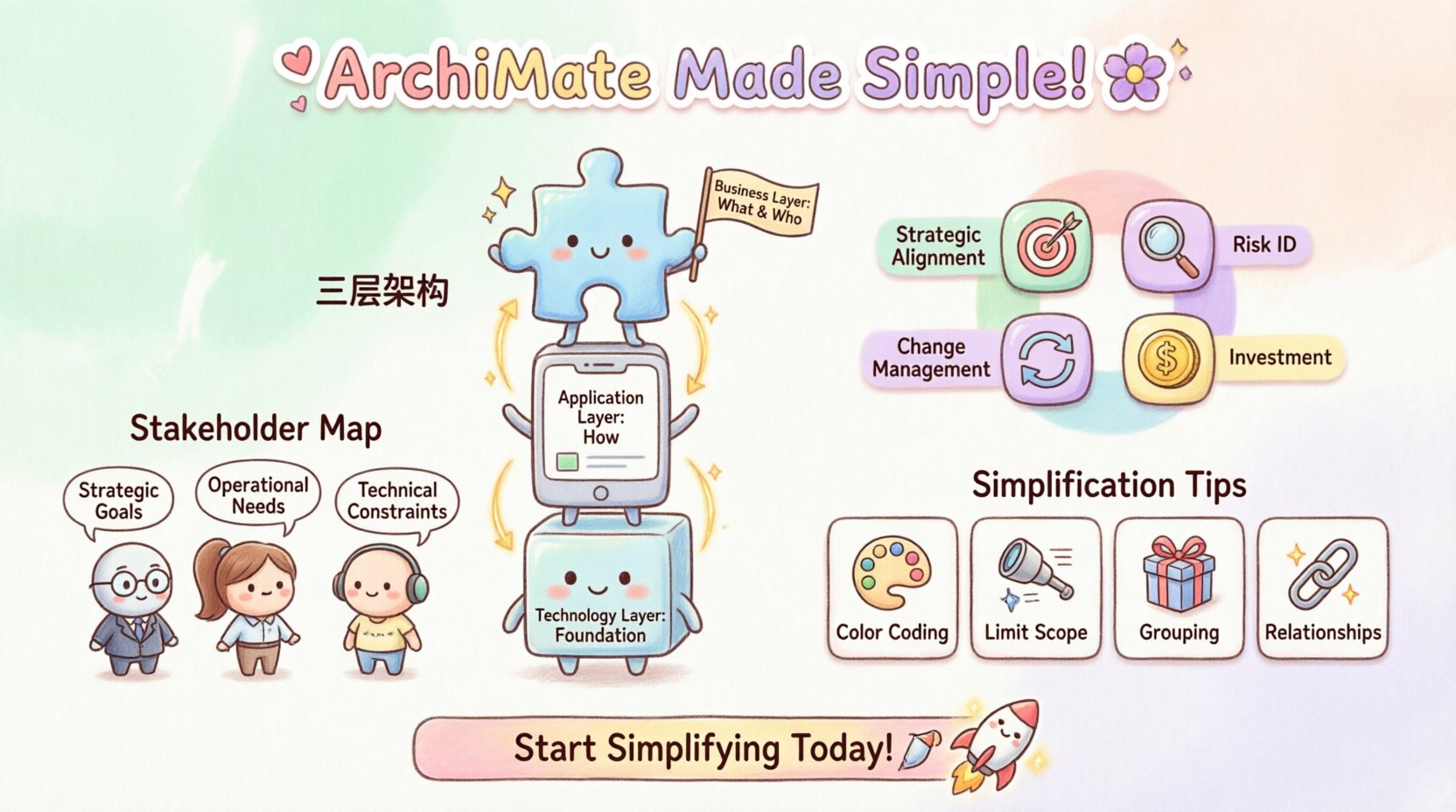
- Strategic Alignment: Seeing how daily operations support high-level goals.
- Risk Identification: Spotting single points of failure in the service chain.
- Change Management: Understanding the ripple effects of a proposed system update.
- Investment Justification: Proving the link between IT spend and business value.
When stakeholders understand these connections, they make more informed decisions. They stop asking “Why do we need this server?” and start asking “How does this server help us achieve the quarterly target?”.
The Three Core Layers Explained Simply 🏛️
One of the primary sources of confusion is the layered structure of the framework. It divides the enterprise into three main layers. To make this digestible, we must strip away the technical definitions and focus on the business reality.
1. The Business Layer 🧩
This layer represents the organization as a business entity. It includes processes, roles, and organizational structures. For a stakeholder, this is the “What” and the “Who”.
- Business Process: A sequence of activities that produce a specific outcome.
- Business Role: A person or group responsible for a function.
- Business Object: Information or data entities that are created or used.
2. The Application Layer 📱
This layer sits below the business layer. It contains the software systems that support the business processes. This is the “How” in terms of digital tools.
- Application Function: A specific capability provided by software.
- Application Service: A service exposed to the outside world.
- Application Component: A modular part of a software system.
3. The Technology Layer 💻
This is the infrastructure layer. It includes the hardware, networks, and platforms that host the applications. This is the physical foundation.
- Node: A computational resource or physical device.
- Device: A specific hardware component like a server or router.
- Network: The communication infrastructure.
When presenting to non-technical audiences, start with the Business Layer. Only introduce the Application and Technology layers when discussing specific system changes. If a stakeholder cares about a process change, do not show them the database schema unless necessary.
Why Complexity Often Hinders Decision Making 🛑
Architects often fall into the trap of completeness. They try to model every relationship and attribute. This results in a “spaghetti diagram” that overwhelms the viewer. For a business leader, a model that takes more than five minutes to interpret is a failed model. 🤯
Complexity creates cognitive load. When the brain spends energy trying to understand the diagram, it has less energy left to evaluate the decision at hand. To avoid this, you must apply the principle of abstraction.
Common pitfalls to avoid include:
- Over-detailing: Showing every single connection in a process.
- Technical Labels: Using internal variable names instead of business terms.
- Ignoring Context: Presenting a view without explaining the scope.
- Static Views: Failing to show the flow or sequence of events.
Simplicity is not about removing information; it is about organizing it so the relevant information stands out. Think of a subway map. It does not show the exact geographic distance between stations, but it shows the connections perfectly. That is the goal of an architectural model.
Strategies for Simplifying Visualizations 🎨
Once you understand the layers, the next step is designing the view. Visual communication is the primary tool for making models understandable. Here are proven strategies to improve clarity.
Use Color Strategically 🎨
Color should convey meaning, not just decoration. Establish a consistent legend. For example, always use blue for business processes and orange for applications. This creates a visual shorthand that stakeholders learn over time.
Limit the Scope
A model should focus on one specific question. Do not try to model the entire enterprise in one diagram. Break the architecture down into domains or value streams. A view for the Finance Director should focus on financial processes, not the entire IT infrastructure.
Group Related Elements
Use containers or boxes to group related elements. This reduces visual clutter. If five application functions belong to one system, place them in a single container labeled with the system name.
Focus on Relationships
Elements are static. Relationships are dynamic. Highlight the connections that matter. If you are showing how a new policy affects the IT system, make the connection line between the policy and the system thick and distinct.
Mapping Stakeholders to Views 👥
Not every stakeholder needs every piece of information. Tailoring the view to the audience is crucial for engagement. A C-level executive needs a high-level summary. A Project Manager needs a detailed process flow. A Developer needs interface specifications.
Use the table below to align stakeholder roles with the appropriate model depth.
| Stakeholder Role | Primary Need | Recommended View Depth | Key Focus |
|---|---|---|---|
| Executive Sponsor | Strategic Alignment | High-Level | Value Streams, Goals |
| Business Owner | Process Efficiency | Medium | Business Processes, Objects |
| IT Manager | System Integration | Detailed | Application Functions, Components |
| Project Lead | Implementation Scope | High Detail | Interfaces, Data Flows |
By creating distinct views for these groups, you ensure that the information is relevant. You prevent the “too much information” syndrome. Each group gets the specific data they need to do their job without being distracted by irrelevant details.
Facilitating Effective Architecture Review Sessions 🗣️
Presenting a model is an event that requires preparation. A review session is not a lecture; it is a collaborative discussion. The goal is to validate the model with the people who know the business best.
Preparation steps include:
- Send Materials Early: Distribute the diagrams at least 48 hours in advance.
- Define the Objective: State clearly what decision is being made or validated.
- Prepare a Narrative: Walk through the diagram like a story. Start at the beginning and move to the end.
- Encourage Questions: Pause frequently to check for understanding.
During the session, avoid asking “Does this look right?”. This invites a generic “Yes”. Instead, ask specific questions like “Does this process flow match how the team handles exceptions?”. This prompts critical thinking and reveals gaps in the model.
Building a Shared Vocabulary Across the Organization 📚
One of the biggest barriers to understanding is inconsistent terminology. Marketing might call a “Customer”, while Sales calls a “Lead”, and IT calls a “Contact”. When these terms appear in a model, confusion reigns. 🤔
To build a shared vocabulary, you must create a glossary. This document defines the terms used in the architecture. It should be accessible to everyone. When a stakeholder sees a term in a diagram, they should be able to look it up and understand it immediately.
Effective vocabulary management involves:
- Standardizing Definitions: Agree on what a term means for the organization.
- Consistent Labeling: Use the approved term in all diagrams and documentation.
- Translation Tables: Map technical terms to business terms.
Consider the following table to help translate technical concepts into business language.
| ArchiMate Concept | Technical Definition | Business Meaning |
|---|---|---|
| Business Process | A sequence of activities | How we get work done |
| Application Service | Functionality exposed to users | What the system does for you |
| Business Object | Data entity | Information we track |
| Node | Computational resource | Where the system runs |
| Flow | Data transfer | Information movement |
Handling Resistance to Architectural Artifacts 🛡️
Even with clear models, some stakeholders may resist. They may view architecture as bureaucracy or a delay to delivery. This resistance often stems from a perception that the work does not benefit them. 🛑
To overcome this, you must demonstrate value. Show how the architecture helps them solve a problem they care about. If they are worried about delivery speed, show how the model identifies bottlenecks before they cause delays. If they are worried about risk, show how the model highlights dependencies.
Common arguments and responses include:
- “This takes too long.” Response: “It saves time by preventing rework later.”
- “We already know the requirements.” Response: “This ensures we understand how the requirements connect to the infrastructure.”
- “The diagrams are too abstract.” Response: “We can add the detail you need for this specific meeting.”
Patience is key. Trust is built over time. As stakeholders see the model helping them make better decisions, their resistance will turn into adoption.
Measuring the Value of Clear Communication 📊
How do you know if your efforts to make models understandable are working? You need metrics. Without measurement, you cannot improve the process. Here are indicators of success.
- Decision Speed: Are decisions being made faster with the architecture in place?
- Question Reduction: Are there fewer requests for clarification on the diagrams?
- Feedback Quality: Is the feedback from stakeholders specific and actionable?
- Adoption Rate: Are more stakeholders requesting to see the models?
Track these metrics over time. If you see a drop in clarification requests, it means your visualizations are becoming clearer. If decision speed increases, it means the architecture is facilitating action.
Practical Steps to Start Today 🚀
You do not need a massive overhaul to improve communication. You can start with small changes.
- Audit Your Current Models: Look at the last five diagrams you created. Would a non-technical person understand them in two minutes? If not, simplify them.
- Create a Legend: If you do not have one, build a standard legend for colors and shapes. Use it everywhere.
- Write a Business Glossary: List the top 20 terms used in your models and define them in plain English.
- Hold a Workshop: Invite a business stakeholder to review a model. Ask them to explain it back to you. Their confusion points are your improvement areas.
- Limit Diagram Size: If a diagram is larger than a standard screen, split it. Do not force users to scroll endlessly.
These steps build a foundation for a culture of clarity. Over time, the models become a natural part of the conversation rather than a separate artifact.
Integrating Feedback Loops into the Process 🔁
Architecture is not a one-time activity. It is iterative. As the business changes, the models must change. However, if the models are too complex to update, they become obsolete quickly. 🔄
Feedback loops ensure the models stay relevant. When a stakeholder points out an error or a missing link, capture it immediately. Update the model and notify the stakeholders of the change. This creates a sense of ownership. They feel like contributors rather than just recipients of information.
Establish a clear process for updates:
- Change Request: Formalize requests for model changes.
- Review: Verify the change against the business rules.
- Update: Apply the change to the model.
- Notify: Inform all relevant stakeholders of the update.
This transparency builds trust. Stakeholders know that the model reflects reality, not just a theoretical ideal.
Final Thoughts on Architectural Clarity ✨
The journey from complex technical models to understandable business insights is challenging but necessary. It requires a shift in mindset from “drawing correctly” to “communicating effectively.” By focusing on the layers, simplifying the visuals, and tailoring the views, you can make ArchiMate a tool for empowerment rather than confusion. 🚀
Remember, the best model is the one that is understood and used. When stakeholders can see the path from strategy to execution, the organization moves with greater agility and confidence. Keep the focus on value, keep the language simple, and keep the dialogue open.
Start simplifying your models today. Your stakeholders will thank you with better decisions and faster delivery.