


Enterprise architecture often gets a reputation for being abstract, theoretical, and disconnected from the day-to-day grind. Many professionals encounter the ArchiMate framework and immediately feel the pressure to create massive diagrams that no one reads. This perception exists, but it is not the only way to engage with the standard. In practice, architects use these modeling techniques to solve concrete problems, facilitate communication, and maintain clarity across complex systems.
This guide explores how the ArchiMate framework functions in actual work environments. We focus on practical application rather than theoretical perfection. The goal is to understand how to model architecture without drowning in detail. By keeping the approach grounded, teams can leverage the language to bridge gaps between business strategy and technical execution.
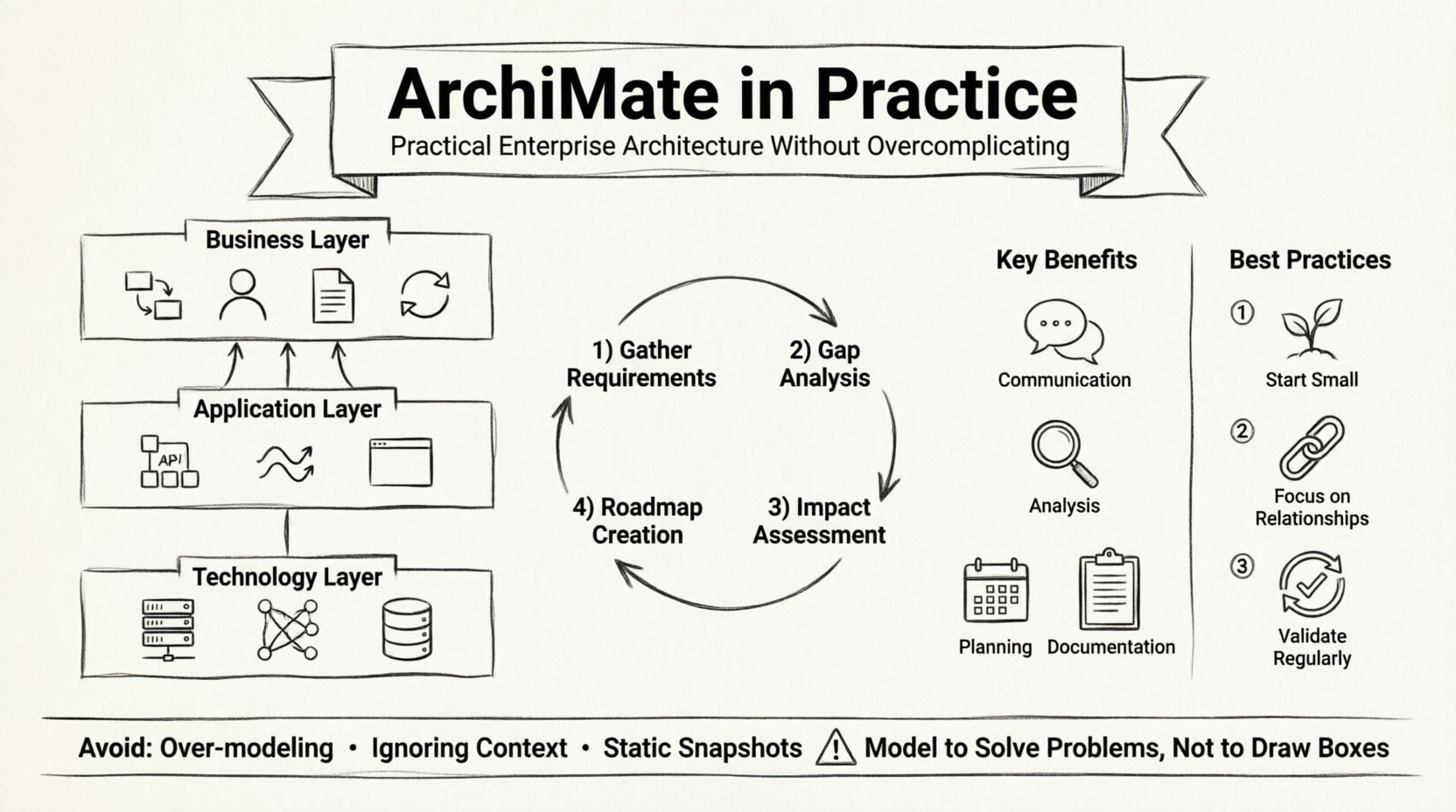
🌍 What ArchiMate Actually Does in Practice
At its core, ArchiMate is a modeling language. It provides a common vocabulary for describing enterprise architecture. Instead of using vague terms that different departments interpret differently, architects use specific elements to represent people, processes, applications, and technology.
When used correctly, this standard serves as a translation tool. It allows a business manager to discuss a process change with a software engineer using the same reference points. This alignment reduces errors and ensures that technical decisions support business goals.
Here is how this translates to daily activity:
- Communication: Providing a visual shorthand for complex dependencies.
- Analysis: Identifying where risks exist in the current setup.
- Planning: Mapping out how to move from the current state to a desired future state.
- Documentation: Creating a living record of the organization’s structure.
The key is to treat the framework as a tool for thinking, not just a tool for drawing. If a diagram does not help someone understand a problem or make a decision, it is likely too complex.
🧩 The Core Layers Explained Simply
ArchiMate organizes architecture into layers. This structure helps separate concerns so that changes in one area do not automatically confuse the entire model. Understanding these layers is essential for daily work.
🏢 The Business Layer
This layer represents the organization itself. It includes:
- Business Processes: The flow of work, such as handling a customer order.
- Business Roles: The people or groups performing the work, like a sales manager.
- Business Objects: The data or items being processed, like a product catalog.
- Business Services: The value provided to stakeholders, such as order fulfillment.
Architects use this layer to map out what the business does before worrying about how technology supports it. This ensures that the IT solution actually delivers the intended value.
💻 The Application Layer
This layer focuses on the software systems that support the business. It includes:
- Application Components: The software modules or services, like a billing engine.
- Application Services: The functions the software provides, such as calculating tax.
- Application Interface: The points where data enters or leaves the system.
When planning a migration, architects use this layer to identify which applications can be retired, which need to be replaced, and which must be integrated.
🔌 The Technology Layer
This layer describes the physical and logical infrastructure. It includes:
- Network: The communication infrastructure connecting systems.
- System Software: Operating systems and databases.
- Hardware: The physical servers and devices.
This is often the foundation. Changes here ripple up to the application and business layers. For example, moving to cloud infrastructure changes the network and system software requirements significantly.
🔄 How It Fits Into Daily Workflows
Architects do not spend all day drawing diagrams. They use the framework to structure their thinking during meetings, reviews, and planning sessions. Here is a typical flow of work.
1. Gathering Requirements
When a new initiative starts, the architect talks to stakeholders. They ask questions about processes, data, and systems. Using ArchiMate concepts, they capture these requirements in a structured way. Instead of a long text document, they might sketch a relationship between a business process and an application service.
2. Gap Analysis
Once the current state is modeled, the architect works with the team to define the target state. They compare the two to find gaps. Where are the missing links? Which processes lack support? This analysis highlights the work needed to achieve the goal.
3. Impact Assessment
Before making a change, the architect assesses the impact. If a database changes, which applications depend on it? If a business process is removed, which roles need to be reassigned? The relationships in the model make these dependencies visible.
4. Roadmap Creation
The final step is often a roadmap. This is a timeline of changes. It prioritizes projects based on value and dependency. The model provides the evidence needed to justify why Project A must happen before Project B.
📊 Real-World Scenarios & Applications
To understand the utility, consider specific scenarios where this framework provides clarity. The table below outlines common situations and how the modeling elements address them.
| Scenario | ArchiMate Element | Benefit |
|---|---|---|
| System Consolidation | Application Component | Identifies redundant systems that can be retired. |
| Compliance Check | Business Process | Maps audit requirements to specific workflows. |
| Cost Reduction | Technology Layer | Highlights hardware or software licenses that are underutilized. |
| Service Change | Business Service | Shows which customer groups are affected by a process change. |
| Security Risk | Network | Visualizes data flow to identify security vulnerabilities. |
These examples show that the framework is not just about drawing boxes. It is about capturing relationships and dependencies that drive decision-making.
🚧 Common Pitfalls to Avoid
Even experienced practitioners can fall into traps. Overcomplicating the model is the most common issue. When a diagram becomes too detailed, it loses its value as a communication tool.
🔴 Over-Modeling
Trying to model every single detail leads to a “museum piece.” The model becomes outdated immediately after creation. Focus on the elements that drive decisions. If a detail does not change the outcome of a discussion, leave it out.
🔴 Ignoring Context
Creating a diagram in isolation is useless. It must be tied to a specific business problem. If the model does not answer a question or solve a problem, it is just decoration.
🔴 Disconnected Stakeholders
If the business team does not understand the model, it fails. Use the language carefully. Avoid overly technical jargon when speaking to non-technical stakeholders. Explain the meaning of the shapes and lines in plain language.
🔴 Static Snapshots
Architecture is dynamic. A static diagram cannot capture the flow of time or versioning. Ensure the model evolves as the organization changes. Treat it as a living document that is updated regularly.
💡 Best Practices for Sustainable Modeling
To keep the work effective, follow these principles. They help maintain a balance between detail and usability.
- Start Small: Begin with a high-level view. Expand only when necessary. Do not start with the technology layer; start with the business needs.
- Focus on Relationships: The value lies in how elements connect. A box alone tells a story. The lines connecting them tell the truth.
- Use Layers Intentionally: Do not mix layers indiscriminately. Keep business logic separate from technical implementation to maintain clarity.
- Validate Regularly: Review the model with stakeholders. Ask if it still represents reality. Update it when the organization changes.
- Limit Scope: Define the scope of the project clearly. Do not try to model the entire enterprise at once. Focus on the area of interest.
- Automate Where Possible: Use tooling to manage the data, but do not let the tool dictate the structure. The logic comes from the architect, not the software.
🤝 Collaboration and Stakeholder Engagement
One of the greatest strengths of this framework is its ability to facilitate collaboration. It provides a neutral ground where different departments can meet.
Connecting Business and IT
Business stakeholders often struggle to understand technical constraints. IT stakeholders often struggle to understand business priorities. The layers act as a boundary. When a business process requires a change, the architect shows the impact on the application layer. This makes the cost of change visible.
Engaging Management
Executives need to see the big picture. High-level models show the strategic alignment. They can see how a specific IT project supports a business goal. This visibility helps secure funding and support for initiatives.
Involving Developers
Developers need to know what to build. The application layer provides the requirements. It defines the services and interfaces needed. This reduces ambiguity and rework during development.
🛠️ Modeling Without Overcomplicating
The challenge is to keep the model simple enough to be useful but detailed enough to be accurate. Here are strategies to achieve that balance.
- Abstraction Levels: Create different views for different audiences. A high-level view for executives and a detailed view for developers.
- Standardize Naming: Use consistent names for processes and services. This makes the model easier to search and understand.
- Limit Complexity: Avoid deep nesting of relationships. If a line crosses too many other lines, the diagram becomes unreadable. Use grouping to simplify.
- Document Decisions: Keep notes on why certain decisions were made. This context is often more valuable than the diagram itself.
- Review Frequency: Set a schedule for reviewing the model. If it is not reviewed, it will drift from reality.
🌱 Moving Forward with Confidence
Using a framework like ArchiMate does not require perfection. It requires consistency and a focus on value. By keeping the focus on solving problems rather than creating artifacts, architects can deliver real results.
The daily work involves listening to stakeholders, understanding their challenges, and using the modeling language to map out solutions. It is a cycle of analysis, design, and validation. When the model serves the conversation, it succeeds.
Remember that the framework is a means to an end. The end is a better-architected enterprise that can adapt to change. Whether dealing with mergers, regulatory changes, or technology upgrades, the ability to visualize the landscape is a critical skill. Keep the models lean, the relationships clear, and the focus on the business outcome.
With practice, the process becomes second nature. The diagrams become a natural part of the workflow, not an extra burden. This integration is what turns a theoretical standard into a practical asset for the organization.
This post is also available in Deutsch, Español, فارسی, Français, English, Bahasa Indonesia, 日本語, Polski, Portuguese, Ру́сский, Việt Nam, 简体中文 and 繁體中文.