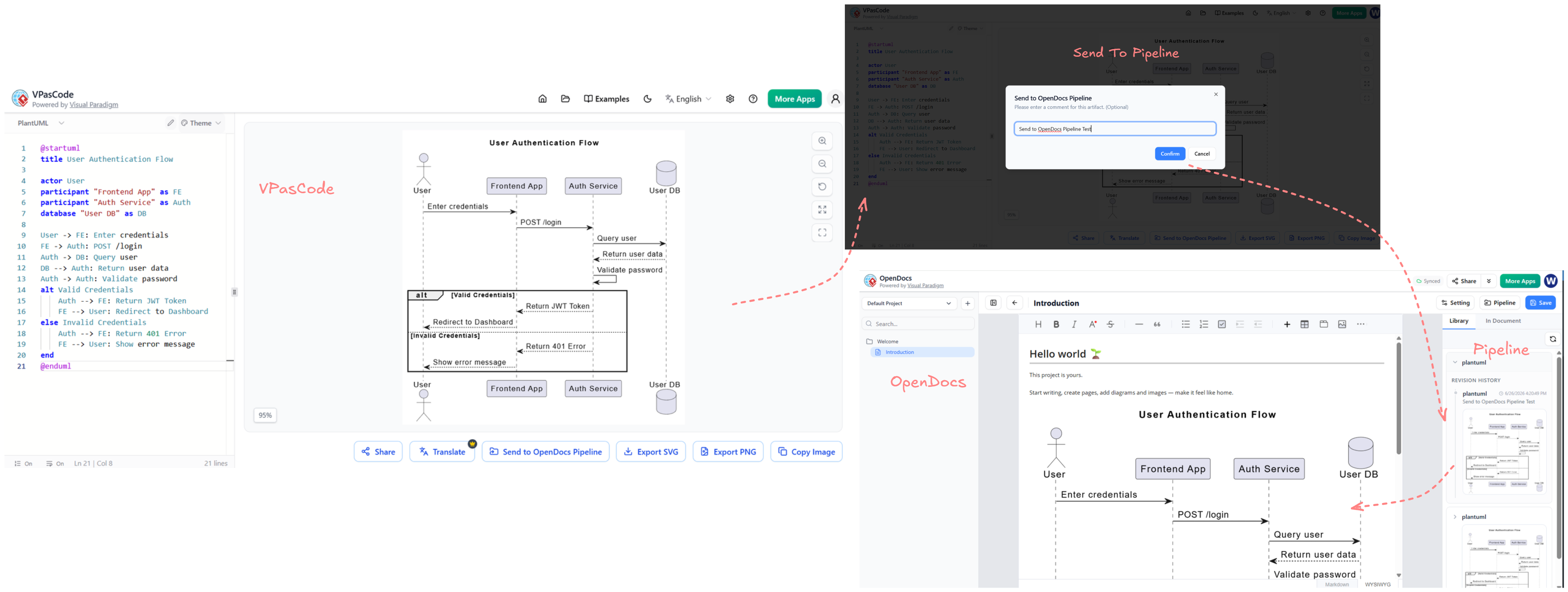
In modern software development, documentation often becomes a stale artifact the moment it is created. Static images exported as PNGs fail to reflect the reality of a live codebase. To bridge the gap between design, development, and documentation, Visual Paradigm has introduced a unified workflow involving VPasCode, the Pipeline, and OpenDocs. This tutorial explores how to architect a seamless, bi-directional system where your diagrams are not just pictures, but living, executable assets.
1. The Architecture: Diagram-as-Code
The foundation of this workflow is the concept of “Diagram-as-Code.” Instead of manually drawing boxes and arrows, developers use a text-based language (like PlantUML) to define system behavior. This approach offers several architectural advantages:
- Version Control: Text files can be stored in Git repositories, allowing for standard branching and merging strategies.
- Reusability: Code snippets can be imported across different diagrams.
- AI Integration: Large Language Models can easily parse and correct syntax errors in text formats.
In the VPasCode environment, you define the components of your system. For our example, we are modeling a User Authentication Flow. This involves defining actors (the User), services (Frontend, Auth), and databases.
@startuml
title User Authentication Flow
actor User
participant "Frontend App" as FE
participant "Auth Service" as Auth
database "User DB" as DB

User -> FE: Enter credentials
FE -> Auth: POST /login
Auth -> DB: Query user
DB --> Auth: Return user data
Auth --> FE: Return JWT Token
FE --> User: Redirect to Dashboard
@enduml
2. The Pipeline: Asset Management
Once your PlantUML code is written and rendered in VPasCode, the next step is to integrate it into your organization’s workflow. This is handled by the Pipeline.
The Pipeline acts as a central repository for your diagrams. When you “Send to OpenDocs Pipeline,” the system performs critical backend tasks:
- Storage: It stores the diagram as a reusable asset, not just a temporary file.
- Versioning: It generates a unique ID and logs the initial version, ensuring you can track changes over time.
- Access Control: It makes the diagram accessible to all authorized team members, removing the need for file-sharing via email or local drives.
This transforms your diagram into a “Live Asset.” It is no longer a static image file (PNG) that requires re-uploading every time it changes; it is a reference to a dynamic object.
3. Embedding in OpenDocs
OpenDocs serves as the documentation tier. It is where the engineering team writes specifications and guides. To keep documentation up-to-date, OpenDocs supports live embedding.
To use your asset, you open a new document (e.g., “Authentication Module Specification”) and use the editor command /diagram or the Insert Visual Asset button. You search for your “User Login Flow” from the Pipeline and select it.
The result is a live embed. The diagram appears in your documentation, but unlike a static image, it retains the link to the source code. If the code changes, the image updates.
4. Bi-Directional Synchronization
The most powerful feature of this architecture is the bi-directional sync. Let’s say your requirements change, and you need to add Multi-Factor Authentication (MFA) to the login process.
In the past, you would have to redraw the diagram, export a new PNG, and re-upload it to the documentation. With this workflow, you simply update the source code in VPasCode:
participant "MFA Service" as MFA
Auth -> MFA: Send OTP
MFA --> Auth: Verify OTP
Once you save and commit this change in VPasCode, the system propagates the update. The change flows through the Pipeline and instantly reflects in the OpenDocs document. Your documentation is now accurate without any manual intervention.
Conclusion
By leveraging VPasCode for authoring, the Pipeline for asset management, and OpenDocs for presentation, teams can maintain a single source of truth. This eliminates the “documentation rot” common in software engineering and ensures that your system architecture diagrams are always as current as the code they describe.