In the rapidly evolving landscape of digital transformation, organizations often find themselves stuck between legacy inefficiencies and the promise of streamlined automation. The bridge between these two states is not built on guesswork, but on precise visualization. Business Process Model and Notation (BPMN) has emerged as the global standard for mapping these workflows, offering a common language that bridges the gap between business stakeholders and technical implementers.
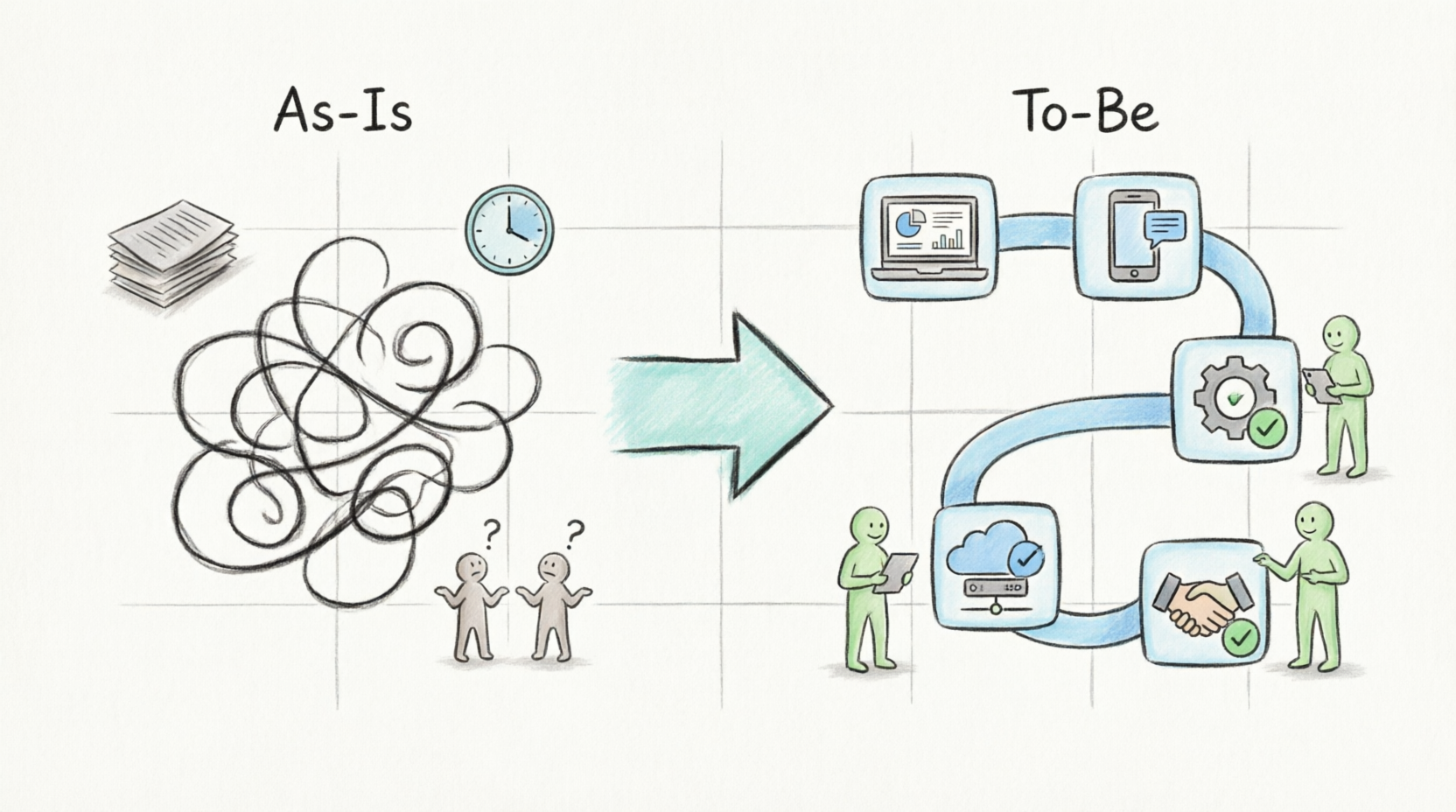
At the heart of any successful process improvement initiative lie two critical artifacts: the As-Is model and the To-Be model. While the As-Is model captures the reality of today’s operations—complete with its tacit knowledge and hidden bottlenecks—the To-Be model paints a picture of tomorrow’s optimized state. This guide explores how to leverage BPMN, specifically using Visual Paradigm, to create these models, highlighting their distinct benefits, usage cases, and the strategic relationship between them. By mastering these concepts, product managers, business analysts, and process owners can drive meaningful change, reduce operational costs, and ensure that technology investments deliver tangible value.
Part 1: The As-Is Process Model – Capturing Reality
The As-Is process model is a faithful representation of the current state of a business process. It does not depict how the process should work according to policy manuals, but rather how it actually works in practice.
Key Objectives
-
Capturing Tacit Knowledge: Much of an organization’s operational expertise exists only in the minds of employees. As-Is modeling transforms this informal, step-by-step expertise into explicit, documented knowledge.
-
Establishing Baselines: It serves as the foundational baseline for measuring key performance indicators (KPIs) such as cycle time, cost per activity, and error rates.
-
Identifying Problems: It reveals known problems, manual bottlenecks, redundant steps, and inefficiencies in legacy systems that erode competitive advantage.
Benefits of As-Is Modeling
-
Transparency: Makes invisible workflows visible to all stakeholders.
-
Objective Analysis: Removes assumptions by grounding discussions in data-driven reality.
-
Risk Identification: Highlights compliance gaps and single points of failure.
Usage Cases & Examples
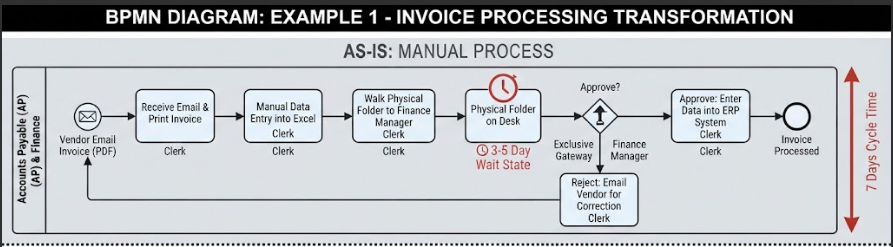
Example 1: Manual Invoice Processing
-
Context: A mid-sized manufacturing firm processes vendor invoices via email and paper.
-
As-Is Workflow:
-
Accounts Payable (AP) clerk receives PDF invoice via email.
-
Clerk prints the invoice.
-
Clerk manually enters data into Excel for tracking.
-
Physical folder is walked to the Finance Manager for approval.
-
If approved, clerk enters data into ERP system.
-
If rejected, clerk emails vendor for correction.
-
-
BPMN Insight: The model reveals a “wait state” where the folder sits on the manager’s desk for 3–5 days, creating a significant bottleneck.
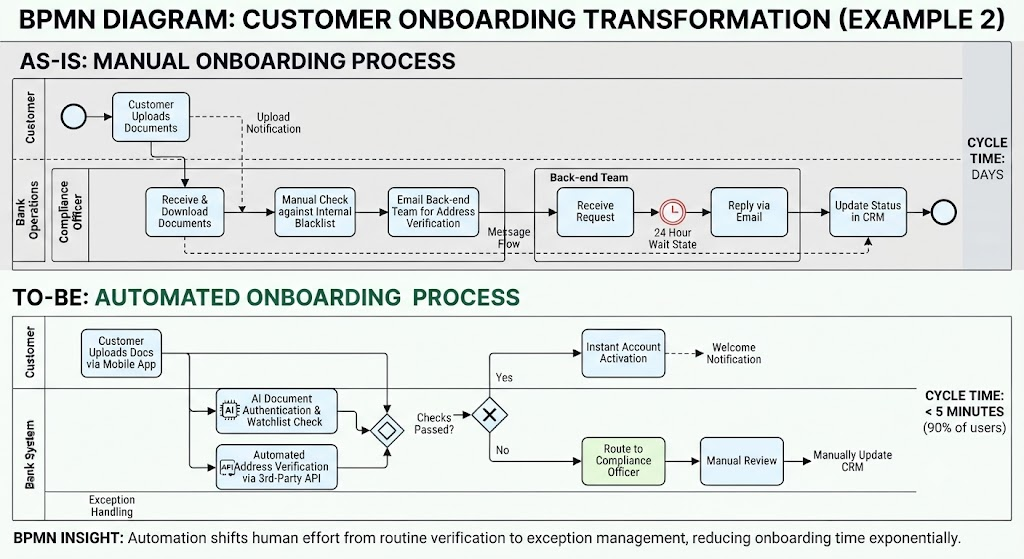
Example 2: Customer Onboarding in Banking
-
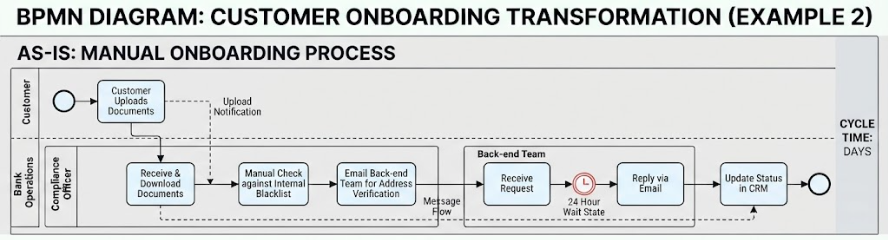
Context: A bank requires new customers to submit identity documents.
-
As-Is Workflow:
-
Customer uploads docs to portal.
-
System sends notification to Compliance Officer.
-
Officer downloads docs, checks against internal blacklist manually.
-
Officer emails back-end team to verify address.
-
Back-end team replies via email after 24 hours.
-
Officer updates status in CRM.
-
-
BPMN Insight: The model highlights multiple handoffs and manual verification steps that increase onboarding time from minutes to days.
Part 2: The To-Be Process Model – Envisioning the Future
The To-Be process model depicts the desired future state of a business process. It is an envisioned solution that incorporates improvements, automation, or reengineered flows.
Key Objectives
-
“What-If” Analysis: Allows practitioners to test new strategies, technology insertions, or structural changes before execution.
-
Defining Requirements: Helps identify specific system requirements by illustrating how automation will eliminate manual actions.
-
Testing Assumptions: Used in simulations to compare current operations against desired outcomes, ensuring that changes will deliver value.
Benefits of To-Be Modeling
-
Clarity of Vision: Provides a clear target for development and operational teams.
-
Requirement Precision: Reduces ambiguity in software development by specifying exact workflow logic.
-
Stakeholder Alignment: Ensures business leaders and IT agree on the expected outcome before resources are committed.
Usage Cases & Examples
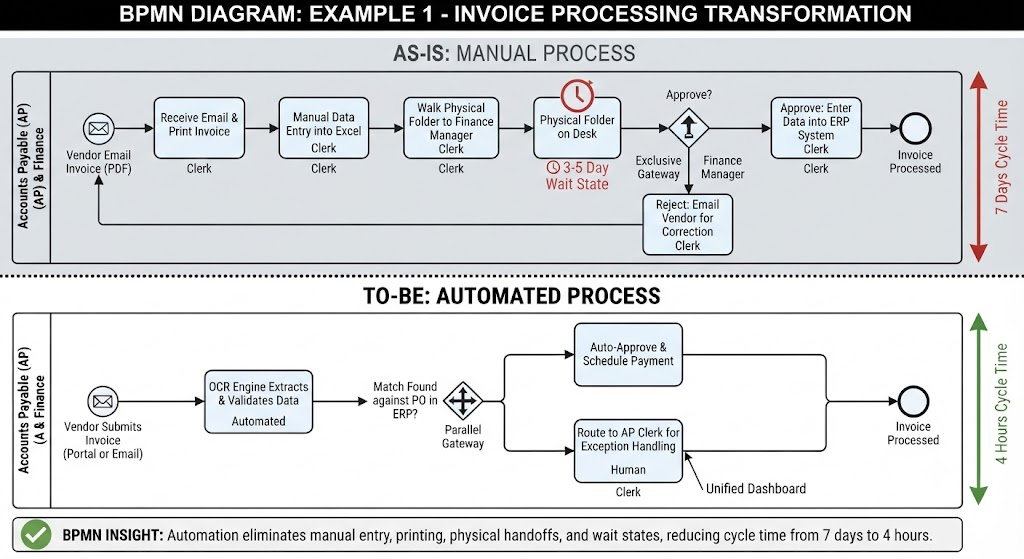
Example 1: Automated Invoice Processing (Improving on Example 1)
-
Context: Implementing an OCR-based Invoice Automation System.
-
To-Be Workflow:
-
Vendor submits invoice via portal or email.
-
OCR engine extracts data and validates against PO in ERP.
-
If match found, system auto-approves and schedules payment.
-
If mismatch, system routes to AP clerk for exception handling.
-
Clerk reviews discrepancy in unified dashboard and approves/rejects.
-
-
BPMN Insight: The model eliminates printing, manual Excel entry, and physical approvals. Cycle time drops from 7 days to 4 hours.
###
Example 2: Digital Customer Onboarding (Improving on Example 2)
-
Context: Integrating AI-driven KYC (Know Your Customer) tools.
-
To-Be Workflow:
-
Customer uploads docs via mobile app.
-
AI verifies document authenticity and checks global watchlists in real-time.
-
System performs automated address verification via third-party API.
-
If all checks pass, account is instantly activated.
-
Only failed cases are routed to human Compliance Officer.
-
-
BPMN Insight: The model shifts human effort from routine verification to exception management, reducing onboarding time to under 5 minutes for 90% of users.
Part 3: The Strategic Relationship – From Baseline to Transformation
The As-Is and To-Be models are not independent artifacts; they are deeply interconnected. The As-Is model provides the necessary steppingstone and baseline data required to develop a successful To-Be version.
The Improvement Cycle
-
Map As-Is: Document the current reality to understand the starting point.
-
Analyze Gaps: Identify pain points, delays, and costs using the As-Is baseline.
-
Design To-Be: Create the future state model that addresses these gaps through automation, outsourcing, or process reengineering.
-
Simulate & Compare: Use BPMN simulation tools to compare metrics (time, cost, resource utilization) between As-Is and To-Be.
-
Implement & Monitor: Execute the To-Be process and monitor actual performance against the modeled expectations.
Why Both Are Essential
-
Without As-Is: You risk solving the wrong problem or overlooking critical dependencies that exist in the current environment.
-
Without To-Be: You lack a clear roadmap for change, leading to scope creep and misaligned expectations during implementation.
Leveraging Visual Paradigm for BPMN Excellence
To effectively bridge the gap between As-Is and To-Be, having the right tooling is crucial. Visual Paradigm offers a comprehensive suite designed for both business analysts and technical architects.
Easy-to-Use BPMN Tools
A BPMN designer for all people, and all projects.
Looking for a BPMN tool?
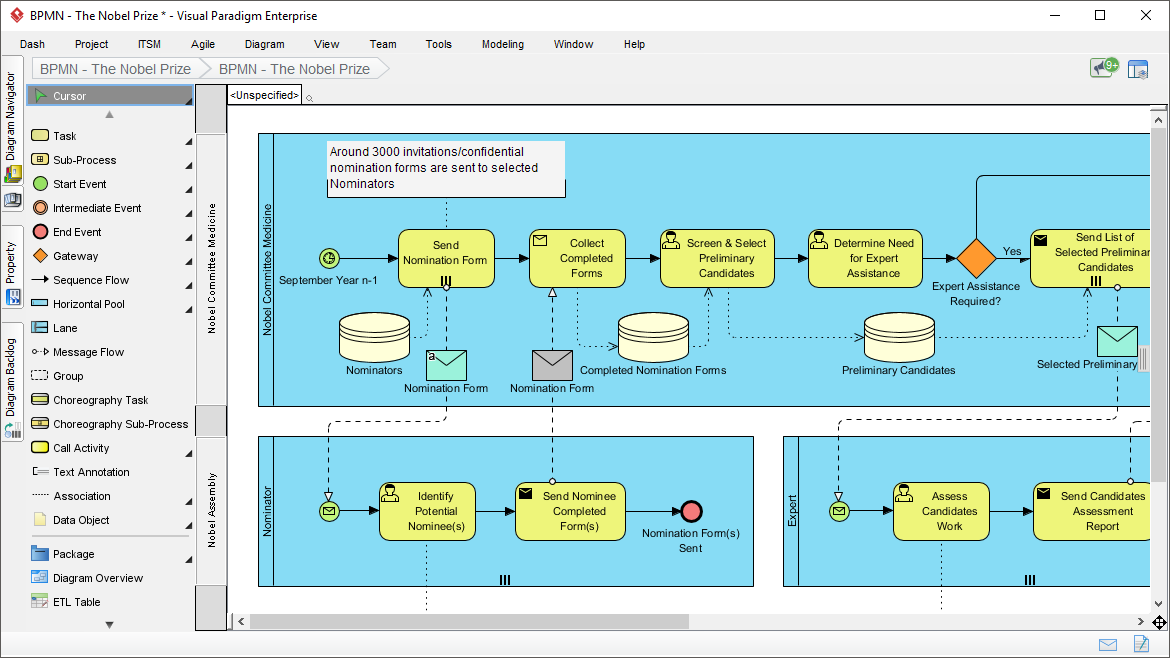
Better processes produce lower costs, higher revenues, motivated employees, and happier customers. Visual Paradigm provides complete Business Process Model and Notation (BPMN) support, with sophisticated BPMN tools, and supporting features for report generation, glossary management, team collaboration and communication. It seamlessly integrated with other complementary open standards such as UML, Mindmap, Decision table, CMMN, Zachman framework and many more! Furthermore, you can put the diagram into actions by using the unique diagram animation and simulation capability.
Powerful BPMN tools for Business Process Improvements
Powerful, seamless BPMN solution
-
Fully support latest BPMN 2 notations
-
Process drill down by sub-process
-
Map process with Any Standards such as use cases, user stories, wireframes and etc.
-
Link important keywords to centralized glossary repository.
Perform useful modeling and analysis
-
Document working procedure for workflow elements
-
Perform As-is-and To-be process analysis
-
Generate RACI and CRUD chart from BPD automatically
-
Perform business process improvements with other related open standards such as mind map, customer journey mapping
Advanced, practical BPMN tools
-
Put business process in action by using process animation tool
-
Analyze business process using process simulator
-
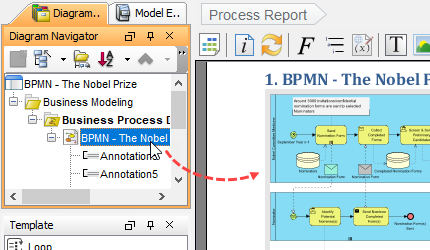
Automatic report generation or advanced custom report generation using Report Designer (Doc. Composer)
Key features and benefits
-
International IT Award winners trusted by over million of users, government units, blue-chips and business and IT consultants.
-
Cross-platform support: Windows, Linux, Mac OS and etc.
-
One-Stop-Shop BPMN tool for enterprise architecture, business process improvement and full software lifecycle development platform.
-
Hassle-free report generation and corporate report designer.
-
Rich online resources available in VP Community Circle, active user forum and know-how blog.
-
Granted free access to online drawing tools for users under valid maintenance plan.
Used by the World’s Best-Known Enterprises
We are trusted by millions of users in companies ranging from small business to Fortune 500 companies, universities and government units.

Key Concepts: Visual Paradigm BPMN + AI Assisted
Modern process modeling goes beyond static diagrams. Visual Paradigm integrates AI-assisted features that accelerate the modeling process:
-
AI-Powered Diagram Generation: Describe a process in natural language, and let AI generate the initial BPMN structure, saving hours of manual dragging and dropping.
-
Smart Gap Analysis: Automatically compare As-Is and To-Be models to highlight removed steps, new automation points, and changed responsibilities.
-
Simulation & Animation: Before implementing changes, run simulations to predict bottlenecks. Visual Paradigm’s animation feature allows stakeholders to “watch” the process flow, making it easier to spot logical errors.
-
Integrated Documentation: Automatically generate detailed process documentation, including RACI charts and role definitions, directly from your BPMN diagrams.
Best Practices for BPMN Modeling
-
Involve Stakeholders Early: Engage the people who actually perform the tasks when creating As-Is models to capture tacit knowledge accurately.
-
Keep It Simple: Use basic BPMN elements (Tasks, Gateways, Events) for high-level views. Reserve complex sub-processes for detailed technical documentation.
-
Validate with Data: Where possible, supplement qualitative interviews with quantitative data (e.g., system logs) to validate As-Is cycle times.
-
Iterate on To-Be: Treat the To-Be model as a living document. Refine it based on feedback from technical teams and feasibility studies.
-
Use Standard Tools: Leverage BPMN-compliant tools like Visual Paradigm to ensure diagrams are interpretable by both business and IT audiences.
Conclusion
The journey from operational inefficiency to digital excellence is paved with clear visualization. By rigorously documenting the As-Is state, organizations gain the humility to understand their current limitations and the data to justify change. By thoughtfully designing the To-Be state, they gain the clarity to execute transformation with precision.
BPMN serves as the universal language that makes this dialogue possible. Whether you are a Product Manager looking to streamline user journeys, a Business Analyst defining system requirements, or an Operations Leader seeking cost reductions, mastering the interplay between As-Is and To-Be modeling is essential. With powerful tools like Visual Paradigm and its AI-assisted capabilities, you move beyond mere documentation to become a catalyst for positive, measurable change in your organization.
Core Tutorials for As-Is / To-Be Modeling
-
How to Develop As-Is and To-Be Business Process?: Official step-by-step guide on capturing current state and generating future-state diagrams from an As-Is model.
-
BPR Process Steps: A Step-by-Step Guide to Re-Engineering: Full BPR journey covering As-Is mapping, To-Be design, gap analysis, and implementation planning.
-
To-Be Process Design: Building Future-State Workflows: Deep dive into radical To-Be design, value analysis, and innovation techniques for future-state workflows.
-
Modeling BPMN Diagrams with Visual Paradigm Desktop: Practical setup and modeling workflow for BPMN diagrams in Visual Paradigm Desktop.
Feature Deep-Dives (Animation & Simulation)
-
How to Animate a BPMN Business Process?: Tutorial on using Visual Paradigm’s animation tool to present dynamic process flows to stakeholders.
-
How to Create BPMN Business Process Diagrams in Visual Paradigm: Covers swimlanes, flow mapping, and process simulation for bottleneck identification.
-
Creating Your First BPMN Diagram in Visual Paradigm: Beginner-friendly guide to tasks, gateways, and sequence flows with validation tips.
Tool Overview & Business Context
-
Visual Paradigm: The Ultimate All-in-One Software: Overview of BPMN capabilities including As-Is/To-Be traceability, RACI charts, and process simulation.
-
Business Process Modeling Tool Solution Page: Feature summary covering auto As-Is/To-Be gap analysis, process drill-down, and RACI/CRUD chart generation.