


Written by the Software Development Team | Key Concepts, Guidelines, and Pro Tips for AI-Powered Database Design
Introduction: Why AI-Assisted Database Design Matters Now
In modern software development, database design remains one of the most critical—and most error-prone—phases of the lifecycle. A poorly structured schema can lead to performance bottlenecks, data inconsistencies, and costly refactoring down the line. Yet, traditional database modeling tools often demand deep expertise, manual diagramming, and iterative guesswork.
Enter DBModeler AI by Visual Paradigm: an intelligent, guided workflow that transforms natural language requirements into production-ready, normalized SQL schemas. This guide, written from the perspective of a seasoned software development team, walks you through the tool’s capabilities, best practices, and pro tips to help you build robust databases faster, with greater confidence and less manual overhead.
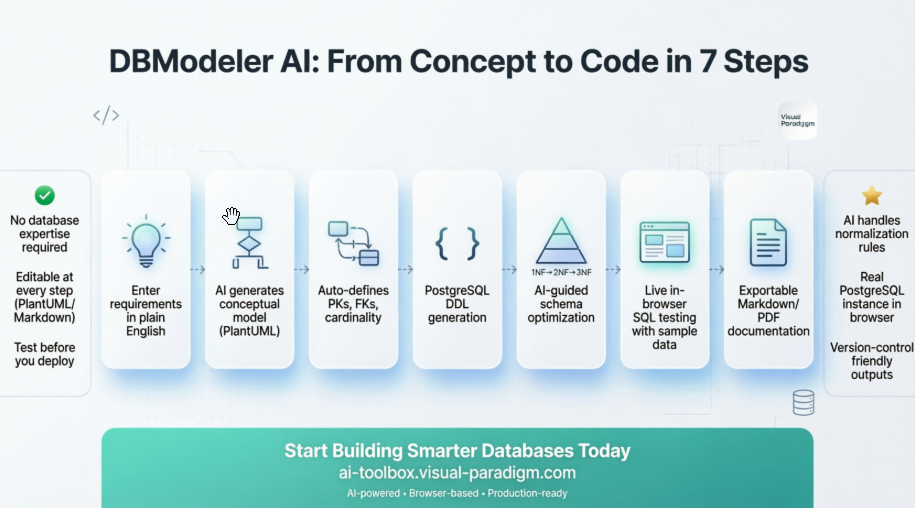
Whether you’re a product manager sketching a new feature, a backend engineer optimizing data architecture, or a full-stack developer prototyping an MVP, DBModeler AI bridges the gap between business logic and technical implementation—without sacrificing control or precision.
Key Concepts for Development Teams
🎯 AI as a Collaborative Designer, Not a Replacement
DBModeler AI doesn’t replace your expertise—it augments it. The AI handles repetitive tasks (normalization, key inference, constraint generation) while you retain full editorial control over diagrams, SQL, and documentation via editable PlantUML and Markdown.
🔁 Iterative Refinement by Design
The 7-step workflow is intentionally cyclical. You can revisit any step, adjust the model, and regenerate downstream artifacts. This supports agile development and evolving requirements.
🧪 Test Before You Deploy
The integrated Playground eliminates the “it works on my machine” problem. Validate schema behavior with real queries and AI-generated sample data before writing a single line of application code.
📐 Normalization as a First-Class Feature
Instead of treating normalization as an afterthought, DBModeler AI makes it an interactive, educational step—showing you why and how your schema evolves from 1NF → 2NF → 3NF.
🌐 Browser-Native, No Installation Overhead
Everything runs in-browser. No local PostgreSQL instance, no Docker setup, no dependency hell. Ideal for rapid prototyping, remote collaboration, and onboarding new team members.
The 7-Step AI Workflow: A Developer’s Deep Dive
Step 1: Problem Input (Conceptual Input)
Goal: Establish clear project scope and business rules.
-
Action: Enter a Project Name and detailed Problem Description (e.g., “A system for managing university courses, students, and enrollments”). Use the AI’s description generator to draft from a short prompt.
-
Dev Tip: Be specific about entities, relationships, and constraints upfront. Example: “Students can enroll in multiple courses; each course has one instructor; enrollments track grades and timestamps.”
-
Output: Structured context for AI to generate accurate domain models.
Step 2: Domain Model (Conceptual Modeling)
Goal: Visualize high-level business entities and relationships.
-
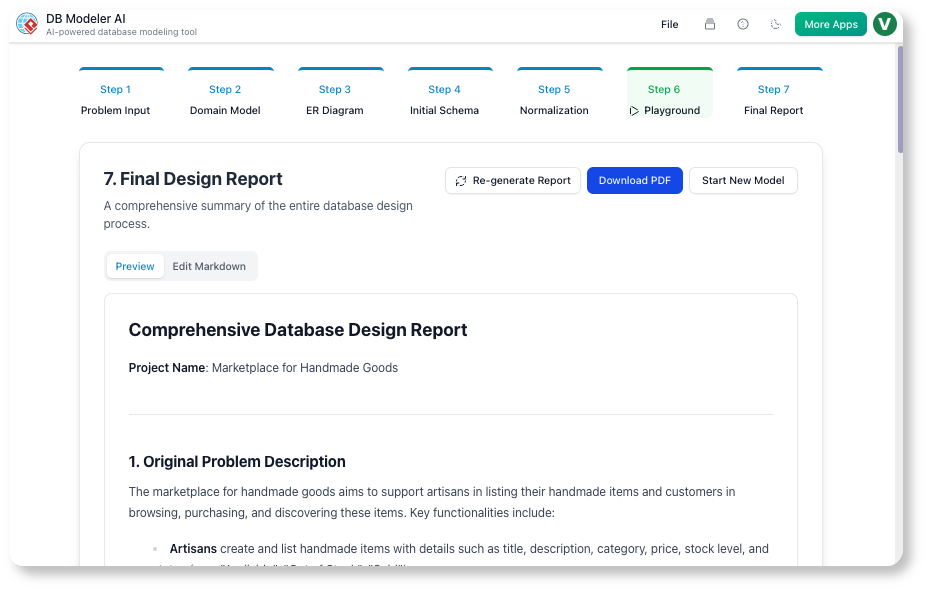
Action: AI generates a Domain Model Diagram using PlantUML syntax, rendered visually.
-
Refinement: Edit the PlantUML code directly to rename classes, add attributes, or adjust associations.
-
Dev Tip: Use consistent naming conventions (e.g.,
PascalCasefor entities) early to avoid refactoring later.
Step 3: ER Diagram (Logical Modeling)
Goal: Translate conceptual models into database-ready structures.
-
Action: AI converts the Domain Model into an Entity-Relationship Diagram (ERD), auto-defining Primary Keys (PKs), Foreign Keys (FKs), and cardinality (1:1, 1:N, N:M).
-
Refinement: Edit the ERD’s PlantUML to enforce composite keys, add indexes, or adjust relationship types.
-
Dev Tip: Review cardinality carefully—misdefined relationships are a common source of query complexity and data anomalies.
Step 4: Initial Schema (Physical Code Generation)
Goal: Generate executable, deployable SQL.
-
Action: Tool outputs complete PostgreSQL DDL (
CREATE TABLEstatements, columns, constraints) derived from the ERD. -
Output: Ready-to-run schema script for local testing or CI/CD pipelines.
-
Dev Tip: Use the generated DDL as a baseline for migration scripts (e.g., with Flyway or Liquibase).
Step 5: Normalization (Schema Optimization)
Goal: Eliminate redundancy and enforce data integrity.
-
Action: AI iteratively applies normalization rules, progressing schema through 1NF → 2NF → 3NF with explanatory notes.
-
Inspection: View schema changes at each stage; understand why tables are split or keys added.
-
Bonus: AI generates sample
INSERTstatements and DML scripts for testing. -
Dev Tip: Don’t blindly accept 3NF—sometimes denormalization is warranted for performance. Use this step to learn the tradeoffs.
Step 6: Playground (Validation & Testing)
Goal: Test schema behavior in a live, isolated environment.
-
Action: Launch an in-browser PostgreSQL instance based on your chosen schema version (Initial, 1NF, 2NF, or 3NF).
-
Testing:
-
Use AI to generate sample records (
"Add 10 students with enrollments") -
Manually insert/filter data
-
Run custom SQL queries to validate joins, constraints, and performance
-
-
Dev Tip: Test edge cases early: What happens when a student drops all courses? Can an instructor teach the same course twice?
Step 7: Final Report (Documentation)
Goal: Produce maintainable, team-ready documentation.
-
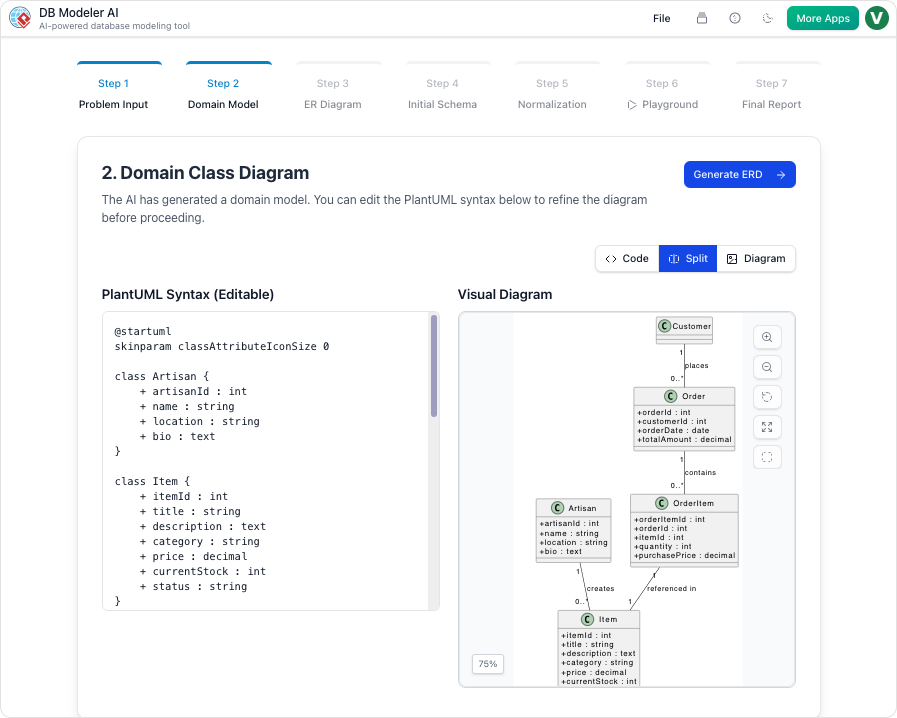
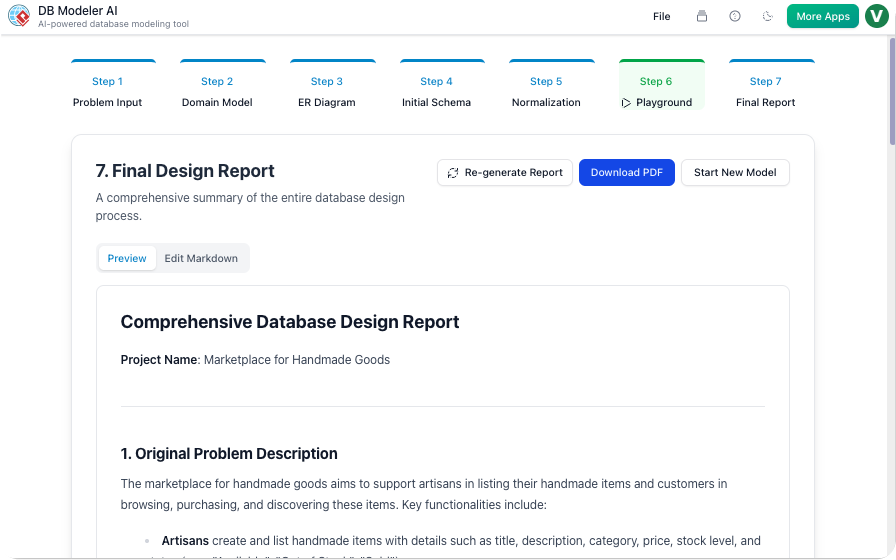
Action: Tool compiles a Final Design Report in Markdown, including:
-
Problem statement
-
Domain & ER diagrams
-
Final 3NF schema
-
Sample DML scripts
-
-
Refinement: Edit the Markdown directly to add architecture notes, API contracts, or deployment instructions.
-
Output: Export as PDF or JSON for wikis, Confluence, or handoff to DevOps.
Guidelines & Best Practices for Production Use
✅ Start with Clear, Atomic Requirements
-
Break complex domains into focused sub-problems (e.g., design “User Management” before “Order Fulfillment”).
-
Use bullet points in your problem description for clarity.
✅ Leverage Editable Artifacts at Every Stage
-
PlantUML and Markdown are version-control friendly. Commit diagram edits to Git alongside code.
-
Use diffs to track schema evolution over sprints.
✅ Validate with Realistic Data Volumes
-
In Playground, generate 100s of records (not just 10) to test query performance and index effectiveness.
-
Simulate concurrent operations if your app requires it.
✅ Document Assumptions Explicitly
-
In the Final Report, add sections like “Design Decisions” or “Known Limitations” to contextualize the schema for future maintainers.
✅ Integrate with Your CI/CD Pipeline
-
Export the final DDL and use it as a migration baseline.
-
Automate schema validation checks (e.g., with
pglintor custom scripts).
Tips & Tricks for Power Users
🔹 Prompt Engineering for Better AI Output
Instead of “Build a blog system”, try:
*”Design a PostgreSQL schema for a multi-tenant blog platform where:
-
Each tenant has isolated posts and comments
-
Posts support tags and scheduled publishing
-
Comments can be nested up to 3 levels
-
All tables include
created_at/updated_attimestamps”*
🔹 Use PlantUML Comments for Team Annotations
' @team: This relationship may need a junction table if we add soft deletes
User "1" -- "0..*" Post : writes
🔹 Export Early, Export Often
Download DDL and Markdown at each major iteration. This creates a paper trail for audits and simplifies rollback if needed.
🔹 Combine with Visual Paradigm Desktop for Advanced Workflows
While the web tool handles design and testing, use Visual Paradigm Desktop to:
-
Reverse-engineer existing databases
-
Generate ERDs from live PostgreSQL instances
-
Export to multiple SQL dialects (MySQL, SQL Server, etc.)
🔹 Teach Junior Developers with the Normalization Steps
Use the interactive 1NF→3NF walkthrough as a training tool. Have team members predict the next normalization step before revealing the AI’s suggestion.
Access, Licensing & Integration Notes
| Aspect | Details |
|---|---|
| Platform | Web-based via Visual Paradigm AI Toolbox |
| Licensing | Requires Visual Paradigm Online Combo (or higher) or Desktop Professional (or higher) with active maintenance |
| SQL Dialect | Primary output: PostgreSQL; other dialects may require Desktop edition |
| Export Formats | SQL DDL, Markdown Report, PDF, JSON, PlantUML source |
| Team Collaboration | Share editable Markdown/PlantUML files via Git; use Final Report for handoff documentation |
| Offline Use | Web version requires internet; Desktop edition supports offline modeling |
💡 Pro Note: For enterprise teams, consider pairing DBModeler AI with Visual Paradigm’s Teamwork Server for centralized model versioning and access control.
Conclusion: Empowering Teams to Build Better Data Foundations
DBModeler AI represents a paradigm shift in how development teams approach database design. By combining AI-powered automation with human-centric control, it reduces time-to-schema, minimizes design errors, and democratizes data modeling across roles.
For software teams, the value isn’t just in faster prototyping—it’s in building maintainable, well-documented, and testable data architectures from day one. The guided 7-step workflow ensures that critical practices like normalization and validation aren’t skipped under deadline pressure.
As AI tools continue to evolve, the most successful teams will be those that use them not as black boxes, but as collaborative partners—augmenting expertise, accelerating iteration, and elevating code quality. DBModeler AI is a powerful step in that direction.
Ready to transform your next database project?
Get Started with DBModeler AI
References
- DB Modeler AI | AI-Powered Database Design Tool by Visual Paradigm: Official feature page detailing capabilities, use cases, and integration options for DBModeler AI.
- Mastering DBModeler AI by Visual Paradigm: In-depth tutorial and workflow walkthrough by a community expert, covering practical implementation strategies.
- DBModeler AI Tool Page: Interactive tool landing page with FAQs, feature highlights, and direct access to the AI generator.
- DBModeler AI Release Notes: Official update logs, new feature announcements, and version history from Visual Paradigm.
- DBModeler AI Database Generator Overview: Concise summary of the tool’s value proposition and 7-step workflow.
- Hospital Management System with DBModeler AI: Real-world case study demonstrating end-to-end database design for a healthcare domain.
- Visual Paradigm AI Toolbox – DBModeler AI App: Direct entry point to launch the web-based DBModeler AI application.
- DBModeler AI Video Walkthrough: Official video tutorial showcasing the interface, workflow, and key features in action.
- Free AI Use Case Diagram Analyzer Release: Context on Visual Paradigm’s broader AI toolbox ecosystem and access instructions for Online users.
- Desktop Integration Tutorial: Video guide on connecting DBModeler AI outputs with Visual Paradigm Desktop for advanced export and reverse-engineering workflows.
This post is also available in Deutsch, Español, فارسی, Français, English, Bahasa Indonesia, 日本語, Polski, Portuguese, Ру́сский, Việt Nam, 简体中文 and 繁體中文.