


Enterprise architecture is a discipline that helps organizations understand their structure and plan for the future. To manage this complexity, the Open Group developed ArchiMate. It is a modeling language specifically designed to describe, analyze, and visualize business architecture, business processes, and information systems. This guide provides a clear understanding of the core components, relationships, and principles that make ArchiMate a robust tool for enterprise architects. 📘
🌐 What is ArchiMate?
ArchiMate is not a methodology or a process. It is a language. Think of it like the grammar used to write architectural blueprints. Just as grammar provides rules for constructing sentences, ArchiMate provides rules for constructing models that describe an enterprise.
The language supports the description, analysis, and visualization of the architecture of an enterprise in a vendor-neutral manner. It is designed to work alongside the TOGAF framework, often serving as the modeling language for the Architecture Development Method (ADM). However, it can stand alone as a standard for describing enterprise structures.
Key Characteristics:
- Vendor-Neutral: It does not belong to any specific software vendor or tool provider.
- Open Standard: It is maintained by The Open Group.
- Layered Approach: It separates concerns into distinct layers to reduce complexity.
- Integrated: It connects strategy to implementation, ensuring alignment across the organization.
🏗️ The Core Layers of ArchiMate
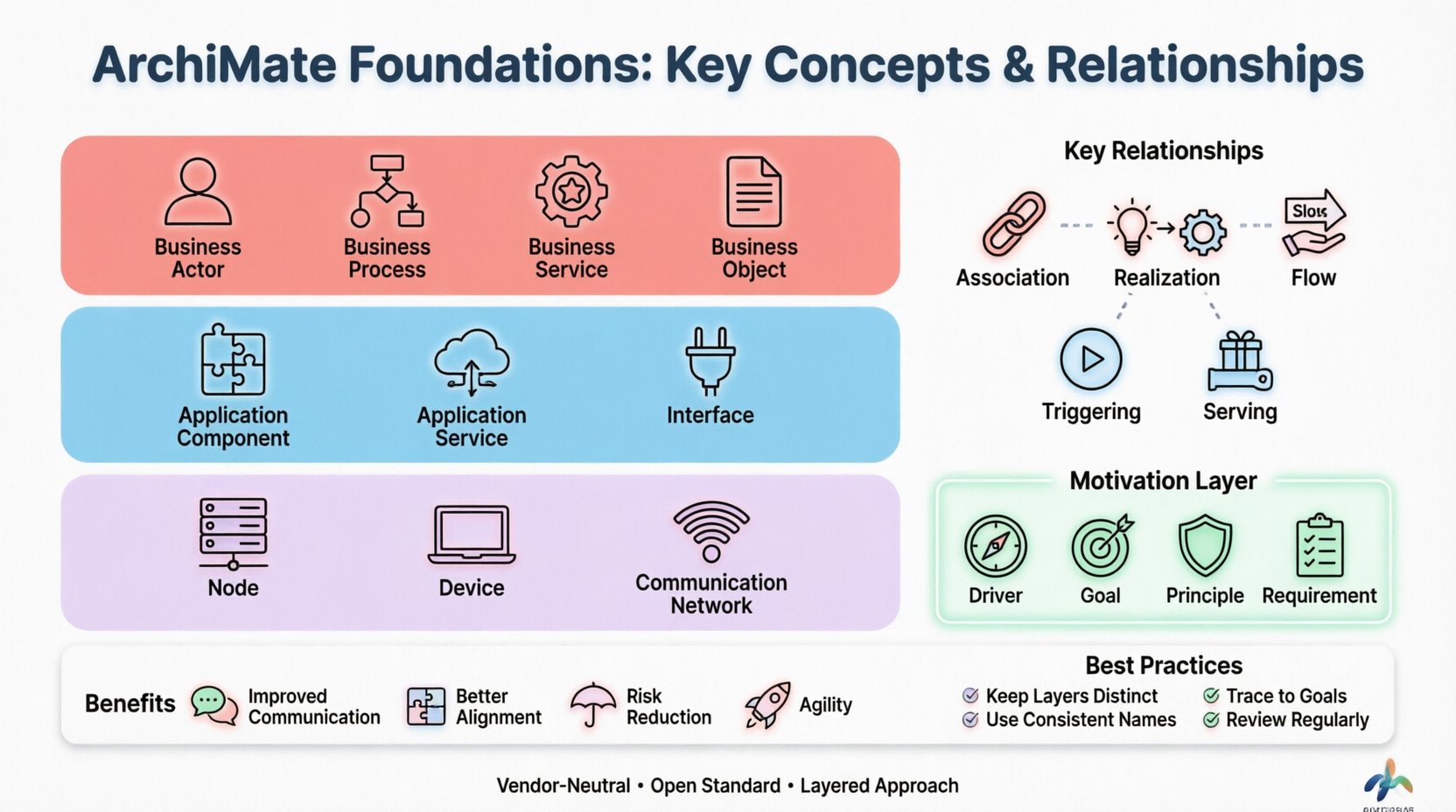
One of the most defining features of ArchiMate is its layered structure. This structure allows architects to model different aspects of the enterprise without getting overwhelmed by the entire system at once. The three primary layers are Business, Application, and Technology. There are also additional layers like Motivation and Implementation & Migration.
1. 🏢 Business Layer
The Business Layer describes the business strategy, governance, organization, and key business processes. It focuses on what the organization does, rather than how it is supported by technology.
Key Elements:
- Business Actor: A unit of the business that can play a role in a business process (e.g., a Customer, a Department, or a Partner).
- Business Role: A collective of people or systems that perform a task (e.g., Sales Manager, Accountant).
- Business Process: A set of business activities and tasks (e.g., Order Processing, Hiring).
- Business Function: A unit of business capability or responsibility (e.g., Marketing, Finance).
- Business Object: A logical description of business-relevant information (e.g., Invoice, Contract, Product).
- Business Interaction: A description of the behavior of a business process (e.g., “Send Invoice”).
- Business Service: A functional capability offered by a business actor to another actor (e.g., “Provide Credit Check”).
2. 💻 Application Layer
The Application Layer describes the software applications and their functionality. It focuses on the software systems that support the business processes.
Key Elements:
- Application Component: A modular unit of application software that provides functionality (e.g., User Interface Module, Reporting Engine).
- Application Function: A functional unit of application software (e.g., “Calculate Tax”).
- Application Service: A functional capability offered by an application component to another component (e.g., “Validate User”).
- Interface: A point of interaction between two components or layers (e.g., API, Web Form).
3. ⚙️ Technology Layer
The Technology Layer describes the physical hardware and software that executes the application layer. It represents the infrastructure that supports the applications.
Key Elements:
- Node: A computational resource where components are deployed (e.g., a Server, a Cloud Instance).
- Device: A physical computational resource (e.g., a Laptop, a Mobile Phone, a Printer).
- System Software: Software that manages the hardware (e.g., Operating System, Database Management System).
- Communication Network: A network that allows communication between nodes (e.g., LAN, WAN, Internet).
- Infrastructure Service: A service provided by the technology layer (e.g., “Storage Service”, “Authentication Service”).
🔗 Understanding Relationships
Modeling elements in isolation does not tell a story. Relationships define how elements interact, depend on, or realize one another. ArchiMate defines several types of relationships, each with a specific semantic meaning. Understanding these is critical for building accurate models.
Below is a structured overview of the most common relationships used in ArchiMate modeling.
| Relationship | Description | Example Scenario |
|---|---|---|
| Association | A general relationship between two elements. | A Business Actor participates in a Business Process. |
| Aggregation | A whole-part relationship where the part can exist independently. | A Department contains multiple Teams. |
| Composition | A whole-part relationship where the part cannot exist without the whole. | A Project consists of specific Tasks (if project ends, tasks are done). |
| Realization | A relationship where an element provides the implementation of another. | A Business Process realizes a Business Service. |
| Flow | A relationship describing the flow of data or objects. | Business Objects flow from one Process to another. |
| Access | A relationship where one element accesses another. | An Application Component accesses a Database. |
| Communication | A relationship describing the exchange of information. | A Node communicates with another Node. |
| Triggering | A causal relationship where one event triggers another. | A Business Event triggers a Business Process. |
| Serving | A relationship where a service is served by a component. | An Application Component serves an Application Service. |
| Abstraction | A relationship where one element is an abstract view of another. | A Business Function is an abstraction of a Business Process. |
| Specialization | A relationship where one element is a specialized version of another. | A “Premium Service” is a specialization of a “Standard Service”. |
Using these relationships correctly ensures that the model reflects the actual logic of the enterprise. For instance, using Realization helps trace how a business goal is actually achieved by a process. Using Flow helps identify where data moves, which is crucial for security and compliance analysis.
🎯 The Motivation Layer
Why do we build this architecture? The Motivation Layer provides the context for the change. It describes the driving forces behind the architecture and the expected value.
Core Elements:
- Driver: A factor that drives the need for change (e.g., Regulatory Change, Market Pressure).
- Goal: A high-level objective that the enterprise wants to achieve (e.g., Reduce Costs, Improve Customer Satisfaction).
- Principle: A rule or guideline that helps achieve the goals (e.g., “Use Cloud First”, “Security by Design”).
- Assessment: An analysis of the current state to identify gaps (e.g., SWOT Analysis, Risk Assessment).
- Requirement: A condition or capability that must be met (e.g., “System must handle 10k transactions/sec”).
Linking motivation elements to the core layers ensures that every technical decision has a business justification. If a technology change does not link back to a Goal or Driver, it risks becoming a “gold-plated” solution that adds cost without value.
👁️ Views and Viewpoints
A complete model of an enterprise is too large for any single person to understand. Views and Viewpoints help manage this complexity by focusing on specific concerns.
Viewpoint: The perspective from which the architecture is described. It defines the concerns of a particular stakeholder group (e.g., CIO, CFO, Developer).
View: The actual representation of the architecture for a specific stakeholder. It is a selection of elements from the full model that are relevant to the viewpoint.
Example Viewpoints:
- Process View: Focuses on Business Processes and their interactions. Audience: Operations Managers.
- Application View: Focuses on Application Components and their interfaces. Audience: IT Developers.
- Technology View: Focuses on Nodes and Devices. Audience: Infrastructure Engineers.
- Strategy View: Focuses on Goals and Drivers. Audience: Executive Board.
By creating distinct views, architects can communicate effectively with different stakeholders without overwhelming them with irrelevant technical details.
🚀 Implementation and Migration
Architecture is not just about the current state; it is about moving from the current state to a future state. The Implementation and Migration Layer describes the transitions.
Key Concepts:
- Gap Analysis: A comparison between the As-Is state and the To-Be state to identify what needs to change.
- Work Package: A set of projects or activities that will implement the changes.
- Project: A temporary endeavor undertaken to create a unique product or service.
- Phase: A distinct period of time in the project lifecycle.
This layer helps in planning the roadmap. It ensures that the transition is managed logically, avoiding disruption to the business operations. It answers questions like: “What is the order of implementation?” and “Which projects deliver the most value first?”
📝 Best Practices for ArchiMate Modeling
To ensure models remain useful and maintainable, follow these guidelines:
- Maintain Abstraction Levels: Do not mix high-level strategy with low-level technical details in the same view. Keep layers distinct.
- Consistent Naming: Use clear, descriptive names for all elements. Avoid abbreviations unless they are standard across the organization.
- Traceability: Ensure that every element can be traced back to a business requirement or goal. This proves the value of the architecture.
- Keep it Simple: Avoid over-modeling. Include only elements that are necessary to answer the specific question or solve the specific problem.
- Use Standard Relationships: Stick to the defined relationships in the specification to ensure consistency across different models.
- Review Regularly: Architecture is not static. Review models periodically to ensure they reflect the current reality of the enterprise.
🧩 Integrating with Other Frameworks
While ArchiMate is a standalone language, it is frequently used in conjunction with other frameworks.
ArchiMate and TOGAF
The TOGAF framework provides a process for developing architecture. ArchiMate provides the language to describe the outputs of that process. In the TOGAF ADM, ArchiMate is often used to model the Business, Information System, and Technology Architectures.
ArchiMate and BPMN
Business Process Model and Notation (BPMN) is excellent for detailed process flows. ArchiMate can complement BPMN by linking processes to the organizational structure (Roles, Actors) and the systems that support them (Applications). This creates a holistic view of how work gets done.
📊 Benefits of Using ArchiMate
Organizations that adopt ArchiMate often see several tangible benefits:
- Improved Communication: Visual models make complex structures easier to understand for stakeholders.
- Better Alignment: Linking IT to business strategy ensures technology investments support business goals.
- Risk Reduction: Understanding dependencies helps identify single points of failure before they cause issues.
- Agility: When changes occur, the impact can be analyzed quickly due to the clear mapping of relationships.
- Documentation: It provides a standardized way to document the enterprise architecture that is easy to maintain.
🔍 Common Pitfalls to Avoid
Even with a powerful tool, mistakes happen. Here are common issues to watch out for:
- Over-Engineering: Creating models that are too detailed to be useful. Start high-level and drill down only where needed.
- Ignoring the Motivation Layer: Building technical models without linking them to business goals. This leads to IT projects that do not deliver value.
- Inconsistent Models: Using different naming conventions or relationship types across different teams. Enforce standards.
- Lack of Governance: Allowing models to become outdated. Assign ownership and review cycles.
🔮 The Future of Enterprise Architecture
The landscape of enterprise architecture is evolving. With the rise of cloud computing, microservices, and digital transformation, the need for clear architectural language is greater than ever. ArchiMate continues to evolve to support these changes, with new versions adding capabilities for agile development and digital innovation.
As organizations become more data-driven, the ability to visualize data flows and information architecture becomes critical. ArchiMate’s ability to link business objects to application components and technology nodes makes it well-suited for data governance initiatives.
Furthermore, the integration of architecture tools with DevOps pipelines is becoming more common. This allows architects to maintain a living model that reflects the state of the code and infrastructure in real-time.
📚 Summary
ArchiMate provides a structured approach to understanding and communicating enterprise architecture. By breaking down the enterprise into Business, Application, and Technology layers, it simplifies complexity. The relationships define how these elements interact, while the Motivation layer ensures alignment with business goals.
Effective modeling requires discipline. It demands consistency, clarity, and a focus on the specific needs of the stakeholders. When done correctly, ArchiMate becomes a powerful tool for strategic planning, risk management, and organizational alignment.
Whether you are a seasoned architect or new to the field, mastering the foundations of ArchiMate is a valuable investment. It equips you with a common language to bridge the gap between business strategy and technical execution, ensuring that the organization moves forward with clarity and purpose. 🚀
This post is also available in Deutsch, Español, فارسی, Français, English, Bahasa Indonesia, 日本語, Polski, Portuguese, Ру́сский, Việt Nam, 简体中文 and 繁體中文.