


Agile methodologies have revolutionized how software development teams operate, prioritizing flexibility, customer collaboration, and iterative progress. However, as teams scale and complexity increases, the need for clarity in workflows becomes critical. This is where Business Process Model and Notation (BPMN) enters the conversation. Often viewed as a heavy enterprise tool, BPMN can actually serve as a lightweight, visual language that enhances communication within Agile environments.
Integrating BPMN into sprint planning and retrospectives allows teams to visualize the “how” behind the “what.” By mapping out processes, teams can identify bottlenecks, clarify handoffs, and ensure that the Definition of Done aligns with actual operational realities. This guide explores how to bring structure to agility without sacrificing speed.
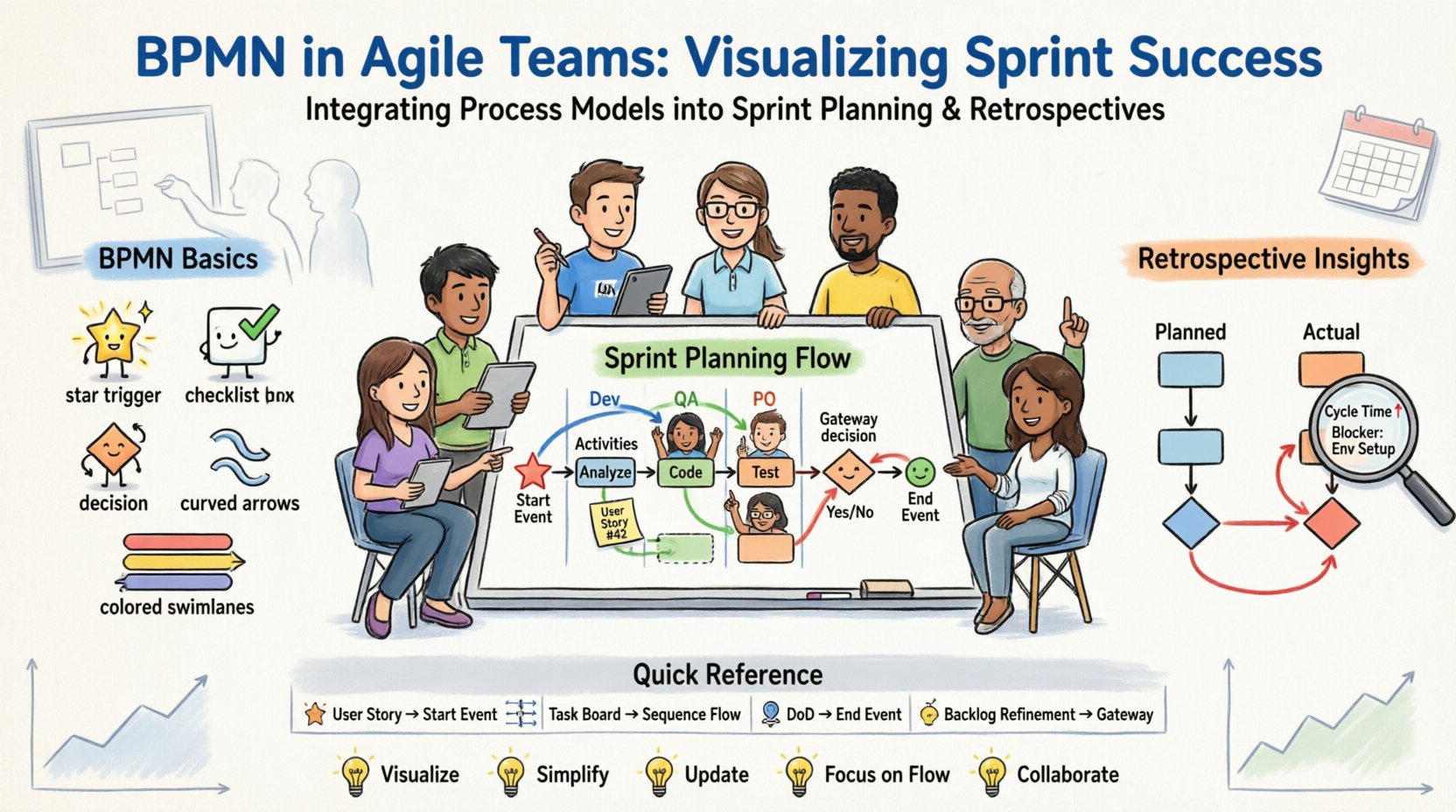
🧩 Understanding BPMN Basics for Agile Contexts
Before diving into integration, it is essential to understand what BPMN brings to the table. BPMN is a standard for business process modeling that uses a set of graphical symbols to represent the flow of activities. Unlike flowcharts that are often static, BPMN is dynamic and can represent events, gateways, and sequence flows that reflect real-world decision points.
For an Agile team, the value lies not in creating exhaustive documentation, but in creating shared understanding. Here are the core elements relevant to sprint work:
- Events: These are triggers that start or end a process. In Agile, a “User Story” often acts as a Start Event.
- Activities: These are the actual work tasks. A development task, code review, or testing phase fits here.
- Gateways: These represent decisions. A “Build Passes” or “Build Fails” scenario is a classic Gateway decision point.
- Sequence Flows: The arrows that dictate the order of execution. This helps in visualizing dependencies between tasks.
- Pools and Lanes: These represent different participants. A Lane can represent a Role (e.g., Developer, QA, Product Owner) or a System.
When applying this to Agile, the focus shifts from rigid compliance to visual communication. The diagram becomes a living artifact that evolves as the sprint evolves.
🚀 Integrating BPMN into Sprint Planning
Sprint planning is the cornerstone of Agile delivery. It is where the team commits to work for the upcoming iteration. Integrating BPMN at this stage ensures that the team understands the end-to-end flow of value delivery, not just the isolated tasks.
1. Visualizing the User Story Journey
During planning, instead of simply listing tickets on a board, map the user story onto a simple process diagram. This helps in identifying hidden dependencies.
- Identify the Trigger: What event starts this story? (e.g., “Customer submits form”)
- Map the Steps: Break down the story into activities. (e.g., “API Update”, “Frontend Change”, “Database Migration”)
- Assign Lanes: Clearly define who is responsible for each step. This reduces ambiguity about ownership.
- Define Exit Criteria: Use End Events to represent the Definition of Done. If the process does not reach the End Event, the story is not complete.
2. Identifying Process Bottlenecks Early
By drawing the process flow, teams often spot areas where work might get stuck. For example, if a process lane requires approval from a stakeholder who is not part of the Agile team, this creates a risk.
- Highlight External Handoffs: Mark any step that requires interaction with an external system or team. These are high-risk areas.
- Assess Cycle Time: Estimate how long each activity takes. If a single gateway decision takes three days, the sprint plan needs to account for that latency.
- Parallel Processing: Identify activities that can happen simultaneously to optimize the sprint capacity.
3. Refining Acceptance Criteria
BPMN diagrams can serve as a visual checklist for acceptance criteria. Every path in the diagram should lead to a successful End Event.
- Happy Path: The ideal flow where everything works as intended.
- Exception Paths: What happens if the gateway decision is “No”? This ensures the team plans for error handling, not just success scenarios.
- Validation Points: Use specific symbols to mark where testing or verification must occur before moving to the next lane.
🔄 Using BPMN in Retrospectives
Retrospectives are designed for continuous improvement. They are the perfect place to analyze the process itself. Using BPMN in retrospectives shifts the focus from “who made a mistake” to “where did the process fail.”
1. Mapping the Actual vs. The Planned
In a retrospective, create two diagrams side-by-side:
- The Planned Flow: The diagram created during sprint planning.
- The Actual Flow: A new diagram that represents how work actually moved through the sprint.
Compare the two to find variances. Did a task take a different route? Was there a loop that shouldn’t have existed? This visual comparison provides objective data for discussion.
2. Analyzing Cycle Time and Waiting
Process diagrams allow you to see where time was lost. Look for:
- Loops: Did the work go back to a previous activity? This indicates rework.
- Waiting Periods: Are there large gaps between activities? This often indicates a resource bottleneck or approval delay.
- Complexity: Are there too many gateways in a specific lane? This might indicate that the process is too convoluted and needs simplification.
3. Actionable Improvement Plans
Once the process is mapped, the team can propose changes directly on the model.
- Remove Unnecessary Gateways: If a decision point is always “Yes,” it is not a gateway; it is a step.
- Parallelize Activities: If two steps are sequential but could be done together, redraw the flow to allow concurrency.
- Clarify Roles: If a lane is too crowded, split it. If a lane is empty, the responsibility may need to be reassigned.
📋 Comparison: Agile Artifacts vs. BPMN Models
It is helpful to understand how BPMN complements standard Agile artifacts. The following table outlines the relationship.
| Agile Artifact | BPMN Equivalent | Purpose of Integration |
|---|---|---|
| User Story | Start Event / Task | Defines the trigger and scope of work. |
| Task Board | Sequence Flow | Visualizes the order of execution and movement. |
| Definition of Done | End Event | Establishes the condition for process completion. |
| Dependency Map | Gateway / Lane | Clarifies decision points and role responsibilities. |
| Retrospective Findings | Process Revision | Updates the model based on actual performance. |
🛠️ Implementation Steps for Teams
Adopting BPMN does not require a massive overhaul. It can be introduced incrementally. Follow these steps to integrate process modeling into your workflow.
Step 1: Select a Pilot Sprint
Choose one sprint or one specific type of work (e.g., a bug fix workflow) to apply BPMN. Do not attempt to model every single story immediately. Start small to validate the value.
Step 2: Use Whiteboards for Collaboration
Keep the modeling session collaborative. Use a physical whiteboard or a digital equivalent where the team draws the process together. This ensures everyone agrees on the flow before writing code.
Step 3: Keep Models Lightweight
Agile teams value working software over comprehensive documentation. Your BPMN diagram should be simple enough to draw on a napkin. Avoid excessive detail. Focus on the critical path and the major decision points.
Step 4: Link to Tickets
Reference the BPMN diagram in the ticket management tool. This keeps the process visible during execution. If the process changes mid-sprint, update the diagram immediately.
Step 5: Review in Retrospective
Make the diagram a standard agenda item in the retrospective. Ask: “Did the process match the model? If not, why?”
⚠️ Common Challenges and Solutions
Integrating process modeling into a fast-paced environment comes with hurdles. Here are common issues and how to address them.
- Challenge: Perceived Bureaucracy.
Solution: Emphasize that the diagram is a communication aid, not a compliance document. It is for the team, not for auditors. - Challenge: Time Consumption.
Solution: Limit the modeling session to 30 minutes. If it takes longer, the process is too complex or the scope is too broad. - Challenge: Outdated Models.
Solution: Treat the model as a living document. If the sprint plan changes, the model changes. It must be as current as the backlog. - Challenge: Lack of Skill.
Solution: Provide basic training on the symbols. Most Agile teams can learn the basics in a single workshop.
📈 Measuring the Impact of BPMN
How do you know if this integration is working? You need to track specific metrics that relate to process efficiency.
1. Cycle Time Reduction
Track the time from Start Event to End Event. As the team refines the process model, the cycle time should decrease. A smoother flow means less waiting.
2. Rework Rate
Monitor the number of loops in your process diagrams. A high number of loops indicates rework. Over time, the goal is to reduce the frequency of these loops.
3. Team Velocity Stability
When processes are clear, estimates become more accurate. Look for a stabilization in velocity across sprints. This indicates that the team has a predictable workflow.
4. Communication Efficiency
Reduce the number of clarification questions asked during planning. If the diagram is clear, fewer questions are needed to understand the scope.
🤝 Aligning Definition of Done with Process Models
The Definition of Done (DoD) is a critical concept in Agile. BPMN provides a visual way to enforce the DoD.
- Quality Gates: Use specific Gateway symbols to represent testing phases. The process cannot move forward until the gateway condition is met.
- Documentation Requirements: Include steps for documentation updates in the model. If the step is missing from the diagram, it is missing from the DoD.
- Deployment Readiness: The End Event should represent a successful deployment, not just code completion.
By embedding the DoD into the process flow, the team ensures that every story is truly finished before it is considered complete. This prevents technical debt from accumulating.
🔍 Advanced Considerations for Scaling
As the organization grows, the complexity of processes increases. BPMN becomes even more valuable in scaling scenarios.
1. Cross-Team Dependencies
When multiple teams work on a single feature, BPMN helps visualize the handoffs. Use different Pools for different teams to see where the baton is passed.
2. System Integrations
Modern applications often rely on multiple systems. BPMN can model the interaction between the application and external services. This helps in understanding API dependencies.
3. Compliance and Security
In regulated industries, process modeling is often a requirement. Using BPMN in Agile allows teams to meet compliance needs without creating separate, disconnected documentation streams.
🏁 Summary of Best Practices
To succeed with BPMN in Agile, keep these principles in mind:
- Visualize to Understand: Draw the process to find gaps in logic.
- Keep it Simple: Use only the necessary symbols.
- Update Frequently: The model must match reality.
- Focus on Flow: Prioritize the movement of work over the work itself.
- Collaborate: Build the model with the whole team, not just one person.
Integrating Business Process Model and Notation into Agile teams is not about adding paperwork. It is about adding clarity. By mapping the sprint planning and retrospectives, teams gain insight into their own workflows. This insight leads to better predictions, fewer bottlenecks, and a smoother delivery pipeline. The goal is not to control the process, but to understand it well enough to improve it continuously.
As you move forward, treat your process models as tools for learning. They will evolve as your team evolves. This dynamic relationship between Agile flexibility and Process structure creates a robust environment for high-quality delivery.
This post is also available in Deutsch, Español, فارسی, Français, English, Bahasa Indonesia, 日本語, Polski, Portuguese, Ру́сский, Việt Nam, 简体中文 and 繁體中文.