


A Comprehensive Guide to Visual Paradigm’s AI-Powered Modeling
At Visual Paradigm, we are committed to refining the intersection of artificial intelligence and professional modeling. While AI ArchiMate diagram generation has been a staple of our toolkit, we have just rolled out a significant enhancement to the underlying engine in Visual Paradigm Desktop. This update focuses specifically on the quality, comprehensiveness, and relevance of the generated results based on your input prompts.
The core of this improvement ensures that when you use our AI ArchiMate generator, the resulting models more accurately reflect the complex relationships and architectural layers described in your requirements. Whether you are utilizing the recently added ArchiMate 4 standard or the classic 3.1 specification, you will notice a smarter distribution of elements and a more intuitive structural flow.
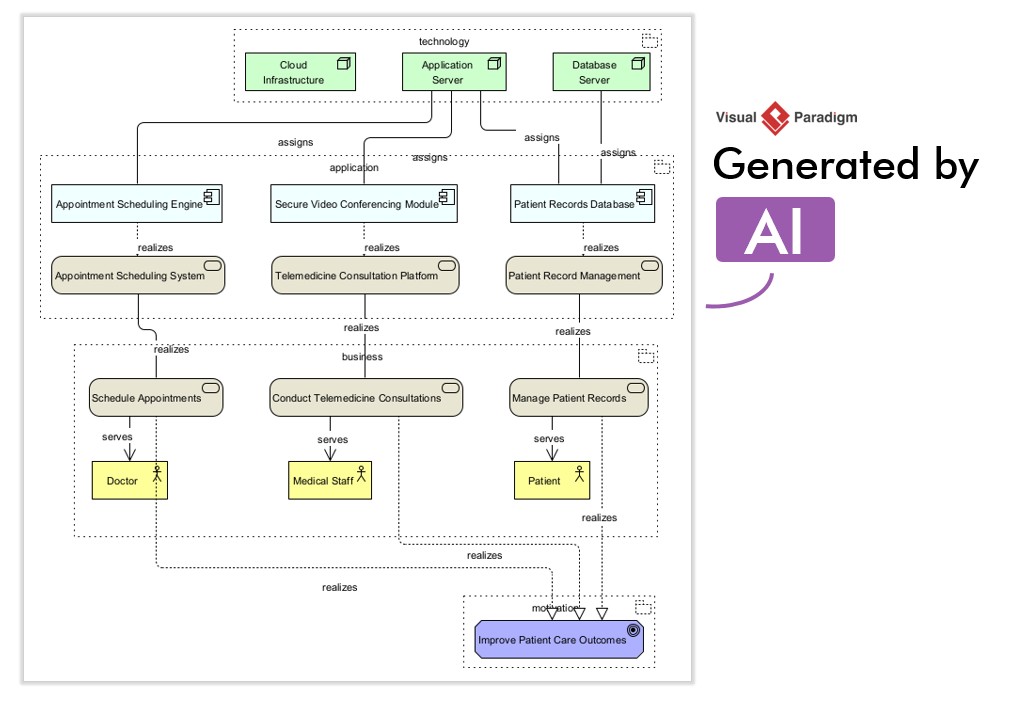
What is ArchiMate Diagram Generation?
For those new to the ecosystem, ArchiMate Diagram Generation is a feature within Visual Paradigm Desktop that translates natural language descriptions into formal architectural models. It acts as an AI ArchiMate tool that bridges the gap between high-level conceptual ideas and standardized notation.
How It Works:
- Natural Language Processing: The engine analyzes your text input to identify key architectural concepts
- Element Recognition: Automatically identifies business actors, application components, and infrastructure nodes
- Relationship Mapping: Infers and creates appropriate relationships like “assignment,” “serving,” and “realization”
This capability significantly reduces the time architects spend on initial model creation, allowing them to focus on refinement, analysis, and stakeholder communication.
Why Enhanced Quality Matters
The latest refinements to the AI ArchiMate diagram tool focus on three specific areas of improvement that directly impact your modeling workflow:
🔍 Contextual Relevance
The AI now better understands the nuances of your prompt, ensuring that the generated elements are directly tied to your specific business or technical case. This means fewer irrelevant components and more targeted architectural representations.
🔗 Comprehensive Element Mapping
Expect a richer set of relationships. The engine is now more adept at identifying implicit connections like:
- Assignment relationships between actors and roles
- Serving relationships between application and business layers
- Realization relationships connecting requirements to implementations
- Aggregation and composition for complex structural hierarchies
📐 Structural Clarity
We have improved how the AI ArchiMate tool handles complex multi-layered prompts, resulting in diagrams that:
- Require less manual reorganization
- Follow ArchiMate layout best practices
- Are ready for immediate analysis and presentation
- Maintain visual consistency across architectural layers
Step-by-Step: Using the Enhanced AI ArchiMate Generator
You can experience these quality improvements immediately within Visual Paradigm Desktop. To generate a more comprehensive model, follow these steps:
Step 1: Access the AI Generator
In Visual Paradigm Desktop, select Tools > AI Diagram Generation to open the dialog box.
Step 2: Select Your Diagram Type
Choose from:
- ArchiMate Diagram (for ArchiMate 3.1 specification)
- ArchiMate 4 Diagram (for the latest ArchiMate 4.0 standard with new Common Domain elements)
Step 3: Optionally Select a Viewpoint
Choose a viewpoint to guide the AI’s focus, or leave it as Unspecified for a broad overview. Available viewpoints include:
- Application Cooperation
- Capability Map
- Technology Usage
- Business Process
- Infrastructure
Step 4: Enter Your Prompt
Craft a descriptive prompt. For example:
“Generate an ArchiMate Diagram for a cloud-based e-commerce platform handling order processing, inventory management, and payment integration.”
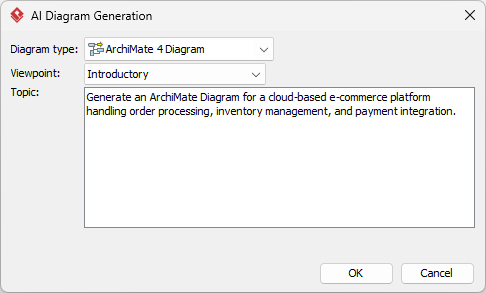
Step 5: Generate & Review
Click OK. The engine will process your request and generate a new, highly relevant ArchiMate diagram directly in your project.
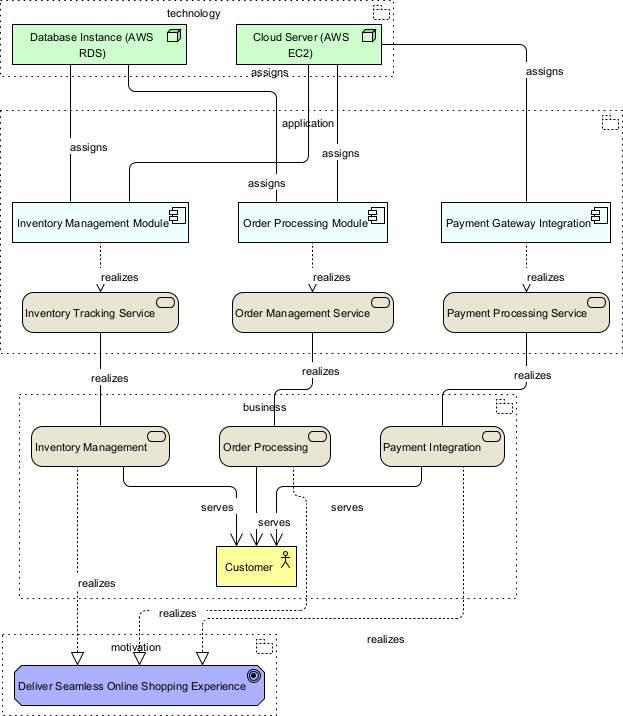
Step 6: Refine & Finalize
Use Visual Paradigm’s native modeling tools to:
- Adjust layout and styling
- Add documentation and properties
- Validate against ArchiMate specification rules
- Export or share with stakeholders
Key AI Features for ArchiMate 4
Visual Paradigm has introduced advanced AI-powered ArchiMate 4 diagram generation within its Desktop and Online platforms. These features bridge the gap between high-level descriptions and formal architectural models.
🎯 Native ArchiMate 4 Support
Users can select “ArchiMate 4 Diagram” as a target to generate models that strictly adhere to the latest specification, including:
- New symbols for the Common Domain
- Updated motivation elements
- Removal of retired elements from previous versions
- Enhanced strategy layer components
🎨 Official Viewpoint Alignment
The AI can structure outputs according to all official ArchiMate viewpoints. A dedicated dropdown menu allows users to tailor the model for specific stakeholders:
| Viewpoint | Primary Audience | Focus Area |
|---|---|---|
| Application Cooperation | Solution Architects | Application interactions |
| Capability Map | Enterprise Architects | Business capabilities |
| Technology Usage | Infrastructure Teams | Technology components |
| Business Process | Business Analysts | Process flows |
| Implementation & Migration | Project Managers | Transition planning |
💬 Conversational Chatbot Interface
An integrated AI Chatbot allows for iterative refinement. You can use natural language commands to:
- Add elements: “Add a payment gateway component”
- Rename components: “Rename ‘Order System’ to ‘Order Management Service'”
- Change relationships: “Connect the inventory service to the warehouse application”
- Request analysis: “Show me which business processes depend on this application”
🧠 Intelligent Analysis
Beyond generation, the AI can perform impact analysis, answering questions like:
- “Which business processes are affected if we decommission this system?”
- “What applications support the customer onboarding capability?”
- “Identify single points of failure in this architecture”
🔗 Seamless Desktop Integration
Generated diagrams can be instantly imported into the Visual Paradigm Desktop environment for:
- Further manual touch-ups
- Advanced formatting and documentation
- Version control and collaboration
- Integration with other modeling languages (UML, BPMN, ERD)
Core Workflow: From Prompt to Professional Diagram
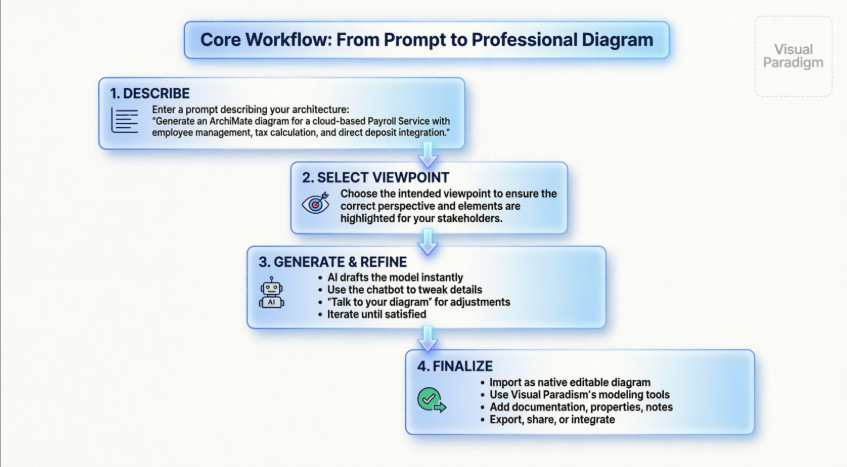
The AI Ecosystem: Four Pillars of Support
Our enhanced diagramming capabilities are part of a broader commitment to AI integration. Visual Paradigm provides multi-faceted AI coverage designed to support every phase of your digital transformation journey:
🖥️ Visual Paradigm Desktop AI Diagram Generation
Our core engine for creating ArchiMate, UML, BPMN, ERD, and more—now with improved logic, contextual understanding, and relevance. Perfect for architects who need precise models.
🤖 Visual Paradigm AI Chatbot
An interactive assistant at chat.visual-paradigm.com to help you:
- Navigate modeling standards and software features in real-time
- Get explanations of ArchiMate concepts and relationships
- Troubleshoot diagram generation issues
- Learn best practices through conversational guidance
📚 Visual Paradigm OpenDocs
A powerful knowledge management platform at visual-paradigm.com/features/opendocs that leverages AI to:
- Organize and query your project documentation
- Link documentation elements to model components
- Generate reports and architecture decision records
- Maintain a single source of truth for enterprise knowledge
⚡ AI Apps Suite
A collection of nimble, web-based tools for rapid task execution:
- Quick diagram generators for specific scenarios
- Template-based architecture starters
- Collaborative review and feedback tools
- Integration with popular productivity platforms
By focusing on the quality of output in Visual Paradigm Desktop, we ensure that your architectural repository remains a source of truth that is both professional and precise.
Learn more about Visual Paradigm’s AI Ecosystem: https://guides.visual-paradigm.com/best-ai-diagram-generator-visual-paradigm-ecosystem/
Best Practices & Pro Tips
✍️ Crafting Effective Prompts
- Be specific but concise: Include key components, relationships, and boundaries
- Use architectural terminology: Terms like “service,” “component,” “actor,” and “capability” help the AI recognize ArchiMate elements
- Specify layers: Mention Business, Application, Technology, or Motivation layers when relevant
- Example prompt structure:
Generate an ArchiMate [3.1/4] diagram for [system name]
that handles [core functions]. Include [key components]
and show relationships with [external systems].
Focus on the [viewpoint] perspective.
🔧 Post-Generation Refinement
- Validate relationships: Ensure all connections follow ArchiMate semantics
- Adjust layout: Use auto-layout tools or manually arrange for clarity
- Add properties: Document version, owner, status, and other metadata
- Apply styling: Use color coding and icons to enhance readability
- Generate documentation: Export reports for stakeholder review
🔄 Iterative Development Approach
- Start with a broad prompt to establish the foundation
- Use the chatbot to add details incrementally
- Validate each iteration against architectural requirements
- Save versions to track evolution of the design
⚠️ Important Notes
This feature is generally available in the Visual Paradigm Professional Edition and above, requiring an active license and internet connection for the AI engine. [14]
Reference
- Enhanced AI ArchiMate Diagram Generation Quality: Official release notes detailing improvements to AI-powered ArchiMate diagram generation, including contextual relevance, comprehensive element mapping, and structural clarity enhancements.
- Comprehensive Review: Visual Paradigm’s AI Diagram Generation Features: Independent analysis of Visual Paradigm’s AI diagram generation capabilities, covering use cases, strengths, and practical implementation guidance.
- Video Tutorial: AI ArchiMate Diagram Generation: Step-by-step video demonstration showing how to use Visual Paradigm’s AI engine to generate ArchiMate diagrams from natural language prompts.
- Native AI ArchiMate 4 Generation & Viewpoints for Desktop: Release announcement for ArchiMate 4.0 support in AI generation, including new Common Domain elements and official viewpoint alignment.
- Visual Paradigm AI Chatbot Feature Page: Overview of the conversational AI assistant that helps users navigate modeling standards, refine diagrams, and get real-time guidance.
- Visual Paradigm ArchiMate 4 Support Release: Technical details on ArchiMate 4.0 specification support, including new elements, updated relationships, and migration guidance from version 3.1.
- AI ArchiMate Viewpoints Generator Release: Documentation on using official ArchiMate viewpoints to guide AI generation for stakeholder-specific architectural perspectives.
- Visual Paradigm AI Chatbot Platform: Interactive web-based AI assistant for real-time modeling support, diagram refinement, and ArchiMate concept explanations.
- ArchiMate Explained: AI-Powered Enterprise Architecture Guide: Educational resource explaining ArchiMate fundamentals and how AI enhances enterprise architecture modeling workflows.
- AI ArchiMate 4 Generator with Chatbot and Import Features: Release notes covering the integration of chatbot-based refinement and seamless import of AI-generated diagrams into Desktop projects.
- ArchiMate Viewpoints: Selecting Relevant Perspectives: Expert guidance on choosing appropriate ArchiMate viewpoints to address specific architectural concerns and stakeholder needs.
- Enterprise Architect User Guide: ArchiMate Getting Started: Foundational reference for ArchiMate modeling concepts, perspective selection, and language features applicable across modeling tools.
- Refine Diagrams Through Conversational AI: Tutorial on using conversational commands to iteratively refine AI-generated diagrams through natural language interactions.
- Visual Paradigm Professional Edition Features Overview: Video overview of Professional Edition capabilities, including AI features, licensing requirements, and system prerequisites for AI-powered diagram generation.
Ready to build better models faster?
Get the Latest Visual Paradigm Desktop
Explore the full potential of these enhancements on our AI Diagram Generation landing page.
This post is also available in Deutsch, Español, فارسی, Français, English, Bahasa Indonesia, 日本語, Polski, Portuguese, Ру́сский, Việt Nam, 简体中文 and 繁體中文.
Related posts:
 Fast-Track Use Case Diagrams with Visual Paradigm AI Chatbot
 From Text to Visual Mastery: A Comprehensive Guide to Visual Paradigm’s AI Chatbot for Instant Diagram Creation
 AI-Powered UML Class Diagram Creation in Visual Paradigm
 Comprehensive Guide: AI-Powered Structural Modeling in Visual Paradigm