


In Agile software development, user stories are the heartbeat of requirements gathering and delivery. They keep teams focused on user value, enable iterative progress in sprints, and provide a lightweight alternative to heavy documentation. But writing clear user stories and turning them into verifiable test cases can be time-consuming and error-prone—especially for large backlogs.
Visual Paradigm’s AI-powered apps (part of its free-to-try AI Toolbox at ai-toolbox.visual-paradigm.com) dramatically accelerate this process. Tools like the AI powered User Story (3Cs) Editor and Agilien generate high-quality stories, acceptance criteria, and even ready-to-use test plans in seconds. This article walks you through the Agile fundamentals, best practices for writing user stories and test cases, and step-by-step guidance on using Visual Paradigm’s AI apps to supercharge your workflow.
1. What Are User Stories in the Agile Approach?
A user story is a concise, user-centric description of a feature. The standard template is:
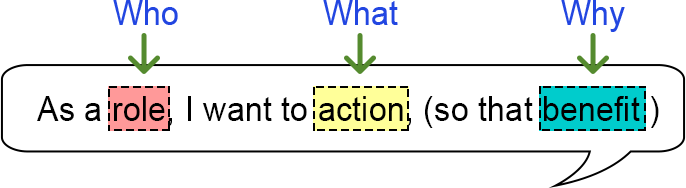
As a [type of user],
I want [some goal],
so that [some benefit/reason].
User stories live in the product backlog and are refined, prioritized, and pulled into sprints. They follow the INVEST criteria to ensure quality:
-
Independent
-
Negotiable
-
Valuable
-
Estimable
-
Small
-
Testable
The 3Cs framework (Card, Conversation, Confirmation) is the gold standard:
-
Card: The short story text.
-
Conversation: Discussions, notes, wireframes, or clarifications among team members.
-
Confirmation: Acceptance criteria that define “Done.”
2. How to Write Effective User Stories
Start with a high-level idea, then break it into small, actionable stories. Focus on the user’s perspective and business value.
✅ Example (Online Bookstore):
As a registered customer, I want to add books to my cart so that I can purchase multiple items at once.
📌 Best Practices:
-
Keep stories small enough to complete in one sprint.
-
Collaborate in refinement sessions (the “Conversation”).
-
Attach acceptance criteria early (more on this below).
-
Use story mapping in Visual Paradigm to visualize the big picture.
💡 Pro Tip: Use the “INVEST” checklist before adding any story to the backlog.
3. How to Write Acceptance Criteria and Derive Test Cases
Acceptance criteria (AC) turn vague stories into testable requirements. The most popular format in Agile is Given-When-Then (Gherkin), which reads like plain English but doubles as executable test scenarios (BDD).
✅ Example Acceptance Criteria (Cart Feature):
Given I am logged in and viewing a book detail page,
When I click “Add to Cart”,
Then the cart icon updates with the new item count and a success message appears.
🧪 How to Derive Test Cases from Acceptance Criteria:
| Test Type | Scenario | Example |
|---|---|---|
| Positive Path | Happy path | User adds a valid item to cart → success message shown |
| Negative Case | Invalid input | User tries to add an out-of-stock item → error message appears |
| Edge Case | Boundary conditions | User adds 100 items (max limit is 50) → validation error |
| Failure Case | System failure | Network drops during submission → retry prompt appears |
🛠️ Structure Each Test Case With:
-
Test Case ID
-
Description
-
Preconditions
-
Steps
-
Expected Result
-
Actual Result
-
Status (Pass/Fail)
✅ In Agile, these become acceptance tests—often automated with tools like Cucumber or SpecFlow.
🔴 The goal: Every story is “Done” only when all acceptance criteria pass.
4. How Visual Paradigm’s AI Apps Supercharge Your Agile Workflow
Visual Paradigm’s AI App Library (no installation required for most tools) includes purpose-built apps that understand Agile practices. The two stars for user stories and testing are:
🎯 A. User Story (3Cs) Editor – Your AI Writing Partner
This app generates complete 3Cs-compliant stories and automatically produces an Acceptance Criteria Test Plan Report.
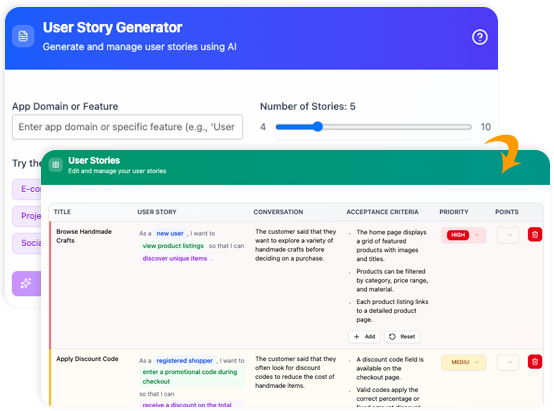
✅ Step-by-Step Usage:
-
Go to: https://ai-toolbox.visual-paradigm.com/app/user-story-editor/
(Or use Tools > Apps in Visual Paradigm Desktop) -
Enter a simple description:
“Build a mobile check-deposit feature for our banking app”
-
Click Generate → AI instantly creates a table of user stories with:
-
Card: The story text
-
Conversation: Discussion notes, edge cases, UX hints
-
Confirmation: Gherkin-style acceptance criteria
-
-
Edit, add, or prioritize stories directly in the dynamic table. Attach wireframes or links.
-
Click Generate Reports → Select Acceptance Criteria Test Plan Report
→ The AI converts every AC into a professional test plan with:
-
Test Case IDs
-
Step-by-step instructions
-
Expected outcomes
-
Priority tags
-
Coverage analysis
-
Ready-to-use QA checklist
-
📌 Example Output (AI-Generated for Banking App):
Story: As a busy professional, I want to deposit a check from my phone so that I don’t have to visit a branch.
Confirmation (Gherkin):
Given I am logged in and have a valid check photo,
When I submit the deposit,
Then funds are credited within 24 hours and I receive a confirmation notification.
📊 Test Plan Report generates 6–8 test cases including:
Valid photo submission
Blurry/low-quality image rejection
Unsupported file type (PDF, etc.)
Network timeout during upload
Duplicate deposit attempt
User not logged in
✅ Benefits:
Stories are INVEST-compliant
Acceptance criteria are immediately testable
QA teams get a ready-made test plan—no manual rewriting
🚀 B. Agilien: AI-Powered Jira Backlog Planner
Perfect for large-scale projects and sprint planning.
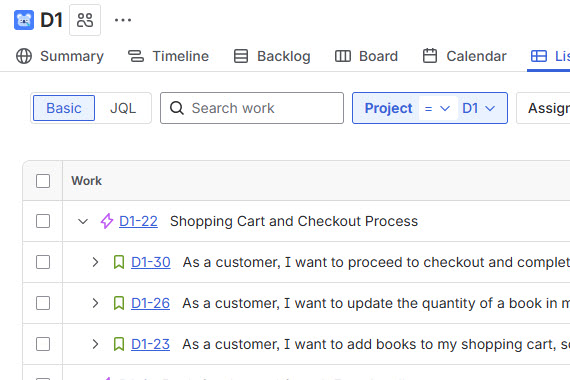
✅ How It Works:
-
Describe your project in plain English:
“Create a customer portal with login, profile management, order history, and support ticket system.”
-
AI generates:
-
Epics
-
User Stories (with acceptance criteria)
-
Sub-tasks
-
Story points (estimated)
-
Dependencies (auto-detected)
-
-
Refine in the editor → Sync directly to Jira (bi-directional sync available).
💡 Ideal for kickstarting new sprints, onboarding new teams, or managing complex product backlogs.
🔧 Bonus AI Tools in the Visual Paradigm AI Toolbox
| Tool | Purpose |
|---|---|
| Agile Backlog Refiner | 7-step guided refinement with risk assessment and sprint planning |
| User Story Mapping (Desktop) | Drag-and-drop visualization of AI-generated stories |
| Use Case AI | Generate use case scenarios and Gherkin test cases from natural language |
🔗 All tools integrate seamlessly with Confluence, Jira, GitHub, and test management systems.
5. Practical Tips for Maximum Impact
-
Start every sprint planning session by running your feature description through the User Story 3Cs Editor.
-
Use the generated Test Plan Report as your Definition of Done checklist.
-
Export stories and test cases to Markdown, JSON, or CSV for integration with:
-
Confluence
-
Jira
-
TestRail
-
qTest
-
Zephyr
-
-
Combine with Visual Paradigm’s Story Mapping Canvas for release planning and roadmap visualization.
-
For regulated industries (e.g., healthcare, finance), AI-generated reports provide excellent audit trails and traceability.
Conclusion: Agile Done Faster and Better
User stories keep Agile teams aligned with real user needs, while well-written acceptance criteria and test cases ensure quality at every sprint.
Visual Paradigm’s AI apps remove the tedious parts—generating stories, fleshing out acceptance criteria, and producing professional test plans—so your team can focus on what matters: delivering value.
🚀 Try It Today (Most Tools Are Free to Start!)
-
User Story 3Cs Editor: https://ai-toolbox.visual-paradigm.com/app/user-story-editor/
-
Agilien Jira Backlog Planner: https://ai-toolbox.visual-paradigm.com/app/agilien/
Whether you’re a Product Owner, Scrum Master, Developer, or QA Engineer, these AI tools will make your Agile process:
-
Faster
-
Clearer
-
More Testable
✨ Happy story writing—and even happier testing!
Transform your Agile workflow with the power of AI.
Try Visual Paradigm’s AI Toolbox today and write, test, and deliver with confidence.
-
What Is a User Story? A Complete Guide to Agile Requirements: This comprehensive guide explains the core concept, purpose, and importance of user stories in Agile development for capturing user needs effectively.
-
AI-Powered User Story 3Cs Editor: Enhance Clarity and Completeness: This resource details an AI-driven tool that helps Agile teams write better stories by guiding them through the 3Cs framework (Card, Conversation, and Confirmation).
-
How to Structure Your Jira Backlog Instantly with Agilien AI: A tutorial exploring how Agilien AI automates backlog structuring by analyzing user stories and generating well-organized sprints and epics.
-
Agilien AI-Powered Jira Backlog Planner – Visual Paradigm: An overview of how to automate and enhance Jira backlog planning using Agilien AI to intelligently structure stories for efficient sprint management.
-
How to Write Effective User Stories: Best Practices and Templates: This section of the user guide provides step-by-step instructions and practical templates for writing clear, actionable, and user-focused stories.
-
Writing Effective User Stories: A Practical Guide for Agile Teams: A hands-on guide that walks teams through the process of crafting high-quality user stories using real-world examples and proven techniques.
-
User Story Guide in the Agile Handbook: From Concept to Implementation: This resource covers the full lifecycle of user stories, including their creation, acceptance criteria, and integration into sprints.
-
Creating User Story Scenarios with Visual Paradigm Doc.Composer: A technical guide explaining how to enrich user stories with detailed scenarios to support testing, validation, and clarity.
-
Visualizing User Stories on Diagrams with Visual Paradigm: This article demonstrates how to integrate user stories directly into diagrams, such as use cases and journey maps, to enhance traceability.
-
Effective User Story Tool for Agile Development: An overview of how users can efficiently create and manage user stories using specialized built-in tools designed for Agile workflows.
This post is also available in Deutsch, Español, فارسی, Français, English, Bahasa Indonesia, 日本語, Polski, Portuguese, Ру́сский, Việt Nam, 简体中文 and 繁體中文.