


Visual Paradigm has announced a groundbreaking enhancement to its flagship knowledge management platform, OpenDocs, introducing full support for UML Profile Diagrams—powered by advanced AI-driven generation capabilities. This innovation marks a major milestone in the evolution of collaborative, web-based documentation, enabling teams to create, customize, and integrate domain-specific UML extensions with unprecedented speed and precision.
What Is OpenDocs?
OpenDocs is Visual Paradigm’s AI-powered knowledge management platform, designed to help engineering, architecture, and product teams build rich, living documentation that evolves alongside their projects. As a fully web-based tool (no installation required), OpenDocs is accessible to users holding a Visual Paradigm Online (Combo Edition) or Visual Paradigm (Professional Edition / Desktop Professional) license.
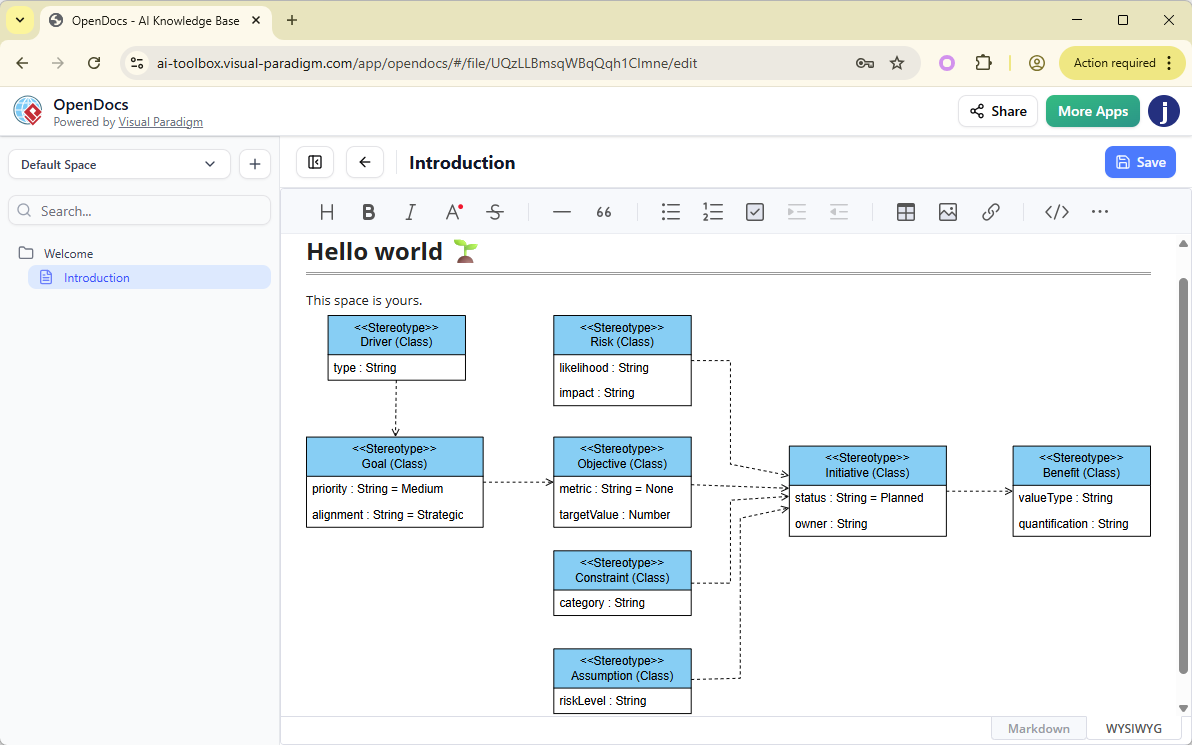 The platform already supports a wide array of UML diagrams—Class, Sequence, Use Case, Activity, State Machine, and Component—enabling teams to visualize complex systems. With this latest update, OpenDocs now extends its capabilities to include UML Profile Diagrams, empowering users to tailor UML for specific industries, platforms, or business domains.
The Power of UML Profile Diagrams
UML Profile Diagrams are a lightweight yet powerful mechanism for extending the Unified Modeling Language (UML) to suit domain-specific modeling needs. They allow teams to define:
-
Custom stereotypes (e.g., «ECU», «Sensor», «Actuator»)
-
Tagged values (metadata like “priority: high”, “compliance: ISO 21448”)
-
Constraints (rules governing element behavior)
-
Extensions to standard UML metaclasses
This extensibility is critical in specialized domains such as:
-
Enterprise Architecture – Tailoring models for TOGAF or ArchiMate integration
-
Healthcare Systems – Modeling HIPAA-compliant workflows and patient data flows
-
Embedded & Automotive Software – Representing ECUs, sensors, and real-time constraints
-
Industrial IoT & Smart Devices – Defining device types, communication protocols, and security profiles
By customizing UML through profiles, teams ensure that their diagrams reflect real-world concepts with accuracy—improving clarity, consistency, and stakeholder alignment.
Key Features of the New Update
✅ 1. Full UML Profile Diagram Support in OpenDocs
Users can now create and manage UML Profile Diagrams natively within the OpenDocs environment. Whether you’re building a profile for automotive software, financial systems, or cloud-native architectures, the platform provides a clean, intuitive interface for defining and organizing your extensions.
🤖 2. AI-Powered Profile Diagram Generation (Game-Changer!)
The standout feature is the AI-powered profile diagram generator—a cutting-edge tool that transforms natural language into a fully formed UML Profile Diagram in seconds.
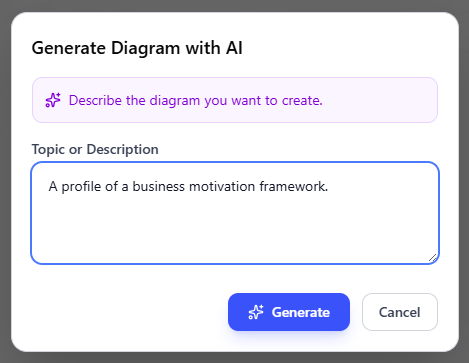
Example Prompt:
“Create a UML profile for automotive software with stereotypes for ECU and sensor components.”
Upon receiving such a prompt, the AI analyzes domain semantics, identifies relevant metaclasses (like Class, Interface, Component), applies appropriate stereotypes, and generates a structured, production-ready diagram.
This capability eliminates hours of manual setup, especially valuable when working in niche or unfamiliar domains.
🎯 3. Manual Creation & Real-Time Editing
For teams that prefer full control, OpenDocs offers a drag-and-drop diagram editor with a comprehensive palette of UML elements. Users can:
-
Add metaclasses and stereotypes
-
Define tagged values and constraints
-
Customize relationships and visibility
-
Adjust layout automatically with built-in alignment tools
The editor supports real-time collaboration, making it ideal for distributed teams.
🌐 4. Seamless Integration into Documentation
Generated or manually crafted Profile Diagrams can be embedded directly into OpenDocs pages in two powerful ways:
-
Interactive Diagram Components: Embedded diagrams are fully interactive—users can hover, zoom, and explore elements without leaving the document.
-
Dedicated Component Pages: Create standalone pages for each profile, serving as reusable reference points across multiple documents.
This integration turns documentation into a dynamic, visual knowledge base, where text and diagrams work together to tell a coherent story.
Step-by-Step: How to Create a UML Profile Diagram with AI in OpenDocs
-
Open your OpenDocs document in the web browser.
-
Click the Insert button in the top navigation bar.
-
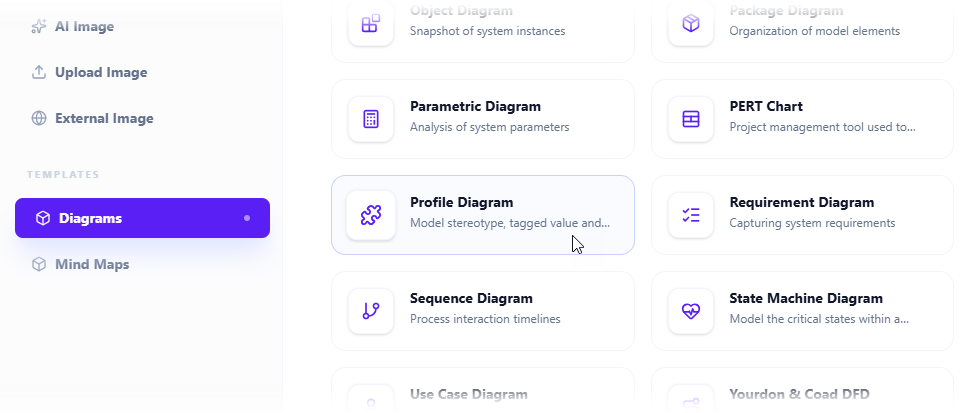
In the Insert dialog, select the Diagrams tab → choose Profile Diagram.
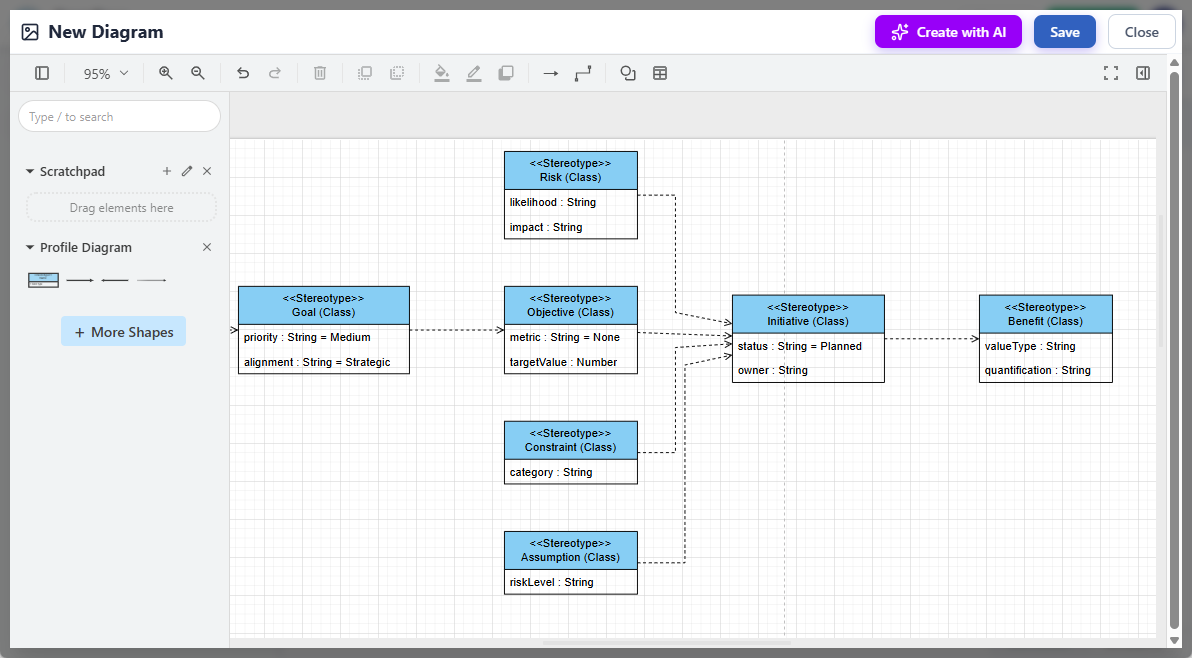
-
The diagram editor opens, complete with a customizable palette.
-
Click Create with AI (top-right corner).
-
Enter a clear, natural language description such as:
“Design a UML profile for healthcare systems with stereotypes for Patient, Doctor, Appointment, and MedicalRecord.” -
Click Generate.
-
The AI processes the request and returns a polished, ready-to-use diagram.
-
Refine the layout, add additional elements, or adjust stereotypes as needed.
-
Click Save → return to your document. The diagram embeds automatically.
💡 Pro Tip: Use specific, domain-focused language for better AI results. The more context you provide, the more accurate and actionable the output.
Why This Update Matters
In today’s fast-moving development and enterprise environments, speed and accuracy are paramount. Manual diagram creation can be time-consuming and error-prone—especially when modeling complex, domain-specific systems.
With AI-powered UML Profile Diagrams, Visual Paradigm delivers:
-
Faster onboarding for new team members and projects
-
Reduced cognitive load by automating repetitive modeling tasks
-
Consistent, standardized extensions across documentation and design artifacts
-
Improved cross-functional communication between business analysts, architects, and developers
This update is a major step toward AI-driven modeling at scale, building on previous AI integrations for other UML types—such as Class, Sequence, and Use Case diagrams.
Get Started Today
Ready to transform how your team models domain-specific systems?
👉 Try OpenDocs now and generate your first AI-powered UML Profile Diagram:
OpenDocs Access
For detailed tutorials, best practices, and real-world examples:
Explore OpenDocs
Looking Ahead
Visual Paradigm continues to pioneer the future of intelligent documentation. With this release, the company strengthens its vision of AI-augmented, collaborative modeling—where documentation is not just static content, but a living, evolving artifact.
Future updates are expected to bring:
-
Auto-suggestions for profile reuse across projects
-
Integration with code generation tools based on custom profiles
-
Smart validation to ensure consistency with defined constraints
Final Thoughts
The integration of AI-powered UML Profile Diagrams into OpenDocs isn’t just an incremental upgrade—it’s a paradigm shift in how teams approach modeling and documentation. By combining the precision of UML with the agility of AI, Visual Paradigm empowers organizations to model smarter, document better, and deliver faster.
Where documentation meets intelligence, innovation accelerates.
Stay tuned for more AI-powered tools and intelligent knowledge management features from Visual Paradigm.
The future of modeling is here—and it’s collaborative, visual, and powered by AI.
-
What is Profile Diagram in UML?: This guide explains that a profile diagram is an extensibility mechanism used to customize UML by adding new building blocks and properties for specific problem domains.
-
Understanding Profile Diagrams in UML – A Comprehensive Guide: A resource providing a detailed look at the purpose, structure, and usage of profile diagrams in behavioral and structural modeling.
-
Drawing a Profile Diagram in Visual Paradigm: A technical user guide that teaches users how to create profile diagrams to define custom stereotypes and constraints within a project.
-
Customizing UML Profiles in Visual Paradigm: Detailed instructions on how to extend standard modeling elements with domain-specific semantics through profile customization.
-
Profile – Visual Paradigm Community Circle: An open documentation resource (part of the Community Circle hub) that provides practical examples and tips for drawing profile diagrams effectively.
-
Visual Paradigm AI Diagram Generation Guide: A comprehensive step-by-step tutorial on using AI-powered tools to generate various types of diagrams quickly and accurately.
-
Visual Paradigm AI Chatbot – Intelligent Diagram Generation: An overview of a cloud-based feature that provides intelligent modeling assistance directly within the desktop software environment.
-
Mastering the Visual Paradigm AI Diagram Generator: A detailed guide focused on leveraging AI to optimize efficient design workflows and automate complex modeling tasks.
-
Introducing the New AI Chatbot: An official update showcasing a new AI assistant designed to streamline workflows and enhance the modeling experience for system architects.
-
Modeling Continuity with AI Services: An article exploring why AI-driven modeling continuity has become an indispensable service for maintaining consistency across complex projects.
This post is also available in Deutsch, Español, فارسی, Français, English, Bahasa Indonesia, 日本語, Polski, Portuguese, Ру́сский, Việt Nam, 简体中文 and 繁體中文.