Agile retrospectives are the heartbeat of continuous improvement. When executed well, they empower teams to identify bottlenecks, celebrate wins, and evolve their processes. However, planning these sessions can often feel like a chore for Scrum Masters and Team Leads. Without a structured approach, retrospectives risk becoming repetitive complaining sessions rather than actionable workshops. Enter the Agile Retrospective Planner, a specialized tool designed to bring structure, depth, and AI-powered efficiency to your session planning.
What is the Agile Retrospective Planner?
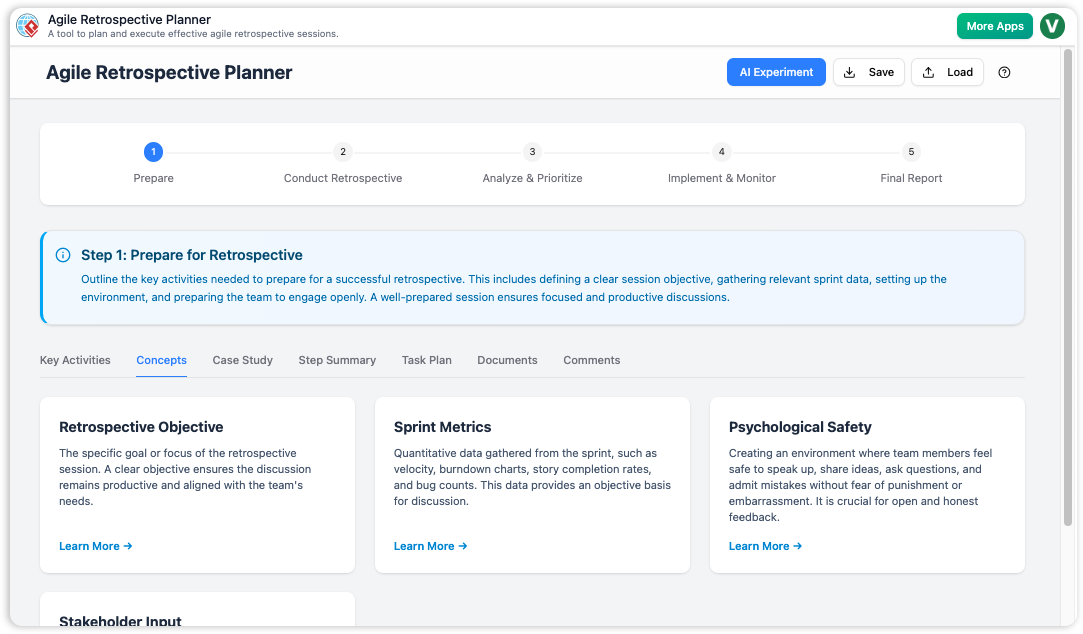
The Agile Retrospective Planner is a web-based application designed to help facilitators create meaningful, organized, and effective retrospective agendas. Unlike digital whiteboards that focus on real-time collaboration during the meeting, this tool focuses entirely on the preparation phase. It guides users through a proven 5-step framework to ensure no aspect of the retrospective is overlooked.
Whether you are a seasoned Agile Coach or a first-time facilitator, the tool serves as both a roadmap and a workspace. It allows you to organize discussion points, manage preparation tasks, and generate comprehensive facilitator guides. Notably, it integrates generative AI to draft complete session plans from a simple description of your sprint context.
Core Features and Functionality
1. AI-Powered Plan Generation
One of the standout features of the planner is the “AI Experiment.” This feature addresses the “blank page” syndrome that often plagues facilitators. By clicking the AI Experiment button, users can input a project description and a retrospective objective. For example, you might describe a sprint where a major feature was deployed but the team suffered from API outages.
The AI then generates a fully populated plan across all planning steps. It suggests icebreakers for setting the stage, specific data-gathering activities, and prompts for generating insights. This transforms hours of agenda design into a task that takes mere minutes, providing a solid foundation that can be customized to fit the team’s specific culture.
2. The 5-Step Guided Wizard
To ensure adherence to best practices, the application forces a logical flow based on the classic retrospective structure:
- Set the Stage: Preparing the environment and aligning on goals to ensure psychological safety.
- Gather Data: Collecting objective facts and subjective feelings about the sprint.
- Generate Insights: Analyzing data to find root causes and patterns.
- Decide What to Do: Creating concrete, actionable improvement items.
- Final Report: Compiling everything into a shareable document.
3. Multi-Tab Organization
Planning a meeting involves more than just listing topics. The tool recognizes this by providing deep organizational capabilities within each step. Users have access to specific tabs:
- Findings: The core agenda items and activities for the session.
- Task Plan: A checklist for the facilitator’s pre-work (e.g., “Book conference room,” “Send survey”).
- Documents: A space to link relevant sprint reports or metrics.
- Concepts & Case Studies: Areas to store educational material or references.
4. Privacy and Data Control
In an era of cloud-based everything, the Agile Retrospective Planner takes a privacy-first approach. It does not store team data on external servers (except for the transient data sent to the AI engine during generation). Instead, all plans are saved locally on the user’s computer as .json files. This ensures that sensitive discussions regarding team performance or incident post-mortems remain confidential and in your control.
How It Works: Practical Workflows
Planning with AI
The most efficient workflow involves leveraging the AI to create a first draft. A user simply enters the sprint context—such as “Sprint 12, Project Phoenix”—and notes key events like a rocky deployment. The tool populates the wizard with tailored activities. The facilitator then reviews the “Findings” tab in each step, tweaking the suggestions to match the timebox available, and exports the final plan.
Manual Customization
For teams that prefer specific formats like “Start, Stop, Continue” or “Starfish,” the tool supports full manual entry. In the Gather Data step, a facilitator can manually add key activities corresponding to these categories. The drag-and-drop interface allows for easy reordering of agenda items to ensure a smooth conversational flow.
Template Reusability
Because the tool uses local files for storage, it enables the creation of a template library. If a specific format works well for a “Post-Mortem” or a “Mid-Project Review,” users can save that plan and reload it effectively as a template for future sessions. This significantly reduces prep time for recurring meeting types.
Pros and Cons
| Pros | Cons |
|---|---|
| Structured Framework: Enforces a 5-step best-practice model that prevents skipping critical phases like “Set the Stage.” | Not for Real-Time Use: This is a planner, not a collaborative whiteboard tool for running the meeting itself. |
| AI Efficiency: Generates detailed agendas in seconds, acting like an expert agile coach. | Fixed Structure: The 5-step wizard cannot be customized or reduced (e.g., to a 3-step process). |
| Data Privacy: Local save/load functionality keeps sensitive team data off the cloud. | Manual File Management: No automatic cloud syncing; users must manage their own .json files. |
| Comprehensive Reporting: Generates a clean final report that serves as a perfect facilitator guide. | No Undo Button: Users must be careful when deleting items as there is no dedicated undo function. |
Conclusion
The Agile Retrospective Planner is a robust utility for Scrum Masters and Engineering Managers who want to elevate the quality of their team’s reflection time. By separating the planning of the retrospective from the running of it, the tool encourages deeper thought and preparation. While it requires a shift in workflow for those used to “winging it” on a whiteboard, the result is a more organized, insightful, and actionable meeting. For anyone looking to turn talk into action and move beyond surface-level discussions, this planner is an invaluable asset.
This post is also available in Deutsch, Español, فارسی, Français, English, Bahasa Indonesia, 日本語, Polski, Portuguese, Ру́сский, Việt Nam, 简体中文 and 繁體中文.