


Automate and streamline use case modeling for software projects
📘 Introduction
In software development, the journey from a high-level idea to a well-defined, testable system begins with requirements—and few artifacts are as foundational as the use case. A well-crafted use case bridges the gap between user needs and technical implementation, enabling teams to align on scope, anticipate edge cases, and build with confidence. Yet, traditionally, developing comprehensive, consistent, and UML-compliant use cases demands significant time, domain expertise, and cross-functional coordination—especially in fast-paced agile environments.
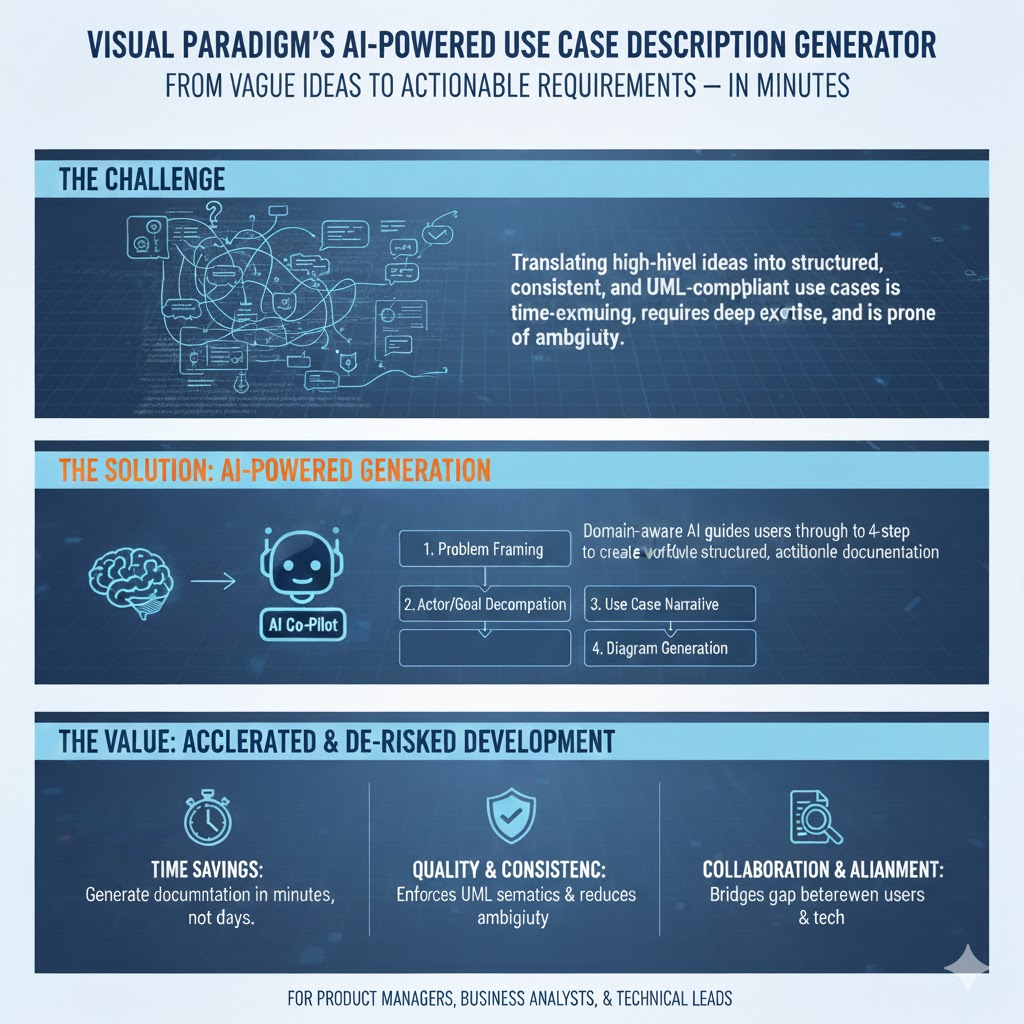
Enter the AI-Powered Use Case Description Generator by Visual Paradigm: a specialized, workflow-driven tool that transforms vague ideas into structured, actionable use case documentation—in minutes, not days. Unlike generic large language models, this generator is purpose-built for software requirements engineering, integrating domain-aware AI with industry-standard modeling practices (e.g., UML semantics, traceability, actor-goal decomposition). By guiding users through a four-step process—from problem framing to diagram generation—it ensures completeness, reduces ambiguity, and accelerates the path from concept to collaboration.
This tutorial explores how the tool works, why it outperforms general-purpose AI for requirements elicitation, and how real teams leverage it to de-risk projects and streamline development—equipping you to turn every software initiative into a successful one.
🔑 Key Concepts
| Concept | Description |
|---|---|
| Use Case | A description of how a user (actor) interacts with a system to achieve a goal. |
| Problem Description | A concise, contextual summary of the system or product domain that sets the stage for use case generation. |
| Candidate Use Cases | AI-suggested high-level use cases derived from the problem description, including names, short descriptions, and relevant actors. |
| Use Case Description Report | A detailed, structured narrative (often in Markdown) outlining preconditions, main flow, alternate flows, exceptions, and postconditions. |
| Use Case Diagram | A UML diagram visualizing actors, use cases, and their relationships — auto-generated and editable. |
Unlike ad-hoc prompting in generic LLMs, this tool embeds domain-specific modeling knowledge (e.g., UML semantics, software requirements best practices) into a guided, iterative workflow.
🎯 Why This Tool Is Helpful
✅ Accelerates Early-Stage Requirements Elicitation
- Reduces time spent on drafting & refining use cases by 50–70%.
- Helps product managers and business analysts overcome “blank page syndrome”.
✅ Enforces Consistency & Completeness
- Follows standardized templates (e.g., Cockburn-style or IEEE-style use case formats).
- Flags missing elements (e.g., actors, preconditions, error flows).
✅ Bridges Textual & Visual Modeling
- Seamlessly transitions from textual description → tabular list → UML diagram.
- Diagrams are editable in Visual Paradigm Online, enabling agile iteration.
✅ Integrates Into Existing SDLC Workflows
- Outputs (Markdown, SVG, editable diagram) plug into tools like Confluence (docs), Jira (stories), or test planning suites.
✅ Lowers Learning Curve
- No UML expertise required to get started — AI does the heavy lifting; user refines.
🆚 Why Not Just Use a General-Purpose LLM (e.g., ChatGPT, Claude)?
| Criterion | General LLM | Visual Paradigm AI Use Case Generator |
|---|---|---|
| Domain Awareness | Generic; lacks built-in software engineering semantics | Trained/fine-tuned for software requirements modeling (e.g., knows what “include/extend” means in UML) |
| Output Structure | Unstructured unless prompted carefully; prone to hallucinated actors/flows | Enforces standardized templates (e.g., precondition → basic flow → alternate flows → postcondition) |
| Visual Integration | Text-only (unless using image-generation plugins) | Auto-generates editable UML diagrams with proper notation and relationships |
| Iterative Refinement | Context window limits hinder multi-step workflows | Stateful, step-by-step UI (problem → candidates → detail → visual) |
| Traceability & Export | Manual copy/paste; risk of version drift | Exports to Markdown/SVG; diagrams saved in VP workspace with versioning |
| Team Collaboration | Hard to co-edit or review in real time | Diagrams/docs live in shared VP project space → direct stakeholder feedback |
💡 Bottom Line: General LLMs are open-ended assistants; this tool is a specialized copilot for requirements engineering.
🛠️ Step-by-Step Walkthrough (with Example)
Let’s walk through building use cases for a “Smart Home Climate Control System”.
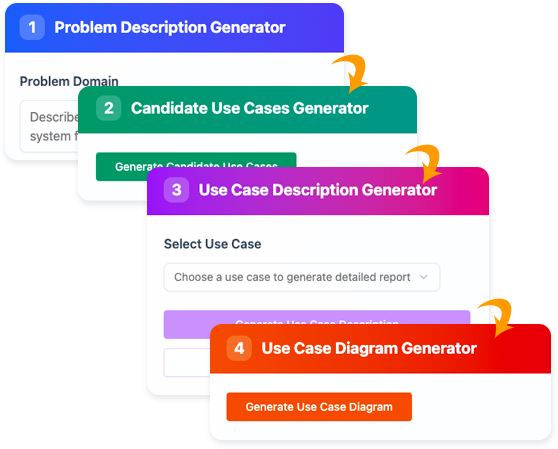
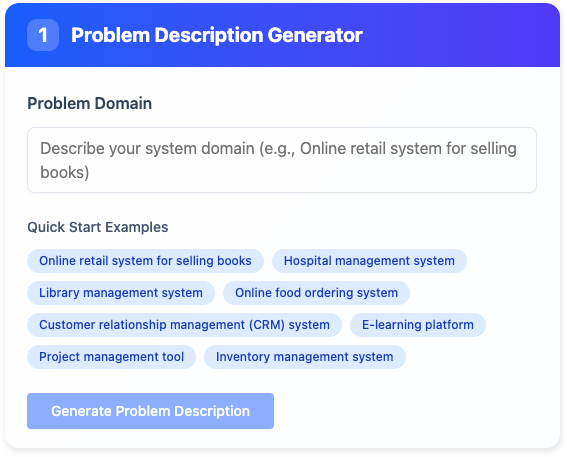
🟢 Step 1: Generate Problem Description
Prompt:
“A smart thermostat system that allows homeowners to control heating/cooling via mobile app, voice assistants, and automated schedules based on occupancy and weather.”
AI Output (edited):
The Smart Home Climate Control System enables users to remotely manage indoor temperature through a mobile app and voice commands (e.g., Alexa, Google Assistant). It supports scheduled temperature changes, geofencing-based auto-adjustment when users leave/return, and integration with local weather forecasts to optimize energy use. Sensors detect room occupancy to reduce heating/cooling in unoccupied zones.
✅ Tip: Edit to clarify scope (e.g., exclude HVAC repair features).
🟡 Step 2: Generate Candidate Use Cases
AI suggests:
| Use Case Name | Description | Actors |
|---|---|---|
| Set Temperature Schedule | User defines daily/weekly temperature profiles | Homeowner |
| Adjust Temperature via App | Real-time manual override from mobile app | Homeowner |
| Voice-Control Thermostat | Change settings using voice commands | Homeowner, Voice Assistant |
| Detect Occupancy & Auto-Adjust | System lowers energy use when rooms are empty | System, Motion Sensors |
| Sync with Weather Forecast | Adjust heating/cooling plan based on external temp | System, Weather API |
✅ Tip: Delete irrelevant ones (e.g., “Replace Battery”) or add missing (e.g., “Grant Guest Access”).
🔵 Step 3: Generate Use Case Description (e.g., Adjust Temperature via App)
AI generates a full Markdown report:
## Use Case: Adjust Temperature via App
**Actor**: Homeowner
**Precondition**:
- User is logged into the mobile app
- Thermostat is online and connected

**Main Success Flow**:
1. User opens app and selects active zone.
2. User slides temperature control or enters target temp.
3. App sends command to thermostat via cloud API.
4. Thermostat confirms update and adjusts HVAC.
5. App displays new temperature and status.

**Alternate Flow A1 (Offline Mode)**:
- If cloud is unreachable, app uses local Bluetooth to send command directly (with warning banner).

**Exception E1 (Device Unresponsive)**:
- After 5s timeout, app shows “Device Not Responding” and offers retry/cancel.

**Postcondition**:
- Target temperature is set; thermostat logs change; energy dashboard updates.
✅ Export to Confluence/Jira for grooming.
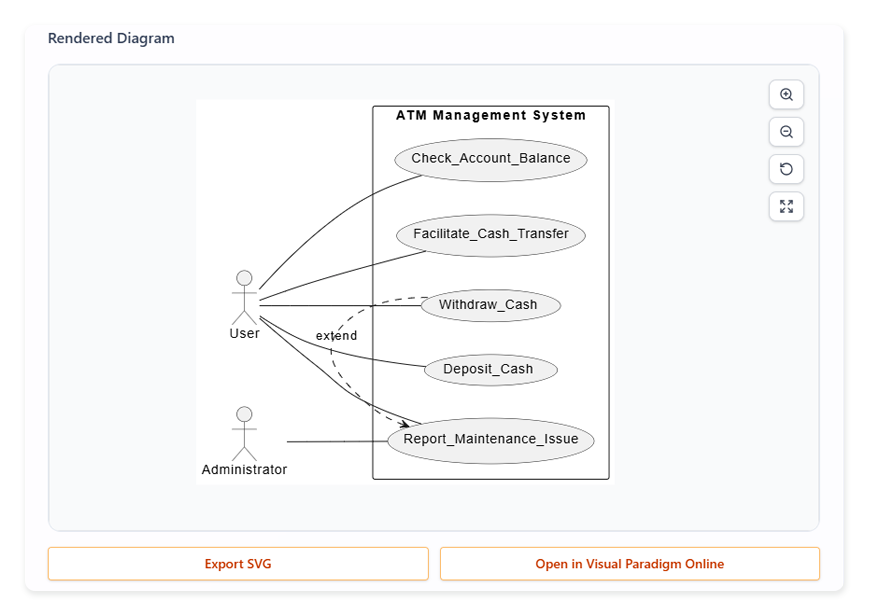
🟣 Step 4 (Optional): Generate Use Case Diagram
- Click [Generate Use Case Diagram]
- Output: UML diagram with:
- Actors:
Homeowner,Voice Assistant,Weather API,Motion Sensors - Use Cases: Oval nodes linked to actors
- Relationships:
<<include>>(e.g., Adjust via App includes Authenticate User)
- Actors:
- Click [Open in Visual Paradigm Online] to:
- Add missing elements (e.g., Guest User actor)
- Refactor overlaps (e.g., merge Set Schedule and Edit Schedule)
- Link to class/activity diagrams later
📊 Case Study: Fintech Startup “PayFlow” (B2B SaaS)
🧩 Challenge
PayFlow wanted to rebuild its payment reconciliation dashboard. Their PM (with 4 years’ experience) struggled to:
- Capture edge cases (e.g., partial refunds, currency conversions)
- Align dev, QA, and compliance teams on scope
- Move from vague user stories to testable requirements
🚀 Solution
Used Visual Paradigm’s AI Use Case Generator in a 3-day workshop:
- Problem Prompt:
“A dashboard for finance teams to reconcile incoming payments (wire, ACH, card) against invoices, flag discrepancies, and export audit reports.” - AI Output Highlights:
- Identified 12 candidate use cases (e.g., Match Payment to Invoice, Resolve Discrepancy, Generate Reconciliation Report)
- Flagged overlooked actors: Compliance Officer, External Auditor
- In Resolve Discrepancy, AI suggested flows for:
- Manual override (with approval)
- Auto-suggest match using fuzzy logic
- Escalate to supervisor
- Diagrams:
- Generated use case diagram → used in kickoff with engineering.
- Edited to add <> for Apply FX Rate Conversion (critical for int’l payments).
📈 Results
- Requirements sign-off time: ↓ 60% (from 2 weeks → 3 days)
- QA test coverage ↑ 35% (thanks to explicit exception flows)
- Dev estimated effort more accurately (fewer mid-sprint surprises)
- Audit-ready documentation exported to internal wiki (Markdown)
🗣️ “The AI didn’t replace our judgment—it helped us ask better questions, faster.”
— Product Lead, PayFlow
🧭 Best Practices & Pro Tips
| Do | Don’t |
|---|---|
| ✅ Start with a focused problem prompt (avoid “build an e-commerce site”) | ❌ Expect perfection on first generation — always review/edit |
| ✅ Use generated use cases as conversation starters with stakeholders | ❌ Treat AI output as final spec — validate with real users |
| ✅ Combine with user research (e.g., turn interview insights into prompts) | ❌ Skip Step 4 if your team is visual — diagrams prevent misalignment |
| ✅ Save/export early & often — build a living requirements repo | ❌ Use for highly regulated domains (e.g., medical devices) without legal review |
🏁 Conclusion
The AI-Powered Use Case Description Generator is not just another prompt box — it’s a purpose-built requirements copilot that:
- Embeds decades of software engineering best practices
- Closes the loop between narrative → structure → visualization
- Empowers PMs, BAs, and engineers to collaborate on shared, traceable artifacts
In a world where ambiguous requirements cause ~50% of project failures (CHAOS Report), tools like this don’t just save time — they de-risk delivery.
🎯 Conclusion
The AI-Powered Use Case Description Generator is more than a productivity shortcut—it’s a paradigm shift in how teams approach requirements engineering. By combining intelligent automation with human oversight, it elevates use case modeling from a tedious documentation chore into a strategic, collaborative activity that drives clarity, quality, and alignment across product, engineering, and QA.
What makes this tool truly powerful is its specialization: it doesn’t just generate text—it generates correct, structured, and actionable artifacts grounded in software engineering best practices. The ability to seamlessly move from natural language → tabulated use cases → detailed narratives → editable UML diagrams creates a virtuous cycle of refinement and validation, ensuring that no critical requirement slips through the cracks.
As software systems grow in complexity and stakeholder expectations rise, investing in tools that enforce rigor without sacrificing agility is no longer optional—it’s essential. With the AI-Powered Use Case Description Generator, teams can lay a rock-solid foundation for their projects, reduce rework, and ultimately deliver solutions that meet real user needs—on time and on target.
Ready to transform ambiguity into clarity? Start your next use case in Visual Paradigm—and let AI do the heavy lifting, while you focus on what matters most: building the right thing, right.
➡️ Next Step: Try it with your current project’s elevator pitch — and iterate in <30 minutes.
Let me know if you’d like a ready-to-use template (Markdown + VP diagram structure) for your domain (e.g., SaaS, IoT, healthcare).
This post is also available in Deutsch, Español, فارسی, Français, English, Bahasa Indonesia, 日本語, Polski, Portuguese, Ру́сский, Việt Nam, 简体中文 and 繁體中文.