
Learn Unified Modeling Language with Visual Paradigm
“A picture is worth a thousand lines of code” — UML Class Diagrams help you visualize, design, and communicate object-oriented systems before writing a single line of code.
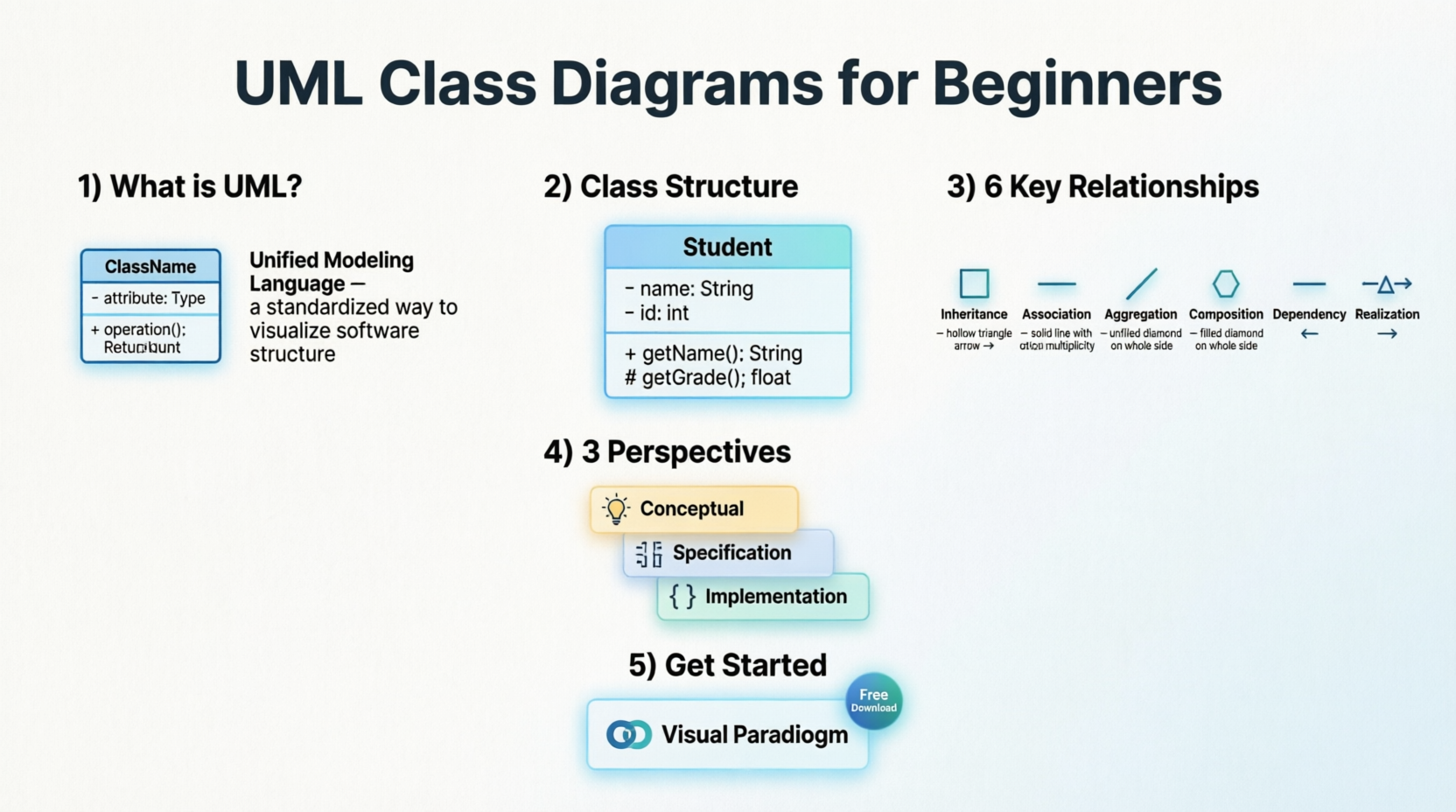
🔹 What is UML?
Unified Modeling Language (UML) is a standardized graphical notation used to visualize, specify, construct, and document object-oriented software systems.
A Class Diagram is a type of static structure diagram that describes a system by showing:
-
✅ Classes – the blueprints of objects
-
✅ Attributes – data/properties of classes
-
✅ Operations (Methods) – behaviors/functions
-
✅ Relationships – how objects interact
💡 Why learn UML? It bridges the gap between requirements and code, improves team communication, and helps catch design flaws early.
🔹 Understanding Classes & Objects
What is a Class?
A Class is a blueprint for creating objects. It defines:
-
State (attributes/properties)
-
Behavior (operations/methods)
What is an Object?
An Object is an instance of a class — a concrete entity built from the class blueprint.
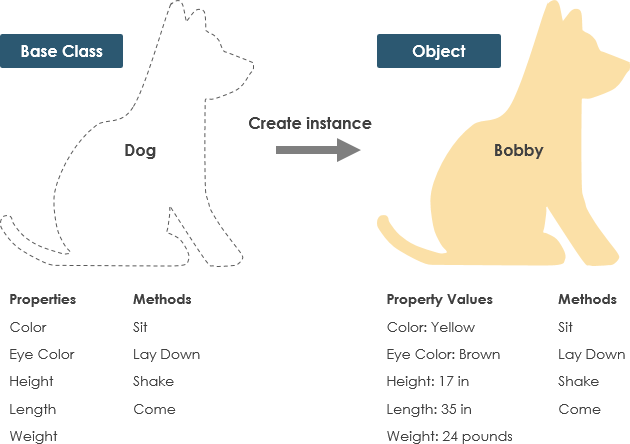
🐕 Real-World Example: Dog Class
Class: Dog
├─ Attributes: color, name, breed
└─ Behaviors: wagging(), barking(), eating()
Each Dog object (e.g., myPet, neighborDog) shares the same structure but holds unique data.
🔹 UML Class Notation Explained
A UML class is represented as a three-compartment rectangle:
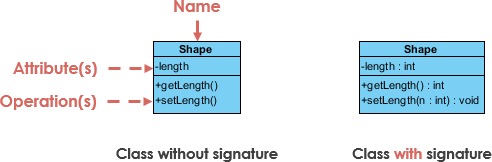
1️⃣ Class Name (Top Partition)
-
Mandatory – the only required element
-
Written in plain text, centered, bold
-
Abstract classes are shown in italics
2️⃣ Attributes (Middle Partition)
-
Format:
visibility name : type = defaultValue -
Map to member variables in code
-
Example:
- age : Integer = 0
3️⃣ Operations/Methods (Bottom Partition)
-
Format:
visibility methodName(param : Type) : ReturnType -
Map to class methods in code
-
Example:
+ calculateTotal() : Double
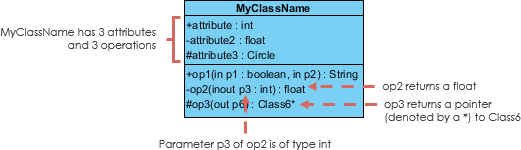
🔹 Class Visibility & Parameters
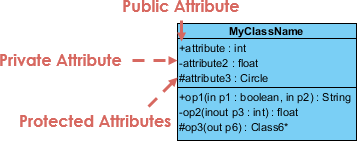
🔐 Visibility Modifiers
Prefix symbols indicate access level:
| Symbol | Visibility | Accessible From |
|---|---|---|
+ |
Public | Anywhere |
- |
Private | Within the class only |
# |
Protected | Within class & subclasses |
➡️ Parameter Directionality
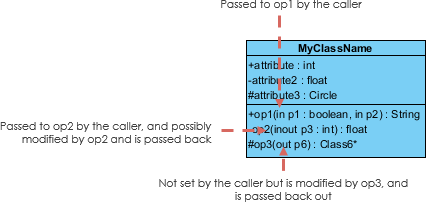
Specify how data flows in method parameters:
| Direction | Meaning |
|---|---|
in |
Input only (default) |
out |
Output only |
inout |
Input and output |
💡 Tip: Most programming languages default to
inparameters. Use directionality when modeling APIs or complex data flows.
🔹 Three Perspectives of Class Diagrams
Choose your diagram’s level of detail based on your development phase:

| Perspective | When to Use | Focus |
|---|---|---|
| Conceptual | Early analysis, domain modeling | Business concepts, real-world entities |
| Specification | Design phase, interface definition | Abstract Data Types (ADTs), method signatures |
| Implementation | Coding phase, technical design | Concrete classes, language-specific details |
🎯 Best Practice: Start conceptual → evolve to implementation. Don’t overload early diagrams with technical details.
🔹 Relationships Between Classes
UML precisely defines how classes interact. Master these 6 core relationships:
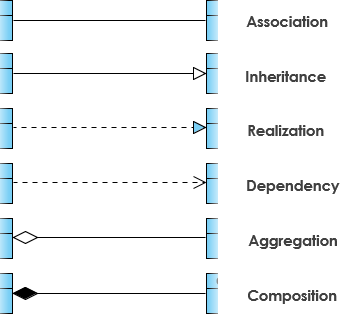
1️⃣ Inheritance (Generalization) → “IS-A”
-
Represents specialization:
SubClassis aSuperClass -
Notation: Solid line with hollow triangle arrowhead pointing to parent
-
Abstract classes shown in italics
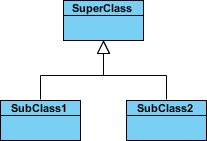
📐 Example: Shapes Hierarchy
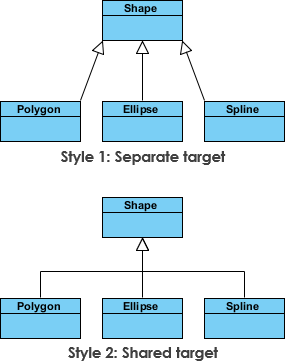
// Code equivalent
abstract class Shape { ... }
class Circle extends Shape { ... }
class Rectangle extends Shape { ... }
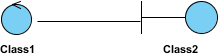
2️⃣ Association → “USES-A” (Structural Link)
-
Represents a persistent relationship between peer classes
-
Notation: Solid line between classes
-
Often labeled with verb phrases:
places,manages,contains
Simple Association Example:
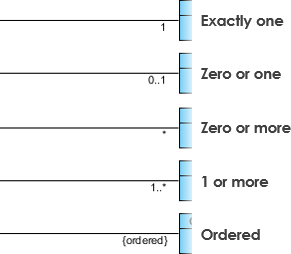
🔢 Cardinality (Multiplicity)
Define how many instances participate:
| Notation | Meaning | Example |
|---|---|---|
1 |
Exactly one | One customer places one order |
0..1 |
Zero or one | A user may have one profile |
* or 0..* |
Zero or many | A department has many employees |
1..* |
One or many | An order has at least one item |
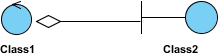
3️⃣ Aggregation → “HAS-A” (Weak Ownership)
-
Special association: “part-of” relationship
-
Parts can exist independently of the whole
-
Notation: Solid line with unfilled diamond at the “whole” end
// Example: Department aggregates Professors
class Department {
    private List<Professor> professors; // Professors exist even if dept is dissolved
}
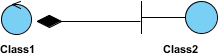
4️⃣ Composition → “STRONG HAS-A” (Strong Ownership)
-
Stronger form of aggregation
-
Parts cannot exist without the whole; lifecycle is tied
-
Notation: Solid line with filled diamond at the “whole” end
// Example: House composes Rooms
class House {
    private List<Room> rooms; // Rooms are destroyed when house is demolished
}
⚠️ Key Difference:
Aggregation:
CarhasWheel→ Wheels can be reusedComposition:
HousehasRoom→ Rooms don’t exist without the house
5️⃣ Dependency → “USES-TEMPORARILY”
-
One class depends on another for implementation (e.g., method parameter)
-
Not a structural relationship; change in supplier may affect client
-
Notation: Dashed line with open arrow
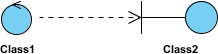
Practical Example: Person reads Book

class Person {
    boolean hasRead(Book book) { ... } // Book is a parameter → dependency
}
6️⃣ Realization → “IMPLEMENTS”
-
Relationship between an interface and its implementing class
-
Notation: Dashed line with hollow triangle arrowhead
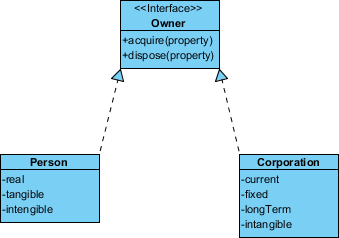
// Java example
interface Owner {
    void acquireProperty();
    void disposeProperty();
}
class Person implements Owner { ... }
class Corporation implements Owner { ... }
🔹 Real-World Examples
🛒 Example 1: Order Management System
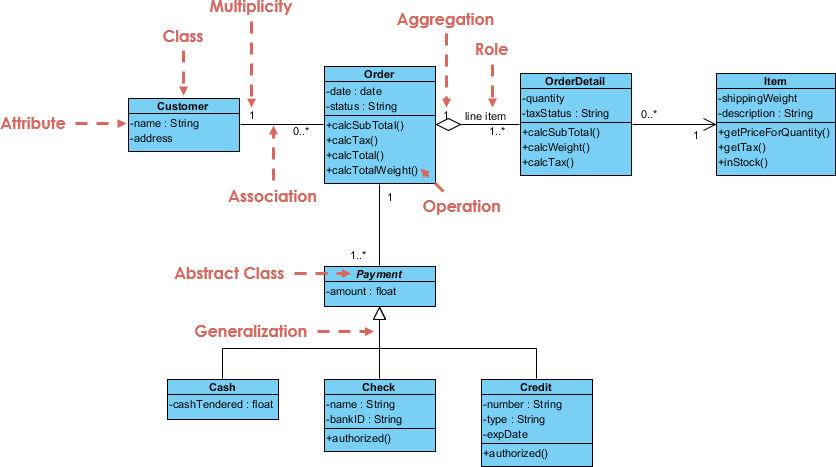
Key Takeaways:
-
CustomerplacesOrder(association, 1..*) -
Ordercomposed ofOrderItem(composition) -
OrderItemreferencesProduct(association) -
PaymentrealizesIPaymentinterface (realization)
💻 Example 2: GUI Application with Notes
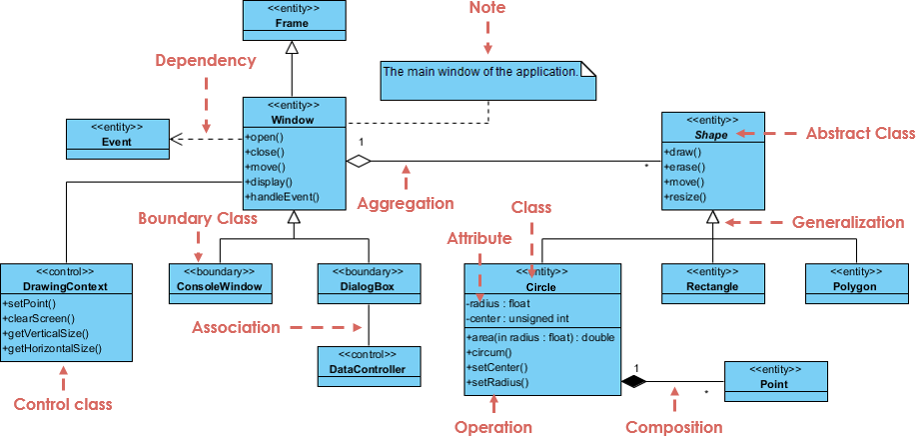
Key Takeaways:
-
Notes (yellow boxes) add clarifications without cluttering classes
-
JFramecontainsJPanel(composition) -
Event listeners use dependency relationships
🔹 Recommended UML Tools
| Tool | Best For | Price | Platform |
|---|---|---|---|
| 🥇 Visual Paradigm Community Edition | Beginners, students, full UML support | ✅ Free | Win/macOS/Linux |
| Lucidchart | Collaboration, web-based | Freemium | Web |
| draw.io (diagrams.net) | Quick diagrams, simplicity | ✅ Free | Web/Desktop |
| StarUML | Lightweight, extensible | Paid (free trial) | Win/macOS/Linux |
| Enterprise Architect | Large teams, complex systems | Paid | Win |
🏆 Why Visual Paradigm Community Edition?
✅ 100% Free for learning and non-commercial use
✅ All UML 2.x diagram types supported (Class, Use Case, Sequence, etc.)
✅ Intuitive drag-and-drop interface – no coding required
✅ Code engineering: Generate code from diagrams & reverse-engineer
✅ Cross-platform: Windows, macOS, Linux
✅ Award-winning: Trusted by universities and professionals worldwide
🔗 Download Visual Paradigm Community Edition Free
🔹 Getting Started with Visual Paradigm: 5-Minute Setup
-
Download & Install
→ Visit visual-paradigm.com/download/community.jsp
→ Choose your OS → Install (takes <2 minutes) -
Create New Project
→ Launch VP →Project→New→ Select “Class Diagram” -
Add Your First Class
→ Drag “Class” from toolbox → Double-click to edit name
→ Right-click class →Add→Attribute/Operation -
Draw Relationships
→ Use relationship tools (Inheritance, Association, etc.) from toolbar
→ Click source class → drag to target class -
Export & Share
→Diagram→Export→ PNG/PDF/SVG
→ Or generate Java/C# code:Tools→Code Engineering
🎬 Pro Tip: Use Model → Model Report to auto-generate documentation from your diagrams!
🎯 Quick Reference Cheat Sheet
Class Diagram Syntax Summary
+---------------------+
|     ClassName       |  ← Top: Name (required)
+---------------------+
| - attr : Type       |  ← Middle: Attributes
| + name : String     |
+---------------------+
| + method() : Type   |  ← Bottom: Operations
| - calc(x: int):int  |
+---------------------+
Relationship Notation Quick Guide
| Relationship | Notation | Keyword |
|---|---|---|
| Inheritance | ───▷ | “is-a” |
| Association | ─── | “has-a”/”uses” |
| Aggregation | ───◇ | “part-of” (weak) |
| Composition | ───◆ | “part-of” (strong) |
| Dependency | – – -> | “uses temporarily” |
| Realization | – – ▷ | “implements” |
🚀 Next Steps for UML Beginners
-
✅ Practice: Model a simple system (Library, Bank Account, Shopping Cart)
-
✅ Reverse-Engineer: Import existing Java/C# code into Visual Paradigm to see auto-generated diagrams
-
✅ Collaborate: Share diagrams with teammates for design reviews
-
✅ Iterate: Start conceptual → refine to implementation as you code
-
✅ Explore: Learn Use Case, Sequence, and Activity diagrams next
💬 Remember: UML is a communication tool, not a bureaucracy. Keep diagrams as simple as needed — and no simpler.
✨ You’re ready to design like a pro!
Start modeling your first class diagram today with Visual Paradigm Community Edition — free, powerful, and beginner-friendly.
Happy Modeling! 🎨🔧🚀