
A Comprehensive Guide for IT Developers
Introduction
Hey there, developers! Have you ever felt that tiny bit of panic when you need to explain how a complex computer system actually works?
 It’s like trying to describe a dream while it’s still happening! You know all these pieces—like users, orders, and products—are moving around, but drawing them out on a blank screen feels totally overwhelming.
Well, take a deep breath and relax, because we are entering a whole new world of creativity. The AI Object Diagram Generator from Visual Paradigm is here to be your best friend, turning your messy thoughts into beautiful, professional pictures in just a few heartbeats. It’s all about making your life easier and letting your big ideas shine without the stress of manual drawing.
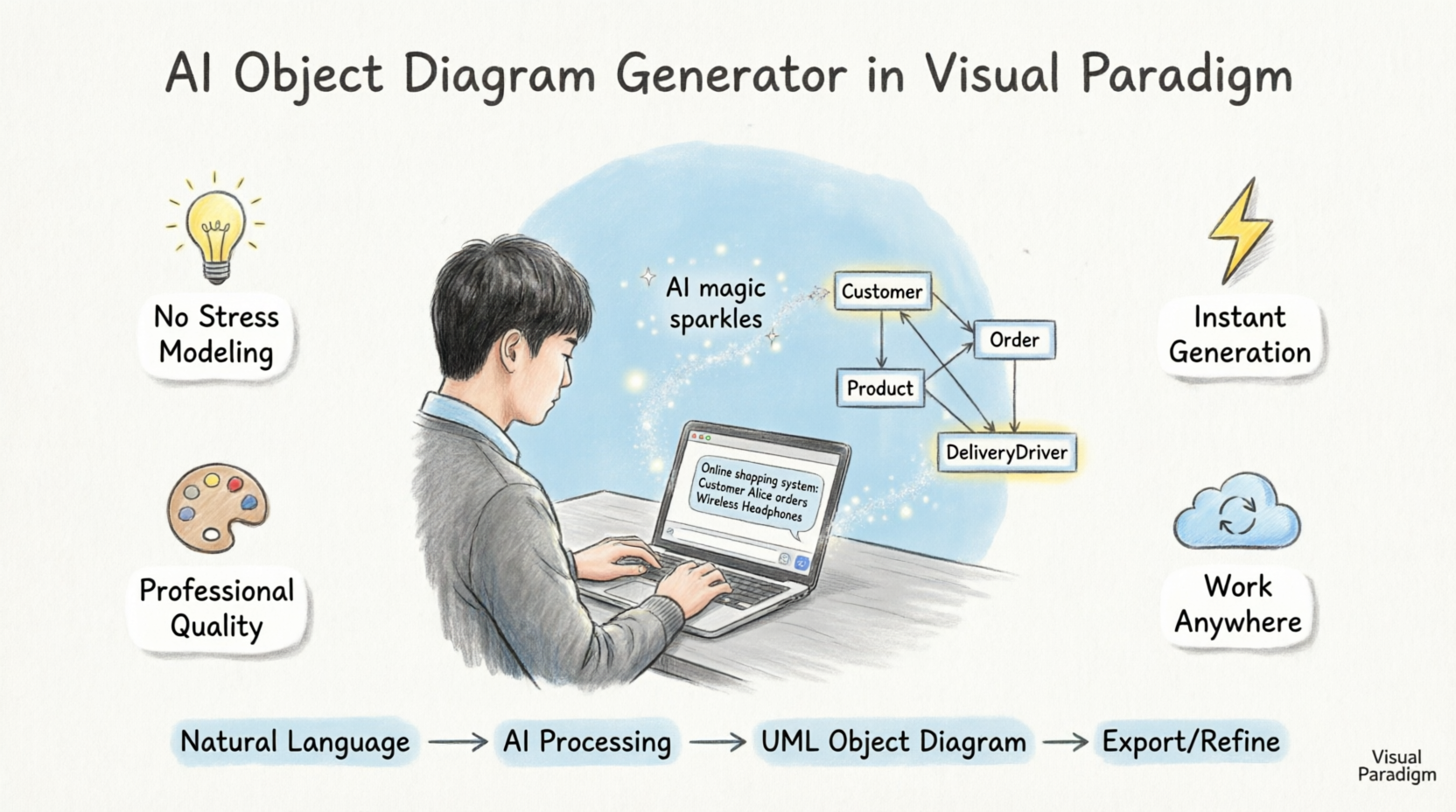
Imagine just telling a computer what’s on your mind and watching a perfect blueprint appear before your eyes. That’s the magic of an AI-powered visual modeling ecosystem. Whether you are a student just starting out or a pro designer, this tool feels like a warm hug for your workflow. It takes away the “blank canvas syndrome” and gives you a solid place to start.
🔑 Key Concepts for IT Developers
What is an Object Diagram?
An Object Diagram in UML (Unified Modeling Language) represents a snapshot of instances (objects) and their relationships at a specific point in time. Unlike Class Diagrams that define structure, Object Diagrams show concrete examples:
| Feature | Class Diagram | Object Diagram |
|---|---|---|
| Purpose | Defines structure & relationships | Shows runtime instances |
| Elements | Classes, interfaces, associations | Objects, links, attribute values |
| Notation | ClassName |
objectName : ClassName |
| Use Case | Design phase | Testing, debugging, documentation |
How AI Object Diagram Generation Works
The AI Object Diagram Generator leverages natural language processing to:
-
Parse your description: Understands entities, relationships, and attributes from plain English
-
Map to UML semantics: Converts concepts into proper UML object diagram notation
-
Generate visual layout: Automatically positions objects and draws relationship links
-
Apply styling standards: Ensures professional, readable diagrams following industry conventions
Core Benefits for Development Teams
-
No Stress Modeling: Turn simple English sentences into complex diagrams instantly without needing to be a tech genius.
-
Huge Variety: Use the AI Object Diagram Generator or choose from over 40 other types of diagrams like Flowcharts and Mind Maps.
-
Work Anywhere: Start a quick chat on your phone or browser, then bring it into the desktop app for the finishing touches.
-
Professional Quality: The AI uses industry standards, so your work always looks like it was made by a top-tier expert.
-
Total Flexibility: It’s a starting point that does 80% of the work, leaving you the fun 20% to customize and play with.
🚀 Getting Started: Step-by-Step Workflow
Method 1: Via Visual Paradigm AI Chatbot
Perfect for quick brainstorming or remote collaboration:
-
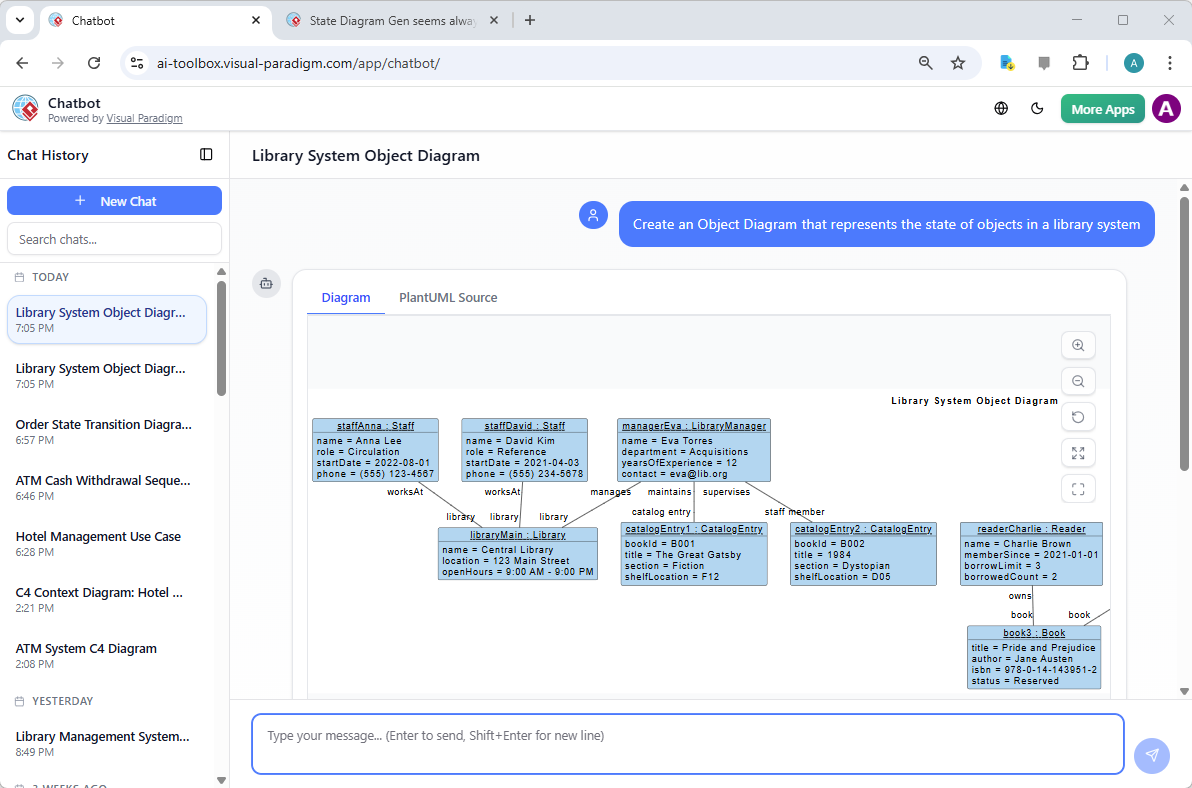
Access the Chatbot: Visit Visual Paradigm AI Chatbot
-
Describe Your System: Type a natural language request like:
"Show me an object diagram for a library system with staff members Anna, David, and manager Eva, showing how they interact with the book catalog" -
Review & Refine: The AI generates a draft diagram instantly. Ask follow-ups:
-
“Add a borrowing transaction object”
-
“Show the relationship between staff and members”
-
-
Export or Continue: Download the diagram or open it in Visual Paradigm Desktop for advanced editing.
Method 2: Via Visual Paradigm Desktop
Ideal for professional development workflows:
-
Open Visual Paradigm Desktop
-
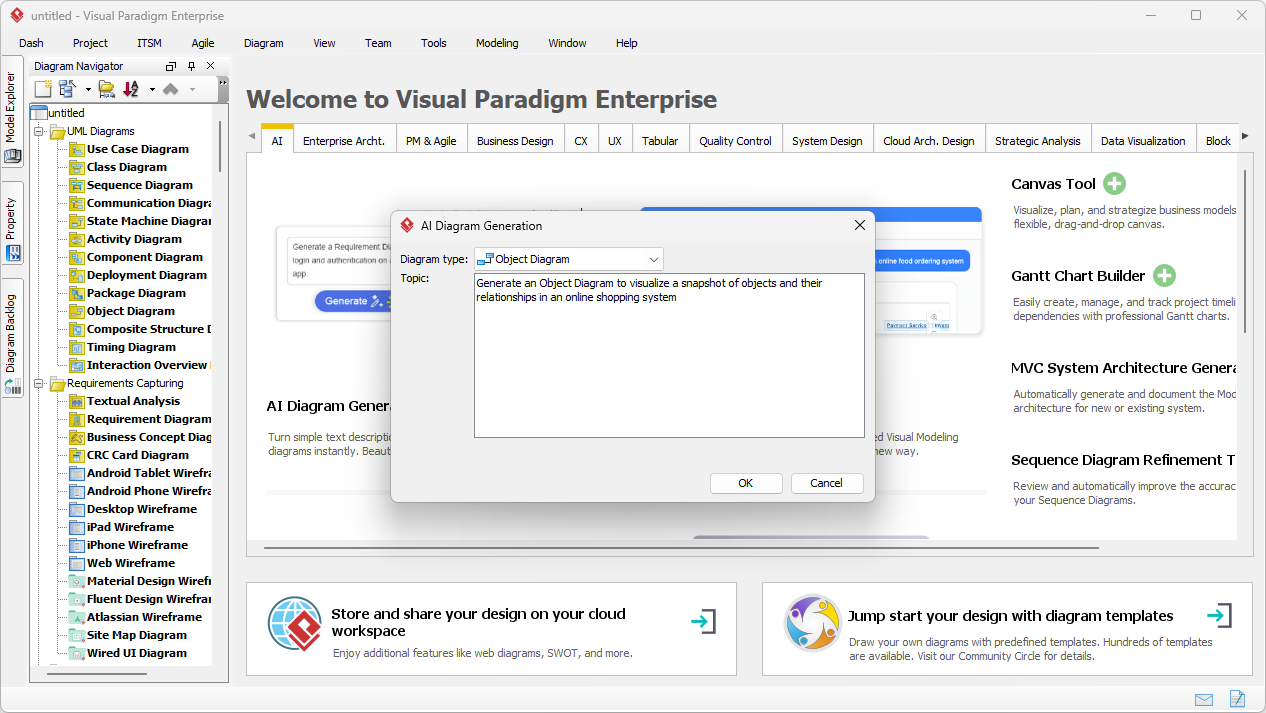
Navigate to AI Tools: Go to Tools > AI Diagram Generation
-
Select Diagram Type: Choose “Object Diagram” from the dropdown
-
Enter Your Prompt: Describe your system scenario clearly:
"Online shopping system: Customer Alice Johnson places an order for Wireless Headphones ($199.99), assigned to delivery driver Mike Patel. Include order ID, transaction timestamp, and shipping status." -
Generate & Customize: Click generate, then refine layout, colors, or add technical annotations.
Sample Output: Online Shopping System
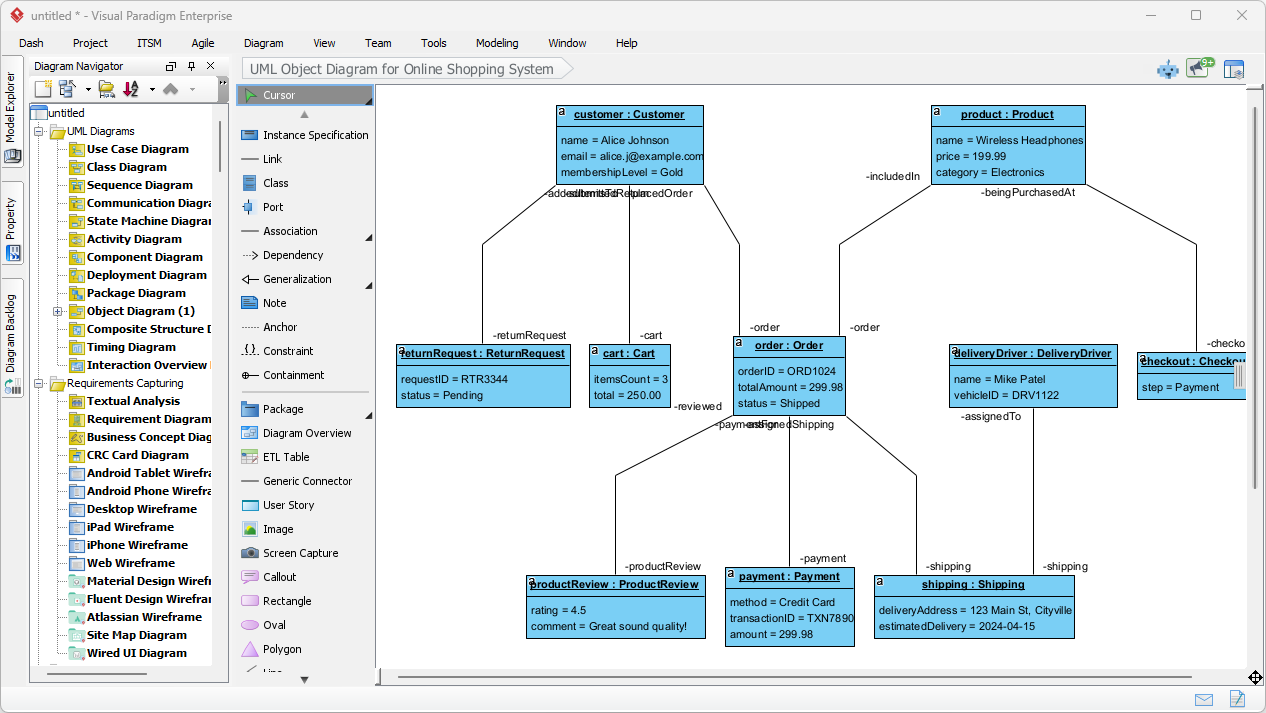
The generated diagram shows:
-
Objects:
aliceJohnson : Customer,order123 : Order,headphones456 : Product,mikePatel : DeliveryDriver -
Attributes: Price (
$199.99), Order ID (#ORD-78901), Status ("Shipped") -
Links: Clear associations showing ownership, assignment, and transaction flow
-
Metadata: Timestamps, transaction IDs, and business rules embedded as notes
💡 Tips & Tricks for IT Developers
✨ Prompt Engineering for Better Results
| Goal | Effective Prompt Example |
|---|---|
| Include attributes | “Show customer object with name, email, and loyalty tier attributes” |
| Define relationships | “Link order object to customer via ‘places’ relationship with cardinality 1..*” |
| Add business logic | “Include validation rule: order total must exceed $50 for free shipping” |
| Specify context | “Snapshot at checkout phase, before payment confirmation” |
🔧 Post-Generation Customization
After AI generation, leverage Visual Paradigm’s desktop tools to:
-
Refine Layout: Use auto-layout algorithms or manually adjust for presentation clarity
-
Add Technical Annotations: Insert OCL constraints, stereotypes, or deployment notes
-
Link to Code: Generate skeleton code or reverse-engineer from existing classes
-
Version Control: Export to XMI for Git integration and team collaboration
🔄 Integration with Development Workflows
graph LR
    A[Natural Language Spec] --> B[AI Object Diagram]
    B --> C[Review with Team]
    C --> D[Refine in Desktop]
    D --> E[Export to XMI/Code]
    E --> F[Implement & Test]
    F --> A
Pro Tips:
-
Use diagrams for onboarding: New team members grasp system state faster visually
-
Generate test scenarios: Object diagrams clarify edge cases for QA teams
-
Document runtime states: Capture system behavior during debugging sessions
-
Bridge business & tech: Non-technical stakeholders understand object interactions intuitively
🛠️ Best Practices for Professional Use
For Architecture & Design
✅ Do: Use object diagrams to validate class design by instantiating key scenarios
✅ Do: Generate diagrams for critical user journeys to identify missing relationships
✅ Do: Export diagrams to documentation for API or microservice specifications
❌ Avoid: Overloading diagrams with too many objects—focus on one cohesive scenario
❌ Avoid: Using object diagrams for high-level architecture (use Component/Deployment diagrams instead)
For Debugging & Testing
✅ Do: Capture “before/after” object states to illustrate bug reproduction steps
✅ Do: Share AI-generated diagrams in pull requests to clarify complex logic changes
✅ Do: Use attribute values from production logs to create realistic test object snapshots
For Team Collaboration
✅ Do: Start sprint planning with AI-generated diagrams to align on scope
✅ Do: Use the chatbot for quick async clarification: “Show me the payment flow objects”
✅ Do: Maintain a diagram library in your wiki for recurring system patterns
🔗 Advanced Use Cases
Microservices Architecture Visualization
Describe service interactions in natural language:
"Show objects for order-service, inventory-service, and payment-service
during checkout. Include request/response payloads as object attributes."
Database State Modeling
Map ORM entities to runtime objects:
"Generate object diagram for User, Profile, and Subscription objects
with Hibernate lazy-loading relationships at session start."
API Contract Validation
Visualize request/response object structures:
"Show REST API objects for POST /orders: request body with cart items,
response with order confirmation and tracking ID."
🎯 Conclusion: Elevate Your Development Workflow
We’ve seen how easy it is to go from a simple thought to a complete, professional diagram. Whether you are chatting with an AI assistant or using the desktop’s AI Object Diagram Generator, the process is designed to be calming, inspiring, and incredibly fast. You have the power to visualize anything from a library system to a global shopping empire without ever feeling lost.
This is the transformation we’ve been waiting for—where technology works for us, helping us express our creativity and solve problems with a smile on our faces. 
For IT Developers, this means:
-
Faster onboarding and knowledge transfer
-
Clearer communication across technical and non-technical teams
-
Reduced ambiguity in system behavior specifications
-
More time coding, less time wrestling with diagramming tools
So, what are you waiting for? There is a whole world of possibilities waiting for you to explore. Don’t let those big ideas stay trapped in your head. Let them out and watch them grow! You can start creating your own amazing visuals right now. It’s time to feel the joy of effortless design and see your projects come to life like never before. You’ve got this, and Visual Paradigm is here to help you every step of the way!
Ready to transform your ideas into reality? Experience the future of diagramming today! Hop over to Visual Paradigm and try the AI Object Diagram Generator for yourself. Just open the app, go to Tools > AI Diagram Generation, and let your creativity soar! 
📚 Reference List
Learning Class Diagrams with Visual Paradigm – ArchiMetric: Class diagrams are a vital tool for modeling the structure of a system in object-oriented design. Visual Paradigm provides an easy-to-use platform for creating and managing class diagrams, making it an excellent choice for software developers.
What is an Object Diagram in UML? A Complete Guide: This comprehensive guide explains the purpose, structure, and use cases of object diagrams in UML, illustrating how they depict instances of classes and their relationships at a specific point in time.
Visual Paradigm User Guide: Object Diagrams: Official documentation from Visual Paradigm detailing how to create and use object diagrams within the Visual Paradigm modeling environment.
Introduction to UML Diagrams in Visual Paradigm: An introductory overview of UML diagrams, including object diagrams, using the Visual Paradigm platform for visual modeling and system design.
How to Draw Object Diagrams in Visual Paradigm: Step-by-step instructions on creating object diagrams in Visual Paradigm, covering tools, notation, and best practices.
Class Diagrams vs Object Diagrams in UML: Key Differences: A clear comparison between class diagrams and object diagrams in UML, highlighting their roles, structures, and when to use each.
What Is a Sequence Diagram? – A UML Guide: An introductory explanation of sequence diagrams in UML, covering their role in visualizing object interactions over time in software systems.
Generate Class Diagram from ERD – Visual Paradigm Tutorial: Learn how to convert an ERD into a class diagram to support object-oriented design and development workflows.