
What is Visual Paradigm OpenDocs?
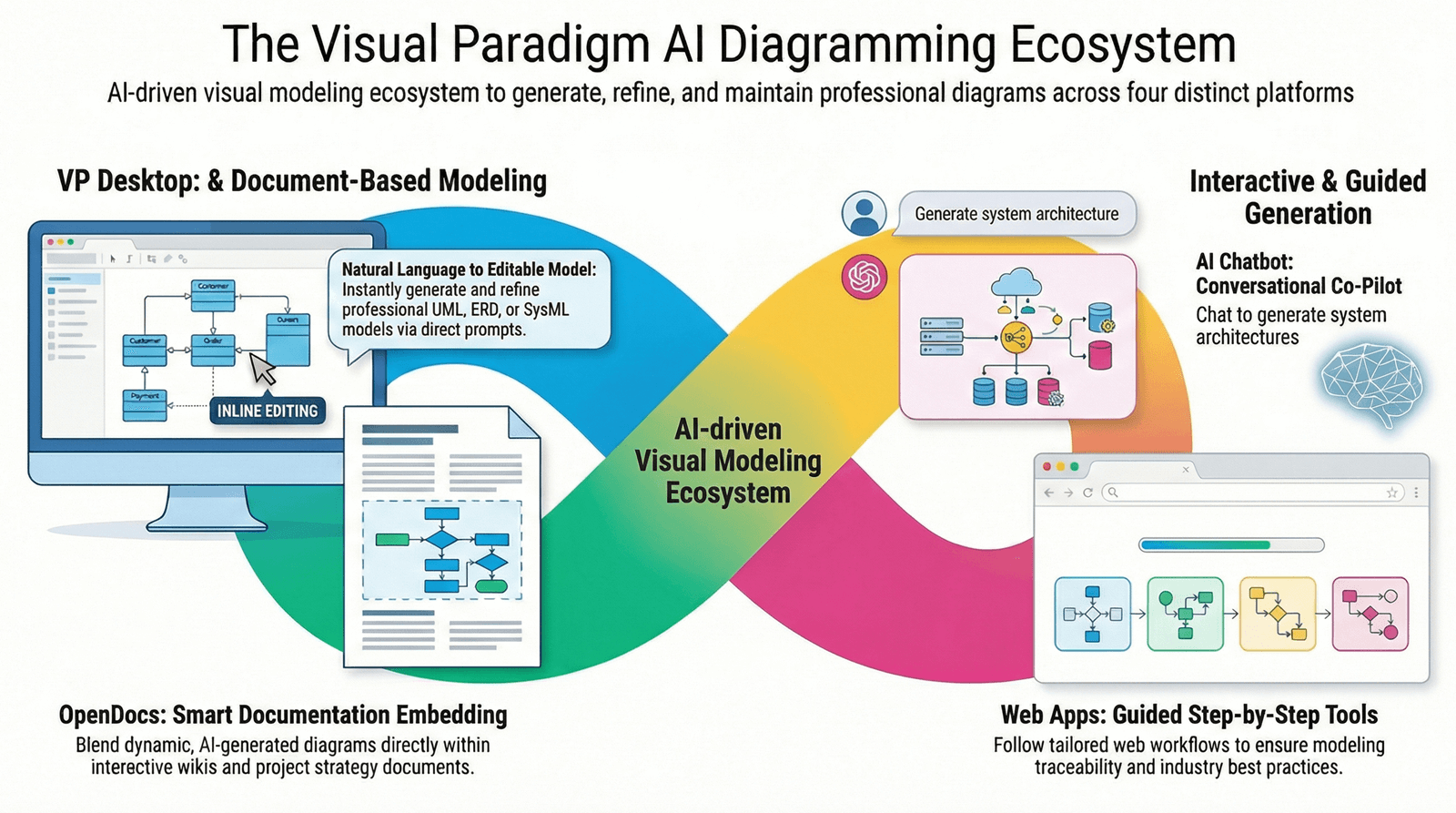
Visual Paradigm OpenDocs is a next-generation documentation platform that merges the precision of technical modeling with the accessibility of natural language content. Designed for modern development teams, business analysts, and project managers, OpenDocs serves as a centralized “visual knowledge engine” where:
-
📝 Text documentation and professional diagrams coexist on the same page
-
🤖 AI assistants generate diagrams from plain English descriptions
-
🌐 Teams collaborate in real-time via any modern web browser
-
🔗 Project specifications, requirements, and technical models remain synchronized
Unlike traditional documentation tools that require switching between word processors and diagramming applications, OpenDocs unifies these workflows into a single, intuitive interface—reducing context-switching and ensuring your documentation stays accurate and up-to-date.
Core Functionalities
🔄 Unified Workspace
OpenDocs combines a full-featured text editor with an integrated diagramming engine. This eliminates the need to switch between different tools, as you can create and edit visuals directly within your document pages. Write requirements, add user stories, and embed flowcharts, UML diagrams, or ERDs—all without leaving the page.
🤖 AI-Driven Creation
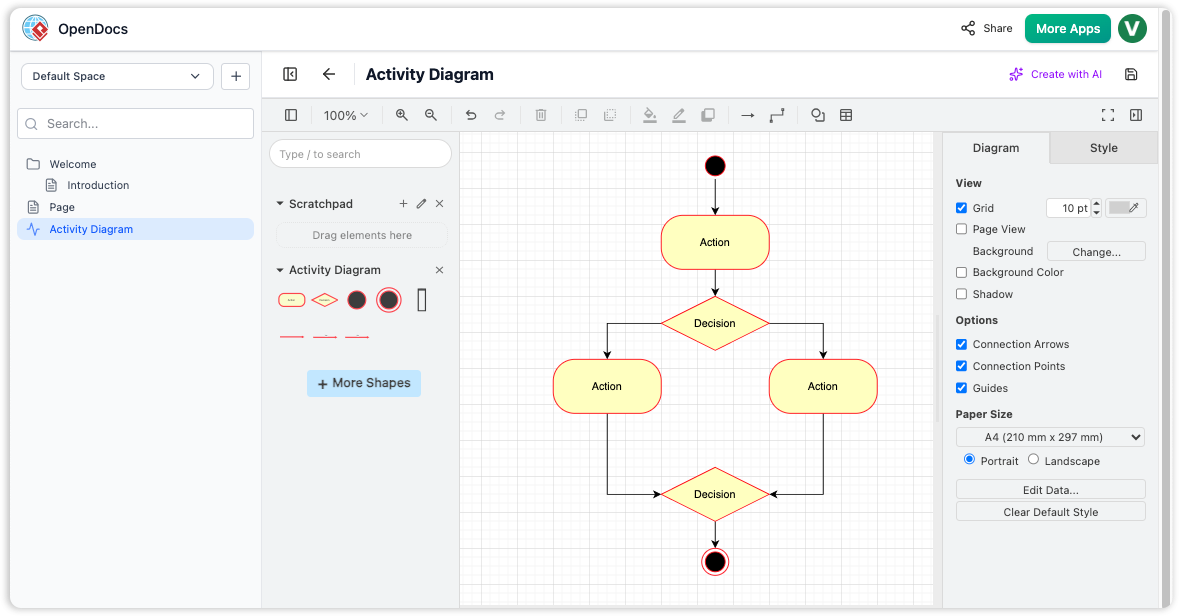
Generate professional-grade diagrams simply by describing a process or system in plain English. Supported diagram types include:
-
Flowcharts & Process Maps
-
Entity Relationship Diagrams (ERDs)
-
UML Diagrams (Class, Sequence, Use Case, etc.)
-
BPMN Workflow Models
-
Mind Maps & Breakdown Structure Charts
Example prompt: “Create an ERD for an e-commerce system with users, products, orders, and payments.”
🌳 Knowledge Tree Structure
Documentation is organized in a hierarchical “tree” with nested folders and pages, making it:
-
✅ Scalable for large enterprise projects
-
✅ Easy to navigate with collapsible sections
-
✅ Searchable across all content and diagrams
-
✅ Permission-controlled at folder or page level
✍️ Flexible Editing Options
OpenDocs supports multiple editing experiences to match your workflow preference:
| Editor Type | Best For | Features |
|---|---|---|
| Markdown Editor | Power users, developers | Live preview, syntax highlighting, keyboard shortcuts |
| WYSIWYG Editor | Business users, writers | Intuitive toolbar, drag-and-drop media, real-time formatting |
🔗 Pipeline Integration
The “Pipeline” feature connects Visual Paradigm Desktop and Online editions to OpenDocs. This allows users to:
-
Create or refine complex diagrams in Visual Paradigm’s dedicated modeling environment
-
Sync diagrams directly into OpenDocs documentation with one click
-
Maintain a “single source of truth” where diagram updates automatically propagate to linked documents
[Note: Original article images would appear here demonstrating the Pipeline workflow, editor interface, and AI diagram generation.]
Key Benefits
🎯 Centralized Source of Truth
Consolidate project specifications, meeting notes, technical models, and API documentation into one searchable hub. Eliminate version confusion and scattered files across email, drives, and messaging apps.
🌐 Web-Based Accessibility
Access OpenDocs via any modern browser with no local installation required. Features include:
-
Real-time collaboration with team members
-
Responsive design for desktop, tablet, and mobile
-
Offline editing support with auto-sync when reconnected
-
Enterprise-grade security with SSO and audit logs
🔗 One-Click Sharing
Share entire knowledge bases or specific “Spaces” with stakeholders through secure, read-only links. Options include:
-
Password-protected public links
-
Expiration dates for temporary access
-
Viewer analytics to track engagement
-
Embeddable widgets for intranets or wikis
🎨 Extensive Diagram Support
OpenDocs supports a wide array of professional diagram types:
✓ UML Diagrams (Class, Sequence, Activity, State, etc.)
✓ BPMN 2.0 Business Process Models
✓ Entity Relationship Diagrams (ERD)
✓ Flowcharts & Decision Trees
✓ PERT Charts & Gantt Timelines
✓ Mind Maps & Concept Maps
✓ Work Breakdown Structure (WBS) Charts
✓ Org Charts & Network Diagrams
Who Should Use OpenDocs?
| Role | Primary Use Cases |
|---|---|
| Software Development Teams | Technical specifications, architecture diagrams, API documentation, sprint retrospectives |
| Business Analysts | Requirements gathering, process mapping, stakeholder reports, use case documentation |
| Project Managers | Project charters, risk registers, timeline visualizations, status reports |
| Product Managers | Product roadmaps, user journey maps, feature briefs, competitive analysis |
| IT & DevOps Teams | Infrastructure diagrams, runbooks, incident post-mortems, compliance documentation |
Getting Started: Typical Workflow
Step 1: Create Your Knowledge Base
-
Sign in to OpenDocs via your Visual Paradigm account
-
Create a new “Space” for your project or team
-
Set up a folder structure using the Knowledge Tree (e.g.,
Project Alpha > Requirements > Technical Specs)
Step 2: Author Content with AI Assistance
-
Open a new page and start writing in Markdown or WYSIWYG mode
-
Type
/aior click the AI assistant icon to generate a diagram -
Describe your desired visual in plain English:
“Show a sequence diagram for user login with authentication service and database” -
Review and refine the AI-generated diagram directly in the editor
Step 3: Organize & Collaborate
-
Drag pages into folders to refine your knowledge hierarchy
-
@mention teammates to request feedback or assign action items
-
Use version history to track changes and revert if needed
Step 4: Share & Publish
-
Click “Share” to generate a secure link for stakeholders
-
Export individual pages or entire Spaces as PDF/HTML
-
Embed diagrams in Confluence, Notion, or internal wikis via iframe
[Note: Original article images would appear here showing the AI prompt interface, knowledge tree navigation, and sharing options.]
Advanced Features: Pipeline Integration
For teams using Visual Paradigm Desktop or Online for detailed modeling, the Pipeline feature creates a seamless bridge to OpenDocs:
How Pipeline Works:
graph LR
    A[Visual Paradigm Desktop/Online] -->|Export Diagram| B(Pipeline Queue)
    B -->|Sync| C[OpenDocs Knowledge Base]
    C -->|Auto-Update| D[Linked Documentation Pages]
    D -->|Feedback Loop| A
Best Practices for Pipeline:
-
✅ Name diagrams consistently in both tools for easy tracking
-
✅ Use tags to categorize diagrams by project phase or team
-
✅ Enable auto-sync for critical architecture diagrams
-
✅ Review sync logs periodically to ensure data integrity
[Note: Original article images would appear here demonstrating the Pipeline configuration panel and sync status indicators.]
- Reference
- Visual Paradigm OpenDocs Features: Official product page detailing OpenDocs capabilities, pricing, and integration options with Visual Paradigm’s modeling suite.
- Visual Paradigm OpenDocs: The Complete Guide to AI-Powered Knowledge Management and Diagram Generation: Comprehensive third-party guide covering setup, AI features, collaboration workflows, and enterprise use cases for OpenDocs.
- Export Diagrams from Visual Paradigm Online to OpenDocs: Release announcement detailing the export workflow for syncing diagrams from Visual Paradigm Online directly into OpenDocs documentation spaces.
- OpenDocs: AI-Powered Knowledge Management Platform: Official launch post introducing OpenDocs as a unified platform for AI-assisted documentation, diagram generation, and team knowledge sharing.
- AI ERD Tool in OpenDocs: Feature spotlight on OpenDocs’ AI-powered Entity Relationship Diagram generator, including prompt examples and customization options.
- AI Flowchart Generator in OpenDocs: Update release notes describing enhanced AI capabilities for creating process flowcharts, decision trees, and workflow diagrams from natural language descriptions.
- OpenDocs WYSIWYG Editor Update: Enhancement announcement for the intuitive WYSIWYG editor, featuring drag-and-drop media, real-time collaboration, and seamless diagram embedding.
- Mastering the Pipeline in Visual Paradigm OpenDocs: A Complete Guide to Streamlined Knowledge Management: In-depth tutorial on configuring and optimizing the Pipeline feature for bidirectional sync between Visual Paradigm modeling tools and OpenDocs documentation.
- Visual Paradigm OpenDocs Tutorial Video: Official video walkthrough demonstrating core OpenDocs workflows, including AI diagram generation, knowledge tree organization, and team sharing features.
- OpenDocs Professional Mind Map Integration: Release notes for adding professional-grade mind mapping capabilities to OpenDocs, with AI-assisted brainstorming and export options.
- AI Breakdown Structure Chart Maker in OpenDocs: Feature announcement for AI-powered generation of Work Breakdown Structure (WBS), organizational charts, and hierarchical decomposition diagrams from text prompts.
-
💡 Pro Tip: Start small—create one project Space in OpenDocs, document a single workflow with an AI-generated diagram, and share it with your team. Iterate based on feedback before scaling to enterprise-wide adoption.