


Visual Paradigm AI Suite: A Comprehensive Guide to Intelligent Modeling Tools
In the rapidly evolving landscape of software development and project management, artificial intelligence is reshaping how professionals visualize complex systems. Visual Paradigm has launched an Innovation Hub featuring a curated suite of AI-powered solutions designed to enhance productivity, streamline workflows, and foster creativity. This comprehensive guide explores these intelligent tools, ranging from conversational AI chatbots to structured UML generators.
The Innovation Hub: A Suite of Intelligent Applications
Visual Paradigm’s Innovation Hub acts as an automation powerhouse, offering tools that effectively build themselves based on user input. These tools cater to various domains including Agile Workflow, Content & Visual design, Process Analysis, and Strategic Analysis.
Featured Tools in the Suite
- AI-Powered Markmap Studio: Instantly turns scattered thoughts into structured mind maps, organizing brainstorming sessions into brilliance.
- DBModeler AI: Guides users from plain English descriptions to production-ready database schemas in minutes.
- AI-Powered C4 PlantUML Studio: Converts plain-language descriptions into standardized C4 diagrams (System Context, Container, Component) using PlantUML.
- Intelligent BPM and Analysis Suite: Allows users to document, visualize, and analyze business workflows effortlessly.
- Agilien: An AI-powered Jira Backlog Planner that translates high-level concepts into detailed, consistent user stories and tasks.
- AI Image Translator: Translates text within images across languages, preserving the visual context.
- AI-Powered BI Analytics: Transforms raw data into actionable reports and visual analytics in seconds.
- Page Editor & Flipbook Maker: Tools for creating stunning websites and publishing e-books with AI assistance.
Deep Dive: The AI Chatbot for Visual Modeling
One of the flagship features of the suite is the AI Chatbot. This tool leverages cutting-edge AI to automate the diagramming process, allowing users to transform simple text prompts into presentation-ready visuals instantly.
How It Works
- Describe Your Idea: Type a request such as “Create a use case diagram for an online shopping system.” The AI interprets the intent immediately.
- Generate Instantly: In seconds, the text is converted into a complete diagram without manual drawing or templates.
- Refine with Commands: Users can talk to the diagram naturally. Commands like “Add payment gateway” or “Rename Customer to Buyer” update the visual model in real-time.
- Explore and Document: Ask the AI questions like “What are the main use cases?” or request a project summary to generate documentation.
Supported Diagram Types
The AI Chatbot supports a vast universe of diagrams, including but not limited to:
- UML Diagrams: Class, Activity, Component, Deployment, Sequence, State Machine, and Use Case diagrams.
- Strategic Frameworks: SWOT Analysis, PEST/PESTLE Analysis, Ansoff Matrix, and Blue Ocean Four Actions Framework.
- Systems Engineering: SysML Block Definition, Internal Block, and Requirement diagrams.
- Architecture: ArchiMate diagrams and C4 models.
- General Business: Organization Charts, Mind Maps, and PERT Charts.
Desktop Integration
While the AI Chatbot is a cloud-based feature of VP Online, it is seamlessly integrated into the Visual Paradigm Desktop environment. Users with a desktop license and an online subscription can use the chatbot without leaving their application. Professional Edition users can even import generated diagrams directly into desktop projects for further advanced modeling.
Spotlight: AI-Assisted UML Class Diagram Generator
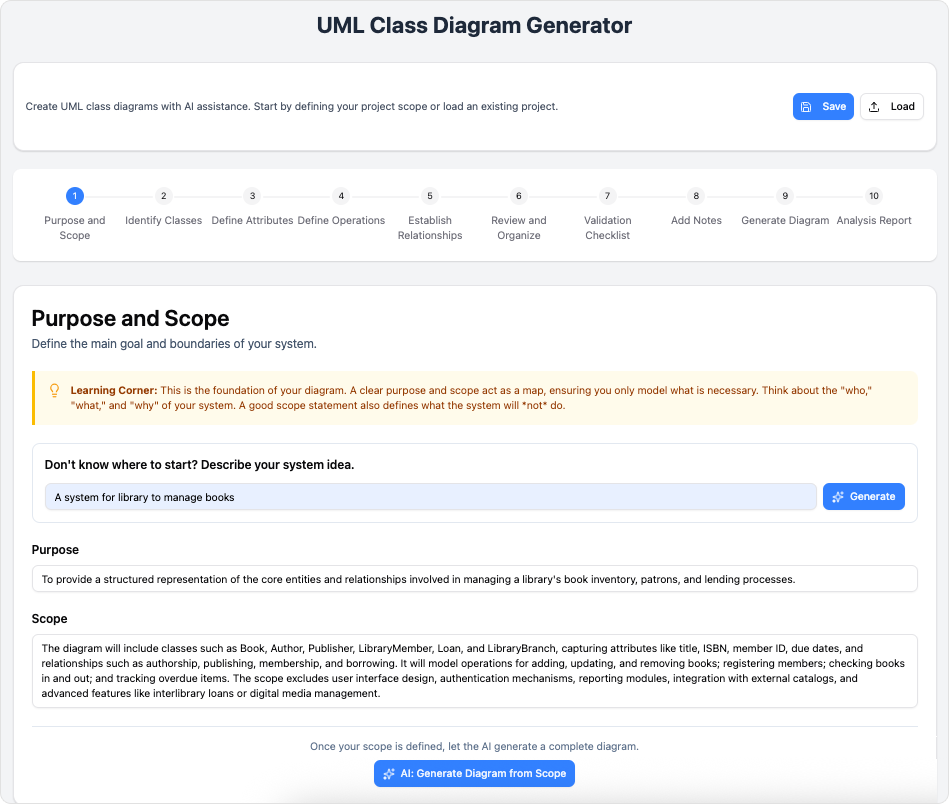
For users requiring specific structural modeling, the AI-Assisted UML Class Diagram Generator simplifies software design through a guided 10-step wizard. It is designed for both educational purposes and professional architectural review.
The 10-Step Wizard Workflow
This tool eliminates the need for syntax expertise (such as PlantUML) by using form-based interactions:
- Purpose and Scope: Define the high-level idea or let AI generate the diagram structure.
- Identify Classes: List the main entities within the system.
- Define Attributes: Specify properties and data types for each class.
- Define Operations: List methods and behaviors.
- Establish Relationships: Define associations, inheritances, and compositions.
- Review and Organize: Ensure consistency across the design.
- Validation Checklist: Run automated checks for best practices.
- Add Notes: Use AI to generate summary notes and design rationale.
- Generate Diagram: Render the final SVG diagram or view raw PlantUML code.
- Analysis Report: Receive an AI-powered critique with suggestions for improving design quality and maintainability.
This workflow is particularly beneficial for students and educators to learn UML principles, and for developers to rapidly prototype architecture.
Business ROI and Licensing
Achieving Better ROI
Adopting these AI tools drives stronger Return on Investment (ROI) by automating time-consuming manual tasks and reducing errors. The data-driven insights provided by tools like the BI Analytics and Intelligent BPM Suite facilitate strategic planning and faster execution.
Free vs. Paid Solutions
Visual Paradigm offers a tiered approach to accessibility:
- Free Tier: Includes core AI applications with fundamental functionality for basic workflow and content generation. These are permanently free, not just short-term trials.
- Paid Tier: Unlocks advanced features such as real-time processing, deep third-party integrations, enterprise-level security, and priority access to specialized strategic analysis tools. Subscriptions are flexible, offered on monthly or annual bases.
Frequently Asked Questions
Are the AI tools easy for non-technical users?
Absolutely. The interfaces are designed to be intuitive, reducing the learning curve and providing immediate value to both technical and non-technical users.How often are new features released?
Visual Paradigm is committed to continuous innovation, releasing new AI solutions and feature updates frequently.
Conclusion
Visual Paradigm’s AI-Powered Solutions represent a significant leap forward in visual modeling and project management. Whether you are generating complex UML diagrams via a wizard, brainstorming with a mind map, or using conversational AI to architect a system, these tools provide the automation and intelligence necessary to transform raw ideas into professional, actionable outputs instantly.
Resources
- Visual Paradigm AI: Advanced Software & Intelligent Apps
- Visual Paradigm – AI -Powered Visual Modeling Platform
- Comprehensive Tutorial: AI-Powered ArchiMate Diagram Generation in …
- Visual Paradigm – Online Productivity Suite
- Explore all the powerful features Visual Paradigm has to offer
- AI Chatbot | Diagramming & Modeling with Visual Paradigm
- AI Archives – Visual Paradigm Guides
- AI Business Process Improvement Tool – Visual Paradigm Product Updates
- AI Diagram Generation Guide: Instantly Create System Models with Visual …
- AI Chatbot for Visual Modeling – Visual Paradigm AI Chatbot
- Intelligent BPM and Analysis Suite | AI Process Mapping Tool
- Kick Start on Using AI Features in Visual Paradigm Desktop
- From Simple to Sophisticated: What is the AI-Powered Sequence Diagram Refinement Tool?
- What is a Use Case Diagram Refinement Tool? A Guide to AI-Powered Modeling
- What Is the Visual Paradigm AI Chatbot? – Visual Paradigm Guides
This post is also available in Deutsch, Español, فارسی, Français, English, Bahasa Indonesia, 日本語, Polski, Portuguese, Ру́сский, Việt Nam, 简体中文 and 繁體中文.