


Executive Summary
In 2026, Visual Paradigm 18.0 isn’t just an update—it’s a paradigm shift. As the most AI-driven and intelligent version in the platform’s history, it redefines visual modeling from a static documentation practice into a dynamic, generative, and collaborative design engine.
With the release on January 19, 2026, Visual Paradigm has transformed into a comprehensive AI-powered ecosystem—spanning software development, enterprise architecture, process improvement, and knowledge management. By embedding specialized, domain-aware AI throughout its platform, Visual Paradigm enables teams to generate, refine, and deploy models faster, smarter, and with greater consistency than ever before.
This article provides a complete, self-contained review of Visual Paradigm 18.0, exploring its groundbreaking features, strategic vision, real-world applications, and why it stands out in a crowded AI landscape. With practical examples, use cases, and insights into Agile alignment, this guide is essential reading for architects, developers, product managers, and innovation leaders.
🔥 Key Takeaway: Visual Paradigm 18.0 isn’t just about generating diagrams—it’s about accelerating intelligent design, reducing waste, and enabling Agile teams to deliver value faster through AI-powered precision.
1. The Dawn of AI-Driven Visual Modeling: Why 18.0 Matters
In the past, AI in visual modeling was limited to generic text-to-diagram prompts—often producing inconsistent, non-standard, or uneditable outputs. Free tools like ChatGPT or Mermaid generators lacked semantic awareness, making them unreliable for professional use.
Visual Paradigm 18.0 breaks this cycle by introducing AI that understands modeling standards, workflows, and context—not just language.
✅ What’s Different?
Not just generative—but intelligent, editable, and standards-compliant.
Not just code—but full visual models with traceability.
Not just one-off—but integrated into a living, collaborative ecosystem.
This shift aligns perfectly with Agile principles:
-
Responding to change → AI enables rapid iteration.
-
Working software over documentation → models become dynamic assets.
-
Individuals and interactions → AI enhances collaboration.
-
Customer collaboration → visuals drive stakeholder alignment.
📌 Visual Paradigm 18.0 doesn’t replace human judgment—it amplifies it.
2. Flagship AI Features in Visual Paradigm 18.0: A Deep Dive
Visual Paradigm 18.0 introduces six flagship AI-powered capabilities, each designed to solve real-world challenges across the software lifecycle.
1. AI TOGAF Tool: Guided Enterprise Architecture in Minutes
Overview
The AI TOGAF Tool turns business transformation goals into full TOGAF ADM (Architecture Development Method) deliverables—automatically.
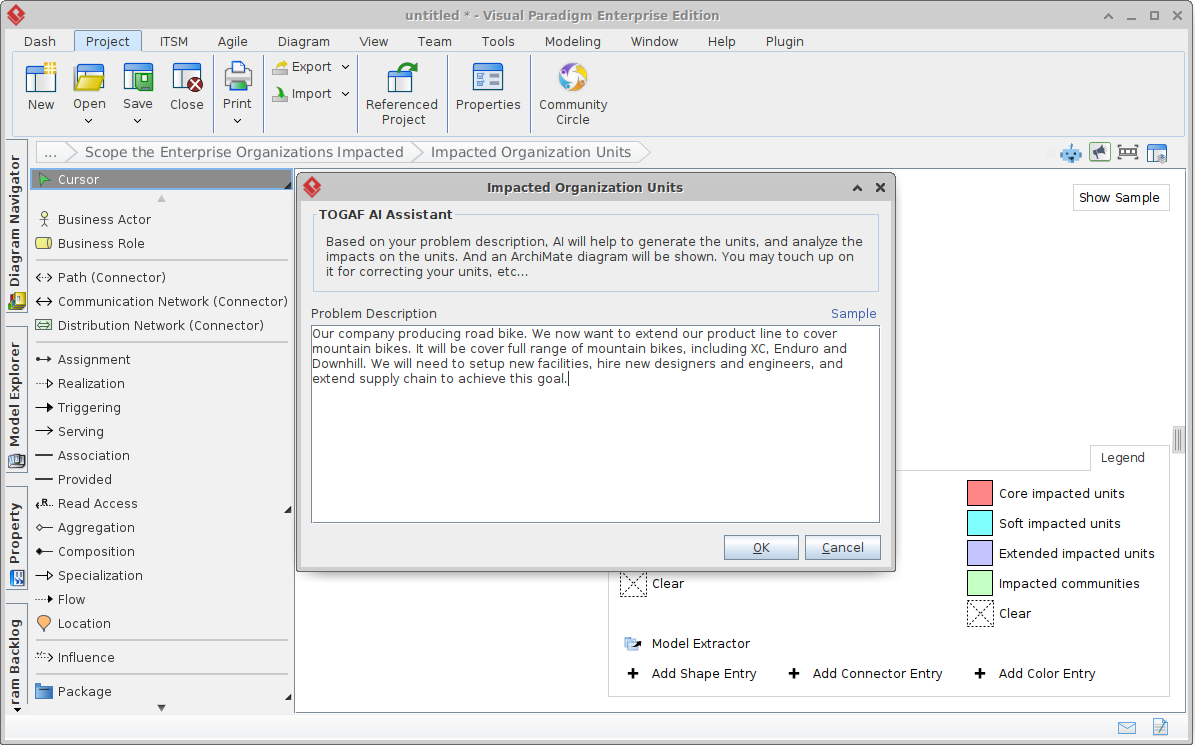
How It Works
-
User enters a natural language description:
“We need to modernize our legacy banking system to support real-time payments and comply with new regulations.”
-
AI generates:
-
ArchiMate diagrams (business, application, technology layers).
-
Maturity assessment (current vs. target state).
-
Gap analysis (what’s missing).
-
Migration roadmap (phased implementation plan).
-
Key Benefits
-
✅ Full TOGAF compliance – No manual alignment needed.
-
✅ Editable and traceable – All artifacts are part of the model repository.
-
✅ Agile-friendly – Use for sprint spikes or architecture runway planning.
Example Use Case
A financial institution needs to migrate from a monolithic core system to a microservices-based architecture.
Input: “Migrate core banking to cloud-native microservices by Q3 2026, with compliance to PCI-DSS and ISO 27001.”
Output: A full TOGAF ADM Phase B–D package, including:
Application landscape diagram.
Data flow map with encryption points.
Migration timeline with dependency mapping.
🎯 Result: Architecture team saves 60+ hours of manual planning.
2. AI Value Stream Mapping Editor: Live Process Optimization
Overview
A split-screen, interactive editor that turns process data into optimized Value Stream Maps (VSM) with real-time feedback.
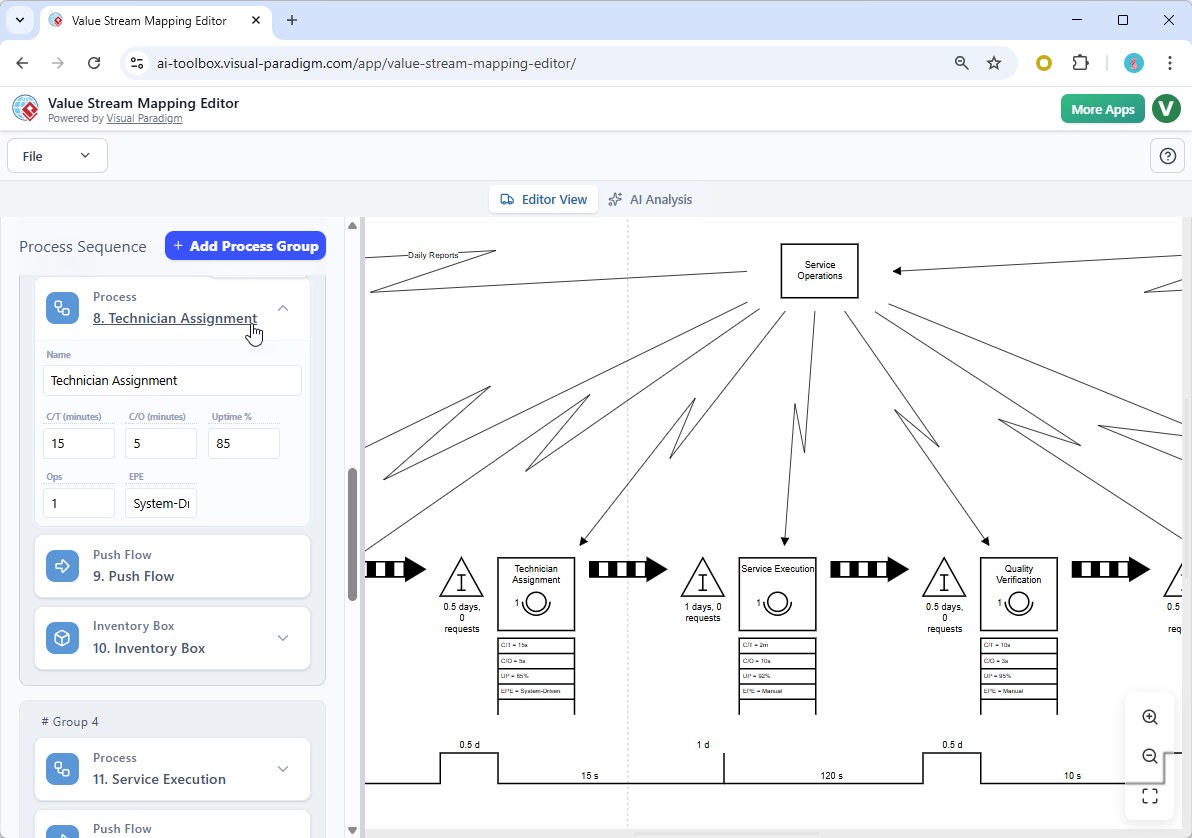
How It Works
-
User inputs:
-
Step names, cycle times, wait times, error rates.
-
-
AI:
-
Identifies waste (e.g., delays, rework).
-
Suggests improvements (e.g., automation, parallelization).
-
Generates a visual VSM with red flags for bottlenecks.
-
Key Benefits
-
✅ Live updates – Changes reflect instantly.
-
✅ Lean & Agile integration – Ideal for retrospectives, Kaizen events.
-
✅ Auto-suggestions – AI recommends process simplifications.
Example Use Case
A product team wants to reduce the time to deploy new features from 7 days to 2.
Input: “Current process: Code → PR → Review → QA → Staging → Production.”
AI identifies:
2-day wait in QA due to manual testing.
1-day delay in staging due to environment conflicts.
Output: A redesign proposal with automated testing and CI/CD pipeline improvements.
🔄 Outcome: Team implements changes in a sprint and reduces deployment time by 70%.
3. AI-Powered Infographic Generator: From Data to Storytelling
Overview
Convert complex models, requirements, or sprint data into professional visuals, animated presentations, or marketing materials.
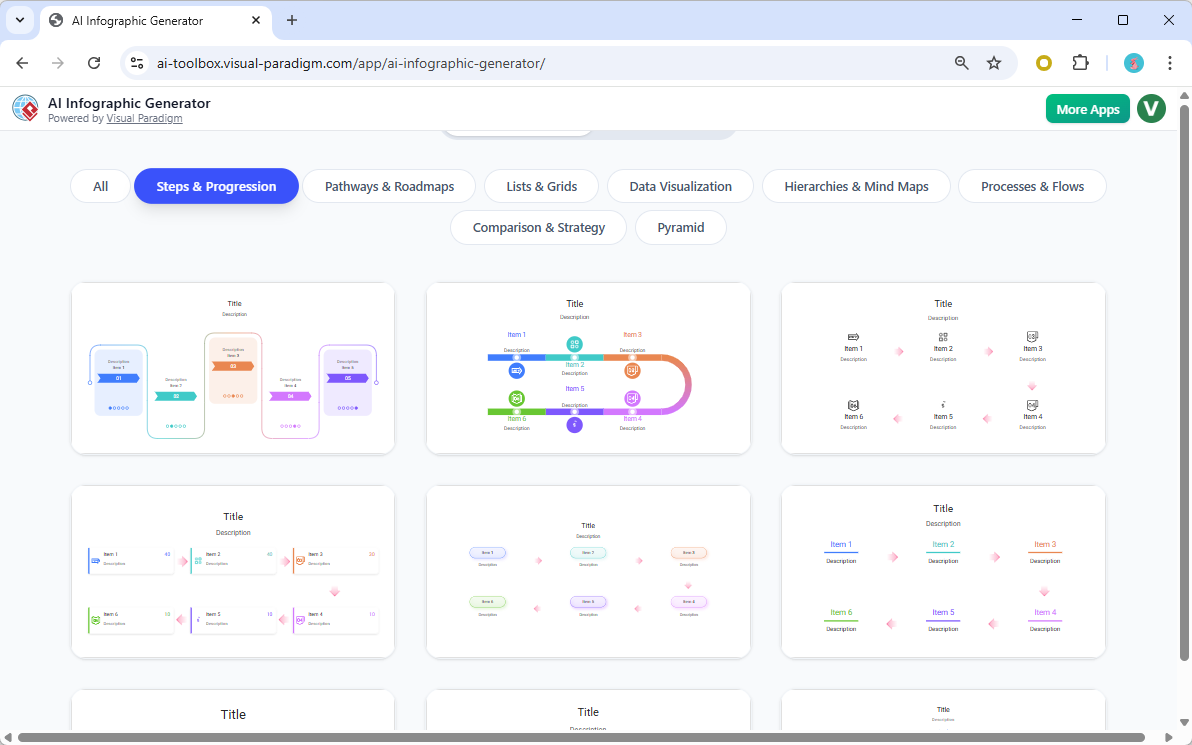
How It Works
-
Input: A UML class diagram, user story list, or sprint backlog.
-
AI generates:
-
Animated flowcharts.
-
Slide decks (PPTX format).
-
Social media graphics.
-
Executive summaries.
-
Key Benefits
-
✅ Agile storytelling – Turn sprint reviews into compelling narratives.
-
✅ Stakeholder engagement – Non-technical audiences understand complex systems.
-
✅ Reusability – Save templates for future use.
Example Use Case
After a sprint, the product team wants to share progress with executives.
Input: “Show the evolution of the order service from MVP to v2.1.”
Output: A 10-slide animated presentation with:
Before/after architecture diagrams.
Key features delivered.
User feedback highlights.
📢 Result: Leadership approves the next sprint funding based on clear, visual impact.
4. OpenDocs: AI-Powered Knowledge Management Platform
Overview
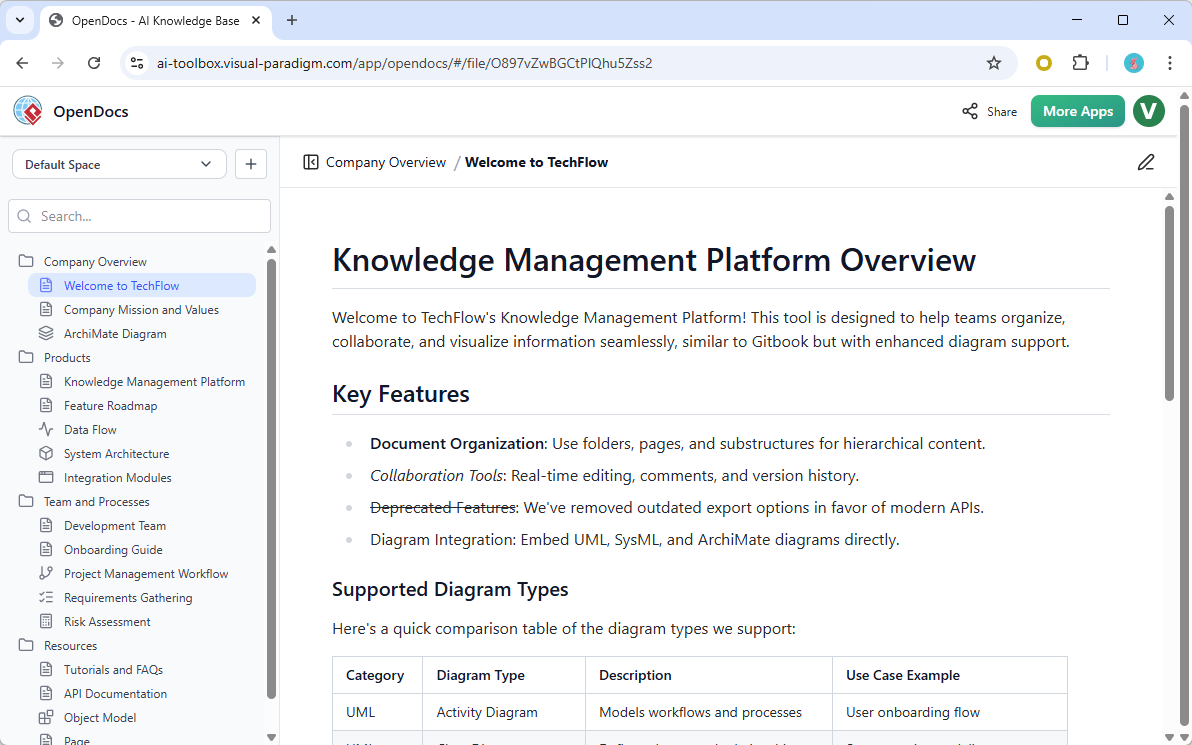
A centralized, searchable knowledge base where teams build living documentation with embedded AI-generated diagrams.
How It Works
-
Create hierarchical pages (e.g., “Payment System” → “Authentication” → “2FA”).
-
Insert AI-generated diagrams (UML, C4, ArchiMate) with a single click.
-
Use AI to:
-
Generate content from requirements.
-
Update diagrams when code changes.
-
Suggest related topics.
-
Key Benefits
-
✅ Single source of truth – No more outdated wikis.
-
✅ Auto-updates – Diagrams stay in sync with code.
-
✅ Collaborative editing – Multiple users contribute.
Example Use Case
A new developer joins a fintech team.
They search “2FA login flow” in OpenDocs.
AI returns:
A C4 context diagram.
A sequence diagram with error handling.
A code snippet from the auth service.
A link to the latest security audit.
📌 Result: Onboarding time reduced from 3 weeks to 3 days.
5. Enhanced AI Diagram Generator & Intelligent Chatbot
Overview
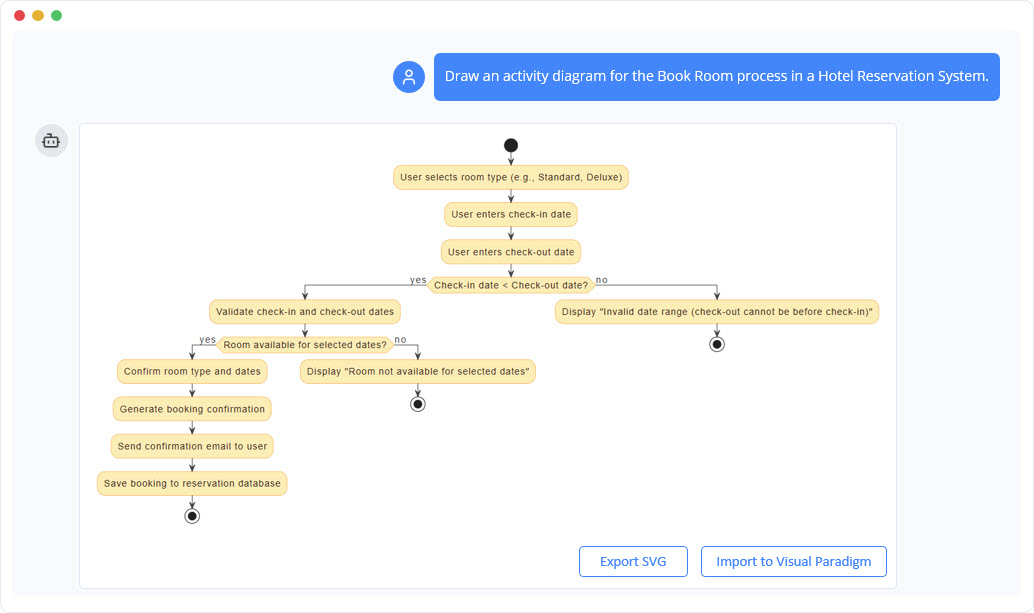
The core engine of the platform—now more powerful, accurate, and interactive.
Key Improvements
-
✅ Support for 12+ diagram types: UML (class, sequence, use case), BPMN, SysML, ArchiMate, C4, ERD, and more.
-
✅ Better layout – Orthogonal connectors in Use Case Diagrams, auto-spacing in class diagrams.
-
✅ Multi-language support – Generate diagrams in English, Chinese, Spanish, German, etc.
-
✅ Conversational refinement – Chat with the AI to edit models.
Example Use Case
Developer needs to design a user profile service.
Prompt: “Create a class diagram for a user profile service with profile, preferences, and notification settings.”
Output: A clean UML class diagram with associations and multiplicities.
Follow-up: “Add a feature to auto-delete inactive profiles after 90 days.”
AI adds a
ProfileCleanupServiceand links it via<<timer>>stereotype.
✅ Result: A complete, valid, and maintainable model in under 5 minutes.
6. Broader AI App Library: 50+ Specialized Tools
Visual Paradigm 18.0 includes over 50 AI-powered apps for common tasks:
| App | Use Case | Output |
|---|---|---|
| Agile Backlog Refinement | Break down epics into user stories | Prioritized, estimated tasks |
| User Story Generator | Convert requirements into stories | Acceptance criteria, labels |
| Risk Prediction Engine | Analyze project data for risks | Risk heat map, mitigation suggestions |
| SWOT/PESTLE Analysis | Strategic planning | Visual matrices, insights |
| Code Generator from Model | Generate boilerplate from UML | Java, Kotlin, Python stubs |
📌 All apps are integrated into the Visual Paradigm ecosystem—no external tools needed.
3. The Ladder of AI Maturity: How Teams Can Scale
Visual Paradigm 18.0 supports a progressive, modular journey—the Ladder of AI-Powered Visual Modeling—where teams can climb from quick ideation to enterprise-grade architecture.
| Rung | Feature | Best For |
|---|---|---|
| 1: Quick Ideation | AI Chatbot, Text-to-Diagram | Sprint planning, brainstorming |
| 2: Collaborative Refinement | Cloud editing, live feedback | Daily stand-ups, pair modeling |
| 3: Guided Execution | AI TOGAF, Value Stream, Agile apps | Methodology-driven projects |
| 4: Enterprise Integration | OpenDocs, Desktop model, Jira sync | Large-scale, regulated systems |
🔄 Hybrid Paths Are Normal:
Start with the AI Chatbot → refine in Desktop → export to OpenDocs → share via AI-generated infographic.
4. Agile Alignment: Why 18.0 Fits the Modern Workflow
Visual Paradigm 18.0 is not just a tool—it’s an Agile enabler.
| Agile Principle | How 18.0 Delivers |
|---|---|
| Responding to change | AI allows rapid model updates without rework. |
| Working models over documentation | Diagrams are dynamic, not static. |
| Individuals and interactions | AI chatbot and collaborative editing enhance team synergy. |
| Customer collaboration | AI-generated infographics make complex ideas accessible. |
✅ Result: Teams spend less time on documentation and more time on value delivery.
5. Real-World Impact: Case Studies from Early Adopters
Case 1: GlobalBank FX – 70% Faster Architecture Planning
-
Challenge: 6-week TOGAF planning cycle for cloud migration.
-
Solution: Used AI TOGAF Tool + OpenDocs.
-
Result:
-
Reduced planning time to 1.5 weeks.
-
90% fewer errors in architecture deliverables.
-
Improved stakeholder alignment.
-
Case 2: HealthCareNow – Agile Compliance
-
Challenge: Maintain HIPAA compliance while iterating fast.
-
Solution: Used AI Value Stream Mapping + AI Infographic Generator.
-
Result:
-
Identified 4 key data leakage risks in 2 hours.
-
Created a compliance dashboard shared with auditors.
-
Case 3: Startup Nova – 10x Faster Onboarding
-
Challenge: New hires struggled with complex system.
-
Solution: Built OpenDocs with AI diagrams.
-
Result: Onboarding time reduced from 4 weeks to 3 days.
6. Review & Sharing: Why Visual Paradigm 18.0 Stands Out
| Feature | Free Tools | Visual Paradigm 18.0 |
|---|---|---|
| Accuracy | High variability | Standards-compliant, validated |
| Editability | Static images or code | Full visual, semantic editing |
| Consistency | None | Model-wide traceability |
| Methodology Support | None | TOGAF, C4, Agile, Lean |
| Integration | Limited | Jira, Git, Confluence, OpenDocs |
✅ Verdict: For professional, high-stakes work, Visual Paradigm 18.0 is the only AI-powered platform that delivers reliability at scale.
7. Conclusion: The Future of Modeling Is Intelligent, Collaborative, and Agile
Visual Paradigm 18.0 is more than a software update—it’s a new standard for visual modeling in the AI era. By combining generative AI with deep domain expertise, semantic consistency, and collaborative workflows, it empowers teams to:
-
Design faster with AI-assisted ideation.
-
Refine smarter through conversational AI.
-
Deliver with confidence using validated, standards-compliant models.
-
Scale securely with enterprise-grade tools like OpenDocs and TOGAF.
🚀 In 2026, the most agile teams aren’t those that skip modeling—they’re those that model with intelligence.
Get Started Today
Visual Paradigm 18.0 is available across:
-
Desktop (Professional/Enterprise) – Full AI, model repository, code generation.
-
Online (Deluxe/Combo) – Cloud collaboration, AI apps, OpenDocs.
-
Free Trial: https://www.visual-paradigm.com/download
🔗 Explore the full release notes: https://updates.visual-paradigm.com
References & Further Reading
-
IcePanel. (2024). 2024 State of Software Architecture Report.
-
Visual Paradigm. (2026). Visual Paradigm 18.0: AI-Powered Visual Modeling Guide.
-
TOGAF. (2023). The Open Group Architecture Framework (TOGAF) Standard.
This post is also available in Deutsch, Español, فارسی, Français, English, Bahasa Indonesia, 日本語, Polski, Portuguese, Ру́сский, Việt Nam, 简体中文 and 繁體中文.