


Introduction to TOGAF ADM
The Open Group Architecture Framework (TOGAF) Architecture Development Method (ADM) is a structured, iterative process for developing and managing enterprise architecture. It consists of phases that guide organizations from defining architecture vision to implementation and ongoing governance. The ADM is divided into phases: Preliminary, A (Architecture Vision), B (Business Architecture), C (Information Systems Architecture), D (Technology Architecture), E (Opportunities and Solutions), F (Migration Planning), G (Implementation Governance), and H (Architecture Change Management), with a central Requirements Management phase. TOGAF ADM emphasizes alignment between business strategy and IT, stakeholder engagement, and governance. It is framework-agnostic but often paired with modeling languages like ArchiMate or visualization tools like the C4 Model to produce artifacts such as diagrams, matrices, and catalogs.
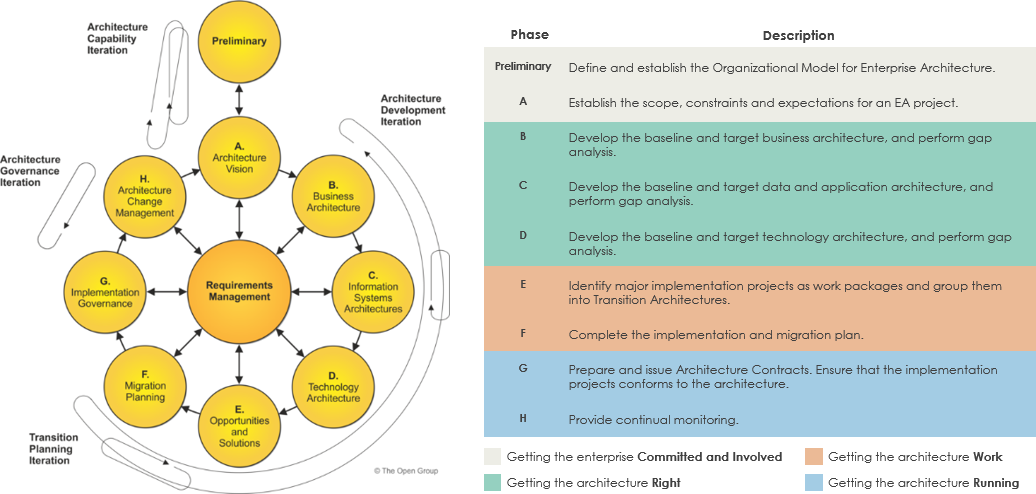
TOGAF ADM provides the “how” of enterprise architecture but does not prescribe a specific modeling notation. This is where ArchiMate and the C4 Model come in, serving as complementary tools for representation and communication within the ADM phases.
Overview of ArchiMate
ArchiMate is an open, independent modeling language developed by The Open Group for describing enterprise architectures. It provides a standardized way to visualize relationships between business processes, applications, data, and technology infrastructure. Key concepts include:
-
Layers: Divided into three core layers—Business (actors, processes, services), Application (components, functions, interfaces), and Technology (nodes, devices, networks)—plus cross-cutting aspects like Motivation (goals, drivers, requirements) and Strategy (capabilities, resources).
-
Elements: Approximately 60 elements, categorized as active (e.g., actors, components), behavioral (e.g., processes, functions), and passive (e.g., data objects).
-
Relationships: Multiple types, including structural (e.g., composition, aggregation), dependency (e.g., realization, serving), dynamic (e.g., flow, trigger), and others (e.g., specialization).
-
Viewpoints: Predefined or custom views tailored to stakeholders, such as capability maps or application landscapes.
ArchiMate is designed for holistic enterprise views, ensuring consistency, traceability, and analysis (e.g., impact analysis). It is compatible with TOGAF and supports governance by modeling motivations and migrations.
Overview of the C4 Model
The C4 Model is a lightweight, notation-independent approach for visualizing software architecture, created by Simon Brown in 2011. It focuses on hierarchical abstractions to communicate architecture effectively to developers and stakeholders. Key concepts include:
-
Levels of Abstraction: Four zoomable levels—Context (high-level system overview with users and external systems), Containers (deployment units like apps, databases, APIs), Components (internal modules or services within containers), and Code (detailed class or code structures, often represented via UML or pseudocode).
-
Elements: Limited to about 10 core abstractions, including persons (users), software systems, containers, components, and relationships (e.g., interactions via APIs or protocols).
-
Diagrams: Four standard types corresponding to the levels, emphasizing simplicity and audience-specific views. No prescribed shapes or colors; it prioritizes clarity over formality.
-
Relationships: Primarily hierarchical (containment) and interaction-based, without complex categories.
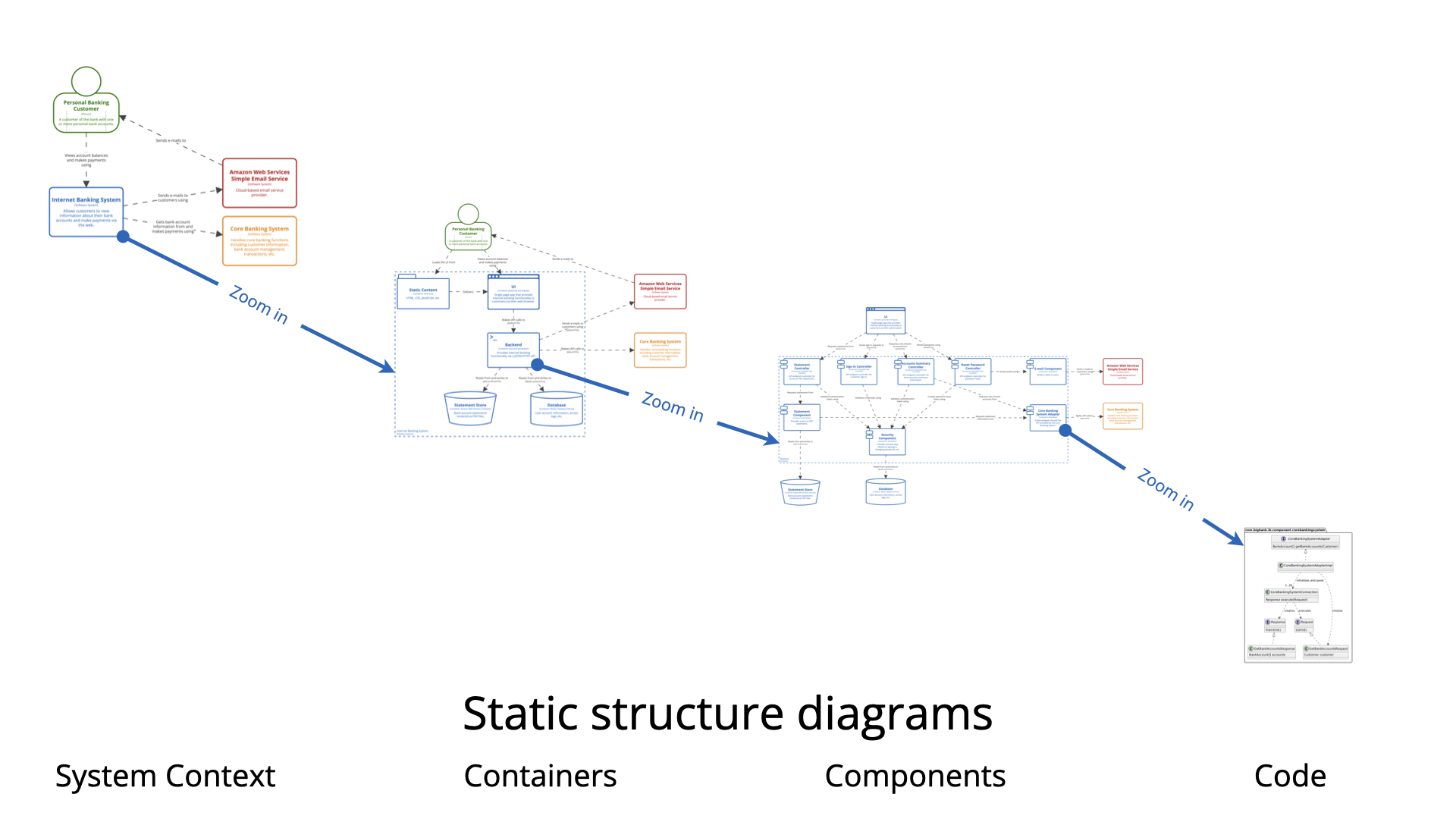
C4 is developer-friendly, practical for agile teams, and excels at bridging high-level designs to implementation. It reflects how software engineers think about systems but lacks depth for non-technical enterprise concerns.
Key Differences Between ArchiMate and C4
ArchiMate and C4 serve overlapping but distinct purposes: ArchiMate is a comprehensive language for enterprise-wide modeling, while C4 is a focused visualization method for software architecture.
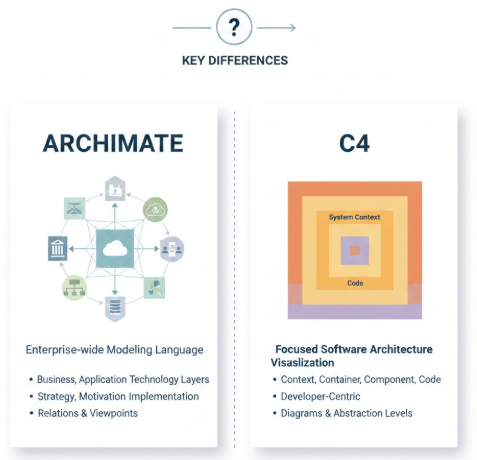
Below is a comparison table highlighting their differences:
| Aspect | ArchiMate | C4 Model |
|---|---|---|
| Scope | Enterprise-wide, covering business, application, technology, strategy, and motivation layers. Holistic view including governance and non-technical elements. | Software-centric, focused on system design from context to code. Limited to technical delivery; does not address business motivation or strategy deeply. |
| Complexity | High: ~60 elements and multiple relationship types (structural, dependency, dynamic, specialization). Formal and rigorous. | Low: ~10 elements, hierarchical relationships. Simple and flexible, notation-independent. |
| Elements | Layered and detailed (e.g., business actors, application functions, technology nodes). Supports passive structures like data objects. | Hierarchical abstractions (persons, systems, containers, components). Overloads terms like “component” for simplicity. |
| Relationships | Diverse and explicit (e.g., realization for how a process is supported by an application). Enables cross-layer traceability. | Mainly containment and interactions (e.g., API calls). Less emphasis on types; focuses on flows. |
| Suitability | Ideal for enterprise architects, security architects, and cross-functional teams needing traceability and analysis. | Best for solution/software architects and developers in agile environments. Feels lightweight and practical for engineering teams. |
| Strengths | Standardization, consistency, support for viewpoints and analysis (e.g., gap/impact). Compatible with frameworks like TOGAF. | Developer engagement, zoomable views, ease of creation. Bridges design to code without bureaucracy. |
| Weaknesses | Can feel verbose or heavy for technical teams; requires tools for management. | Lacks enterprise breadth; not suited for motivation, governance, or non-software aspects. May need extension for complex enterprises. |
In terms of application components, ArchiMate offers nine detailed elements (e.g., application component, function, service, interface), allowing fine-grained modeling across layers. C4 uses a single “component” concept across four sizes/levels, making it more abstracted but easier to grasp.
Integration of ArchiMate and C4 with TOGAF ADM
ArchiMate and C4 are not competitors but complements within TOGAF ADM. TOGAF provides the process (ADM phases), ArchiMate the modeling language for enterprise consistency, and C4 the visualization for detailed software views. This integration creates a workflow from strategic alignment to implementation:
-
Mapping C4 to ArchiMate: C4 concepts can be expressed using ArchiMate elements for consistency. For example:
-
C4 Persons → ArchiMate Business Actors
-
C4 Software Systems/Containers → ArchiMate Application Components
-
C4 Components → ArchiMate Application Functions
This allows C4 diagrams to be part of an ArchiMate repository, ensuring traceability.
-
-
Benefits of Integration: Enhances communication (ArchiMate for executives, C4 for developers), improves traceability (link business goals to code), and supports agile practices within TOGAF’s governance. Without modeling, TOGAF can be abstract; ArchiMate adds rigor, and C4 adds practicality.
Usage in TOGAF ADM Phases
ArchiMate is typically used for broad modeling in early phases, while C4 provides detailed views in later phases.
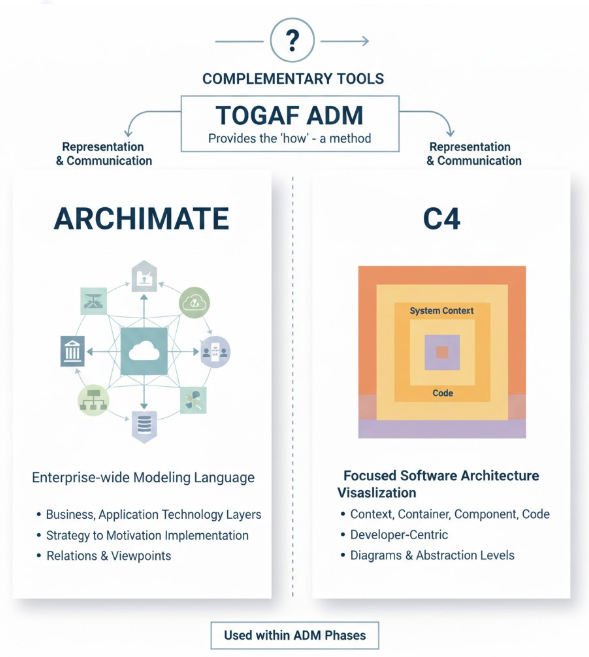
Here’s a phase-by-phase guide:
| TOGAF ADM Phase | ArchiMate Usage | C4 Usage | Key Activities/Example Artifacts |
|---|---|---|---|
| Preliminary | Define modeling standards and metamodels. | N/A (high-level setup). | Establish ArchiMate viewpoints. |
| A: Architecture Vision | Model motivations (goals, drivers) and high-level landscapes. | Level 1 (Context) for system overview. | ArchiMate motivation diagram; C4 context showing stakeholders and systems. |
| B: Business Architecture | Model business processes, actors, capabilities. | Level 1 to link processes to systems. | ArchiMate business process view (e.g., “Order Management” process). |
| C: Information Systems Architecture | Model applications, data flows, integrations. | Level 2 (Containers) for apps/APIs; Level 3 (Components) for internals. | ArchiMate application landscape; C4 container diagram (e.g., microservices and DBs). |
| D: Technology Architecture | Model infrastructure, nodes, networks. | Level 2 for deployment units. | ArchiMate technology view (e.g., cloud infrastructure); C4 deployment diagram. |
| E: Opportunities & Solutions | Assess impacts, model solutions and gaps. | Levels 2-3 for migration options. | ArchiMate gap analysis; C4 comparison of current vs. target. |
| F: Migration Planning | Plan transitions, risks. | Levels 2-3 for rollback/implementation. | ArchiMate migration viewpoint; C4 transition diagrams. |
| G: Implementation Governance | Monitor compliance via models. | Levels 3-4 for developer handoff. | ArchiMate governance views; C4 component/code links. |
| H: Architecture Change Management | Track changes and evolutions. | Levels 3-4 for updates. | ArchiMate change impact analysis; C4 evolved diagrams. |
This mapping ensures artifacts are produced efficiently, with ArchiMate handling enterprise consistency and C4 zooming into software details.
Examples
Consider a case study of RetailX, an e-commerce company migrating to a microservices platform:
-
Phase A: Use ArchiMate to model business goals (e.g., “Reduce checkout time <3 seconds” as a driver influencing a capability). C4 Level 1 shows the system context with customers, payment gateways, and the core e-commerce system.
-
Phase B: ArchiMate diagrams business processes (e.g., “Place Order” flow involving actors like Customer and services like Inventory Check).
-
Phase C: ArchiMate models application components (e.g., Order Service interacting with Payment Service via data flows). C4 Level 2 depicts containers (e.g., API Gateway, Order Microservice, Database) with HTTPS interactions.
-
Phase D: ArchiMate shows technology nodes (e.g., AWS EC2 hosting Kubernetes). C4 Level 2 adds deployment details like cloud services (S3 for storage).
-
Phase E/F: ArchiMate performs gap analysis (e.g., current monolith vs. target microservices). C4 compares container diagrams for migration paths.
-
Phase G/H: ArchiMate tracks compliance (e.g., PCI DSS via motivation elements). C4 Level 3 breaks down components (e.g., “Order Validator” module), linking to code repositories for governance.
This example illustrates how ArchiMate provides the enterprise backbone, while C4 enables developer-focused implementation.
When to Use ArchiMate vs. C4 in TOGAF ADM
-
Use ArchiMate when: Dealing with enterprise-scale transformations, needing cross-layer traceability, or aligning with business strategy/governance. It’s essential for large organizations where consistency across domains is critical.
-
Use C4 when: Focusing on software delivery, engaging development teams, or needing quick, intuitive visualizations in agile contexts. It’s ideal for zooming into specific systems without overwhelming detail.
-
Use Both: In most TOGAF ADM implementations for balanced coverage—ArchiMate for the big picture, C4 for the details. Tools like Enterprise Architect, Archi, or Visual Paradigm support this integration.
This guide equips architects to leverage both tools effectively within TOGAF ADM, promoting efficient, stakeholder-aligned enterprise architecture.
- Step-by-Step TOGAF ADM Enterprise Architecture Guide: A comprehensive tutorial that explains the Architecture Development Method (ADM) phases and demonstrates how Visual Paradigm helps produce standardized deliverables with instructions, tips, and case studies.
- The Ultimate Guide to C4-PlantUML Studio: Revolutionizing Software Architecture Design: This resource explains how the studio combines AI-driven automation, the structural clarity of the C4 model, and the flexibility of PlantUML to solve documentation bottlenecks.
- The Essential Guide to ArchiMate: How It Works, Strengths, and Overcoming Challenges with AI: This guide explores how AI-powered ArchiMate diagram generation addresses traditional modeling disadvantages and highlights best practices for effective usage.
- Comprehensive Tutorial: Using ArchiMate with TOGAF ADM and the Role of AI in Enterprise Architecture Modeling: A detailed walkthrough exploring how Visual Paradigm, as a certified tool, facilitates EA modeling through its AI Diagram Generator within the TOGAF framework.
- Beginner’s Guide to C4 Model Diagrams: A step-by-step introduction to the four levels of abstraction—Context, Containers, Components, and Code—for effective software architecture communication.
- Full ArchiMate Viewpoints Guide (Examples Included): A complete reference including 23 official ArchiMate example viewpoints with clear diagram explanations and certified tool vendor insights.
- Comprehensive Guide to Applying Gap Analysis in TOGAF ADM: A technical overview providing a systematic approach to identifying discrepancies between current and target architectures within the TOGAF lifecycle.
- Comprehensive Tutorial: Generating and Modifying C4 Component Diagrams with AI Chatbot: A hands-on guide demonstrating how to use a conversational AI assistant to create and iteratively refine the internal structures of a software system.
- Seamlessly Integrating ArchiMate into TOGAF’s Architecture Development Method: This article explains how to automate the TOGAF ADM process using standard diagrams and a visual Process Navigator to simplify the architect’s journey.
- Why ArchiMate? A Guide to the Common Language of Enterprise Architecture: An exploration of ArchiMate’s role as an independent modeling language for describing, analyzing, and visualizing enterprise architectures.
- AI-Powered C4 Diagram Generator – Features and Core Levels: Documentation detailing support for the four core C4 levels (Context, Container, Component, Deployment) plus essential supporting architectural views.
- TOGAF ADM Phase A: Architecture Vision Deliverables: A focused technical guide detailing the specific activities and mandatory deliverables expected during the initial vision phase of the ADM.
- Mastering ArchiMate: A Comprehensive Tutorial for Enterprise Architects: A structured walkthrough designed to help architects use standardized notation to analyze and visualize cross-layer relationships.
- Introducing AI-Powered ArchiMate Viewpoints Generator in Visual Paradigm: This release note covers an AI-driven tool that automates the creation of viewpoints to boost modeling speed and standards compliance.
- TOGAF ADM: Requirements Management Deliverables: A guide focused on the processes and artifacts required to maintain and manage architectural requirements throughout the entire ADM cycle.
This post is also available in Deutsch, Español, فارسی, Français, English, Bahasa Indonesia, 日本語, Polski, Portuguese, Ру́сский, Việt Nam, 简体中文 and 繁體中文.