


The UML Object Diagram serves a unique and critical function within the suite of structural modeling tools: it provides a concrete, instance-level view of a system. While the Class Diagram (the blueprint) shows the abstract potential—the types of objects that can exist and their potential relationships—the Object Diagram shows the actual objects that do exist at a specific moment, including their current data values and established connections.
Think of a Class Diagram as the recipe for a cake, detailing the ingredients and steps. The Object Diagram, by contrast, is a photograph of a specific cake baked today, showing its size, frosting color, and actual placement on the table.
Learn more about Class vs. Object Diagram– When to Use Instances .
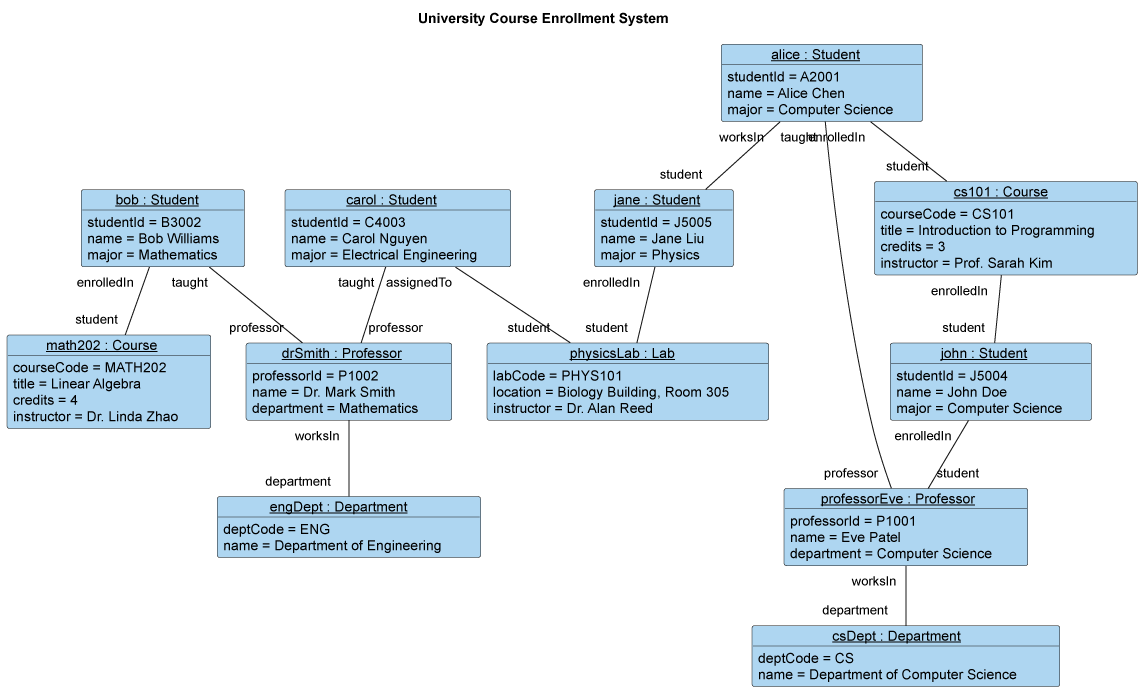
The Relationship to Class Diagrams
An Object Diagram is fundamentally an instance-level version of a Class Diagram. Every element in an Object Diagram must conform to the structure defined by a corresponding class in the Class Diagram:
-
Object Instance: An object in the diagram is an instance of a specific class.
-
Link: A link between two objects is an instance of a specific association defined between their corresponding classes.

This concrete visualization is vital for validating the abstract, theoretical design. If a Class Diagram is designed incorrectly, the flaw often becomes immediately apparent when attempting to model a realistic scenario using an Object Diagram.
Key Elements of the Object Diagram
1. Object Instance
An object instance is the primary element, represented as a rectangle. The notation follows a specific format to clearly distinguish it from a class:
-
objectName(Optional): The specific name given to the instance (e.g.,myOrder,userA). The name is underlined. -
ClassName: The name of the class from which the object is instantiated. -
The Colon Separator: The colon (
:) separates the instance name from the class name. -
Underlining: Both the instance name and the class name must be underlined to signify that this represents an object instance, not a class definition. (e.g.,
userB : Useror: Order)
2. Attribute Values
Unlike a Class Diagram, which shows the names of attributes, the Object Diagram shows the current values of those attributes for the specific instance. This is what makes the diagram a “snapshot.”
The attributes are listed in the second compartment of the rectangle using the syntax:
-
Example: An object named
myCar : Vehiclemight have the attribute valuecolor = "red"andspeed = 65.
3. Links
A Link is an instance of an Association (relationship) defined in the Class Diagram. Links are drawn as simple, solid lines connecting two object rectangles.
Links demonstrate how one specific object instance is currently connected to, or referencing, another specific object instance. Multiplicity constraints (e.g., $1..*$ or $0..1$) are validated by the existence of these links in the snapshot.
-
Example: If the Class Diagram shows an association between
CustomerandOrder, the Object Diagram will show a concrete link between the instancecust1 : Customerand the instanceorder52 : Order.
Why and When to Use an Object Diagram
Object Diagrams are typically used during the analysis and design phases for two primary purposes:
-
Scenario Visualization and Validation: They are excellent tools for visualizing complex configurations or edge cases. By laying out specific objects and their values, the team can verify that the design handles scenarios correctly, such as a customer with multiple addresses or a shopping cart that is currently empty.
-
Demonstrating Complex Structures: When a class structure uses advanced concepts like aggregation or composition, an Object Diagram can be used to show a concrete example of the resulting hierarchy and lifetime dependencies.
-
Testing and Debugging: By defining a snapshot, they can act as the expected state of the system before or after a specific test case is executed, facilitating clear communication of complex test data.
The Object Diagram transforms abstract class structures into concrete, verifiable scenarios, making it an invaluable tool for ensuring design correctness and clearly communicating implementation examples.
Want to learn more about UML and AI visualization? Check our UML resource hub.
This post is also available in Deutsch, Español, فارسی, Français, English, Bahasa Indonesia, 日本語, Polski, Portuguese, Ру́сский, Việt Nam, 简体中文 and 繁體中文.