


The evolution of software modeling tools has taken a significant leap forward with the integration of artificial intelligence. The AI Class Diagram capabilities in Visual Paradigm represent a sophisticated suite of AI-driven tools designed to automate the generation, refinement, and analysis of UML class diagrams directly from natural language inputs. These features bridge the gap between unstructured problem descriptions and structured software models, making high-level design accessible to developers, business analysts, and non-technical stakeholders alike.
Understanding Visual Paradigm’s AI Core
Visual Paradigm utilizes advanced natural language processing (NLP) and conversational AI to transform text into accurate visual models. This technology reduces the manual effort traditionally associated with Unified Modeling Language (UML) design, ensuring consistency and enforcing industry best practices. By interpreting requirements contextually, the platform can automatically generate classes, attributes, operations, and relationships, turning a simple paragraph into a functional diagram.
Core AI Tools and Features
Visual Paradigm offers a multi-faceted approach to AI modeling, providing distinct tools tailored to different user needs and workflow preferences.
1. AI-Assisted UML Class Diagram Generator
Accessible via the browser and within the desktop platform, this wizard-style tool guides users through a comprehensive 10-step process. It is designed for those who require a structured approach, starting from defining the project purpose to final analysis. Its key capabilities include:
- Automated Generation: Converts natural language scopes into complete class diagrams, including attributes and operations.
- Validation Checklists: Automatically checks for consistency and adherence to UML best practices.
- Export Flexibility: Supports outputs in SVG, JSON, and PlantUML (.puml) formats.
- Analysis Reports: Provides critiques and recommendations to improve the model’s logic.
2. Interactive AI Chat for UML Generation
For users who prefer a conversational interface, the Interactive AI Chat allows for real-time diagram creation. This tool is ideal for rapid prototyping and iterative design. Users can input plain text commands such as “Create a class diagram for an online shopping system,” and the AI generates an immediate visual result. Subsequent commands can refine the diagram by adding specific relationships (inheritance, composition) or asking the AI to explain specific multiplicities.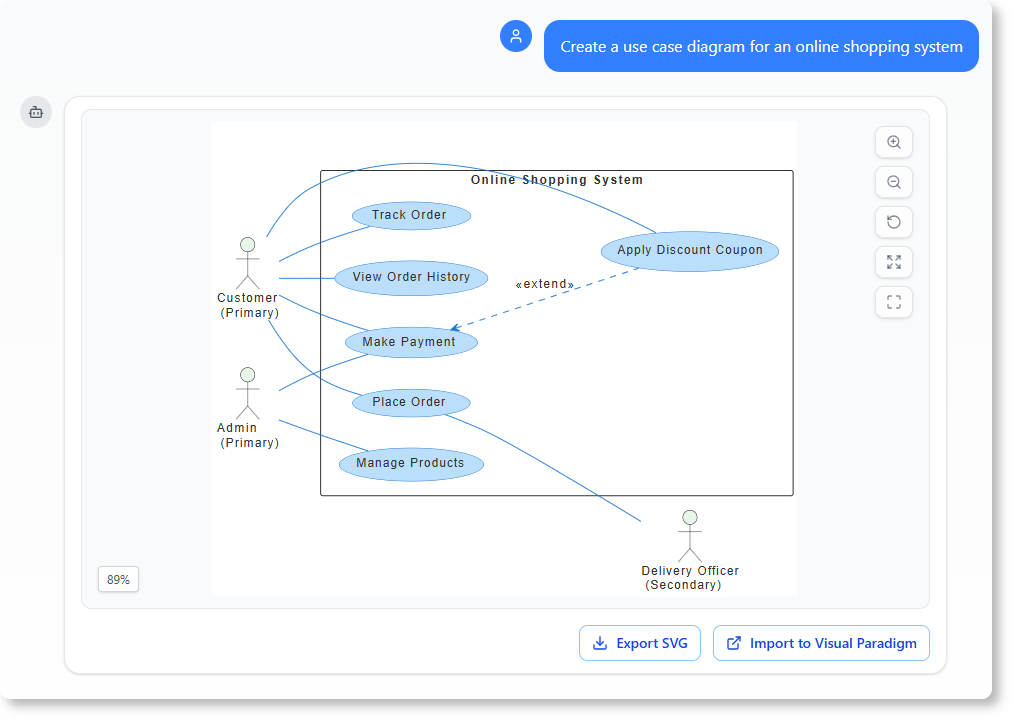
3. AI Textual Analysis
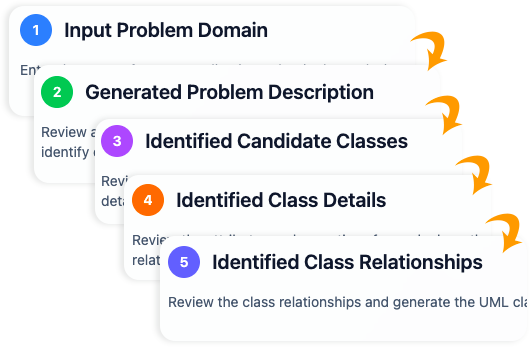
Integrated directly into user guides and modeling tools, this feature applies a rigorous NLP pipeline to problem descriptions. It functions by:
- Identifying candidate classes through noun extraction.
- Discovering attributes and operations based on described behaviors.
- Uncovering relationships and defining multiplicities.
- Generating editable outputs compatible with Visual Paradigm Online.
Guidelines for Effective Use
To maximize the accuracy and utility of AI-generated diagrams, users should adhere to the following best practices.
Provide Clear and Detailed Inputs
The quality of the output is directly proportional to the clarity of the input. Vague prompts yield generic models. For the best results, explicitly mention key entities and actions. For example, instead of saying “Make a store diagram,” use “A customer places an order containing multiple products, with payment and shipping details.”
Leverage Iterative Refinement
AI models are powerful baselines but benefit significantly from human guidance. Use the chat interface to refine the model incrementally. Commands like “Add a Loan class between Member and Book” or “Explain the relationship between Order and Payment” help the AI capture domain-specific nuances that might be missed in the initial pass.
Follow the Structured Workflow
When using the wizard generator, follow the sequential steps: define the scope, review candidate classes, refine attributes, and define relationships. Always utilize the automated validation checklists to ensure the model is technically sound before finalizing the design.
Real-World Case Studies
Visual Paradigm’s AI tools have been demonstrated effectively across various domains, proving their versatility in translating requirements into visual structures.
Online Shopping System
From a simple prompt regarding an e-commerce platform, the AI successfully identifies core classes such as Customer, Product, Order, Cart, and Payment. It automatically establishes complex relationships, such as the aggregation between Order and Products, and composition between Cart and Items, significantly accelerating the initial design phase.
Library Management System
In this scenario, the AI distinguishes between actors and objects, creating classes for Member, Librarian, Book, and Loan. It intelligently assigns attributes like ISBN and availability status to Books, while defining associations where a Member can have multiple active Loans, ensuring the multiplicity constraints are logical.
Hotel Reservation System
For hospitality management, the AI generates a model including Guest, Room, Reservation, and Billing. It infers that a Hotel is an aggregate of Rooms and that a Reservation is composed of Billing details, accurately reflecting the dependencies inherent in the system.
Conclusion
Visual Paradigm’s AI Class Diagram suite represents a paradigm shift in software modeling. By automating the translation of natural language into structured UML diagrams, it reduces development time from hours to minutes. Whether for education, rapid prototyping, or professional system architecture, these tools provide a robust foundation, allowing developers to focus on high-level logic and innovation rather than the mechanics of drawing.
VP AI Class Diagram Resource
The following articles and resources provide detailed information on creating and refining AI-driven UML class diagrams using the Visual Paradigm platform:
-
AI-Assisted UML Class Diagram Generator – Visual Paradigm: This tool generates UML class diagrams with AI-powered suggestions, validation, and PlantUML export capabilities.
-
AI-Powered UML Class Diagram Generator by Visual Paradigm: This platform allows users to produce accurate UML class diagrams from natural language descriptions via AI-assisted automation.
-
Interactive AI Chat for UML Class Diagram Generation: Users can generate and edit UML class diagrams in real time through natural language interaction using a conversational AI interface.
-
AI-Assisted UML Class Diagram Generator – Visual Paradigm AI Toolbox: This AI-powered tool automates the modeling process by generating UML class diagrams from text descriptions with minimal manual input.
-
From Problem Description to Class Diagram: AI-Powered Textual Analysis: This guide explains how to convert natural language problem descriptions into structured and accurate class diagrams using AI analysis.
-
How AI Enhances Class Diagram Creation in Visual Paradigm: Artificial intelligence improves design accuracy and automates the creation of class diagrams with minimal user input.
-
Streamlining Class Diagrams with Visual Paradigm’s AI: AI tools within the platform reduce the time and complexity for software projects by creating accurate class diagrams from requirements.
-
Comprehensive Tutorial: Generate UML Class Diagrams with Visual Paradigm’s AI Assistant: This tutorial offers a step-by-step guide to creating UML class diagrams from plain text using an AI assistant.
-
Building a Hotel Reservation System Class Diagram with Visual Paradigm AI: This resource provides a tutorial on using AI features to model a hotel reservation system through UML class diagrams.
-
Real-Life Case Study: Generating UML Class Diagrams with Visual Paradigm AI: This case study showcases how an AI assistant transforms textual requirements into precise UML models in a real-world project context.
-
Creating a UML Class Diagram for a Library System Using AI and Visual Paradigm: Users can follow this guided case study to build a library system class diagram using AI modeling.
-
Case Study: AI-Powered Textual Analysis for UML Class Diagram Generation: This study explores how AI-driven textual analysis extracts domain classes and relationships from unstructured text for diagram generation.
-
AI-Powered UML Modeling: Online Shopping System: This case study illustrates how AI-powered software helps a developer build a complete UML class diagram for an online shopping system.
-
Identifying Domain Classes Using AI Textual Analysis in Visual Paradigm: AI tools in Visual Paradigm automatically identify domain classes from text to streamline the software modeling process.
-
Comprehensive Tutorial: AI-Powered Textual Analysis for Software Design: This tutorial shows how AI-powered analysis transforms unstructured descriptions into structured domain models by identifying classes.
This post is also available in Deutsch, Español, فارسی, Français, English, Bahasa Indonesia, 日本語, Polski, Portuguese, Ру́сский, Việt Nam, 简体中文 and 繁體中文.