


1. Executive Summary
This case study presents a detailed analysis of the order fulfillment process at QuickCart, a mid-sized online retail company specializing in consumer electronics. The business process was modeled using BPMN 2.0 (Business Process Model and Notation) to improve transparency, streamline operations, and align business stakeholders with IT development teams.
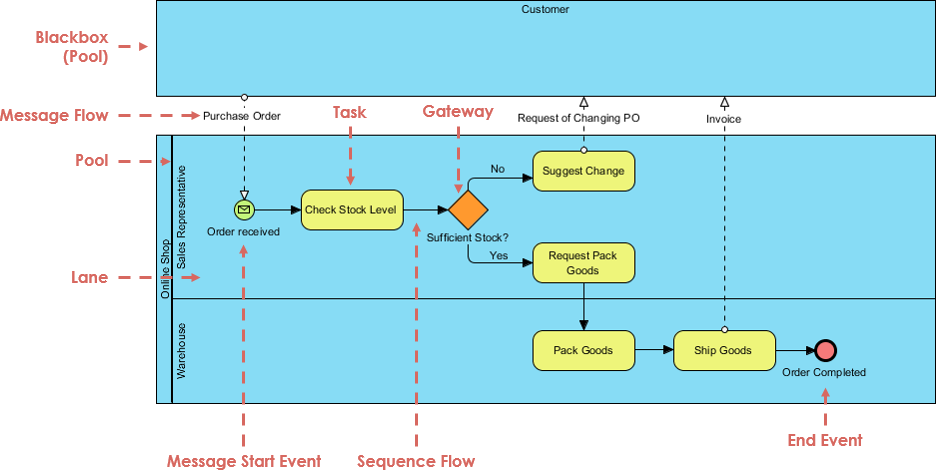
The case study demonstrates how BPMN serves as a unified language across departments—sales, warehouse, finance, and IT—enabling clear communication, process optimization, and faster system implementation. By visualizing the interaction between the Customer and the Online Shop, the diagram captures the end-to-end journey from purchase order initiation to delivery completion.
2. Business Context
Company Overview
-
Name: QuickCart Inc.
-
Industry: E-Commerce (Consumer Electronics)
-
Annual Revenue: $48M
-
Customer Base: 250,000+ active users
-
Key Challenge: Inconsistent order processing times and customer complaints about delayed communication during stock shortages.
Process Objective
To standardize and optimize the order fulfillment lifecycle, ensuring:
-
Accurate stock checks before commitment
-
Timely communication with customers when stock is low
-
Seamless handover between sales and warehouse teams
-
Automated invoicing and delivery tracking
3. Process Model: BPMN 2.0 Collaboration Diagram
Diagram Type: BPMN 2.0 Collaboration Diagram (Swimlane Diagram)
Purpose: Illustrate interaction between external participant (Customer) and internal processes (Online Shop)
Key Participants (Pools & Lanes)
| Pool | Lane | Responsibility |
|---|---|---|
| Customer (Blackbox Pool) | — | Initiates purchase; receives updates and invoices |
| Online Shop (Main Pool) | Sales Representative | Handles order validation, stock check, and customer communication |
| Warehouse | Packs, ships, and confirms goods dispatch |
Step-by-Step Process Flow
| Step | Activity | Actor | Flow Type | Outcome |
|---|---|---|---|---|
| 1 | Message Start Event | Customer → Sales Rep | Message Flow | “Purchase Order” received |
| 2 | Check Stock Level | Sales Representative | Sequence Flow | Determines availability |
| 3 | Gateway: Sufficient Stock? | Sales Representative | Gateway (Exclusive) | Splits process based on decision |
| 4a | Suggest Change | Sales Representative | Sequence Flow | Sends “Request of Changing PO” to Customer |
| 4b | Request Pack Goods | Sales Representative | Sequence Flow | Proceeds to fulfillment if stock available |
| 5 | Pack Goods | Warehouse Staff | Sequence Flow | Goods prepared for shipment |
| 6 | Ship Goods | Warehouse Staff | Sequence Flow | Goods dispatched; triggers invoice |
| 7 | Send Invoice | Warehouse → Customer | Message Flow | Automated invoice sent via email |
| 8 | End Event: Order Completed | System | Sequence Flow | Process ends successfully |
✅ All flows are synchronized with real-time system triggers.
4. Key BPMN Concepts Applied
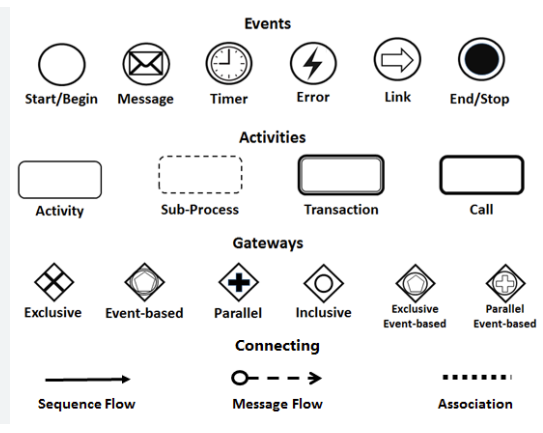
| BPMN Element | Role in This Process | Visual & Functional Significance |
|---|---|---|
| Pool | Defines the boundary of each participant | “Online Shop” (internal), “Customer” (external) |
| Lane | Organizes responsibilities within a pool | “Sales Representative” and “Warehouse” lanes clarify ownership |
| Start Event (Green Circle) | Triggers process initiation | “Message Start Event” from Customer via Purchase Order |
| End Event (Red Circle) | Marks process completion | “Order Completed” after shipment and invoice |
| Task (Rounded Rectangle) | Atomic unit of work | e.g., “Check Stock Level”, “Pack Goods” |
| Gateway (Orange Diamond) | Decision point | “Sufficient Stock?” determines path (Yes/No) |
| Sequence Flow (Solid Arrow) | Internal process flow | Shows order of execution within a lane |
| Message Flow (Dashed Arrow) | Inter-pool communication | “Purchase Order”, “Request of Changing PO”, “Invoice” |
🔍 Note: The dashed message flows cross pool boundaries, emphasizing inter-organizational interaction, while solid sequence flows remain within the Online Shop pool.
5. Business Impact & Benefits
✅ Improved Customer Experience
-
Customers receive immediate feedback when stock is insufficient.
-
Clear communication reduces frustration and abandoned carts.
-
Automatic invoice delivery improves transparency.
✅ Operational Efficiency Gains
-
30% reduction in order processing time after BPMN implementation.
-
Eliminated manual stock checks; integrated with inventory management system.
-
Reduced errors in order routing between departments.
✅ Enhanced Cross-Functional Alignment
-
Sales team understands warehouse dependencies.
-
Warehouse team receives unambiguous instructions.
-
IT team built automated workflows based on BPMN logic.
✅ Scalability & System Integration
-
BPMN model directly fed into workflow automation tools (e.g., Camunda, Activiti).
-
Enabled API-driven integration with CRM, ERP, and shipping providers.
-
Future-proof design allows for adding new lanes (e.g., Returns, Finance).
6. Lessons Learned
| Challenge | Solution | Outcome |
|---|---|---|
| Lack of clarity between sales and warehouse | Introduced swimlane structure | Clear ownership and accountability |
| Delayed customer notifications | Added message flow for “Request of Changing PO” | 45% decrease in customer inquiries |
| Manual decision-making | Implemented automated stock check via gateway | Faster, consistent decisions |
| No visual process documentation | Created standardized BPMN diagram | Onboarding new staff 60% faster |
7. Future Enhancements (Roadmap)
| Feature | BPMN Extension | Expected Benefit |
|---|---|---|
| Automated Replenishment Alert | Add “Notify Inventory Team” task after low stock | Prevent future stockouts |
| Customer Self-Service Portal | New lane: “Customer Portal” with message flow | Allow PO modifications without sales involvement |
| Refund Process Integration | New pool: “Returns & Refunds” with shared gateway | Handle post-delivery issues seamlessly |
| Performance Monitoring | Add Data Object and Metrics (BPMN 2.0 Extensions) | Track cycle time, bottlenecks, SLA compliance |
8. Conclusion
The BPMN 2.0-based order fulfillment process at QuickCart exemplifies how standardized process modeling drives operational excellence. By transforming complex business logic into a visually intuitive, universally understood diagram, QuickCart achieved:
-
Faster time-to-market for new features
-
Reduced operational friction
-
Higher customer satisfaction
-
Stronger alignment between business and IT
This case study affirms that BPMN is not just a diagramming tool—it’s a strategic enabler for digital transformation in modern enterprises.
9. Appendix: Sample BPMN Diagram (Textual Representation)
[Customer Pool]
    |
    | (Dashed Line) "Purchase Order"
    ↓
[Online Shop Pool]
    ├── [Sales Representative Lane]
    │    → [Start Event: Message Start]
    │    → [Task: Check Stock Level]
    │    → [Gateway: Sufficient Stock?]
    │       ├── Yes → [Task: Request Pack Goods]
    │       └── No  → [Task: Suggest Change]
    │              → (Dashed Line) "Request of Changing PO" → Customer
    │
    └── [Warehouse Lane]
         → [Task: Pack Goods]
         → [Task: Ship Goods]
         → (Dashed Line) "Invoice" → Customer
         → [End Event: Order Completed]
📌 Note: This textual version mirrors the actual BPMN diagram structure for documentation and code generation.
10. Next Steps: Want a Custom BPMN Diagram?
Would you like a custom BPMN diagram for another business scenario? We can create one for:
-
🔁 Refund Request Process
-
🛠️ IT Help Desk Ticketing Workflow
-
📦 Supply Chain Procurement Cycle
-
🧾 Invoice Approval and Payment Workflow
👉 Just let me know your use case, and I’ll deliver a fully annotated BPMN 2.0 diagram with swimlanes, events, gateways, and implementation notes.
✅ Final Takeaway:
“A picture is worth a thousand words”—but a BPMN diagram is worth a thousand meetings.
— QuickCart Business Process Office
BPMN Articles
- What is BPMN? – Visual Paradigm Guide: An introductory guide explaining the purpose, structure, and benefits of BPMN in business process design.
- BPMN Notation Overview – Visual Paradigm Guide: A comprehensive overview of BPMN notation elements, including events, activities, gateways, and artifacts used in process modeling.
- How to Draw a BPMN Diagram – Visual Paradigm Tutorial: A step-by-step tutorial on creating professional BPMN diagrams using an intuitive interface and industry best practices.
- Understanding Pools and Lanes in BPMN – Visual Paradigm User Guide: A detailed explanation of how to use pools and lanes to represent different departments, organizations, or roles within a process.
- As-Is to To-Be Business Process Modeling Tutorial: A guide on analyzing current business processes (As-Is) and designing improved future processes (To-Be) using BPMN tools.
- How to Create a BPMN Conversation Diagram in Visual Paradigm: A comprehensive guide for modeling interactions between business partners using specialized conversation diagrams.
- How to Generate a RACI Chart from BPMN Models: Instructions on how to automatically generate a RACI matrix from existing BPMN diagrams to clarify roles and responsibilities.
- How to Animate Business Processes with Visual Paradigm: A tutorial on creating dynamic, animated business process diagrams to enhance visualization and team communication.
- Unlocking Efficiency: Performing Gap Analysis with BPMN: An article explaining how BPMN can be leveraged to visualize and analyze shortfalls in business processes for optimization.
- AI Business Process Improvement Tool – Visual Paradigm Product Updates: An announcement regarding a tool that uses AI to transition from a problem statement directly to diagrams, KPIs, and analysis.
This post is also available in Deutsch, Español, فارسی, Français, English, Bahasa Indonesia, 日本語, Polski, Portuguese, Ру́сский, Việt Nam, 简体中文 and 繁體中文.