


In the evolving landscape of software design and system architecture, the transition from manual drafting to AI-assisted modeling is redefining productivity. For professionals who have spent hours dragging and dropping shapes to model workflows, Visual Paradigm’s AI-powered features offer a significant leap forward. This comprehensive guide explores how to leverage these tools to transform text into precise UML activity diagrams, focusing on the conversational AI Chatbot and the Use Case to Activity Diagram converter.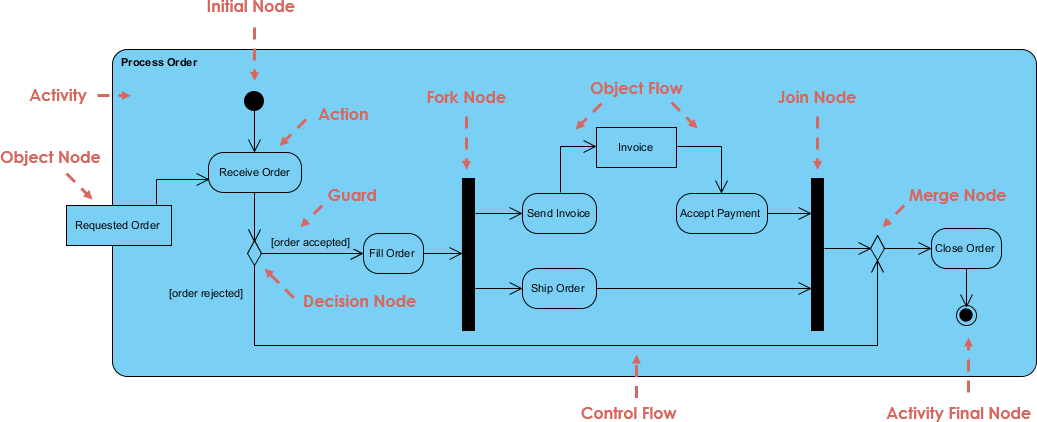
The Shift to AI-Powered Modeling
Traditional modeling often involves tedious manual layout adjustments and syntax checking. Visual Paradigm has introduced AI capabilities that allow users to generate diagrams using natural language. This approach shifts the focus from the mechanics of drawing to the logic of the workflow itself. By utilizing tools like the AI Chatbot and the integrated Visual Paradigm Online suite, users can iterate faster and validate logic with greater ease.
1. Getting Started with the Conversational AI Chatbot
The AI Chatbot for UML Activity Diagrams is an excellent entry point for rapid prototyping and brainstorming. It requires no complex installation and operates directly within the browser, making it ideal for immediate visualization of process flows.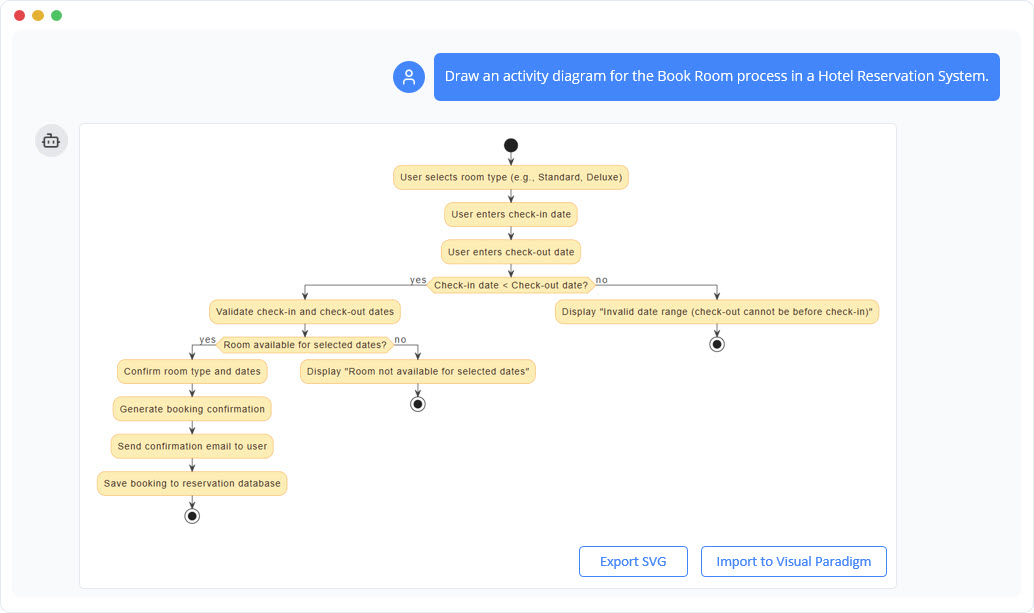
Initiating the Design
To begin, users simply navigate to the Visual Paradigm AI Chatbot interface. The process starts with a natural language prompt. Rather than selecting shapes, you describe the process in plain English. This method is particularly effective for standard business processes or logic flows.
For example, a prompt for an e-commerce system might look like this:
“Generate an activity diagram for an online shopping checkout process. Include customer adding items to cart, proceeding to checkout, entering payment details, system validating payment, processing order, and sending confirmation. Add decisions for payment failure and out-of-stock during final check.”
Upon receiving this prompt, the AI instantly constructs a UML-compliant diagram. Key elements automatically generated include:
- Start and End Nodes: Clearly defining the boundaries of the process.
- Action States: Representing steps like “Add to Cart” or “Validate Payment.”
- Decision Nodes: Diamond shapes representing logic branches, such as “Payment Successful?”
- Control Flows: Arrows indicating the direction of the workflow.
- Fork/Join Nodes: Bars representing parallel processing where applicable.
2. Refining and Iterating: The Power of Conversation
The true strength of the AI tool lies in its iterative capability. The initial generation is rarely the final product; it serves as a solid foundation (often 80-90% accurate) that can be refined through dialogue.
Real-Time Updates
Instead of manually dragging connection points to reroute a flow, users can issue follow-up commands. This conversational refinement dramatically speeds up the editing process. Effective follow-up prompts include:
- Adding Parallelism: “Add a parallel flow for sending an order confirmation email right after payment success.”
- Handling Exceptions: “Include an exception loop: if payment fails 3 times, cancel the order and notify the user.”
- Structural Organization: “Add swimlanes for Customer, Payment Gateway, and Order System.”
- Logic Simplification: “Simplify this by removing the guest checkout option.”
Exploratory Modeling
Beyond simple commands, the chatbot acts as a modeling assistant. Users can ask explanatory questions to verify the logic of the generated diagram, such as “What happens at the ‘Payment Failed’ decision node?” or request alternative scenarios like “Show me alternative paths for international shipping delays.” This allows for rapid “what-if” scenario testing without the overhead of manual redrawing.
3. Structured Modeling: Use Case to Activity Diagram
For scenarios involving formal requirements gathering or Agile user stories, the Use Case to Activity Diagram tool in Visual Paradigm Online provides a more structured approach than the free-form chatbot. This tool is best suited for converting written documentation into visual models.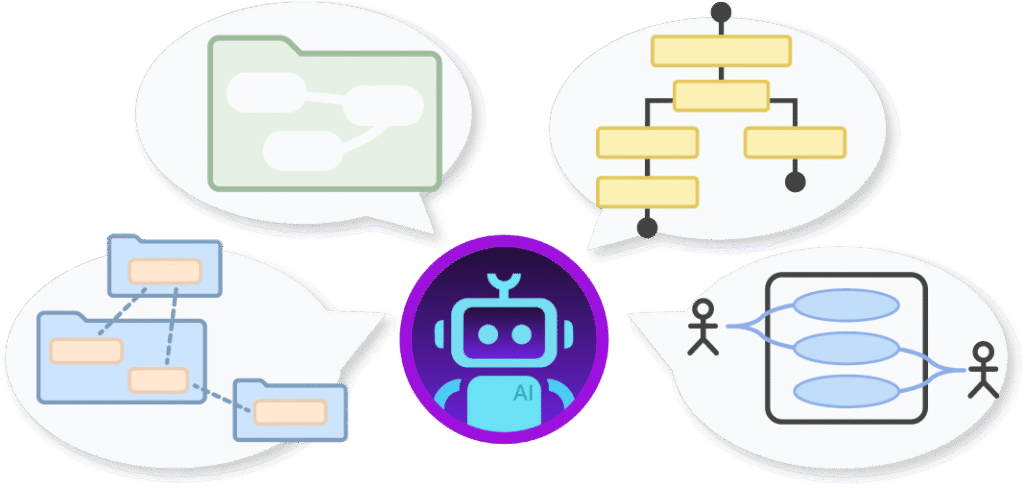
The Workflow
Using this tool typically follows a systematic process:
- Setup: Select the “Use Case to Activity Diagram” tool within the workspace.
- Input Definitions: Enter the System Name, Use Case Name (e.g., “Process Loan Application”), and define Actors (e.g., Applicant, Loan Officer).
- AI Generation: Users can input a brief summary and let the AI auto-fill preconditions, postconditions, main flows, and alternative flows.
- Review and Refine: It is crucial to review the generated text for domain accuracy. Users can manually edit numbered steps to handle specific logic, such as “If credit check fails…”
- Diagram Creation: Clicking “Generate” produces a comprehensive UML Activity Diagram alongside a structured use case report.
This method excels at transforming verbose textual requirements into precise visual flows, ensuring that complex decision points and merge nodes are accurately represented based on the text provided.
4. Exporting and Integration
Once a diagram is generated and refined, it needs to be integrated into project documentation or development pipelines. Visual Paradigm offers several pathways for this:
- Immediate Sharing: Diagrams generated in the chatbot can be shared via URL or exported as images.
- Workspace integration: Projects created in the online tools can be saved to a Visual Paradigm workspace.
- Desktop Editing: For advanced customization—such as adjusting specific layout constraints, adding stereotypes, or linking to other UML artifacts like sequence diagrams—the content can be imported into the full Visual Paradigm desktop editor.
5. User Experience and Best Practices
Transitioning to AI-assisted diagramming offers significant benefits in terms of speed and collaboration, though it requires a shift in mindset.
Performance and Limitations
In practice, workflows that previously took up to an hour to model manually can often be drafted in under 10 minutes. The accuracy is generally high for standard business processes, though highly domain-specific logic may require manual tweaking. Complex nested regions or orthogonal states may also require multiple rounds of refinement to perfect.
Pro Tips for Success
To maximize the utility of these tools, consider the following strategies:
- Start Broad: Begin with a high-level description to get the skeleton of the diagram, then refine the details iteratively.
- Be Explicit: When describing decisions and loops, use clear, step-by-step language to ensure the AI understands the conditional logic.
- Use Swimlanes Early: If your process involves multiple actors, mention them in the initial prompt to generate swimlanes immediately.
- Hybrid Approach: Generate the initial flow from existing use case text, then use conversational prompts to refine specific sections.
By integrating Visual Paradigm’s AI features into the modeling workflow, developers and business analysts can treat diagramming as a modern, collaborative design activity rather than a manual documentation chore.
Visual Paradigm AI Powered Activity Diagram resource
The following articles and resources provide information on utilizing AI-powered tools for creating and optimizing UML activity diagrams within the Visual Paradigm platform:
-
Integrating AI Activity Diagrams into Your Visual Paradigm: This article explains how to generate and refine UML activity diagrams using natural language input through AI-powered modeling in Visual Paradigm.
-
Mastering UML Activity Diagrams with AI | Visual Paradigm Blog: This resource explores how AI features enhance the creation and optimization of UML activity diagrams for developers and analysts.
-
Convert Use Case to Activity Diagram – AI-Powered Transformation: This tool enables users to automatically convert use case diagrams into detailed activity diagrams to visualize system workflows.
-
Interactive UML Activity Diagram Creator – Visual Paradigm Chat Interface: Users can generate and edit UML activity diagrams in real time using natural language interaction via a conversational AI interface.
-
AI-Powered Use Case to Activity Diagram Tutorial with Visual Paradigm: This tutorial provides a step-by-step guide on automatically converting use case descriptions into detailed activity diagrams using Visual Paradigm’s AI.
-
Convert Use Case Diagrams to Activity Diagrams with Visual Paradigm: The platform allows for the automatic transformation of use case diagrams into detailed activity diagrams using intelligent modeling features.
-
Comprehensive Guide: Transforming Use Cases into UML Activity Diagrams with AI: This guide describes how AI-powered tools automate the conversion of use cases into structured UML activity diagrams for efficient system analysis.
-
AI-Powered Editor for Converting Use Cases to Activity Diagrams: This AI-driven editor automatically converts use case descriptions into structured UML activity diagrams while providing intelligent suggestions.
-
Generate Activity Diagrams from Use Cases Instantly with Visual Paradigm’s AI: The Visual Paradigm AI engine can rapidly convert use cases into precise UML activity diagrams with minimal effort.
This post is also available in Deutsch, Español, فارسی, Français, English, Bahasa Indonesia, 日本語, Polski, Portuguese, Ру́сский, Việt Nam, 简体中文 and 繁體中文.