


In the rapidly evolving landscape of Enterprise Architecture (EA) and Model-Based Systems Engineering (MBSE), the ability to visualize complex requirements instantly is a game-changer. The release of Visual Paradigm’s enhanced AI Chatbot marks a significant milestone in this domain. With improved stability, relevance, and the ability to handle highly technical prompts, professionals can now generate rigorous ArchiMate and SysML Requirement diagrams through natural language.
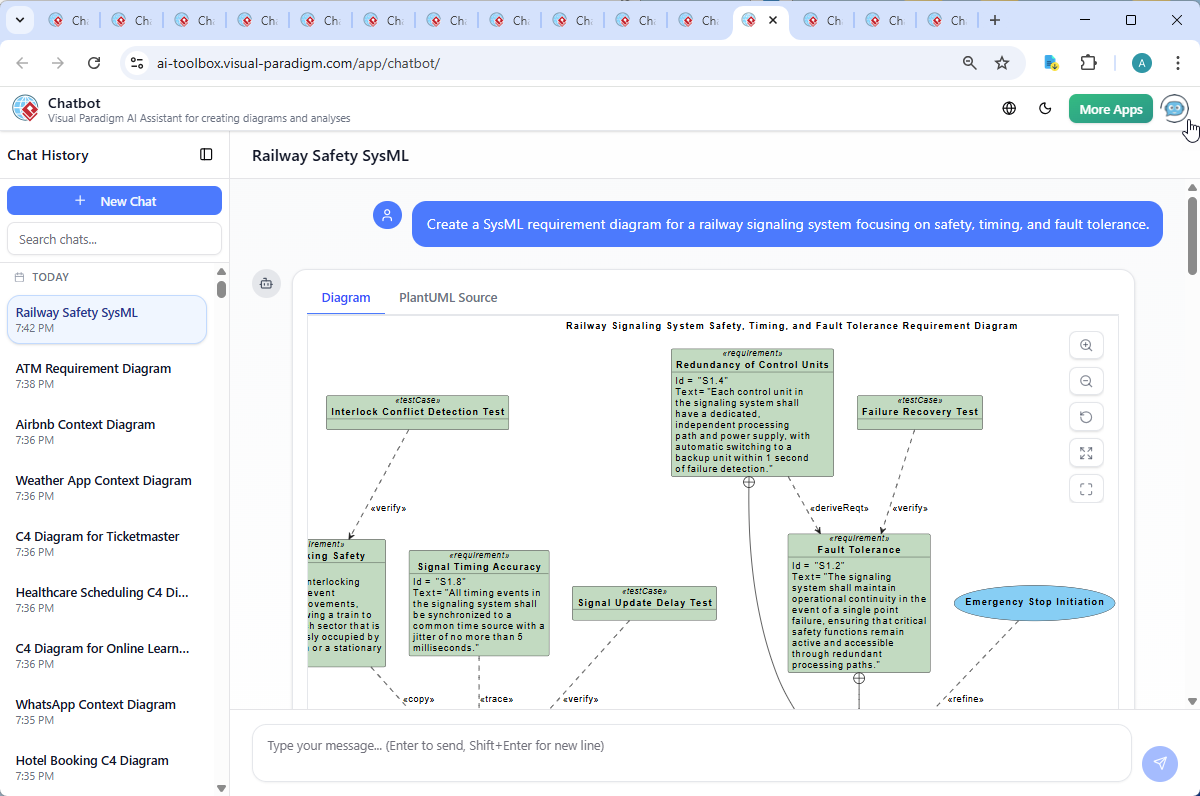
This comprehensive guide explores how to leverage these AI advancements to model safety-critical systems and enterprise ecosystems, focusing on a detailed case study of a Railway Signaling System.
Key Concepts
Before diving into the workflows, it is essential to understand the core technologies and standards discussed in this guide:
- SysML (Systems Modeling Language): A general-purpose modeling language for systems engineering applications. It supports the specification, analysis, design, verification, and validation of a broad range of systems and systems-of-systems.
- ArchiMate: An open and independent enterprise architecture modeling language to support the description, analysis, and visualization of architecture within and across business domains.
- MBSE (Model-Based Systems Engineering): The formalized application of modeling to support system requirements, design, analysis, verification, and validation activities, moving away from document-centric approaches.
- Traceability: The ability to link requirements to their sources, derived requirements, design elements, and test cases. In SysML, this is often handled via
$trace,$verify, and$refinerelationships.
The Evolution of AI Diagramming: Stability and Context
The latest iteration of the AI Chatbot addresses the primary pain points of early text-to-diagram tools: hallucination and instability. The enhanced model offers:
- Dramatically Improved Stability: High-demand reliability ensures that complex requests result in completed diagrams rather than generation failures.
- Contextual Relevance: The AI now understands nuance. If you describe a “business process” versus a “system architecture,” the output aligns precisely with the respective domain standards.
- Advanced Prompt Handling: Long, detailed technical descriptions—such as specific timing constraints in milliseconds—are accurately parsed and visualized.
Case Study: Designing a Railway Signaling System with SysML
Designing safety-critical infrastructure requires precision. Let’s explore how the AI handles a request for a Railway Signaling System focusing on safety, timing, and fault tolerance.
1. The Requirement Structure
When tasked with creating a SysML requirement diagram for such a system, the AI generates a structured model adhering to safety standards (like EN 50126 and IEC 61508). The resulting model typically includes:
- Signal Integrity (req01): Ensures real-time updates with a max delay of 0.5s.
- Fault Tolerance (req02): Mandates operational continuity after single-point failures via redundant paths.
- Timed Clearing (req03): Limits track clearing time to 3 seconds.
- Interlocking Safety (req05): Logical constraints to prevent conflicting train movements.
- Fail-Safe Default State (req06): A critical safety feature that defaults the system to “STOP” during power loss.
2. Decoding the Logic: Traceability and Validation
A static diagram is insufficient for systems engineering; the relationships define the safety logic. The AI utilizes advanced SysML constructs to build a “living model”:
Verification: Uses
$verify(testCase01, req01)to link specific test cases (e.g., Signal Update Delay Test) to requirements, proving the 0.5-second constraint is testable.Traceability: Uses
$trace(req08, req01)to show how technical timing accuracy supports broader signal integrity goals.Refinement: Uses
$refine(useCase01, req05)to connect abstract requirements to actual operational use cases like “Train Movement Authorization.”
Guidelines for Generating Professional Diagrams
To achieve the best results when using the AI Chatbot for ArchiMate or SysML, follow these step-by-step guidelines:
Step 1: Define the Scope and Standards
Be explicit about the modeling language and the specific viewpoint. For example, instead of asking for a “business diagram,” ask for an ArchiMate diagram using the Layered Architecture viewpoint.
Step 2: Provide Technical Constraints
For SysML diagrams, include quantitative data in your prompt. The AI can process and visualize constraints such as:
- “Maximum latency of 5ms”
- “Redundancy failover within 1 second”
- “Compliance with IEC 61508”
Step 3: Engage in Conversational Refinement
Treat the AI as a collaborator. Do not stop at the first generation. If the diagram shows a “Fail-Safe State,” ask the AI: “Can you explain how this default state is implemented during a power loss?” The AI will provide technical insights (hardware monitoring, software logic) and can update the diagram to reflect these specific implementation details.
Tips and Tricks for Power Users
Unlock the full potential of the AI Diagram Generator with these optimization strategies:
- Leverage Hierarchy: When defining requirements, use terms like “derived from” or “contained in” to help the AI establish
$deriveReqtand$containmentrelationships automatically. - Cross-Domain Modeling: You are not limited to one type. Start with a SysML Requirement diagram to define what the system needs, then ask the AI to generate a UML Sequence diagram to show how those requirements interact in real-time.
- Use Scenarios: For ArchiMate, describe a full customer journey (e.g., “End-to-end e-commerce order fulfillment”). This prompts the AI to generate Motivation, Business, Application, and Technology layers in a single, cohesive view.
- Validate with Standards: Explicitly mention industry standards (e.g., GDPR for data diagrams, ISO 26262 for automotive) to ensure the AI includes relevant compliance requirements.
Conclusion
The Visual Paradigm AI Chatbot has transformed from a productivity tool into an intelligent modeling partner. By understanding complex prompts and industry standards, it allows Enterprise Architects and Systems Engineers to create rigorous, traceable models in seconds. Whether you are defining a fail-safe railway network or mapping a cloud migration, the combination of human expertise and AI efficiency ensures safer, smarter, and faster architecture design.
Resources
- Master AI-Driven Use Case Diagrams: A Short Tutorial
- Case Study: Enhancing System Modeling Efficiency with Visual Paradigm’s AI-Powered Chatbot
- Mastering Data Flow Diagrams with Visual Paradigm: A Step-by-Step Guide
- UML Deployment Diagram: A Definitive Guide to Visualizing Your Infrastructure with AI
- AI Chatbot | Diagramming & Modeling with Visual Paradigm
- Visual Paradigm – AI-Powered Visual Modeling Platform
- AI-Powered MVC System Architecture Generator
- Mastering MVC Architecture with the Sequence Diagram Refinement Tool
- AI Product Breakdown Structure Generator: Simplify Product Development Instantly
- From Simple to Sophisticated: What is the AI-Powered Sequence Diagram Refinement Tool?
- What Makes Visual Paradigm’s AI Chatbot Different from Other AI Diagram Tools?
- Generate ArchiMate Diagrams and Viewpoints Instantly with AI
- AI Diagram Generation Guide: Instantly Create System Models with Visual Paradigm’s AI
- AI Textual Analysis – Visual Paradigm
- How Startups Can Speed Up Architecture Design with AI-Powered Modeling
This post is also available in Deutsch, Español, فارسی, Français, English, Bahasa Indonesia, 日本語, Polski, Portuguese, Ру́сский, Việt Nam, 简体中文 and 繁體中文.