
Business Process Model and Notation (BPMN) provides powerful mechanisms for modeling not just process flow, but also the data and contextual information that drive business processes. This guide explores BPMN’s data modeling capabilities and artifact notations.
Introduction
One of the common characteristics of traditional modeling techniques is to allow the modeling of data to be created, read, and updated during the execution of a process. A classical example would be Data Flow Diagram (DFD). Although BPMN is not primarily designed for data modeling, there is still a set of notations that lets you model the data involved in a business process.
BPMN also provides several artifact notations that allow modelers to describe a business process in more detail. For example, group objects can be used to group related activities, and text annotation objects can be used to explain flow objects in more detail.
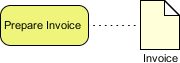
Figure 1: Example of BPMN data objects integrated within a process flow
BPMN Data Elements
Overview of Data Modeling in BPMN
Very often, when a business process is executed, data may be produced either during or after the process. For example, a successful execution of the “Place Order” task will produce data such as a purchase order, invoice, receipt, etc. In BPMN, data can be modeled using several types of “data” objects:
| Element | Symbol | Description | Usage |
|---|---|---|---|
| Data Object | 📄 | Represents information relevant to the process | Shows data created, updated, or consumed by activities |
| Data Input | 📥 | Data required before an activity can start | Specifies prerequisites for task execution |
| Data Output | 📤 | Data produced after an activity completes | Indicates deliverables or results |
| Data Store | 🗄️ | Persistent storage for data | Represents databases, files, or repositories |
Visual Representation
Data objects appear as documents with a folded corner. Associations (dotted lines) connect data objects to activities, showing whether data is read from or written to the object:
-
Input Association (arrow pointing to activity): Data is read/consumed
-
Output Association (arrow pointing from activity): Data is created/updated
-
Bidirectional Association: Data is both read and updated
Data Object States and Lifecycle Management
Understanding Data States
A purchase order has a life cycle within the process, from creation to completion. BPMN allows modelers to define states for data objects to track their progression through the process.
Common states include:
-
Create: Initial instantiation of the data object
-
To be Assigned: Waiting for resource allocation
-
To be Delivered: Ready for fulfillment
-
Completed: Final state after successful processing
Managing State Transitions
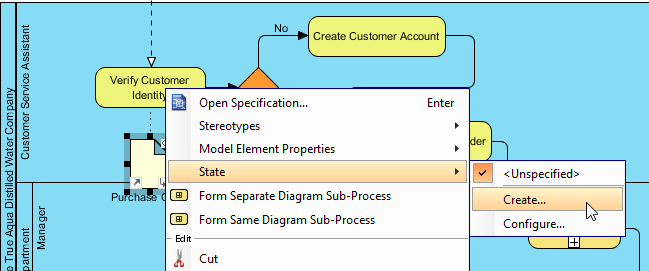
Figure 2: Creating a state for a data object
To model state changes:
-
Right-click on the data object
-
Select State > Create… from the popup menu
-
Enter the state name (e.g., “Create”, “To be Assigned”)
-
The state tag appears alongside the data object name
Reusing Data Objects Across States
When the same logical data object appears at multiple points in a process with different states:

Figure 3: Referencing an existing data object
Key Steps:
-
Create a new data object with the exact same name as the existing one
-
When prompted, choose Yes to reference the existing model element
-
Assign a new state to reflect the data’s progression
-
The same logical object now appears with different states at different process points
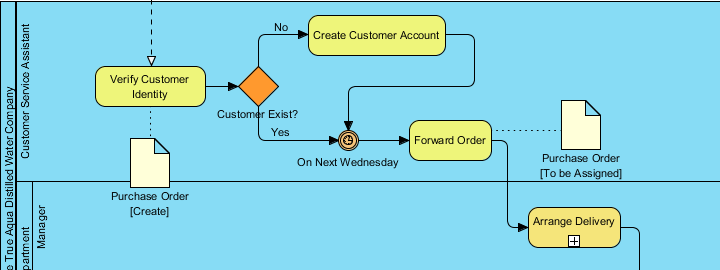
Figure 4: Same Purchase Order data object shown with multiple states
Artifact Notations
Artifacts provide additional contextual information without affecting process flow execution.
Groups
A group is a box with a dotted line border that provides modelers with a mechanism to group shapes by different categories.
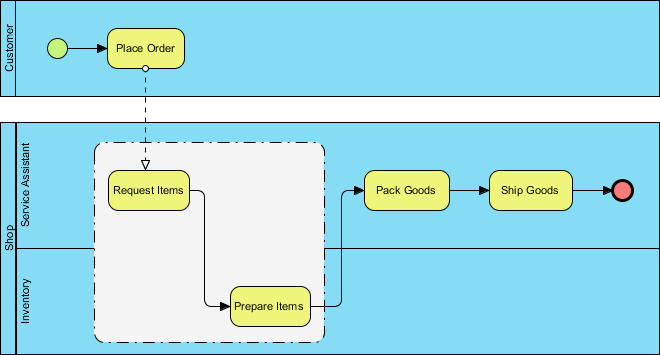
Figure 5: Using groups to categorize related activities
Use Cases for Groups:
-
Organize activities by department or role
-
Highlight processes subject to specific regulations
-
Visually separate optional or parallel process branches
-
Improve diagram readability for stakeholders
Implementation:
-
Draw a group container around related elements
-
Label the group with a descriptive category name
-
Groups do not affect sequence flow or execution logic
Text Annotations
A text annotation can be used to add extra detail to flow objects in a BPD. It does not affect the flow, but it provides details about objects within a flow.
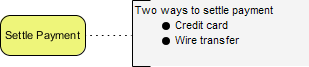
Figure 6: Text annotation providing contextual details
Best Practices for Annotations:
-
Keep text concise and focused on clarification
-
Use annotations for business rules, exceptions, or statistics
-
Connect annotations to specific elements using association lines
-
Avoid duplicating information already captured in element names
Case Study: True Aqua Distilled Water Company
Continuing from Parts I-III, we enhance the distilled water ordering process with data objects and annotations.
Step 1: Modeling Purchase Order Creation
The execution of the distilled water ordering process results in the production of a purchase order. We model this by creating a data object from the Verify Customer Identity task.
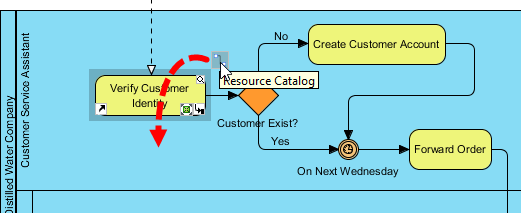
Figure 7: Accessing the Resource Catalog to add elements
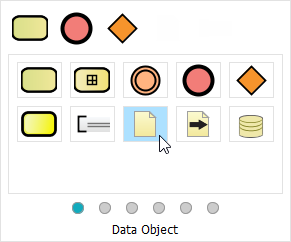
Figure 8: Selecting Data Object from the catalog
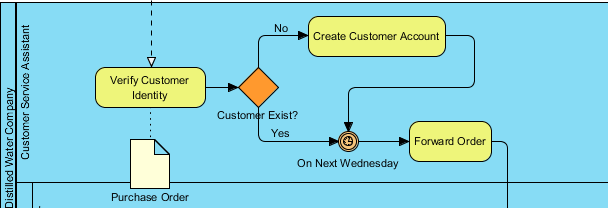
Figure 9: Named “Purchase Order” data object attached to task
Step 2: Tracking State Progression
When the customer service assistant finishes the Forward Order task, the purchase order enters a new state.
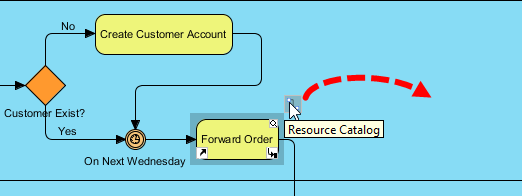
Figure 10: Creating another reference to the same data object
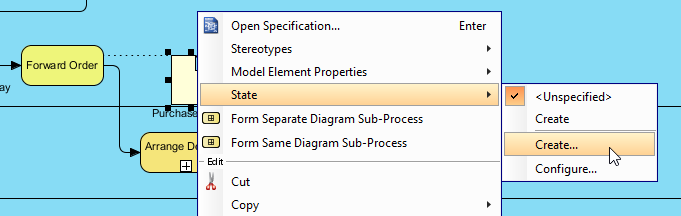
Figure 11: Adding the “To be Assigned” state
Step 3: Completing the Lifecycle
Continue modeling state changes through delivery:
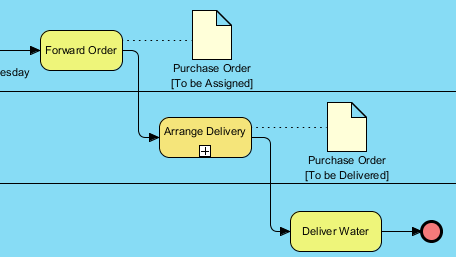
Figure 12: Purchase Order with “To be Delivered” state
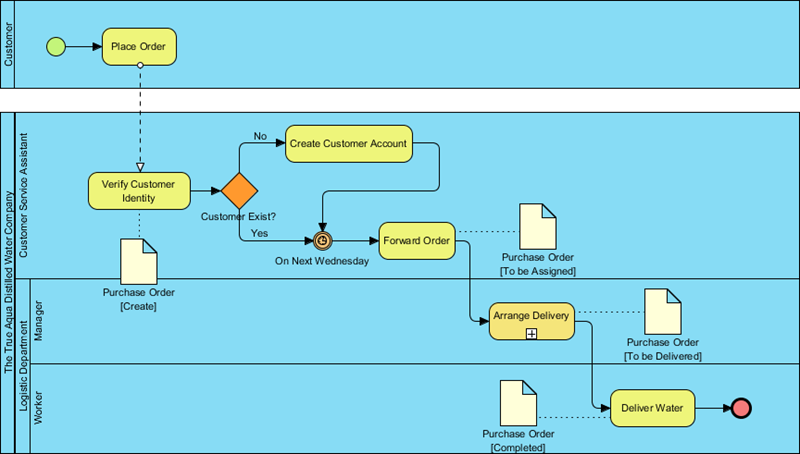
Figure 13: Full lifecycle with “Completed” state
Step 4: Adding Contextual Annotations
Some order requests are made by phone call, others by email. We document this using a text annotation.

Figure 14: Attaching annotation to Place Order task

Figure 15: Entering statistical detail in annotation
Final Diagram
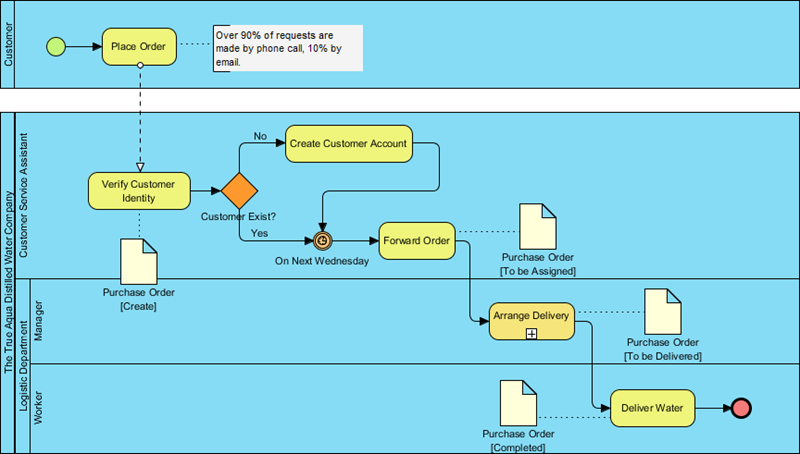
Figure 16: Complete BPMN diagram with data objects, states, and annotations
Key Concepts Summary
Core Principles
✅ Data Objects Represent Information Flow: They show what data is created, consumed, or stored during process execution.
✅ States Track Data Lifecycle: Assigning states to data objects helps visualize progression and business rules.
✅ Reference, Don’t Duplicate: Use the same-named data objects with different states to represent one logical entity evolving through the process.
✅ Artifacts Enhance Clarity: Groups and annotations provide context without altering executable logic.
✅ Associations Show Relationships: Dotted lines connect data to activities, indicating read/write operations.
BPMN Data Element Quick Reference
Data Object          : 📄 Information created/used in process
Data Input           : 📥 Prerequisite data for activity start
Data Output          : 📤 Resulting data after activity completion
Data Store           : 🗄️ Persistent repository (database, file)
Association          : ⤏ Dotted line showing data-activity relationship
Group                : ▦ Dotted container for visual organization
Text Annotation      : 📝 Explanatory note attached to elements
Best Practices
For Data Modeling
-
Name data objects clearly: Use business terminology (e.g., “Purchase Order” not “Data1”)
-
Limit states to meaningful transitions: Avoid over-complicating with trivial state changes
-
Show only relevant data: Include data objects that impact process decisions or outputs
-
Use data stores for persistence: Distinguish transient data objects from stored records
For Artifacts
-
Use groups strategically: Group by organizational unit, regulation, or process phase
-
Keep annotations concise: Focus on exceptions, statistics, or clarifications
-
Position artifacts for readability: Avoid cluttering sequence flows
-
Document business rules externally: Use annotations to reference, not replace, detailed rule specifications
For Diagram Maintenance
-
Consistent naming conventions: Ensure data object names match across states
-
Version control annotations: Update text annotations when business rules change
-
Validate associations: Confirm arrows correctly indicate data flow direction
-
Review with stakeholders: Ensure data modeling reflects actual business operations
References
BPMN Official Specification: The official resource for Business Process Model and Notation standards, maintained by the Object Management Group (OMG), providing authoritative documentation on BPMN syntax, semantics, and modeling guidelines.
- Introduction to BPMN Part IV – Data and Artifacts (PDF): Downloadable PDF version of this tutorial covering BPMN data objects, states, groups, and text annotations with step-by-step case study instructions.
- Visual Paradigm Enterprise Edition: Comprehensive BPMN modeling solution with advanced collaboration, simulation, and code generation features for large-scale enterprise process management.
- Visual Paradigm Professional Edition: Full-featured BPMN tool supporting data modeling, artifacts, and integration with development workflows for professional business analysts.
- Visual Paradigm Standard Edition: Core BPMN modeling capabilities including data objects, groups, and annotations for small to medium business process documentation.
- Visual Paradigm Modeler Edition: Lightweight BPMN editor focused on diagram creation and basic data modeling for individual practitioners and small teams.
- Part I – Introduction to BPMN: Foundational tutorial covering BPMN basics, core flow objects, and simple process modeling concepts for beginners.
- Part II – Swimlanes: Intermediate guide to modeling organizational responsibilities using pools, lanes, and role-based process partitioning in BPMN.
- Part III – Flow and Connecting Objects: Detailed exploration of sequence flows, message flows, gateways, and events for constructing complex process logic in BPMN diagrams.
This guide synthesizes BPMN 2.0 specification concepts with practical modeling techniques. For executable process automation, complement BPMN diagrams with detailed business rules and system integration specifications.