


Software architecture often suffers from a communication gap between high-level conceptualization and low-level implementation. The C4 model addresses this by offering a hierarchical approach to visualizing software architecture, allowing teams to progressively “zoom in” on a system through four distinct levels of abstraction. This guide explores the four levels of the C4 hierarchy and demonstrates how Visual Paradigm facilitates this methodology through advanced modeling tools and AI-driven automation.
The Four Levels of the C4 Model Hierarchy
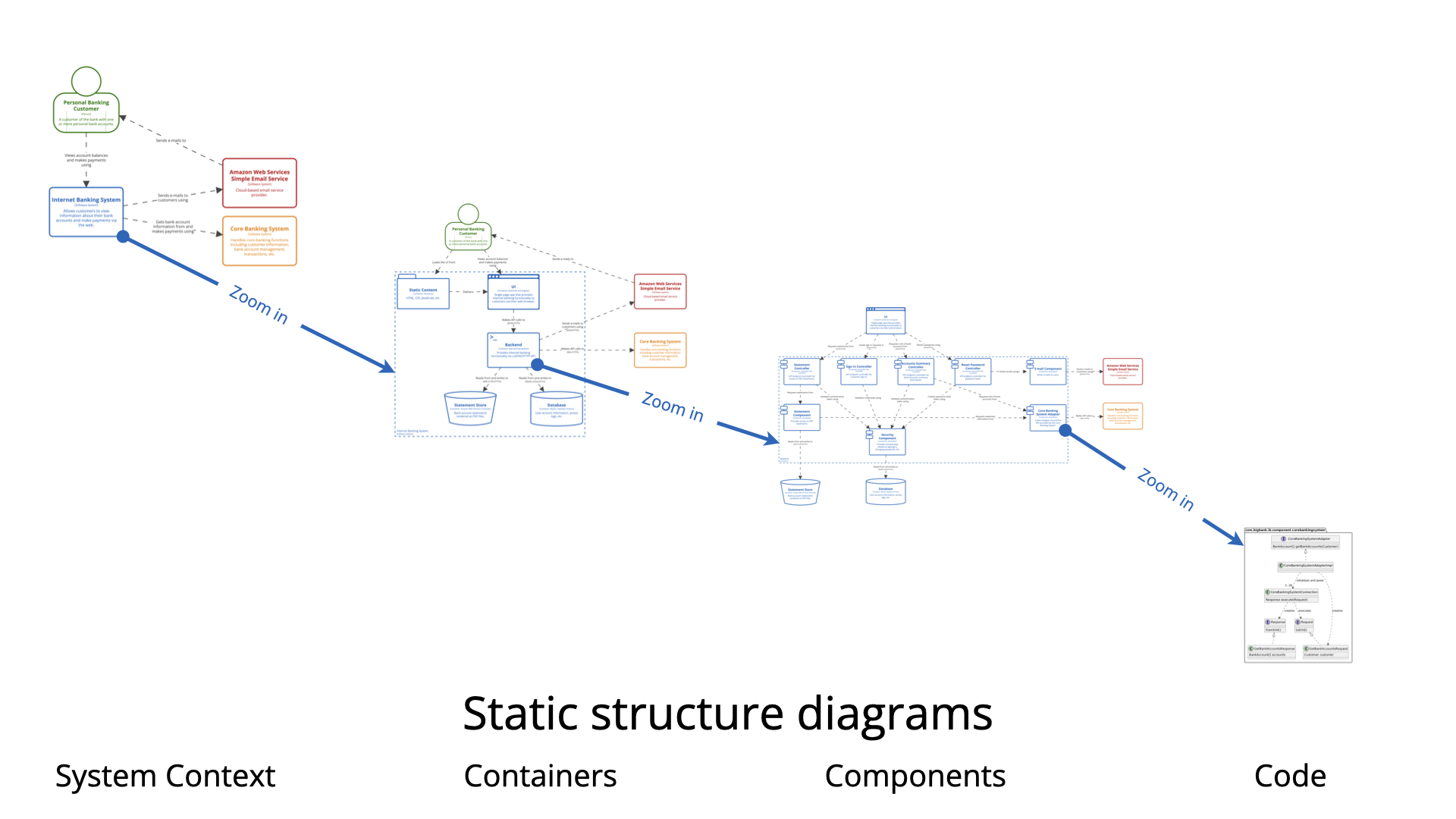
The C4 model functions similarly to a set of nested maps, starting from a continental view and zooming down to street level. Each level serves a specific audience and purpose, ensuring that both stakeholders and developers have the necessary context.
Level 1: System Context Diagram
Scope & Purpose: The System Context diagram represents the highest level of abstraction. It acts as the “big picture” overview, defining the system’s boundaries and illustrating how it interacts with the outside world. This includes interactions with external actors (such as users, roles, and personas) and external systems (such as third-party APIs or legacy systems).
Audience: Because it avoids technical jargon, this diagram is intended for everyone involved in the project, including non-technical stakeholders, business analysts, and project managers.
Level 2: Container Diagram
Scope & Purpose: “Zooming in” from the context level brings us to the Container diagram. This level depicts the high-level technical building blocks of the software. In the C4 model, a container is a separately runnable or deployable unit. Examples include server-side web applications, single-page applications, mobile apps, microservices, and databases.
Audience: This view is designed for technical individuals, including software architects, developers, and operations staff who need to understand the deployment architecture and technology choices.
Level 3: Component Diagram
Scope & Purpose: The Component diagram decomposes a specific container to reveal its internal components. It identifies the major structural building blocks—such as controllers, services, or repositories—and maps out their responsibilities and interactions. This level bridges the gap between high-level architecture and code.
Audience: The primary audience includes software architects and developers who require a detailed understanding of how the application is structured internally.
Level 4: Code Diagram
Scope & Purpose: The most granular level of the C4 model is the Code diagram. It provides an in-depth view of implementation specifics, visualizing elements such as classes, interfaces, and methods (often utilizing UML Class diagrams).
Note: In modern practice, this level is rarely used for manual documentation. Due to the high rate of change in codebases, most teams rely on Integrated Development Environments (IDEs) or automated tools to generate these details on demand.
Visualizing Architecture with Visual Paradigm
While the C4 model provides the theoretical framework, Visual Paradigm offers a comprehensive ecosystem to implement it effectively. The platform combines professional modeling tools with AI-powered features to streamline the documentation process.
Full Hierarchical Support and Traceability
Visual Paradigm supports all six C4 diagram types, covering the four core levels as well as System Landscape, Dynamic, and Deployment diagrams. A key feature is the traceable “Drill-Down” navigation. Users can decompose systems into containers, and containers into components, creating a linked hierarchy of sub-diagrams. This ensures that changes in one diagram can automatically propagate to update related diagrams, maintaining architectural consistency.
AI-Powered Generation and Refinement
To reduce the manual effort of drawing, Visual Paradigm integrates AI through several tools:
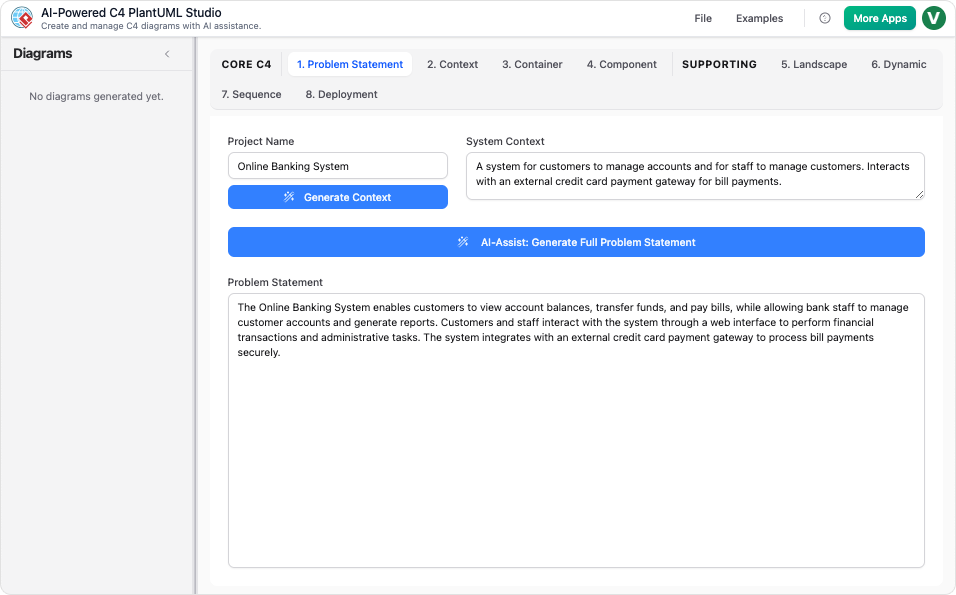
- C4-PlantUML Studio: This tool transforms natural language descriptions into professional C4 diagrams instantly. It enforces a structured workflow, guiding users to select parent elements (like a container) before generating nested diagrams (like components) to ensure architectural accuracy. See the guide to C4-PlantUML Studio for more details.
- Conversational Refinement: The AI Chatbot allows users to build and modify models through natural dialogue. Commands such as “Add a payment gateway” or “Rename element” enable rapid iteration without manual drafting.
Professional Modeling and Collaboration
For architects requiring granular control, the desktop application offers Smart Magnets for efficient connecting and a Smart Sweeper to automatically align messy layouts. Furthermore, VP Online facilitates real-time multi-user editing, allowing distributed teams to collaborate seamlessly. Diagrams can be exported as standard images (PDF, PNG, JPG) or as PlantUML code, making them version-controllable and easy to integrate into CI/CD pipelines.
Analogy: The GPS for Software Architecture
To understand the synergy between the C4 model and Visual Paradigm, consider the analogy of a sophisticated GPS navigation system:
- The System Context level is the national map, showing the borders and major routes.
- The Container level is the city map, displaying major districts and infrastructure.
- The Component level is the street map, detailing individual buildings and roads.
In this analogy, Visual Paradigm acts as the AI-powered navigator. It does not merely draw these maps based on text prompts; it allows users to “zoom” seamlessly between levels while ensuring every street and building remains perfectly aligned and traceable.
This post is also available in Deutsch, Español, فارسی, Français, English, Bahasa Indonesia, 日本語, Polski, Portuguese, Ру́сский, Việt Nam, 简体中文 and 繁體中文.