


Creating SysML Block Definition Diagrams with an Visual Paradigm’s AI Chatbot
Introduction
In the realm of systems engineering, SysML (Systems Modeling Language) serves as a powerful framework for designing and analyzing complex systems. At the heart of SysML is the Block Definition Diagram (BDD), which provides a static structural view of a system by defining its components and their interrelationships. Traditionally, creating these diagrams requires manual effort using specialized software, which can be time-consuming and prone to errors.
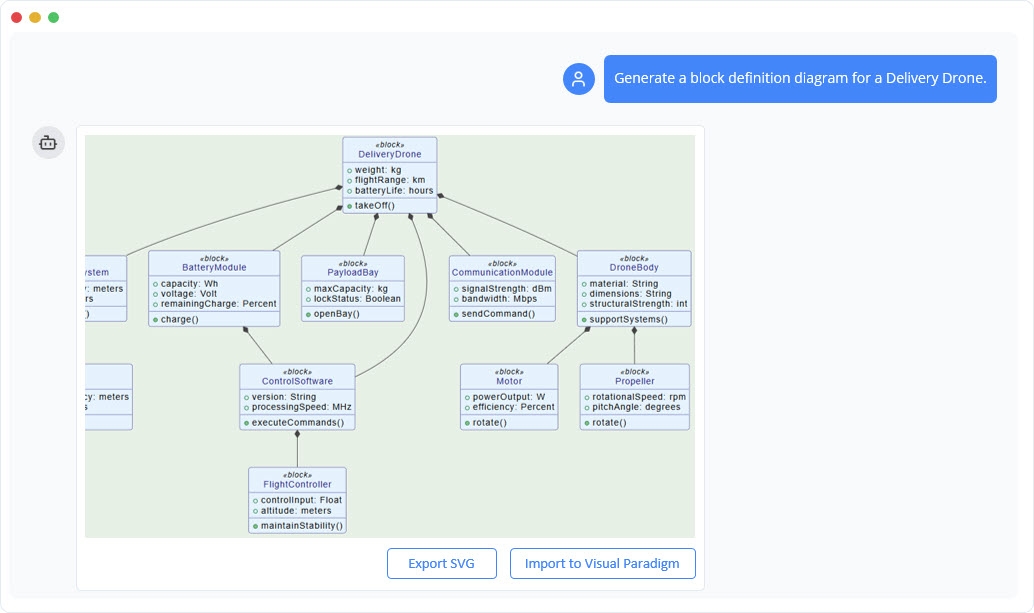
This tutorial introduces an innovative AI-powered chatbot tool that revolutionizes the process of generating and refining SysML BDDs. By leveraging natural language processing, the AI allows users to describe systems in everyday language and instantly produces accurate, SysML-compliant diagrams. Whether you’re a systems engineer, project manager, or student learning SysML, this tool streamlines your workflow, fosters iterative design, and enhances understanding.
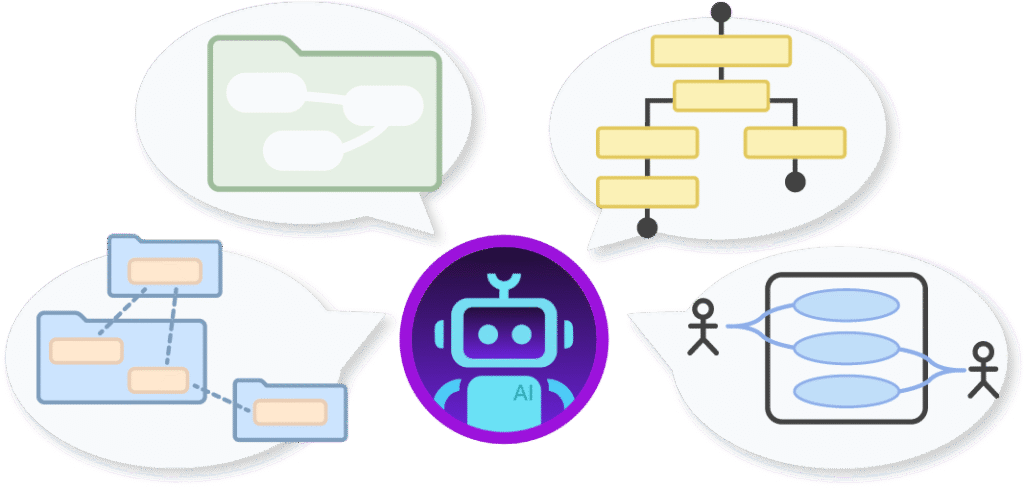
We’ll cover the fundamentals of BDDs, key concepts, step-by-step guidance on using the AI chatbot, practical examples, and the benefits of this approach. By the end, you’ll be equipped to create professional-grade BDDs efficiently, focusing more on innovation and less on tedious modeling tasks.
Key Concepts in SysML Block Definition Diagrams
Before diving into the tool, it’s essential to grasp the core elements of a SysML BDD. These diagrams are analogous to UML class diagrams but tailored for systems engineering, emphasizing hardware, software, data, interfaces, and even human elements. Here’s a breakdown of the key concepts:
- SysML Block Definition Diagram (BDD): The BDD is the foundational diagram in SysML for depicting the static structure of a system. It defines “blocks” (the building blocks of the system) and their relationships, serving as a blueprint that guides further modeling, such as behavior diagrams or requirement tracing. Blocks can represent anything from physical entities like sensors to abstract concepts like data flows.
- Block: The basic unit in a BDD, representing a logical or physical entity within the system. Examples include “Vehicle,” “Sensor,” or “User Interface.” Each block can have properties (e.g., attributes like size or capacity) and operations (e.g., functions it performs).
- Composition: This denotes a strong “whole-part” relationship where the parts are dependent on the whole and cannot exist independently. For instance, a “Car” is composed of an “Engine” and “Wheels”—if the car is destroyed, so are its components. In diagrams, this is shown with a filled diamond connector.
- Aggregation: A weaker “whole-part” relationship where parts can exist separately from the whole. For example, a “Fleet” aggregates “Cars,” meaning cars can be removed or added without destroying the fleet. This is represented by an empty diamond connector.
- Generalization: An inheritance or “is-a” relationship where one block specializes or extends another. For example, an “Electric Car” is a generalization of a “Car,” inheriting its properties while adding unique ones like battery capacity. This is depicted with a hollow arrowhead line.
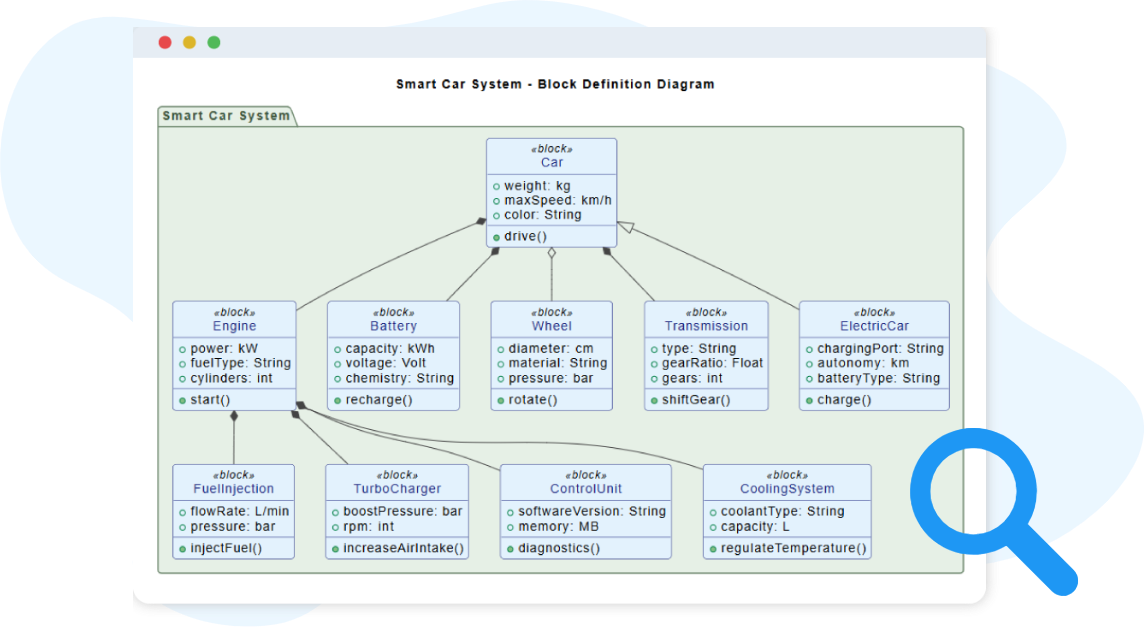
These concepts form the backbone of BDDs, ensuring clarity in system decomposition, hierarchies, and interactions. The AI chatbot automates their application, adhering to SysML conventions to produce consistent and error-free diagrams.
Getting Started: Using the AI Chatbot for BDD Generation
The AI chatbot transforms SysML modeling into a conversational experience, making it accessible even for beginners. Here’s a step-by-step guide to creating and refining BDDs:
Step 1: Instant Block Definition Diagram Generation
- Describe Your System: Start by providing a simple text prompt in natural language. No need for technical jargon—the AI interprets your description and generates a complete BDD.
- How It Works: The chatbot analyzes your input to identify key blocks, properties, and relationships. It then constructs a diagram that follows SysML standards, including hierarchies and notations.
- Example Prompt: Type something like, “Create a Block Definition Diagram for a Project Management Tool.” In seconds, the AI outputs a visual model with blocks such as “Project,” “Task,” “User,” and their connections (e.g., composition between “Project” and “Task”).
- Tips: Be descriptive for better results—mention subsystems, properties, or relationships explicitly if needed. The tool handles the rest, saving you from manual drawing.
Step 2: Refine the System Structure Through Guided Conversation
- Iterative Interaction: Once the initial diagram is generated, engage in a back-and-forth conversation to evolve it. Ask questions or give instructions like, “Add a subsystem for resource allocation” or “Change the relationship between ‘User’ and ‘Task’ to aggregation.”
- Real-Time Updates: The AI responds instantly, updating the diagram and explaining changes. This allows exploration of alternatives, such as decomposing a large block into smaller ones or introducing new associations.
- Advanced Refinements:
- Update properties: “Add a ‘priority’ attribute to the Task block.”
- Restructure hierarchies: “Make ‘Admin User’ a generalization of ‘User’.”
- Identify Gaps: The AI can suggest improvements, like missing blocks or undefined relationships, based on SysML best practices.
- Collaborative Use: Ideal for workshops—share the chat history for team reviews and instant updates during discussions.
Step 3: Best Practices and Tips
- Start Simple: Begin with high-level descriptions and refine iteratively to avoid overwhelming the AI.
- Leverage Explanations: The tool provides SysML concept explanations alongside diagrams, helping you learn as you design.
- Integration with Other Tools: While focused on BDDs, this chatbot is part of a broader suite including PDF tools, diagram makers, and more from the provider.
- Common Pitfalls to Avoid: Ensure prompts are clear; ambiguous language might lead to incomplete models. Always review the output for accuracy in your domain.
Examples of Generating SysML Block Definition Diagrams
To illustrate the tool’s capabilities, here are real-world examples based on simple prompts. Each demonstrates how everyday descriptions translate into structured SysML models. You can access full chat histories for these via the tool’s interface.
- Project Management Tool:
- Prompt: “Create a Block Definition Diagram for a Project Management Tool.”
- Result: The AI generates blocks like “Project” (composed of “Tasks” and “Milestones”), “User” (with generalizations like “Team Member” and “Manager”), and relationships such as aggregation for “Resources.” This highlights task decomposition and user roles.
- Weather Forecasting System:
- Prompt: “Create a Block Definition Diagram for a Weather Forecasting System.”
- Result: Key blocks include “Sensor Network” (aggregated sensors like “Temperature Sensor”), “Data Processor” (composed of “Algorithm” and “Database”), and “User Interface.” Generalizations might show “Satellite Sensor” as a type of “Sensor,” emphasizing data flow and hardware integration.
- Email Management System:
- Prompt: “Create a Block Definition Diagram for an Email Management System.”
- Result: Blocks such as “Inbox” (composed of “Emails”), “User Account” (with properties like “Storage Limit”), and relationships like aggregation for “Attachments.” This model clarifies storage hierarchies and user interactions.
These examples show the tool’s versatility across domains, from software to environmental systems. Experiment with your own prompts to see tailored results.
Benefits of Using the AI Chatbot for BDD Creation
Adopting this AI-driven approach offers numerous advantages:
- Efficiency: Generates complete structures from descriptions in moments, automating routine tasks.
- Accuracy: Ensures consistent SysML notation, reducing errors in relationships and properties.
- Insight Discovery: Helps spot structural gaps, missing blocks, or unclear hierarchies during refinement.
- Collaboration: Supports real-time updates in workshops, fostering team alignment.
- Time Savings: Frees you from manual modeling, allowing focus on problem-solving.
- Better Organization: Encourages proper decomposition and clearer system architecture.
- Educational Value: Provides explanations of SysML concepts, aiding learning for novices.
In essence, this tool democratizes systems modeling, making it faster and more intuitive.
Why Choose Visual Paradigm AI Chatbot?
In the fast-paced world of visual modeling, diagramming, and systems engineering, the Visual Paradigm AI Chatbot stands out as a game-changer. Built by modeling experts and integrated seamlessly into the Visual Paradigm ecosystem, it’s not just another generic AI tool—it’s a specialized assistant designed to transform natural language ideas into professional, standards-compliant diagrams and models. Whether you’re a software architect sketching UML sequences, a business analyst crafting SWOT analyses, or a student learning SysML, this chatbot eliminates manual drudgery and accelerates your workflow. Below, I’ll break down the key reasons why it’s worth your time, drawing from its core features, benefits, and what sets it apart from competitors.
1. Instant Diagram Generation from Everyday Language
Traditional tools force you to drag-and-drop shapes, learn syntax, or fiddle with templates. With Visual Paradigm AI Chatbot, you simply describe your idea in plain English—like “Create a SysML Block Definition Diagram for a Weather Forecasting System with sensors and data processors”—and it generates a complete, visually polished diagram in seconds. No design skills required; the AI handles layout, relationships, and labeling automatically. This is ideal for rapid prototyping, brainstorming sessions, or turning vague requirements into clear visuals for stakeholders.
2. Conversational Refinement and Iterative Design
Modeling isn’t a one-and-done task. The chatbot excels at guided conversations: Ask to “Add a generalization between Electric Car and Vehicle” or “Refine the composition in this project management tool diagram,” and it updates instantly while preserving context. It even suggests improvements, like spotting missing relationships or structural gaps, turning your diagram into a living, evolving model. This interactive workflow fosters deeper exploration and ensures logical coherence—perfect for workshops or solo refinement.
3. Adherence to Industry Standards for Accuracy and Compliance
Unlike general-purpose AI tools that spit out pretty but imprecise visuals based on patterns, Visual Paradigm’s chatbot is fine-tuned on real-world instances of formal standards like UML, SysML, ArchiMate, C4, BPMN, and business frameworks (e.g., SWOT, PESTLE). It produces diagrams that are not only aesthetically correct but semantically accurate, reducing errors in relationships, hierarchies, and notations. For systems engineers, this means reliable outputs you can trace to requirements or export for certification—without the guesswork.
4. Seamless Integration and Workflow Continuity
As a native feature of Visual Paradigm Online (with desktop access for Professional Edition users and above), it syncs effortlessly across web, desktop, and team workspaces. Generate in the chat, refine collaboratively in real-time, and import editable models directly into your VP projects for advanced analysis, version control, or linking to code/databases. No more silos or file transfers—it’s a true end-to-end assistant that scales from ideation to implementation.
5. Broad Support for Diverse Use Cases and Learning
- Domains Covered: From software (sequence diagrams, ERDs) to enterprise architecture (ArchiMate viewpoints), agile (backlog refinement), project management (risk prediction), and strategy (Ansoff Matrix).
- Educational Edge: It doubles as a tutor—ask “Explain the composition in this BDD” for breakdowns, or generate examples to learn UML faster through hands-on visualization. Great for students, onboarding teams, or non-technical users turning ideas into discussable models.
- AI App Library: Over 50 specialized apps for tasks like bottleneck detection or infographic creation extend its utility beyond diagrams.
6. Proven Efficiency and ROI
Users report slashing hours of manual work, enabling faster decision-making and better team alignment. Trusted by 320,000+ professionals worldwide—including enterprises, universities, and governments—it’s battle-tested for real-world reliability. Plus, with continuous updates (new features released frequently), it future-proofs your toolkit.
| Aspect | Traditional Tools | Visual Paradigm AI Chatbot |
|---|---|---|
| Speed | Hours of manual drawing | Seconds from text to diagram |
| Accuracy | Prone to human error in standards | Fine-tuned for UML/SysML compliance |
| Usability | Steep learning curve | Natural language, no expertise needed |
| Integration | Isolated apps/files | Seamless VP ecosystem sync |
| Collaboration | Static sharing | Real-time co-editing and suggestions |
Conclusion
This tutorial has equipped you with the knowledge to harness an AI chatbot for creating SysML Block Definition Diagrams effortlessly. From understanding key concepts like blocks, composition, aggregation, and generalization to generating and refining diagrams through natural conversation, you’ve seen how this technology simplifies complex engineering tasks. The examples demonstrate its practical application, while the benefits underscore its value in saving time and enhancing precision.
Ready to transform your workflow? Embrace AI-powered modeling to focus on innovation rather than tools. Start chatting with the AI today—describe your system, iterate, and watch your ideas take structural form. For more resources, explore the provider’s suite of tools, blogs, and forums. Revolutionize your systems engineering with clarity and speed!
This post is also available in Deutsch, Español, فارسی, Français, English, Bahasa Indonesia, 日本語, Polski, Portuguese, Ру́сский, Việt Nam, 简体中文 and 繁體中文.