


Imagine you’re an entrepreneur with a brilliant new idea, but you don’t have a team of developers or a huge marketing budget. You need a professional website to launch your startup, but the thought of coding or hiring a designer is daunting. What if you could build a stunning, functional landing page in just a few minutes? That’s exactly what the AI-Powered Page Editor from Visual Paradigm makes possible. This tool is designed to help you turn your vision into a live, shareable website without writing a single line of code.
Looking at the screenshot, you see a clean, modern interface with a clear workflow. On the left, a panel offers a library of pre-designed sections—like Hero, Text, Image & Text, and Gallery—that you can drag onto your canvas. The main area displays a live preview of your site, currently showing a powerful “Stop Wasting Time on Repetitive Tasks” headline over a brick wall background. This isn’t just a template; it’s a dynamic workspace where you can build your site from scratch or customize a template. The goal is to empower anyone to create a professional web presence quickly and easily.
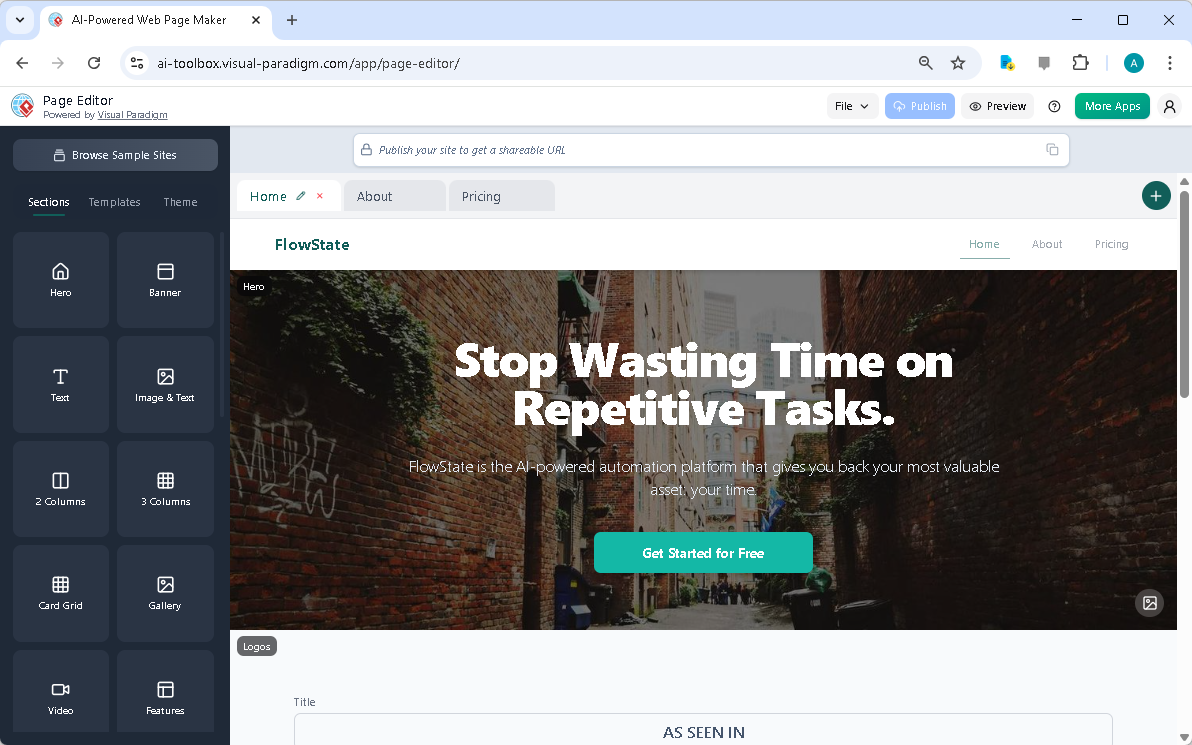
The core of this process is the visual drag-and-drop builder. Instead of wrestling with complex code, you simply select a section from the sidebar—say, a “Hero” block—and drag it onto your page. You can then customize it by editing the text, changing the image, or adjusting its layout. This intuitive approach makes web design accessible to everyone, from solo founders to marketing teams.
But the real magic happens with the integrated AI. Notice the “AI Generate” button in the properties panel? This feature allows you to leverage artificial intelligence to write compelling content for your sections. For instance, you can ask the AI to generate a catchy headline for your hero section or a persuasive description for your product features. This is a game-changer for overcoming writer’s block and significantly speeding up the content creation process.
For a startup, the ability to quickly iterate on a landing page is crucial. You can easily add new pages—like “About” or “Pricing”—using the “Pages” tab at the top. The editor manages the navigation between these pages automatically. You can also apply a theme to your entire site with a single click, ensuring a consistent and professional look that aligns with your brand identity.
Key Benefits of the AI-Powered Page Editor
Here’s a quick summary of the core advantages this tool offers:
-
Build websites faster with a visual drag-and-drop interface.
-
No coding required—create professional pages without knowing HTML or CSS.
-
Professional design guaranteed using a library of responsive, pre-designed sections.
-
Consistent branding through one-click theme application.
-
AI for content inspiration to generate compelling text for your sections.
-
Seamless publishing to a live, shareable URL with one click.
These benefits directly address the pain points of building a website. Instead of spending weeks or months on development, you can focus on your core business while the editor handles the technical and creative aspects of web design.
Getting Started: Your First Website
Starting with the AI-Powered Page Editor is straightforward. First, launch the tool. You’ll likely see a blank page or a default template. The first step is to add your first section. Click on the “Sections” tab in the left sidebar and drag a “Hero” section onto the canvas. Then, click on the section to open its properties panel. Here, you can edit the text and use the AI to generate a compelling headline. Next, add other sections like “Features,” “Testimonials,” or a “Contact” form. Use the “Section Divider” to place them exactly where you want them. Once you’ve built your page, you can add more pages via the “Pages” tab. Apply a theme to unify the design, preview it on different devices, save your work to the cloud, and finally, publish it to get a unique URL.
Real-World Applications
Let’s imagine a few scenarios where this tool shines:
Building a Business Landing Page with AI
For a new business, the goal is to create a single, impactful page. You start by adding a “Hero” section and use AI to generate a powerful headline and subheading. Then, you add “Features” and “Testimonials” sections, again using AI to write the content. After rearranging the sections to create a compelling flow, you apply a professional theme and publish the site. The entire process takes minutes.
Designing a Multi-Page Portfolio Site
For a freelancer or designer, a portfolio site needs multiple pages. You can create a “Home” page with a “Gallery” section to showcase your work. Then, add an “About” page with a “Hero” section for your introduction and a “Team” section for your bio. The drag-and-drop interface makes it easy to structure your site, and AI helps you write engaging text for each section.
Conclusion
The AI-Powered Page Editor from Visual Paradigm is a powerful tool that democratizes web design. It removes the barriers of coding and design expertise, allowing anyone to create a professional, responsive website quickly. By combining a visual, drag-and-drop interface with AI-powered content generation, it streamlines the entire website creation process from idea to launch. Whether you’re a startup founder, a marketer, or a freelancer, this tool can help you build a stunning online presence in minutes.
Ready to see it in action? Try the AI-Powered Page Editor now and start building your website today.
Related Links
-
AI -Powered Site Builder | Visual Paradigm: The AI Powered Site Builder block-based visual editor, showing a user dragging and dropping a component onto the page . Build pages by dragging and dropping pre-designed blocks like Hero sections, Feature Grids, and Testimonials.
-
Visual Paradigm Review: AI-Powered Modeling & Design Tools: Explore our in-depth review of Visual Paradigm . Discover how its new Generative AI engine transforms UML modeling, agile management, and enterprise architecture.
-
Introducing the AI-Powered Website Builder: Create Stunning Websites in …: Discover Visual Paradigm’s new AI Website Builder . Describe your desired website, and our AI will generate a stunning, fully-functional site for you. Customize it with our intuitive drag-and-drop editor. Try it now!
-
Visual Paradigm AI Platform: A Comprehensive ArchiMate Guide: Explore the Visual Paradigm AI Visual Modeling Platform through the ArchiMate perspective. Learn how its standardized intelligence, persistent visual structures, and context-aware tools outperform generic LLMs.
-
AI Website Builder: Create Stunning Sites in Minutes: Page Editor is a dynamic, all-in-one website creation platform built around the concept of modular, section-based design. It is your visual interface for web development, allowing you to drag, drop, edit, and publish multi- page sites directly in your browser.
-
AI-Powered Page Editor – Visual Paradigm: The Page Editor is an intuitive web-based tool designed for both beginners and professionals to create stunning, responsive websites quickly. Enhanced with AI content generation, it streamlines the web design process with an easy drag-and-drop interface.
-
AI-Powered Site Builder – ai-toolbox.visual-paradigm.com: Build and deploy websites instantly with AI -powered site builder . Generate content automatically, customize designs, and publish online. Free AI website builder with fast deployment.
This post is also available in Deutsch, Español, فارسی, Français, English, Bahasa Indonesia, 日本語, Polski, Portuguese, Ру́сский, Việt Nam, 简体中文 and 繁體中文.