


Welcome to this in-depth tutorial on the AI-Powered Business Canvas Toolkit from Visual Paradigm. Whether you’re a startup founder brainstorming your first venture, a product manager iterating on a new feature, or an innovator tackling a complex challenge, this tool streamlines the journey from vague idea to actionable strategy. We’ll cover the fundamentals, key concepts, hands-on steps, real-world examples, and why Visual Paradigm’s AI-enhanced Business Model Canvas (BMC) tool stands out as a game-changer.
By the end of this guide, you’ll be equipped to leverage AI for rapid strategy building, turning “what if” moments into polished plans. Let’s dive in!
1. Introduction to the AI-Powered Business Canvas Toolkit
The Model Canvas Tool is an intuitive, web-based application powered by advanced AI, designed to accelerate business planning and innovation. At its core, it transforms a simple text prompt—like “a sustainable coffee shop in an urban area”—into a fully fleshed-out strategic canvas in seconds. This eliminates the dreaded “blank-page syndrome,” where ideas stall before they start.
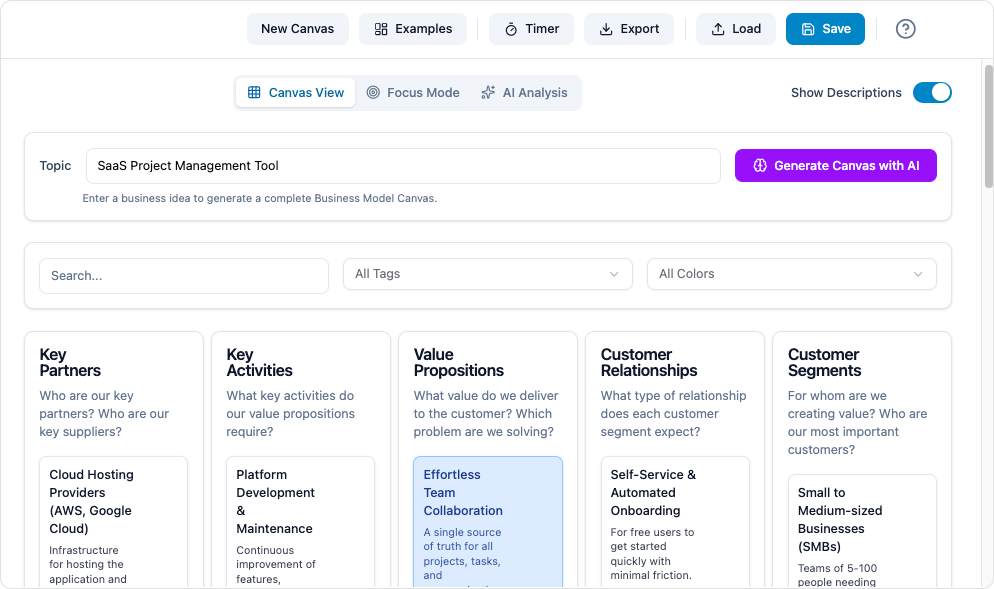
Key highlights include:
- Instant AI Generation: Input an idea, and get a structured canvas with populated sections.
- Deep Analysis: One-click AI tools to uncover insights, risks, and opportunities.
- Versatile Library: Dozens of templates across business, product, and analysis frameworks.
- Collaboration-Ready: Exportable outputs for teams, presentations, or further modeling in Visual Paradigm’s ecosystem.
Hosted on Visual Paradigm’s platform, the tool integrates seamlessly with diagramming, project management, and agile workflows, making it ideal for solo creators or enterprise teams. To get started, head to visual-paradigm.com and sign up for a free trial—no credit card required.
2. Key Concepts
Before jumping into the tool, let’s ground ourselves in the essentials. Business canvases are visual frameworks that distill complex strategies into digestible, one-page maps. They promote clarity, alignment, and iteration, drawing from lean startup principles.
What is a Business Canvas?
A business canvas is a structured template that captures the key elements of a strategy in blocks or sections. Unlike lengthy documents, it’s visual and collaborative, encouraging quick feedback loops. Popularized by tools like the Business Model Canvas (BMC), canvases focus on relationships between components (e.g., customers, revenue, costs) rather than linear narratives.
Core Canvas Types in the Toolkit
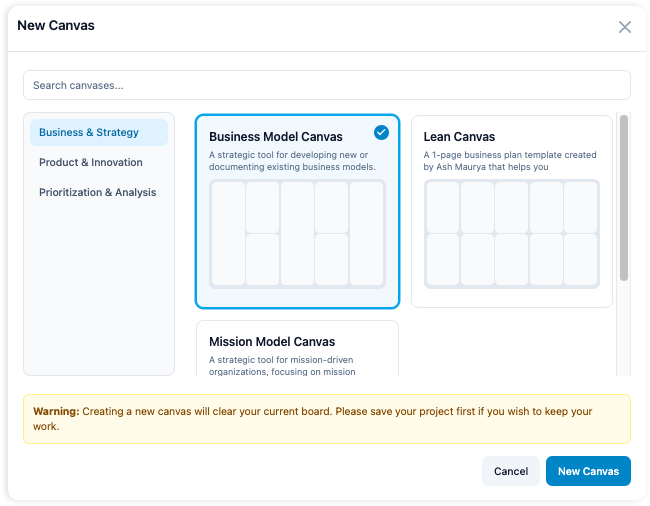
The Model Canvas Tool supports a rich library of industry-standard frameworks, categorized for ease:
- Business & Strategy:
- Business Model Canvas (BMC): The flagship tool—maps nine building blocks: Key Partners, Key Activities, Value Propositions, Customer Relationships, Customer Segments, Channels, Revenue Streams, Cost Structure, and Key Resources. Ideal for defining how a business creates, delivers, and captures value.
- Lean Canvas: A BMC variant for startups, emphasizing problems, solutions, key metrics, and unfair advantages.
- Porter’s Five Forces: Analyzes industry competitiveness through supplier power, buyer power, threat of substitutes, new entrants, and rivalry.
- Product & Innovation:
- Customer Journey Map: Visualizes user interactions from awareness to advocacy, highlighting pain points and delights.
- Empathy Map: Explores what customers say, think, do, and feel to build user-centric products.
- Lean UX Canvas: Focuses on assumptions, outcomes, and experiments for agile product design.
- Prioritization & Analysis:
- SWOT Analysis: Balances internal Strengths/Weaknesses with external Opportunities/Threats.
- Impact-Effort Matrix: Prioritizes tasks by potential impact vs. required effort.
- Eisenhower Matrix: Sorts tasks into urgent/important quadrants for productivity.
Each canvas comes with pre-built templates, expert tips, and examples to jumpstart your work.
The Role of AI in Canvases
AI supercharges traditional canvases by:
- Automating Population: Uses natural language processing to infer and fill sections based on your prompt, ensuring relevance and completeness.
- Generating Insights: Applies machine learning to scan the canvas for patterns, producing SWOT breakdowns, cohesion scores (how well elements align), risk assessments, and even pitch outlines.
- Iterative Refinement: Suggests enhancements, like alternative value propositions or risk mitigations, based on best practices from thousands of models.
This AI layer makes canvases dynamic tools for discovery, not static artifacts.
3. Why Visual Paradigm’s AI BMC Tool?
In a sea of diagramming and planning software, Visual Paradigm’s AI-powered Model Canvas Tool (with its robust BMC support) shines for several reasons:
- Speed and Accessibility: Traditional BMC creation can take hours of research and sketching. Here, AI delivers a draft in seconds, letting you focus on validation and iteration. It’s web-based, requiring no downloads, and scales from solopreneurs to teams.
- Intelligence Beyond Templates: While free tools like Canvanizer or Strategyzer offer basic BMCs, Visual Paradigm’s AI adds layers of analysis—auto-generating SWOTs or pitch decks—that reveal blind spots early. The cohesion & risk score, for instance, quantifies how your revenue streams align with customer needs, preventing flawed assumptions.
- Versatility and Depth: Unlike single-framework apps, it offers 20+ canvases with seamless transitions (e.g., export a BMC to a Customer Journey Map). Integration with Visual Paradigm’s full suite—diagramming, BPMN modeling, and agile boards—means your canvas evolves into full project artifacts.
- Proven for Real Impact: Backed by Visual Paradigm’s 20+ years in enterprise tools, it’s trusted by Fortune 500s for its reliability and expert-curated templates. Benefits include faster time-to-market (up to 80% reduction in planning time), reduced risks through AI insights, and enhanced pitches that secure funding.
- Cost-Effective Innovation: Free tier for basics, with premium unlocks for unlimited AI generations and exports. It’s not just a tool—it’s an AI co-pilot that democratizes strategic planning.
In short, if you’re tired of generic templates or manual drudgery, Visual Paradigm’s tool turns AI into your unfair advantage for smarter, faster strategies.
4. Step-by-Step Tutorial: Using the AI-Powered Model Canvas Tool
Let’s walk through creating, analyzing, and refining a BMC for a hypothetical eco-friendly delivery service. (Adapt these steps to your idea.)
Step 1: Access and Set Up
- Visit visual-paradigm.com/features/canvas-tool/ and click Try Now.
- Sign up with your email (free trial available). Log in to the dashboard.
- Navigate to New Canvas > Select Business Model Canvas from the library.
Step 2: Generate Your Canvas with AI
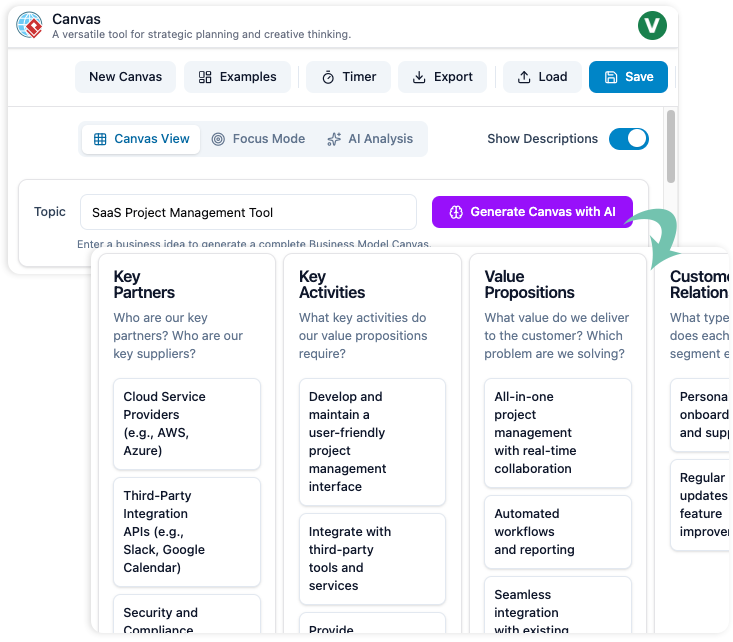
- In the prompt box, enter a concise description: “Eco-friendly bike delivery service for urban groceries, targeting busy professionals.”
- Click Generate with AI. The tool processes your input (via natural language understanding) and populates the nine BMC blocks:
- Customer Segments: Busy urban professionals aged 25-40.
- Value Propositions: Fast, zero-emission deliveries with fresh, local produce.
- Channels: App-based ordering and real-time tracking.
- (And so on for all blocks—AI draws from patterns in successful models.)
- Review the draft: Each section includes bullet-point suggestions with rationale (e.g., “Key Partners: Local farms—reduces carbon footprint and ensures quality”).
Pro Tip: If the output misses nuances, refine by adding details like “Focus on vegan options” and regenerate.
Step 3: Customize and Iterate
- Edit blocks manually: Drag-and-drop elements, add notes, or link to external data (e.g., market research PDFs).
- Use built-in tips: Hover over sections for examples, like revenue streams via subscription boxes.
- Collaborate: Share a live link for real-time edits with your team.
Step 4: Analyze with AI Insights
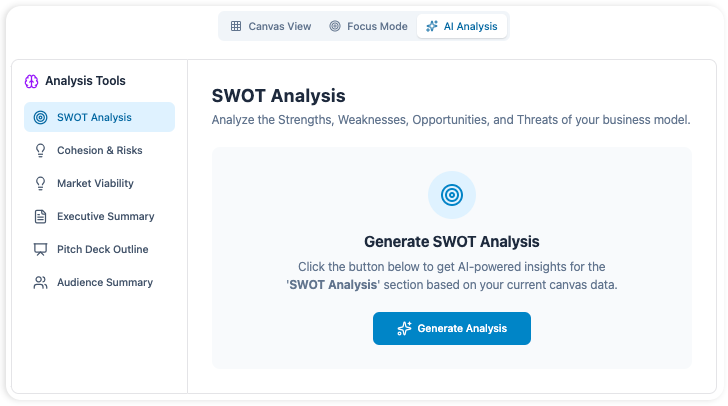
- Click Analyze Canvas at the top.
- Select tools:
- SWOT Analysis: AI scans for Strengths (e.g., “Sustainable branding appeals to eco-conscious users”) and Threats (e.g., “Weather disruptions to bike deliveries”).
- Cohesion & Risk Score: Get a 0-100 score (e.g., 85/100) with breakdowns—low cost structure cohesion might flag mismatched partners.
- Pitch Deck Outline: Auto-generates a 10-slide structure: Problem, Solution (your BMC visualized), Market Size, Traction, etc.
- Apply suggestions: AI might recommend “Add insurance partnerships to mitigate risk.”
Step 5: Export and Act
- Export as PDF, PNG, or editable Visual Paradigm file.
- Integrate: Import into project management tools for roadmaps or diagramming for flowcharts.
- Iterate: Save versions and regenerate based on feedback.
Total time: Under 10 minutes from idea to insights!
5. Real-World Examples
Example 1: Startup Pitch – Lean Canvas for a Fitness App
- Prompt: “Mobile app for personalized HIIT workouts using AI coaching for remote workers.”
- AI Output: Problem (sedentary lifestyles), Solution (adaptive routines), Key Metrics (user retention via streaks).
- Analysis: SWOT reveals Opportunity in post-pandemic health trends; Risk Score: 92 (strong alignment). Pitch Outline includes monetization via premium tiers.
- Outcome: Founder uses it to secure seed funding by visualizing unfair advantage (AI personalization).
Example 2: Product Feature – Customer Journey Map for E-Commerce Checkout
- Prompt: “Streamline checkout for fashion retailer to reduce cart abandonment.”
- AI Output: Stages (Awareness → Purchase) with touchpoints (email reminders, one-click pay) and emotions (frustration at slow loads).
- Analysis: Empathy insights highlight “Trust gap in payment”—suggests adding reviews. Cohesion Score: 78; tweak for better flow.
- Outcome: PM iterates to a 20% conversion lift.
Example 3: Strategic Review – BMC + Porter’s Five Forces for Tech Consultancy
- Prompt: “AI consulting firm specializing in supply chain optimization.”
- AI Output: BMC with Revenue (project fees), Partners (cloud providers). Follow-up with Porter’s: Low threat from new entrants due to expertise barrier.
- Analysis: SWOT flags Weakness in scaling talent; generates action plan. Full pitch deck ready for board meeting.
- Outcome: Uncovers pivot to SaaS tools, boosting projected revenue 30%.
Conclusion: Launch Your Ideas with Confidence
The Visual Paradigm AI-Powered Business Canvas Toolkit isn’t just software—it’s a catalyst for innovation, blending time-tested frameworks like the BMC with cutting-edge AI. By mastering generation, analysis, and iteration, you’ll build resilient strategies that stand out.
Ready to try? Head to the Model Canvas Tool page and input your first idea today. Share your canvases in the comments or community forums for feedback—what’s your next big spark? If you have questions, experiment and iterate; that’s the canvas way!
This post is also available in Deutsch, Español, فارسی, Français, English, Bahasa Indonesia, 日本語, Polski, Portuguese, Ру́сский, Việt Nam, 简体中文 and 繁體中文.