
In modern software development, creating clear, structured, and comprehensive use case documentation is essential for aligning stakeholders, guiding development teams, and ensuring system completeness. Visual Paradigm’s AI-Powered Use Case Description Generator revolutionizes this process by automating the creation of detailed use case narratives and visual diagrams from simple text prompts. This guide walks you through the entire workflow—from initial idea to finalized UML documentation—using AI-driven tools to accelerate design, improve accuracy, and enhance collaboration.
✅ Note: While AI significantly enhances productivity, always review and validate generated content for correctness and context-specific accuracy. [1, 3, 6]
🔧 Overview of the AI-Powered Use Case Workflow
Visual Paradigm’s AI features enable a bidirectional modeling experience:
-
Text → Diagram: Turn a plain-language description into a fully structured use case diagram.
-
Diagram → Text: Convert diagrams into detailed, standardized use case descriptions.
This seamless integration supports rapid prototyping, stakeholder communication, and technical documentation—all within a single platform (Desktop or Online).
📌 Step-by-Step Development Process
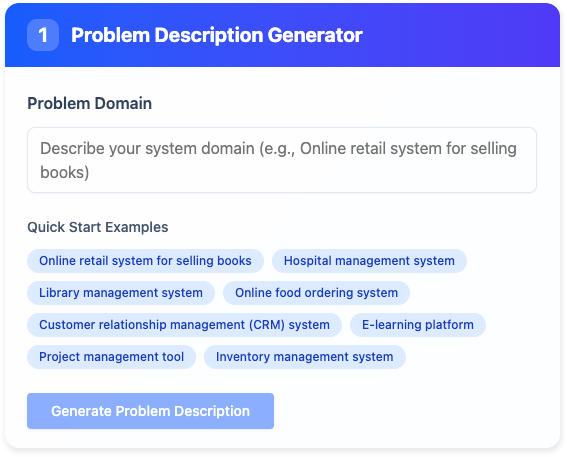
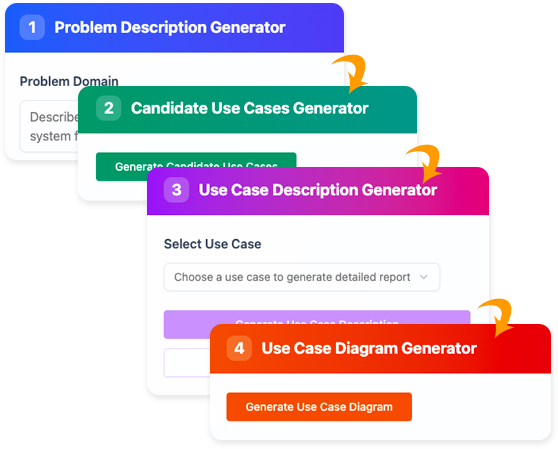
Step 1: Generate Problem Description
Begin with a high-level vision of your system.
✅ Steps:
-
Open Visual Paradigm (Desktop or Online).
-
Navigate to Tools > Apps from the main menu.
-
Locate and click Use Case Description Generator.
-
Enter a brief prompt such as:
“An online movie ticketing system where users can browse films, select seats, book tickets, and receive digital receipts.”
-
Click Generate Problem Description.
-
Review the AI-generated paragraph. Edit it to better reflect your domain, business rules, or user expectations.
💡 Pro Tip:
Use specific keywords like “user authentication,” “payment processing,” or “seat availability” to guide the AI toward more relevant outputs.
📌 The AI synthesizes your input into a coherent problem statement, serving as the foundation for all subsequent use case generation. [1, 3, 4, 5, 6]
Step 2: Identify Candidate Use Cases
Now, let the AI identify potential use cases based on your problem description.
✅ Steps:
-
Click Generate Candidate Use Cases.
-
The AI returns a table with:
-
Use Case Name
-
Description
-
Actors (e.g., Customer, Admin, Payment Gateway)
-
Example Output:
| Use Case Name | Description | Actors |
|---|---|---|
| Browse Movies | View available movies with details | Customer |
| Select Seat | Choose a seat from a theater layout | Customer |
| Book Ticket | Confirm booking and pay for tickets | Customer |
| Cancel Reservation | Cancel a booked ticket before showtime | Customer |
| Manage Screenings | Add, edit, or delete movie showtimes | Admin |
✏️ Refinement:
-
Add missing use cases (e.g., “View Booking History”).
-
Remove irrelevant ones (e.g., “Update User Profile” if not part of core flow).
-
Adjust actor roles for clarity (e.g., “Payment Gateway” as a system actor).
✅ This step ensures system coverage and helps uncover edge cases early. [1, 3, 4, 6]
Step 3: Generate Detailed Use Case Description
Select a candidate use case and generate a full, structured description.
✅ Steps:
-
Choose a use case (e.g., Book Ticket).
-
Click Generate Use Case Description.
-
The AI produces a rich, standardized report including:
| Section | Content Example |
|---|---|
| Preconditions | User is logged in; movie session exists; seats are available. |
| Main Flow | 1. User selects a movie and time. 2. System displays seat map. 3. User selects seats. 4. System calculates total price. 5. User confirms booking and pays. 6. System issues digital ticket. |
| Alternative Flows | A1: No seats available → show alternative sessions. A2: Payment fails → prompt retry or change method. |
| Post-conditions | Ticket is recorded in user’s account; seat is reserved; payment status updated. |
📤 Export Options:
-
Click Export Markdown to save the description as a reusable document.
-
Use in Confluence, Notion, or GitHub repositories for team collaboration.
✅ The AI ensures consistency across all use cases using a uniform template. [1, 3, 6, 8, 9]
Step 4: Visualize as a Use Case Diagram
Transform your textual use cases into a visual UML diagram.
✅ Steps:
-
Click Generate Use Case Diagram.
-
The AI creates a diagram showing:
-
Actors (stick figures)
-
Use Cases (ovals)
-
Associations (lines connecting actors to use cases)
-
-
Click Open in Visual Paradigm Online to:
-
Edit the diagram
-
Add notes or constraints
-
Save to your workspace
-
🎯 Why This Matters:
Visual diagrams are critical for stakeholder alignment—especially non-technical ones. They clarify responsibilities and system boundaries at a glance.
✅ This is a core example of bidirectional modeling: text drives diagrams, and diagrams inform text. [1, 2, 10, 12, 15, 16]
Step 5: Refine and Model Behavior Further
Enhance your model with advanced AI tools to achieve deeper insight and precision.
🔹 Refine with AI (Use Case Diagram Refinement Tool)
-
If your diagram feels too basic, use the “Refine with AI” feature.
-
The AI analyzes shared functionality and automatically:
-
Adds generalization (e.g., “Online Booking” → “Book Ticket”, “Cancel Reservation”)
-
Adds include/extend relationships (e.g., “Book Ticket” includes “Validate Payment”)
-
Suggests system boundaries and subsystems
-
📌 This prevents oversimplification and improves model fidelity. [11, 12, 13]
🔹 Convert to Activity Diagram (Use Case to Activity Diagram)
-
Select the “Use Case to Activity Diagram” app.
-
Choose a use case (e.g., “Book Ticket”).
-
The AI transforms the main flow and alternative flows into a UML Activity Diagram, showing:
-
Decision nodes (e.g., “Payment successful?”)
-
Fork/join points (parallel processes)
-
Flow of control and exceptions
-
✅ This provides a granular, executable view of business logic—ideal for developers and testers. [14, 8, 9]
📌 For example, the “Book Ticket” activity diagram can reveal bottlenecks in seat allocation or payment validation. [8]
✅ Key Benefits of Using AI in Use Case Development
| Benefit | Description |
|---|---|
| Automation | Eliminates repetitive writing; generates complete use cases in seconds. |
| Completeness | Identifies overlooked use cases and edge cases (e.g., cancellations, errors). |
| Consistency | Enforces standard templates across all use cases. |
| Bidirectional Modeling | Go from text to diagram and back—ideal for iterative design. |
| Faster Onboarding | New team members can quickly understand system behavior via AI-generated docs. |
🌟 AI doesn’t replace human judgment—it amplifies it. Always validate outputs against real-world requirements. [1, 3, 6]
📚 Related Resources & Further Learning
-
How AI Chatbot Can Help You Learn UML Faster:
This article details how the AI chatbot provides an interactive environment to practice UML, offering instant visualization and feedback for learners. Perfect for students and beginners mastering UML concepts like use cases, sequence diagrams, and class diagrams. -
Generate Activity Diagrams from Use Cases Instantly:
Learn how to convert textual use case flows into detailed UML Activity Diagrams with one click. -
Boost Productivity in Software Design with Visual Paradigm’s AI Tools:
Explore how AI-powered refinement tools enhance diagram quality and reduce manual effort. -
Watch: AI-Powered Use Case Diagram Creation (YouTube):
A step-by-step video tutorial showing the full workflow in action. -
AI Use Case Description Generator – Official Page:
Explore features, download the app, and access documentation.
🧠 Final Tips for Success
-
Start Simple: Begin with a 1–2 sentence system description. The AI will expand it intelligently.
-
Iterate: Generate → Review → Edit → Regenerate. Refine until the output matches your intent.
-
Use Markdown Export: Save AI-generated content for version control and documentation reuse.
-
Combine with Other AI Tools: Use the AI Sequence Diagram Generator or Class Diagram Generator to build a full UML model.
-
Validate with Stakeholders: Share the AI-generated diagrams and descriptions with business analysts, developers, and product owners for feedback.
📌 Summary
Visual Paradigm’s AI-powered use case tools empower teams to:
-
Rapidly generate complete, consistent, and professional use case documentation.
-
Visualize system behavior with accurate UML diagrams.
-
Refine models using intelligent suggestions.
-
Accelerate design cycles and improve software quality.
By leveraging AI as a co-pilot—not a replacement—you can focus on innovation, not paperwork.
🚀 Transform your ideas into structured, visual, and actionable software requirements—faster than ever before.
🔗 References
[1] Visual Paradigm – AI Use Case Description Generator
[2] Visual Paradigm – AI Diagram Generator (2)
[3] AI Use Case Description Generator – Official Tool Page
[4] Free AI Use Case Description Generator – Release Notes
[5] Free AI Use Case Diagram Tool – Release Notes
[6] Visual Paradigm – AI Use Case Description Generator (2)
[7] AI Use Case Description Generator – Alternative Link
[8] Fliplify – Transforming Use Cases into UML Activity Diagrams with AI
[9] Visual Paradigm Blog – Generate Activity Diagrams from Use Cases
[10] YouTube: AI-Powered Use Case Diagram Creation
[11] Cybermedian – AI Refinement Tools for Use Cases
[12] Visual Paradigm – AI Use Case Diagram Refinement Tool
[13] YouTube: Refining Use Case Diagrams with AI
[14] Visual Paradigm – Use Case to Activity Diagram Feature
[15] Visual Paradigm – Bidirectional Modeling with AI
[16] Visual Paradigm – AI in UML Design
📘 Next Step: Try it yourself today at https://ai.visual-paradigm.com and experience the future of software modeling.