
Introduction
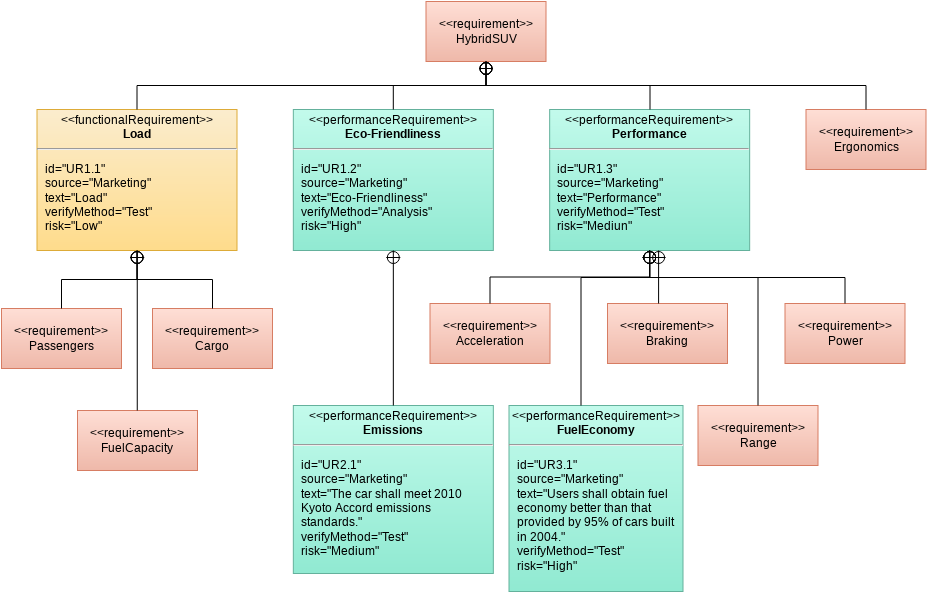
Visual Paradigm’s SysML Requirement Diagram provides a graphical representation to define, link, and manage complex system requirements. It serves as a bridge between traditional text-based requirements and structural or behavioral models in Model-Based Systems Engineering (MBSE).
AI Generation Capabilities
Recent updates have introduced AI Diagram Generation, which automates the creation of these diagrams from natural language prompts:
Key AI Features:
-
Prompt-to-Diagram: Input a topic (e.g., “Requirement diagram for an autonomous vehicle navigation system”), and the AI identifies necessary requirements, assigns unique IDs, and builds the hierarchical structure.
-
Intelligent Refinement: The AI can automatically suggest and add elements like test cases for verification or design blocks for satisfaction based on the context of the requirements.
-
Standard Compliance: AI-generated diagrams adhere to SysML standards, properly using stereotypes like
<<requirement>>and mapping relationships such as<<deriveReqt>>,<<satisfy>>, and<<verify>>.
Key Diagram Elements & Relationships
A SysML requirement diagram typically consists of the following core components:
| Element | Description |
|---|---|
| Requirement | The central block containing a unique ID, Name, and Text description. |
| Package | A container used to group related requirements into logical hierarchies. |
| Test Case | Elements that specify how a requirement will be validated. |
| Block | Design components (from BDDs or IBDs) that fulfill specific requirements. |
Standard Relationships:
-
<<containment>>: Shows a parent requirement composed of several sub-requirements. -
<<deriveReqt>>: Indicates that one requirement is derived from another, often at a more detailed level of the system hierarchy. -
<<satisfy>>: Links a design element (like a Block) to a requirement it fulfills. -
<<verify>>: Connects a test case to the requirement it checks. -
<<refine>>: Used when a model element (like a Use Case) adds more detail or context to a requirement.
Tabular & Matrix Views
For projects with hundreds of requirements, Visual Paradigm provides alternative views for better management:
-
Requirement Table: Displays requirements and their properties (ID, text, priority) in a compact, Excel-like format for bulk editing.
-
Traceability Matrix: A grid that visualizes relationships between requirements and other model elements, making it easy to spot gaps where requirements aren’t yet satisfied or verified.
Getting Started: You can use the AI Chatbot in Visual Paradigm to generate a baseline diagram and then use the Resource Catalog to manually add detailed relationships.
Core AI SysML Diagram Support
Visual Paradigm provides AI-powered generative modeling for Systems Modeling Language (SysML), allowing users to automate the creation and refinement of complex system diagrams using natural language prompts.
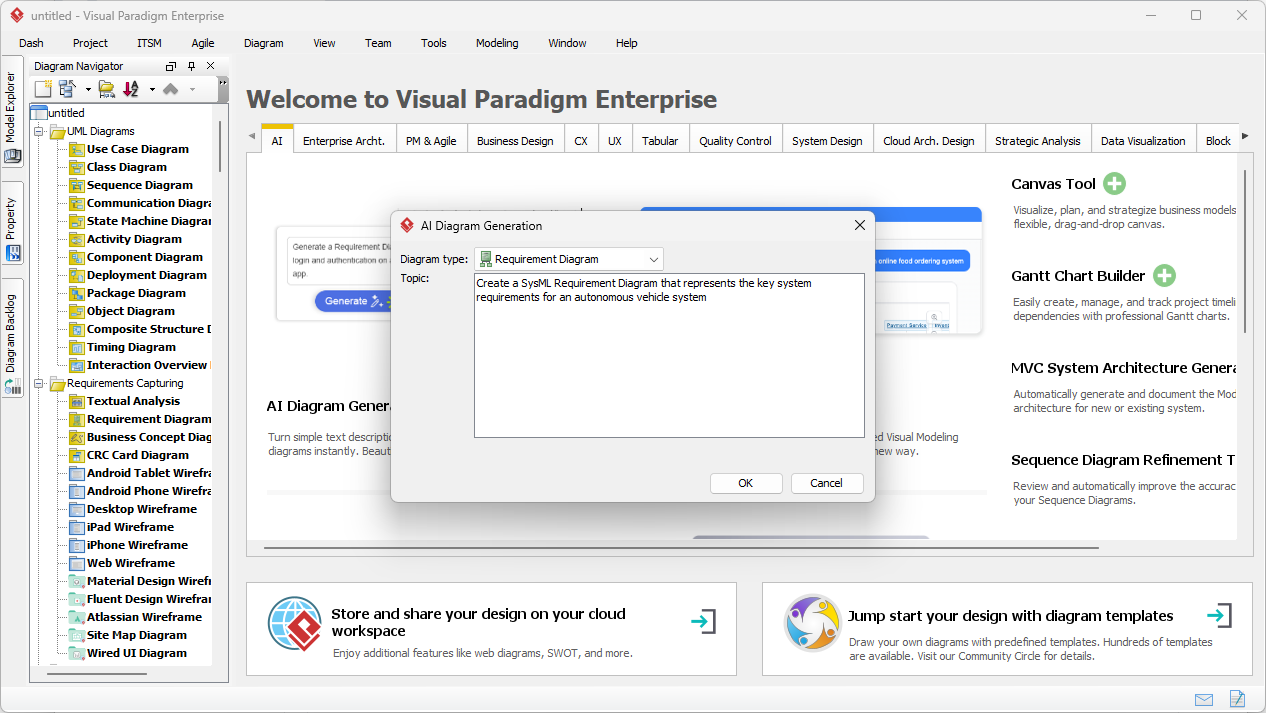
The AI engine specifically supports the generation of foundational SysML diagrams by interpreting technical descriptions and architectural intent:
1. Requirement Diagrams
Instantly generates hierarchical requirement structures. The AI identifies necessary requirement blocks, assigns unique IDs, and establishes relationships like <<deriveReqt>>, <<satisfy>>, and <<verify>> from plain text prompts.
2. Block Definition Diagrams (BDD)
Automates the creation of system hierarchies and classifications. Users can describe a system (e.g., “a smart TV”) and instruct the AI to add specific modules or functions, such as video streaming or audio operations.
3. Internal Block Diagrams (IBD)
Produces detailed internal structures, bypassing the manual effort of defining ports, connectors, and item flows. The AI serves as a “co-pilot” to ensure structurally compliant wiring between internal system parts.
Key AI Features for Systems Engineering
Conversational Editing
You can refine diagrams by chatting with the AI—for example, asking it to “Add a payment gateway,” “Rename blocks,” or “Refactor relationships”.
Intelligent Analysis
The AI can explain generated diagrams, suggest design improvements, and identify potential mismatches, such as incompatible port types in an IBD.
Automated Documentation
On-demand generation of detailed reports, summaries, and professional documentation based on your visual models.
Traceability & Compliance
Automatically establishes auditable traces from high-level stakeholder needs to detailed design components and their verification tests.
Seamless Integration
Diagrams generated via the cloud-based AI Chatbot (VP Online) can be imported directly into the Visual Paradigm Desktop environment for advanced modeling, versioning, and team collaboration.
Reference
- Beginner’s Guide to Requirement Diagrams in SysML: Comprehensive introduction to SysML requirement diagrams and their fundamental concepts.
- SysML Requirement Diagram Reference: Technical reference guide for SysML requirement diagrams.
- Requirement Diagram Documentation: Official documentation on requirement diagrams in SysML.
- SysML Requirement Diagram: A Guide to AI-Powered Requirements Engineering: Complete guide to using AI for SysML requirement diagram generation.
- AI Diagram Generation Features: Overview of Visual Paradigm’s AI-powered diagram generation capabilities.
- Harnessing Visual Paradigm’s AI for Diagram Generation: The Ultimate 2026 Guide: Comprehensive guide on leveraging AI for diagram generation.
- Visual Paradigm AI Diagram Generation Guide: Official guide covering AI diagram generator features including package diagrams.
- AI-Powered SysML Requirement Diagram Tool: Article showcasing AI-powered tools for SysML requirement modeling.
- SysML Requirement Diagram Tutorial: Tutorial on creating SysML requirement diagrams.
- Modeling Requirements with SysML: Article on requirements modeling techniques using SysML.
- SysML Diagram Tool Features: Overview of Visual Paradigm’s SysML diagramming tools and features.
- Establish Traceability Using Matrix and ETL Table: Guide on creating traceability matrices for requirements management.
- AI Chatbot Features: Information about Visual Paradigm’s AI chatbot for diagram generation.
- Block Definition Diagram: Guide to creating block definition diagrams with AI assistance.
- AI Diagram Generator Updates: Release notes on new diagram types supported by AI generator.
- SysML Internal Block Diagram: A Guide to AI-Powered Detailed System Design: Guide to generating internal block diagrams using AI.
- Case Study: Enhancing System Modeling Efficiency with Visual Paradigm’s AI-Powered Chatbot: Real-world case study on AI-powered system modeling.