
🔍 Overview: What is Agilien?
Agilien is an AI-powered web-based tool from Visual Paradigm, designed to revolutionize Agile planning and visualization for software development teams. It seamlessly integrates with Jira to automate backlog creation, enhance requirements clarity, and generate professional diagrams—all in seconds.
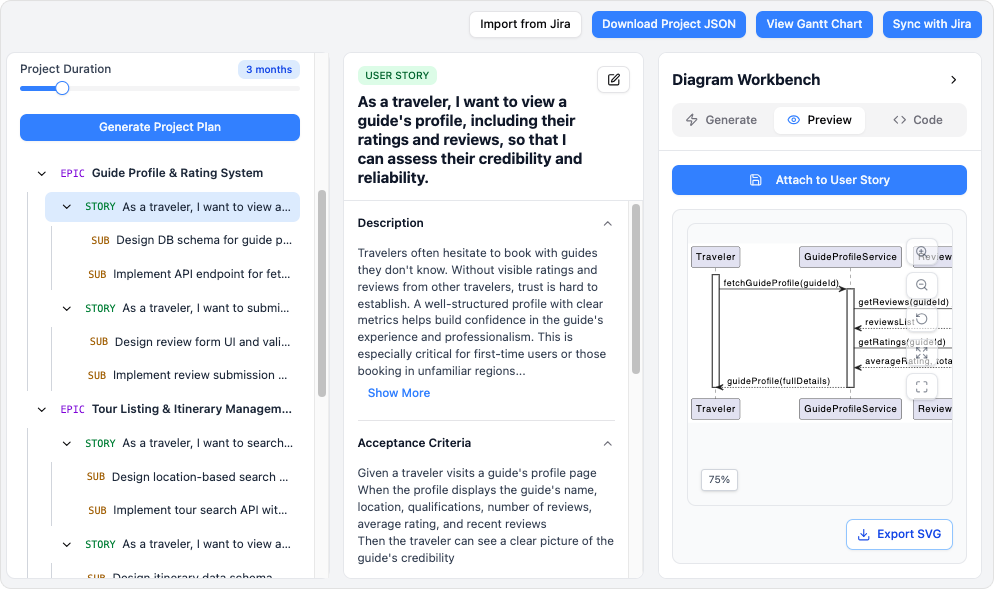
Agilien transforms high-level product goals into structured, prioritized backlogs using intelligent AI, while automatically generating UML diagrams, activity flows, and Gantt charts directly from user stories and tasks. It’s built for teams who want to save time, reduce ambiguity, and align stakeholders through intelligent, visual Agile planning.
✅ Agilien = AI + Jira + Visual Modeling = Smarter Agile Execution
🔄 Why Agilien? The Pain Points It Solves
| Challenge | How Agilien Helps |
|---|---|
| Manual backlog grooming takes hours | AI auto-generates epics, stories, and tasks from a single prompt |
| Misunderstood requirements lead to rework | AI analyzes descriptions and creates accurate UML diagrams |
| Time-consuming diagram creation | One-click generation of sequence, activity, class diagrams |
| Lack of visual roadmap for planning | Dynamic Gantt charts with AI-scheduled timelines |
| Disconnect between product owners and engineers | Shared visual models bridge communication gaps |
Agilien eliminates friction between planning, design, and execution—all within the familiar Jira environment.
🛠️ Core Features at a Glance
| Feature | Description |
|---|---|
| ✅ AI-Powered Backlog Generation | Turn a product goal into a full backlog in seconds |
| ✅ 3C User Story Format | Automatically structures stories: Card, Conversation, Confirmation |
| ✅ Bi-Directional Jira Sync | Import from or export to Jira with one click |
| ✅ Auto-Generated UML Diagrams | Sequence, Activity, Class diagrams from text |
| ✅ Dynamic Gantt Charts | AI schedules tasks based on priority, dependencies, and team velocity |
| ✅ Real-Time Collaboration | Work with your team in real time via cloud-based interface |
| ✅ Free Trial Available | Test-drive Agilien risk-free at agilien.visual-paradigm.com |
🌐 Seamless Jira Integration: Work Where You Already Do
Agilien doesn’t replace Jira—it enhances it. The integration is bi-directional, ensuring data stays synchronized and your Jira instance remains the single source of truth.
🔽 Import from Jira
-
Pull any Jira project: team-managed or company-managed.
-
Import epics, user stories, tasks, and even custom fields.
-
Use existing backlog items as a starting point for AI refinement.
📌 Ideal for teams looking to analyze, refactor, or visualize their current backlog with AI.
➡️ Export to Jira
-
Push the entire AI-enhanced backlog back to Jira with one click.
-
Automatically creates or updates:
-
Epics
-
User Stories (with 3C format)
-
Sub-tasks
-
Priorities
-
Estimated timelines
-
-
No need to re-enter data manually.
✅ No duplicate work. No errors. Just pure efficiency.
💡 Pro Tip: Use Agilien to refine your backlog before sprint planning, then export it to Jira—keeping your team aligned and ready to execute.
🧠 AI-Powered Diagramming: From Text to Visuals in Seconds
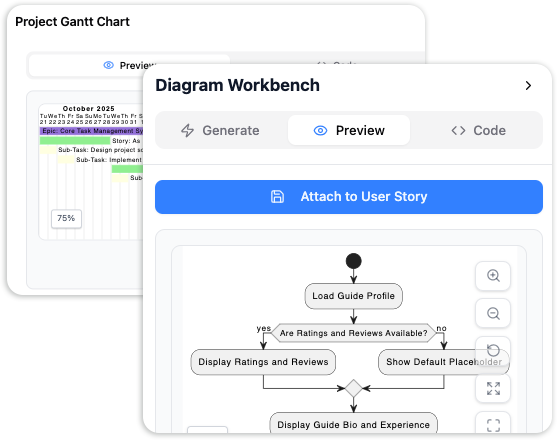
The real magic of Agilien lies in its ability to transform plain text into professional diagrams using advanced AI.
📌 1. Automated UML Diagram Generation
Agilien uses natural language processing (NLP) and domain-specific AI to extract system behavior and structure from backlog items.
✅ Sequence Diagrams
-
Visualize interactions between actors and system components over time.
-
Example: “As a user, I want to log in so I can access my dashboard.”
→ Agilien generates a sequence diagram showing user → authentication service → dashboard flow.
✅ Activity Diagrams
-
Model business processes, decision points, and workflows.
-
Example: “When a payment fails, retry up to 3 times, then notify the support team.”
→ Agilien maps out the loop, decisions, and actions.
✅ Class Diagrams
-
Represent object-oriented structure: classes, attributes, methods, relationships.
-
Example: “A customer places an order that includes multiple line items.”
→ Agilien identifiesCustomer,Order,LineItem, and their associations.
🎯 All diagrams are UML-compliant, accurate, and contextually relevant.
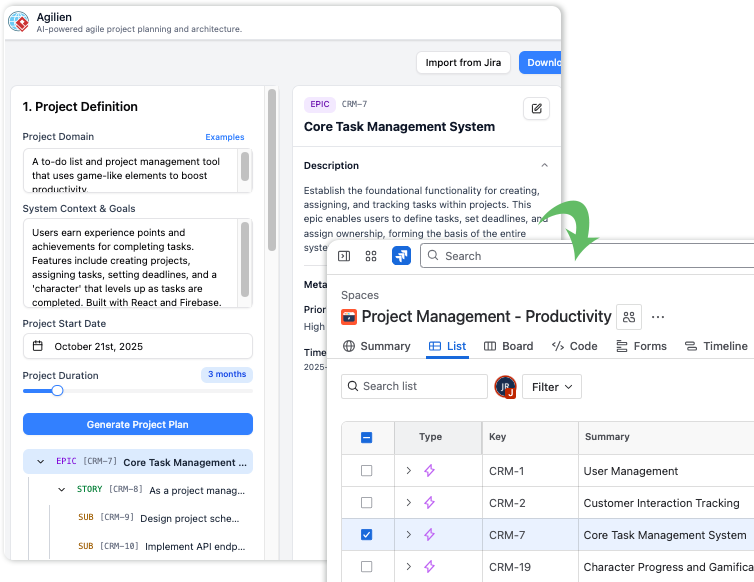
📅 2. Dynamic Gantt Chart Generation (AI-Powered Scheduling)
Agilien doesn’t just visualize workflows—it plans them.
-
Analyzes task dependencies, priorities, and team capacity.
-
Uses AI to estimate start/end dates based on sprint velocity and complexity.
-
Generates a visual roadmap with:
-
Milestones
-
Sprint timelines
-
Task dependencies
-
Resource allocation hints
-
📌 Perfect for sprint planning, roadmap presentations, and stakeholder reporting.
🔄 How Agilien Works in Practice: Step-by-Step Workflow
Here’s how teams can use Agilien to supercharge their Agile process:
🧩 Step 1: Start with a Goal (in Agilien or Jira)
-
Option A: Start in Agilien with a high-level idea:
“Build a user login and registration system.” -
Option B: Import an existing Jira project (e.g., a feature backlog).
✅ Agilien automatically parses the goal or backlog and begins structuring it.
🤖 Step 2: AI Generates the Backlog (in Seconds)
Agilien’s AI:
-
Breaks down the goal into epics.
-
Creates user stories in the 3C format:
-
Card: “As a user, I want to log in…”
-
Conversation: (AI suggests discussion points)
-
Confirmation: (AI defines acceptance criteria)
-
-
Generates technical sub-tasks (e.g., “Create login form,” “Implement JWT token validation”).
-
Assigns priorities and estimated effort.
🚀 What used to take hours now happens in under a minute.
🖼️ Step 3: Visualize with AI Diagrams
Select any backlog item and choose a diagram type:
| Action | Result |
|---|---|
| Click “Generate Sequence Diagram” | See how user actions interact with backend services |
| Click “Generate Activity Diagram” | Map out the full login workflow, including error paths |
| Click “Generate Class Diagram” | View the system’s core structure (User, Session, AuthToken, etc.) |
💡 All diagrams are editable and exportable (PNG, PDF, SVG).
🔄 Step 4: Sync Back to Jira
Once refined:
-
Click “Export to Jira”
-
Agilien pushes all changes:
-
Updated stories with improved descriptions
-
New diagrams as attachments or comments
-
Prioritized backlog with timelines
-
-
Jira issues are automatically created or updated.
🎯 Your Jira backlog is now smarter, clearer, and fully visualized.
🎯 Use Case Example: Building a Payment Feature
Let’s say your team is building a payment processing feature.
-
Start: Import a Jira epic: “Implement Stripe Payment Integration”
-
AI Action: Agilien generates:
-
Epics: “Payment Flow”, “Refund Handling”, “Error Recovery”
-
Stories: “As a customer, I want to pay via credit card…”
-
Sub-tasks: “Set up Stripe webhook”, “Validate payment amount”, etc.
-
-
Visualize: Generate a Sequence Diagram showing:
-
User → Frontend → Backend → Stripe API → Response
-
-
Schedule: Generate a Gantt chart with estimated timelines.
-
Export: Push everything back to Jira.
✅ Result: Your team has a clear, visual, and actionable backlog—ready for sprint planning.
🌟 Key Benefits for Agile Teams
| Benefit | Impact |
|---|---|
| ⏱️ Saves 5–10+ hours per sprint | No more manual backlog writing or diagramming |
| 📊 Improves requirement clarity | Visual models reduce misinterpretation |
| 🤝 Aligns product owners & engineers | Shared understanding via diagrams |
| 📈 Enables data-driven planning | AI estimates timelines and dependencies |
| 📁 Maintains Jira as the source of truth | No tool sprawl, no data silos |
| 🎨 Professional, consistent output | All diagrams follow UML standards |
📦 Pricing & Access
-
Free Trial: agilien.visual-paradigm.com
-
Full access to AI backlog generation, diagramming, and Jira sync
-
No credit card required
-
14-day trial (extendable upon request)
-
-
Plans:
-
Starter: For individuals or small teams
-
Professional: For larger teams with advanced modeling needs
-
Enterprise: Custom features, SSO, audit logs, dedicated support
-
💬 Contact sales for team licenses or enterprise deployment options.
📌 Best Practices for Getting the Most from Agilien
-
Start Simple: Begin with one epic or user story to test AI capabilities.
-
Refine Prompts: Use clear, descriptive language (e.g., “As a user, I want to reset my password via email…”).
-
Use Diagrams Early: Generate visuals during backlog refinement to catch design flaws early.
-
Leverage Gantt Charts: Use for sprint planning and stakeholder reporting.
-
Sync Regularly: Export back to Jira before sprint kick-off to keep the team aligned.
📣 Final Thoughts: Why Agilien is a Game-Changer for Agile Teams
Agilien bridges the gap between product vision and technical execution by combining:
-
AI intelligence to automate planning
-
UML modeling to clarify complexity
-
Jira integration to maintain workflow integrity
It’s not just a diagramming tool. It’s an AI co-pilot for Agile teams—empowering product owners, scrum masters, and developers to work faster, smarter, and more collaboratively.
✨ Agilien turns ideas into action—visually, intelligently, and instantly.
🔗 Get Started Today
👉 Try Agilien for Free: https://agilien.visual-paradigm.com
No credit card. No risk. Just smarter Agile planning in minutes.
🏁 Ready to Transform Your Agile Workflow?
Agilien is here to help your team plan faster, visualize better, and deliver with confidence—powered by AI and built for Jira.
🛠️ The future of Agile is visual. The future is intelligent. The future is Agilien.
-
How to Structure Your Jira Backlog Instantly with Agilien AI: This tutorial explains how Agilien AI automates Jira backlog structuring by analyzing user stories to generate organized sprints and epics.
-
Agilien AI-Powered Jira Backlog Planner – Visual Paradigm: A resource detailing how to automate and enhance Jira backlog planning using Agilien AI to intelligently structure stories for efficient sprint management.
-
Enhancing Visual Modeling and Backlog Planning with Agilian: This tutorial demonstrates how integrating Agilian with visual modeling tools improves backlog planning and agile workflow efficiency.
-
Visual Paradigm Chat – AI-Powered Interactive Design Assistant: An interactive interface that helps users generate diagrams, write code, and solve design challenges in real time using conversational AI.
-
AI-Powered Visual Modeling and Design Solutions: A hub for exploring cutting-edge AI-driven tools for visual modeling and software design, enabling smarter development workflows.
-
AI Chatbot Feature – Intelligent Assistance for Visual Paradigm Users: This feature allows users to leverage AI-powered chatbot functionality for instant guidance and task automation within the modeling platform.
-
AI-Powered Use Case Modeling Studio Release: An announcement regarding a specialized studio environment that uses AI to enhance use case modeling and broader software design activities.
-
Case Study: Enhancing System Modeling Efficiency with Visual Paradigm’s AI-Powered Chatbot: This study demonstrates how the assistant improves productivity and accuracy in system modeling by enabling conversational diagram creation.
-
Visual Paradigm AI Toolbox: Textual Analysis Tool for Software Modeling: A powerful AI-driven tool that transforms unstructured text into structured software models by identifying entities and key relationships.
-
Meet Your New AI Assistant – Product Update: An official update showcasing an AI assistant capable of accessing purpose-built apps for analysis and generating diagrams from text prompts in seconds.