


🌐 Welcome to Visual Paradigm Annotator
A New Era of Active Research & Team Collaboration
In an age where information is abundant but attention is scarce, Visual Paradigm Annotator redefines how you interact with online content. Whether you’re a student analyzing academic papers, a designer reviewing prototypes, a researcher gathering insights, or a team collaborating on technical documentation — this tool brings your web research to life.
✅ Free to use
✅ No downloads required
✅ Works on any public website or online PDF
✅ Seamless integration with Visual Paradigm Online
This comprehensive guide walks you through every feature, workflow, and best practice to help you master the Annotator and transform passive browsing into active knowledge creation.
🎯 Why You Need Visual Paradigm Annotator
❌ The Problem: Fragmented Research & Disconnected Collaboration
- You open 10 tabs, copy-paste snippets into Google Docs, lose context.
- Feedback on a website or PDF gets buried in messy email chains or outdated screenshots.
- Team members can’t see what others are thinking — and why.
- Research notes become inaccessible months later.
✅ The Solution: Annotate Where the Content Lives
Visual Paradigm Annotator solves these problems by letting you:
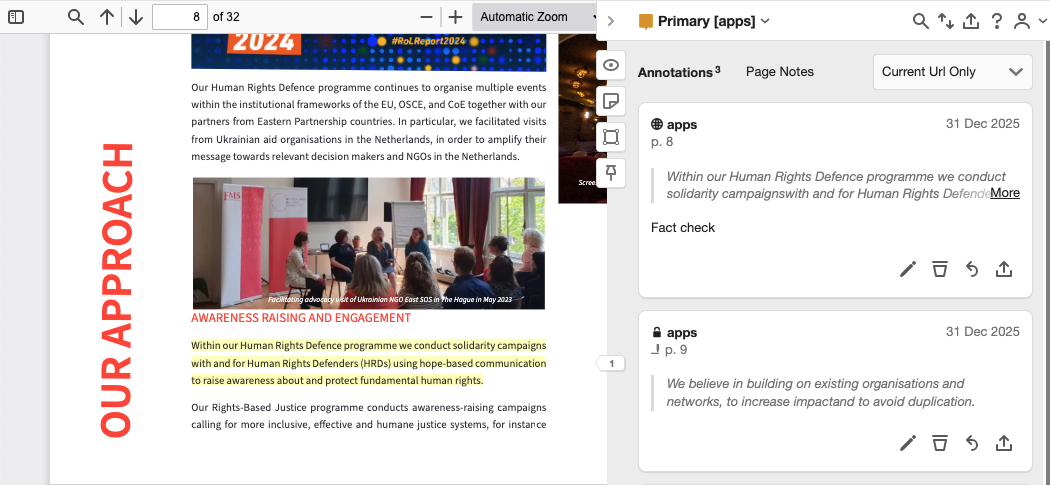
- Highlight and annotate directly on any webpage or PDF.
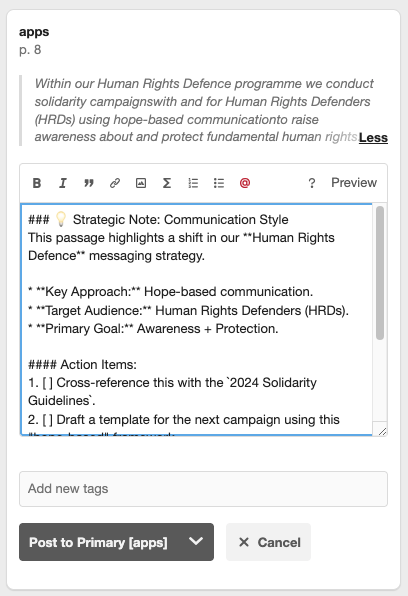
- Attach rich notes, tags, and discussions to specific content.
- Collaborate in real time within secure, private groups.
- Retain full context — no more lost “aha!” moments.
💡 Your research isn’t just saved — it’s anchored to the source.
🛠️ Getting Started: How to Access the Annotator
Step 1: Sign In or Sign Up
- Go to https://online.visual-paradigm.com
- Click “Log In” → Choose “Log in with Visual Paradigm Online”
- If you don’t have an account, click “Create Free Account” (takes less than 2 minutes).
📌 Pro Tip: Use your existing email or Google account for fast sign-up.
Step 2: Install the Browser Extension (Optional but Recommended)
- Visit the Visual Paradigm Extension Store (Chrome Web Store or Firefox Add-ons).
- Search for “Visual Paradigm Annotator” and click Add to Browser.
- Once installed, you’ll see the Annotator icon (📝) in your browser toolbar.
🔍 The extension works on all modern browsers: Chrome, Firefox, Edge, and Safari.
Step 3: Open Any Website or Online PDF
- Navigate to a research article, product design prototype, technical wiki, or academic PDF.
- Click the Annotator icon in your browser toolbar → the sidebar opens.
🌐 Works on:
- Public websites (e.g., Wikipedia, Medium, news sites)
- Online PDFs (e.g., arXiv, SSRN, Google Drive PDFs)
- Web-based documentation (e.g., Notion, Confluence, GitHub Pages)
📌 Core Features & How to Use Them
1. Contextual Annotation: Annotate Anywhere, Anytime
How it works:
- Highlight any text, image, or section on the page.
- A pop-up appears → choose “Annotate” to add a note.
What You Can Do:
- Add rich-text notes (bold, italic, lists, links).
- Insert emojis for tone or emphasis (e.g., ✅ for “valid”, ❓ for “unclear”).
- Attach files (PDFs, images, code snippets) to support your thoughts.
🧠 Example:
Highlight: “The study found a 40% increase in user retention after UX improvements.”
Annotate:
📌 Insight: This matches our A/B test results from Q3. Should we replicate this in the new onboarding flow?
🔗 [See Q3 Retention Report]
🏷️ #UX #research #action-item
2. Private Collaboration Groups: Work Together Securely
What is a Group?
- A private workspace where you and your team can annotate and discuss content together.
- Only members can view or comment on annotations within the group.
How to Create & Use a Group:
- Click “Create Group” in the Annotator sidebar.
- Name your group (e.g., “Marketing Team – Q1 Strategy”).
- Invite members via email or share a link.
- Set visibility: Private (only members), Shared (invite-only), or Public (optional).
Use Cases:
- Design teams reviewing a live prototype.
- Researchers discussing a journal article.
- Clients and developers reviewing a product spec.
🔒 All group data is encrypted and stored securely in your Visual Paradigm Online account.
3. Smart Tagging System: Organize Your Knowledge
Why Tags Matter:
- Turn scattered notes into a searchable knowledge base.
- Quickly retrieve insights by topic, status, or priority.
How to Use Tags:
- In the annotation box, type
#followed by a keyword:#research→ for academic findings#todo→ for action items#question→ for unresolved issues#insight→ for key takeaways
📊 Bonus: Use tag filters in your dashboard to view all
#todoitems across all websites.
🛠️ Pro Tip: Create custom tags like
#client-feedback,#priority-1, or#needs-review.
4. PDF Annotation: Annotate Online Documents Like a Pro
Supports:
- PDFs hosted on websites (e.g., research papers, reports, manuals).
- PDFs opened in Google Drive, Dropbox, or other cloud services.
Features:
- Highlight text, draw shapes, add sticky notes.
- Use the “Annotate” button to attach notes to specific paragraphs.
- Save your annotations — they persist even if you close the tab.
📄 No need to download or print. Annotate the PDF directly in your browser.
5. Integrated Ecosystem: Unified Experience Across Tools
Seamless Workflow:
- Your annotations sync across devices via your Visual Paradigm Online account.
- Use the same login to access:
- Annotator (web & PDF)
- Diagramming tools (UML, BPMN, ERD)
- Project management features
- Knowledge base and dashboard
🔄 Switch between annotating a website and sketching a process flow — all in one place.
🔄 Step-by-Step Workflow: From Browsing to Insight
✅ Repeat for every insight. Build a living knowledge base.
🔍 Advanced Tips & Best Practices
✅ Use Tags Strategically
- Create a consistent tagging system across your team:
#research– factual findings#idea– creative suggestions#todo– action items#blocked– issues needing help#client– feedback from stakeholders
✅ Use the Dashboard to Review Insights
- Go to “My Dashboard” in Visual Paradigm Online.
- Filter by:
- Date
- Tag
- Group
- Visibility
- Export your annotations as a PDF report or CSV for sharing.
✅ Link Annotations to Projects
- Create a project (e.g., “User Onboarding Redesign”).
- Assign relevant annotations to it.
- Track progress over time.
✅ Use Comments for Team Discussions
- Click “Reply” on any annotation to start a threaded conversation.
- Mention teammates with
@usernameto notify them. - Resolve threads when feedback is addressed.
❓ Frequently Asked Questions (FAQ)
Is Visual Paradigm Annotator free?
✅ Yes! It’s included in the free edition of Visual Paradigm. No credit card required.
Can I use it on mobile?
📱 Not yet — the Annotator is currently browser-only. However, your notes sync across devices, so you can view them on mobile via the web app.
Can I annotate password-protected pages?
🔐 No. The Annotator only works on publicly accessible websites and PDFs. It cannot access content behind login walls.
Can I export my annotations?
📤 Yes! You can:
- Export to PDF (with highlights and notes)
- Export to CSV (for analysis)
- Share a link to your annotated page (with group visibility)
How do I delete or edit an annotation?
✏️ Click the three dots (⋯) on any annotation → choose Edit or Delete.
🔒 Only the owner or group admin can edit/delete.
Is my data secure?
🔒 Yes. All data is encrypted in transit and at rest. Your private annotations are never shared with third parties.
🚀 Ready to Transform Your Research?
Visual Paradigm Annotator isn’t just a highlighter — it’s your digital research partner.
✅ Save time by eliminating tab-switching
✅ Collaborate smarter with contextual, threaded discussions
✅ Build a searchable knowledge base with smart tagging
✅ Stay focused with content-anchored insights
🎁 Start Now – It’s Free!
👉 Click Here to Try Visual Paradigm Annotator Today
No download. No setup. Just open a webpage, click the icon, and start annotating.
📢 Join the Community
- Follow us on Twitter/X and LinkedIn
- Share your annotated research with #VisualParadigmAnnotator
- Submit feedback via the Help & Feedback button in the Annotator sidebar
🌟 The web is no longer just a place to read — it’s a place to think, collaborate, and create.
With Visual Paradigm Annotator, you’re not just consuming content — you’re shaping it.
Visual Paradigm Annotator
Annotate. Collaborate. Understand.
Free. Secure. Powerful.
Available Now — Start Your Journey Today.
This post is also available in Deutsch, Español, فارسی, Français, English, Bahasa Indonesia, 日本語, Polski, Portuguese, Ру́сский, Việt Nam, 简体中文 and 繁體中文.