
Visual Paradigm 18.0 marks a transformative leap in enterprise architecture (EA) modeling by becoming the first desktop-based modeling tool to offer full, early support for the ArchiMate 4 (Pre-Release) specification.
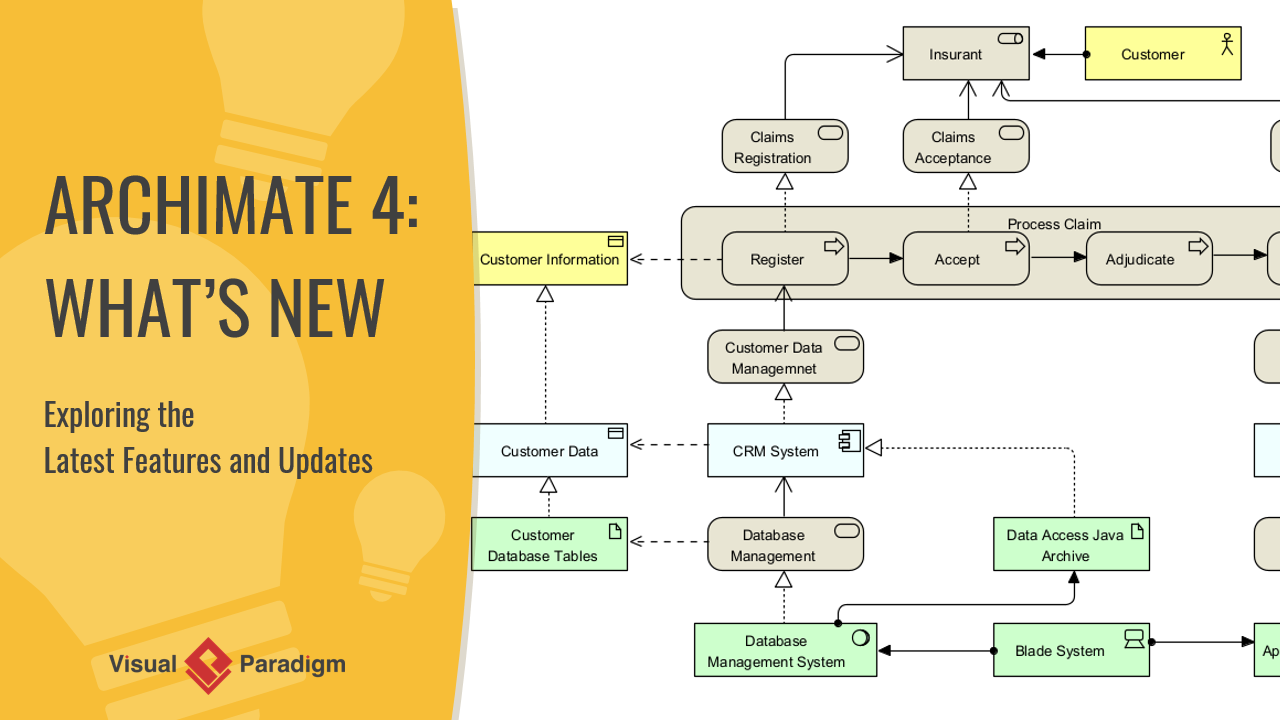
This release redefines how enterprise architects design, visualize, and communicate complex systems by embracing simplicity, flexibility, and precision, while maintaining backward compatibility with ArchiMate 3.2. This guide provides a complete overview of the new features, conceptual shifts, and practical benefits of ArchiMate 4 in Visual Paradigm 18.0.
🔷 Overview: Why ArchiMate 4? A Shift Toward Simplicity
ArchiMate 4 is not just an incremental update—it’s a philosophical evolution of the ArchiMate standard. The core principle driving ArchiMate 4 is:
“Simplicity over Comprehensiveness”
This means reducing redundancy, eliminating rigid structures, and focusing on clarity, reusability, and real-world applicability. Visual Paradigm 18.0 leads the industry in implementing these changes, offering enterprise architects a modern, intuitive, and future-ready modeling environment.
🔷 Key Innovations in ArchiMate 4 (Visual Paradigm 18.0)
✅ 1. ArchiMate 4 Diagram Editor & Palette
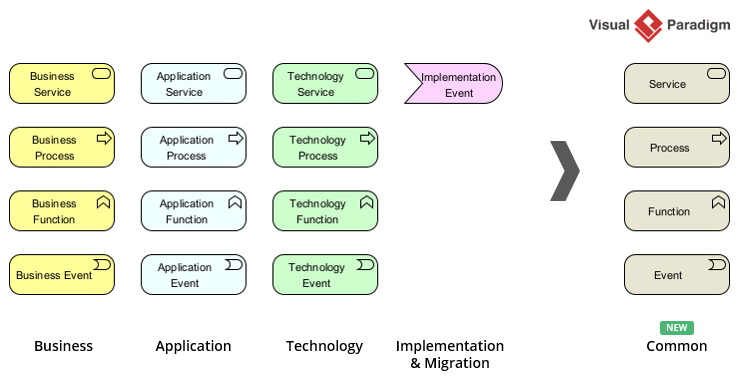
The diagram editor has been completely redesigned to reflect the new ArchiMate 4 vocabulary. The updated palette includes:
-
New icons and symbols for the Common Domain (e.g., Service, Process, Function, Event).
-
Streamlined representation of behavior elements.
-
Support for domain-specific visual cues without enforcing layer-based constraints.
📌 This ensures that models align with the new standard from the ground up, while preserving familiar workflows.
✅ 2. Native Multiplicity on Connectors
One of the most significant enhancements in ArchiMate 4 is the introduction of native multiplicity on relationships.
-
What it means: You can now define precise cardinality constraints directly on connectors (e.g.,
1..*,0..1,1..1). -
Why it matters: This enables more accurate modeling of system interactions—such as how many services can invoke a process, or how many roles participate in a function.
-
Implementation in VP 18.0: Multiplicity is displayed inline on relationships and validated during model checking.
🛠️ Example: A “Process” may be executed by one or more “Roles” → modeled as
1..*on the relationship.
✅ 3. Streamlined Elements: Eliminating Redundancy
ArchiMate 4 removes over 30 redundant or overly specific elements from previous versions. Key changes include:
| Removed (ArchiMate 3.2) | Replaced With (ArchiMate 4) |
|---|---|
| Business Interaction | Collaboration / Service |
| Application Interaction | Collaboration / Service |
| Technology Interaction | Collaboration / Service |
| Constraint | Generalization / Qualifier |
| Specific Process Types | Generic Process (with context) |
💡 Result: A leaner, more reusable set of core elements that reduce cognitive load and increase model portability.
✅ 4. Introduction of the Common Domain
The Common Domain is the cornerstone of ArchiMate 4’s new structure. It acts as a centralized, reusable library of non-layer-specific elements:
-
Core Elements: Service, Process, Function, Event
-
Purpose: These elements can be used across any domain (Motivation, Strategy, Application, etc.) without duplication.
-
Benefits:
-
Eliminates the need to redefine the same concept in multiple layers.
-
Encourages reuse and consistency.
-
Supports cross-domain modeling (e.g., a “Service” used in both Strategy and Application domains).
-
🧩 Think of the Common Domain as a shared vocabulary that transcends traditional layering.
✅ 5. Flexible Domains (Replacing Rigid Layers)
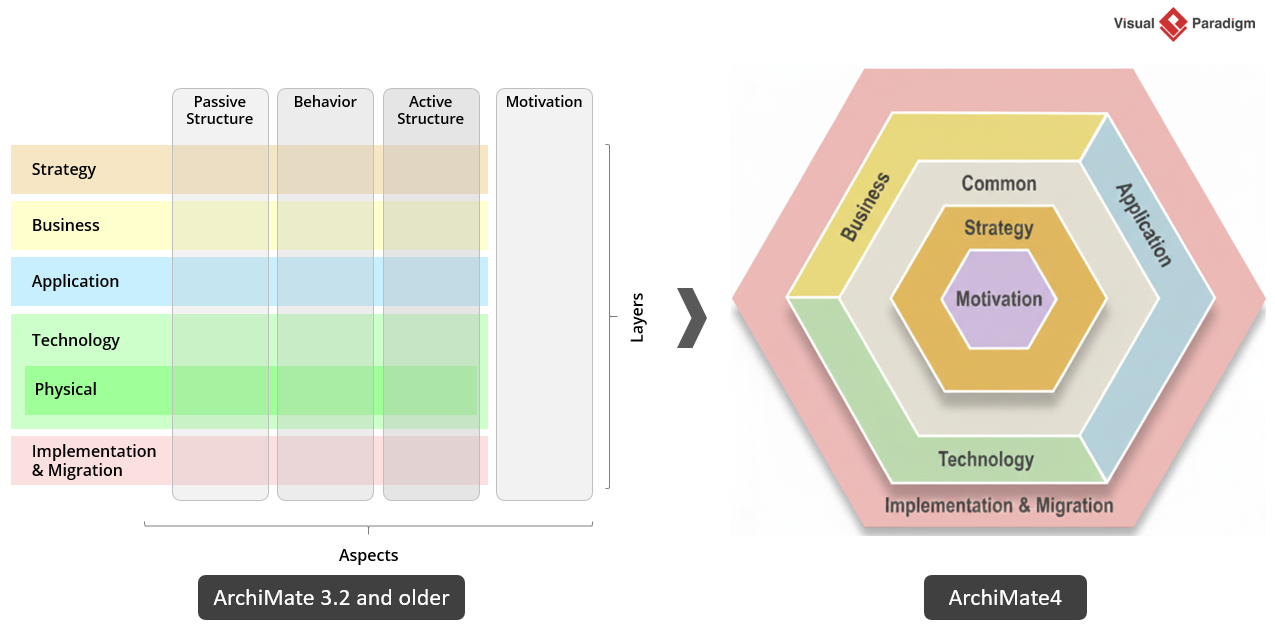
ArchiMate 4 replaces the traditional three-layer model (Business, Application, Technology) with seven flexible domains:
-
Motivation
-
Strategy
-
Common (new)
-
Business
-
Application
-
Technology
-
Implementation & Migration
🔄 Key Shift: Domains are now not hierarchical—they are contextual and overlapping. An element can belong to multiple domains simultaneously.
This allows architects to model systems in a way that reflects real-world complexity, not artificial boundaries.
✅ 6. The ArchiMate Hexagonion: A New Visualization Paradigm
Visual Paradigm 18.0 introduces the ArchiMate Hexagonion—a revolutionary visual framework for representing enterprise architecture.
-
Structure: The Motivation domain is placed at the center, symbolizing that business outcomes drive all decisions.
-
Surrounding Domains: The six other domains (Strategy, Common, Business, Application, Technology, Implementation) are arranged around it in a hexagonal layout.
-
Purpose: To emphasize cause-and-effect relationships from motivation to execution.
-
Benefits:
-
Visualizes alignment between business goals and technical implementation.
-
Highlights dependencies and feedback loops.
-
Ideal for executive presentations and strategy workshops.
-
🎯 The Hexagonion turns EA from a static diagram into a dynamic, outcome-driven narrative.
✅ 7. Full Backward Compatibility with ArchiMate 3.2
Visual Paradigm 18.0 does not force migration. Instead, it supports coexistence:
-
Existing ArchiMate 3.2 diagrams can be opened, edited, and saved.
-
Elements are automatically mapped to their ArchiMate 4 equivalents where possible.
-
Users can choose to upgrade their models incrementally using built-in migration tools.
✅ This ensures a smooth transition path for organizations adopting ArchiMate 4 at their own pace.
✅ 8. Enhanced Reporting & Integration
ArchiMate 4 models are now fully supported in Visual Paradigm’s reporting and publishing ecosystem:
-
Document Generation: Reports can include ArchiMate 4-specific structures, including the Common Domain and Hexagonion.
-
Project Publisher: Export to PDF, HTML, or Word with full formatting and navigation.
-
XMI Import/Export: Supports ArchiMate 4 XMI schemas, enabling integration with other tools (e.g., Sparx EA, Enterprise Architect).
-
Model Validation: Built-in checks ensure compliance with ArchiMate 4 rules.
📤 This makes ArchiMate 4 models production-ready for governance, audit, and stakeholder communication.
✅ 9. AI-Powered Diagram Generation (New Feature)
Visual Paradigm 18.0 integrates AI-driven diagram generation, powered by generative AI models trained on ArchiMate 4 best practices.
-
How it works:
-
Type a natural language description (e.g., “Create a diagram showing how customer service processes are supported by IT services”).
-
The AI generates a fully compliant ArchiMate 4 diagram (coming soon) using the Common Domain, proper multiplicity, and Hexagonion layout.
-
-
Use Cases:
-
Rapid prototyping.
-
Onboarding new team members.
-
Brainstorming sessions.
-
-
Validation: AI-generated diagrams are validated against ArchiMate 4 rules and flagged for inconsistencies.
🤖 AI doesn’t replace architects—it accelerates ideation and reduces manual setup time.
🔷 Best Practices for Adopting ArchiMate 4 in Visual Paradigm 18.0
| Practice | Description |
|---|---|
| Start with the Hexagonion | Use the ArchiMate Hexagonion as your primary modeling canvas to ensure business outcomes are always visible. |
| Leverage the Common Domain | Reuse Service, Process, Function, and Event across domains to avoid duplication. |
| Use Multiplicity Early | Define cardinality on all relationships to improve model precision. |
| Migrate Gradually | Open existing 3.2 models and update them incrementally using the migration assistant. |
| Use AI for Ideation | Generate initial diagrams with AI, then refine them manually for accuracy. |
| Train Your Team | Use the built-in tutorials and documentation to onboard users quickly. |
🔷 Conclusion: The Future of Enterprise Architecture is Here
Visual Paradigm 18.0 isn’t just a software update—it’s a paradigm shift in how we model enterprise architecture. By embracing ArchiMate 4’s principles of simplicity, flexibility, and precision, Visual Paradigm sets a new benchmark for enterprise modeling tools.
With features like:
-
The ArchiMate Hexagonion for outcome-driven visualization,
-
Native multiplicity for accurate relationships,
-
The Common Domain for reusable elements,
-
And AI-powered diagram generation,
Visual Paradigm 18.0 empowers architects to build models that are not only more accurate but also more understandable, collaborative, and aligned with business strategy.
🏁 Whether you’re upgrading from ArchiMate 3.2 or starting fresh, Visual Paradigm 18.0 gives you the tools to model the future—today.
🔷 Reference List (Markdown Format)
- ArchiMate 4: A New Era of Simplicity and Clarity in Enterprise Architecture: A comprehensive overview of ArchiMate 4’s design philosophy, key changes, and benefits for enterprise architects.
- Visual Paradigm Updates: ArchiMate 4 Support Announced: Official release notes detailing the new features, compatibility, and roadmap for ArchiMate 4 in Visual Paradigm 18.0.
- Cybermedian: ArchiMate 4 Preview – A New Era of Simplicity and Integration: Insightful analysis of ArchiMate 4’s shift from layers to domains and its implications for EA practice.
- Harnessing Visual Paradigm’s AI for Diagram Generation: The Ultimate 2026 Guide: A deep dive into the AI-powered diagram generation capabilities in Visual Paradigm 18.0, including use cases and best practices.
- Use Case Modeling Studio – Visual Paradigm: An in-depth look at Visual Paradigm’s Use Case Modeling Studio, highlighting its role in creating, managing, and generating use cases with AI assistance.
- Visual Paradigm – ArchiMate Tools Overview: A feature comparison and overview of Visual Paradigm’s support for ArchiMate across versions, including 3.2 and 4.
- Visual Paradigm Product Area Updates: Official updates on new modeling features, including AI, XMI, and diagram enhancements in Visual Paradigm 18.0.
- YouTube: Visual Paradigm 18.0 – ArchiMate 4 Preview Demo: A live demo video showcasing the new ArchiMate 4 features, including the Hexagonion, multiplicity, and AI diagram generation.
⚠️ Note: AI can make mistakes. Always verify model accuracy, especially when using AI-generated diagrams. Use official documentation and validation tools to ensure compliance with ArchiMate 4 standards.