
In today’s data-driven software development landscape, efficiently transforming raw data—especially JSON—into structured, production-ready database schemas is critical. Visual Paradigm offers a powerful, AI-powered workflow that simplifies this process, enabling teams to move from unstructured JSON data to fully functional database systems with minimal manual effort. This comprehensive guide walks you through every step of the process, highlighting how AI enhances modeling accuracy, accelerates development, and ensures alignment between user needs and technical implementation.
Overview of the AI-Powered Workflow
Visual Paradigm leverages artificial intelligence to automate and streamline the transformation of JSON data into a relational database schema. The workflow integrates AI-driven data visualization, intelligent conceptual modeling, and automated SQL generation, all within a single, unified platform. This end-to-end process supports agile development practices by ensuring traceability, reducing ambiguity, and accelerating delivery.
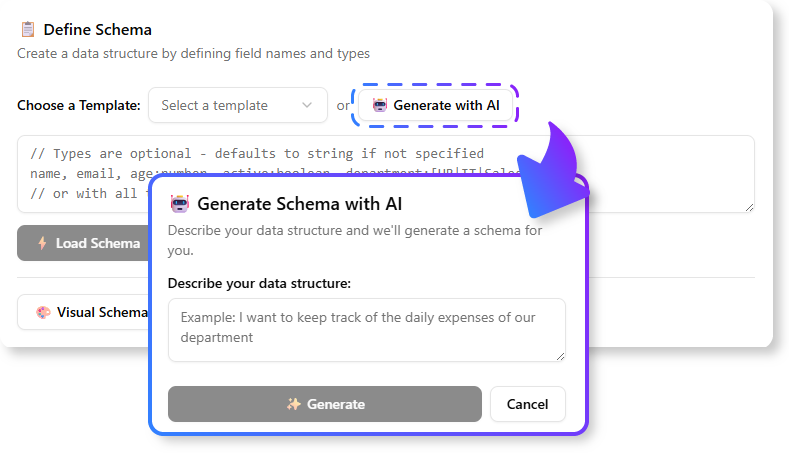
✅ Target Users: Software developers, database architects, business analysts, and technical leads working on data-centric applications.
🛠️ Required Editions:
Desktop: Professional Edition or higher
Online (Cloud): Combo Edition or higher
Step-by-Step Guide: From JSON to Database Schema
Step 1: Load JSON Data Using AI JSON CRUD Table Maker
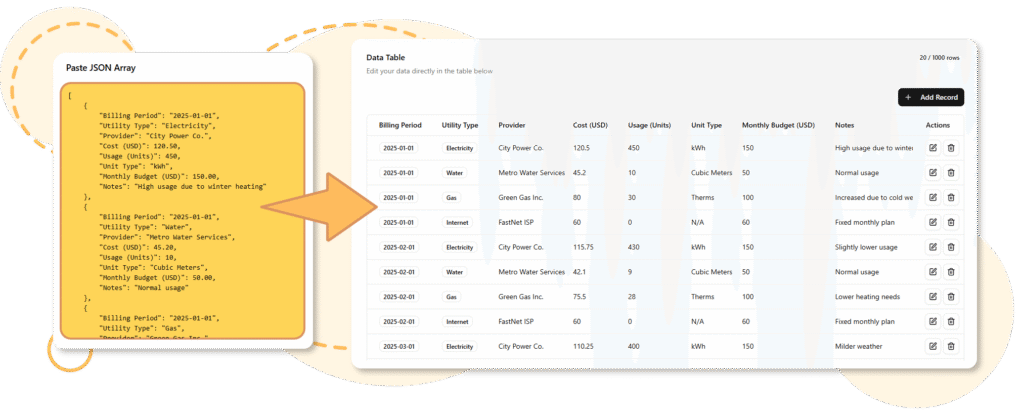
The journey begins with your raw JSON data—whether it’s a configuration file, API response, or data export.
🔧 How to Use:
-
Open Visual Paradigm Desktop or access the Visual Paradigm Online platform.
-
Navigate to Tools > AI JSON CRUD Table Maker.
-
Upload your JSON file or paste a JSON array directly into the editor.
-
Click “Analyze” or “Generate Table”.
💡 AI Features in Action:
-
The AI parses nested structures, arrays, and object hierarchies.
-
It infers data types (string, number, boolean, date, etc.) automatically.
-
It detects primary keys, foreign key candidates, and relationships between entities.
📌 Example: A JSON array of user orders with nested product details will be parsed into a table with
orderId,customerId,orderDate, and a sub-table forproducts.
📚 Reference:
AI JSON CRUD Table Maker
This feature enables instant conversion of JSON into an interactive, editable table—ideal for rapid prototyping and data exploration.
Step 2: Generate Interactive Table with AI-Powered Parsing
Once the JSON is processed, Visual Paradigm generates a fully interactive table that mirrors the structure of your data.
✅ Key Capabilities:
-
Editable cells: Modify values directly in the table.
-
Column customization: Rename columns, change data types, add constraints.
-
Row management: Insert, delete, or duplicate rows to refine sample data.
-
Real-time preview: See how changes affect the underlying schema.
🎯 Tip: Use this stage to validate the AI’s interpretation of your data. For instance, if a
timestampfield is detected asstring, you can correct it todatetimemanually.
📚 Reference:
Convert JSON to Table Instantly: Fast, Simple Data Visualization
This blog post demonstrates how the AI table generator speeds up data discovery and validation.
Step 3: Refine and Model the Data Structure
With the initial table in place, you can now refine the structure to better reflect your domain logic.
🔍 What You Can Do:
-
Rename columns to follow naming conventions (e.g.,
user_idinstead ofuserId). -
Define primary keys and unique constraints.
-
Split or merge tables based on normalization principles.
-
Add comments and metadata for documentation.
⚠️ Note: While AI is highly accurate, it may misinterpret complex or ambiguous JSON. Always review and validate the structure before proceeding.
📚 Reference:
AI Table Generator
This tool supports advanced data modeling by generating structured tables from unstructured inputs—perfect for initial data analysis.
Step 4: Convert to ER Diagram (Conceptual Model) Using DB Modeler AI
Now that you have a clean, refined table, it’s time to turn it into a high-level Entity-Relationship (ER) Diagram.
🤖 How DB Modeler AI Helps:
-
Select the table(s) in the AI Table Editor.
-
Use the “Generate ER Diagram” option via DB Modeler AI.
-
The AI analyzes the structure and suggests:
- Candidate entities (tables)
- Attributes (columns)
- Relationships (e.g., one-to-many, many-to-many)
- Candidate keys and foreign keys
✨ AI-Powered Enhancements:
-
Identifies likely relationships based on naming patterns (e.g.,
customerId→Customertable). -
Recommends normalization improvements.
-
Suggests appropriate cardinalities and constraints.
🎯 Use Case: If your JSON contains
orderandcustomerdata, the AI may infer aCustomerentity with a one-to-many relationship toOrder.
📚 Reference:
DB Modeler AI
This feature uses natural language understanding and pattern recognition to generate accurate conceptual models from data.
Step 5: Generate Database Schema (SQL DDL Statements)
With the ER diagram in place, you can now generate the actual SQL Data Definition Language (DDL) statements.
📥 Steps:
-
Open the ER Diagram in the Database Modeler.
-
Go to Tools > Generate SQL.
-
Choose your target database system:
- PostgreSQL
- MySQL
- Oracle
- SQL Server
- SQLite
- And more
✅ Output Includes:
-
CREATE TABLEstatements -
Primary key and foreign key constraints
-
Indexes on frequently queried columns
-
Data type mappings tailored to the selected DBMS
📌 Pro Tip: Use the “Preview SQL” option to inspect generated code before execution.
📚 Reference:
AI-Powered Database Generation
This release notes highlight the integration of AI into database generation, making schema creation faster and more reliable.
Step 6: Generate Physical Database (Optional – Desktop Only)
For desktop users, Visual Paradigm offers a direct database generation feature that creates the physical database on your local or remote server.
🔧 Steps:
-
In the Database Modeler, go to Tools > Generate Database.
-
Configure your database connection:
-
Host, port, username, password
-
Database name
-
-
Select the schema to deploy.
-
Click “Generate”.
✅ Outcomes:
-
Tables are created directly in the target database.
-
Indexes, constraints, and triggers are applied automatically.
-
You can immediately test queries and insert sample data.
⚠️ Caution: Always back up your database before generating new schemas, especially in production environments.
📚 Reference:
How to Generate Database from Model in Visual Paradigm
This video tutorial walks through the full process of generating a PostgreSQL database from an ER diagram.
Why Use a Use Case-Driven Agile Process with Visual Paradigm and AI?
While the above steps focus on technical transformation, the real power of Visual Paradigm lies in its ability to align technical implementation with user needs through a use case-driven agile methodology.
The Overall Purpose: Bridging the Gap Between User Needs and Code
Many software projects fail not due to technical flaws, but because of misalignment between stakeholders and developers. Visual Paradigm solves this by providing a visual, traceable, and AI-augmented workflow that ensures every line of code serves a real user goal.
🔗 Core Principle: Build the right product, the right way, faster.
Key Benefits of the AI-Enhanced Agile Workflow
1. Improved Alignment and Quality
-
User-Centered Development: Start with User Goals and map them to Use Cases, ensuring every feature addresses a real problem.
-
Shared Understanding: Visual models (use case diagrams, ER diagrams, sequence diagrams) serve as a common language for business analysts, developers, and product owners.
-
Reduced Ambiguity: Eliminates misinterpretations of requirements that often occur in text-based documentation.
✅ Example: A user goal like “View all orders for a customer” leads directly to a use case, which informs the creation of a
Customerentity andOrdertable—ensuring the database supports the actual user need.
2. Increased Efficiency Through AI & Automation
-
Auto-Generate Models from User Stories: Paste a user story like “As a user, I want to register with my email and password”, and AI generates a
Userentity withemail,password, andcreated_atfields. -
Code Generation: From the UML model, generate boilerplate code (e.g., Java classes, C# models, REST API endpoints).
-
AI Estimation Assistant: Uses historical sprint data to predict effort and set realistic sprint velocities.
-
Automated Documentation: AI generates up-to-date documentation (e.g., API specs, database schema docs) from models and code.
🚀 Result: Teams spend less time on repetitive tasks and more time on innovation.
3. Enhanced Project Management and Traceability
-
End-to-End Traceability: Trace a database table back to a use case, then to a user story, and finally to a high-level user goal.
-
Prioritized Backlog: Use User Story Mapping to visualize the user journey and prioritize features that deliver the most value.
-
Sprint Integration: Visual models are directly linked to sprint tasks, ensuring developers understand the context of their work.
🔍 Example: A database column
is_activecan be traced from theUserentity →Activate Accountuse case →User Registrationstory →Onboarding Experiencegoal.
4. Agility and Adaptability
-
Faster Feedback Loops: Deliver working increments quickly, enabling early stakeholder feedback.
-
Easier Refactoring: Since models and code are linked, changes to the ER diagram automatically reflect in the generated code and documentation.
-
Supports Iterative Design: As requirements evolve, update the model, regenerate the schema, and redeploy—without rewriting from scratch.
Best Practices and Recommendations
| Practice | Why It Matters |
|---|---|
| Review AI Output Manually | AI is powerful but not infallible. Always verify data types, relationships, and naming conventions. |
| Use Consistent Naming Conventions | Helps AI infer relationships and improves code readability. |
| Start with User Goals | Ensures your database supports real business needs, not just technical convenience. |
| Leverage Version Control | Save your models in Git or Visual Paradigm’s cloud repository for audit and collaboration. |
| Combine AI with Human Judgment | Use AI for speed, but apply domain expertise for correctness and scalability. |
Conclusion
Visual Paradigm’s AI-powered workflow transforms the traditionally tedious task of converting JSON to a database schema into a fast, intuitive, and intelligent process. By combining AI-driven data parsing, automated ER modeling, and seamless SQL generation, it empowers teams to deliver data-driven applications with greater speed, accuracy, and alignment with user needs.
When integrated with a use case-driven agile methodology, this workflow becomes even more powerful—ensuring that every table, column, and constraint serves a clear purpose in the user’s journey.
References (Markdown Format)
- How AI Chatbot Can Help You Learn UML Faster: This article details how the AI chatbot provides an interactive environment to practice UML, offering instant visualization and feedback for learners.
- AI JSON CRUD Table Maker: This feature enables instant conversion of JSON into an interactive, editable table—ideal for rapid prototyping and data exploration.
- DB Modeler AI: This feature uses natural language understanding and pattern recognition to generate accurate conceptual models from data.
- Convert JSON to Table Instantly: Fast, Simple Data Visualization: This blog post demonstrates how the AI table generator speeds up data discovery and validation.
- AI-Powered Database Generation: This release notes highlight the integration of AI into database generation, making schema creation faster and more reliable.
- How to Generate Database from Model in Visual Paradigm: This video tutorial walks through the full process of generating a PostgreSQL database from an ER diagram.
- AI Table Generator: This tool supports advanced data modeling by generating structured tables from unstructured inputs—perfect for initial data analysis.
- Visual Paradigm AI JSON CRUD Table Maker Tool: Official tool page for the AI-powered JSON-to-table conversion feature.
✅ Final Tip: Always treat AI as a co-pilot, not a replacement. Use its speed and intelligence—but keep your expertise at the helm.