
Master UML Class, Object, Component, Package, and Composite Structure Diagrams with AI Assistance
Introduction: The Future of Structural Modeling with AI
Structural modeling in Visual Paradigm (VP) focuses on the static architecture of a system—its classes, objects, components, packages, and relationships. Traditionally, this requires deep knowledge of UML syntax and design patterns. However, with the integration of AI-powered tools, developers and designers can now generate accurate, best-practice-compliant structural diagrams using natural language prompts.
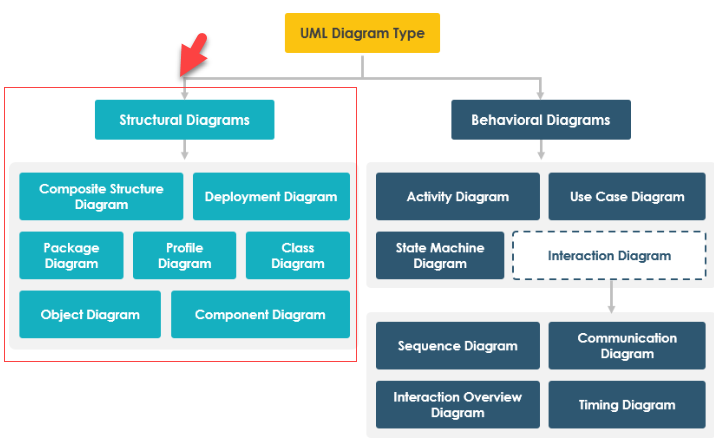
This guide walks you through the full workflow of AI-assisted structural modeling in Visual Paradigm, covering:
-
AI-Assisted UML Class Diagram Generator
-
AI Chatbot for Interactive Diagram Creation
-
Component, Package, and Composite Structure Diagrams
-
Integrated Desktop Workflow
-
Real-world example: A Smart Home Network System
All tools are backed by real-world updates and tutorials from Visual Paradigm’s official resources.
1. AI-Assisted UML Class Diagram Generator: Build Complex Systems Without UML Expertise
The AI-Assisted UML Class Diagram Generator is a guided, step-by-step tool designed for both beginners and experienced users to rapidly prototype class structures using plain English.
✅ Step-by-Step Workflow
1. Define Scope
Enter a high-level system description such as:
“Online Shopping System”
The AI will:
-
Analyze the domain
-
Generate a system purpose (e.g., “A web-based platform for customers to browse, purchase, and track products”)
-
Output a preliminary list of classes (e.g.,
Product,Customer,Order,Payment,ShoppingCart)
📌 Tip: Be specific. Use phrases like “e-commerce platform,” “user authentication,” or “inventory management” to improve accuracy.
2. Iterative Identification & Refinement
🔹 Class Identification
Review the AI-generated classes. Add or remove classes based on your domain needs:
-
✅ Keep:
Customer,Product,Order -
❌ Remove:
ShippingAgent(if not needed) -
➕ Add:
Review,Wishlist,PromoCode
🔹 Members (Attributes & Operations)
The AI auto-generates:
-
Attributes (e.g.,
Product: id, name, price, stockQuantity) -
Operations (e.g.,
Customer: login(), placeOrder(), updateProfile())
You can:
-
Modify data types (e.g., change
pricefrominttodouble) -
Add new methods (e.g.,
Product: applyDiscount()) -
Remove irrelevant operations
🔹 Relationships
The AI intelligently identifies and suggests:
-
Associations:
Customer↔Order(one-to-many) -
Aggregation/Composition:
OrdercontainsOrderItem(composition) -
Inheritance:
PremiumCustomerextendsCustomer -
Dependencies:
Paymentdepends onOrder
You can:
-
Adjust multiplicities (e.g.,
1..*for orders per customer) -
Change relationship types
-
Add navigability or constraints
3. Validation & Rendering
Use the AI Validation Checklist to ensure:
-
No cyclic dependencies
-
Correct multiplicity usage
-
Proper naming conventions (e.g., PascalCase for classes)
-
Avoidance of God classes
Once validated, the AI renders a PlantUML-based SVG diagram that can be:
-
Exported directly
-
Imported into your desktop project
-
Further refined with VP’s full UML editing suite
2. Structural Modeling via AI Chatbot: Conversational UML Creation
The Visual Paradigm AI Chatbot enables a natural language, conversational approach to building various structural diagrams. It’s ideal for rapid prototyping, learning, and collaborative design.
✅ Key Features & Use Cases
🔹 Object Diagrams: Visualize Real-World Instances
Describe a specific scenario:
“Create an object diagram for a vehicle maintenance system showing John Doe’s car repair order.”
The AI will:
-
Identify relevant classes (
Customer,Car,RepairOrder,Service) -
Instantiate objects with attributes (e.g.,
John Doe,Toyota Camry,2024-05-10) -
Show links between objects (e.g.,
John DoeownsToyota Camry, which hasRepairOrder)
📌 Perfect for testing system behavior in real-world contexts.
🔹 Composite Structure Diagrams: Model Internal Class Structure
Use advanced prompts to visualize internal parts and ports:
“Show the internal structure of a Flight Control System with parts like NavigationModule, EngineController, and CommunicationPort.”
The AI generates:
-
Parts (e.g.,
NavigationModule,EngineController) -
Ports (e.g.,
DataInPort,ControlOutPort) -
Connectors between parts
-
Internal structure with proper composition
📌 Enhanced stability for complex hierarchies – ideal for embedded systems or microservices.
🔹 Package Diagrams: Organize Your System Logically
Prompt the chatbot:
“Generate a package diagram for an onboard flight management system.”
The AI will:
-
Group related classes into packages:
-
FlightOperations -
PassengerManagement -
CrewScheduling -
SafetySystems
-
-
Show dependencies between packages (e.g.,
PassengerManagementdepends onFlightOperations) -
Use standard notation for package boundaries
📌 Great for architecture planning and team collaboration.
🔹 Component Diagrams: Model Software Architecture
With the major upgrade in AI component diagram generation, you can now:
“Generate a component diagram for a mobile banking app with secure authentication, transaction processing, and notification services.”
The AI outputs:
-
Components:
AuthenticationService,TransactionProcessor,NotificationService -
Interfaces:
LoginInterface,PaymentInterface -
Dependencies:
TransactionProcessordepends onAuthenticationService -
Improved layout with automatic placement and routing
📌 Bonus: The AI chatbot supports multi-turn conversations, allowing you to refine diagrams iteratively:
“Add a
FraudDetectioncomponent.”“Show how it connects to
TransactionProcessor.”
3. Integrated Desktop Workflow: Seamlessly Merge AI Output with Your Project
If you’re using the Visual Paradigm Desktop Application, you can fully integrate AI-generated models into your existing projects.
✅ Step-by-Step Integration
-
Open Visual Paradigm Desktop
-
Navigate to Tools > Apps
-
Choose:
- AI Assisted UML Class Diagram Generator
- AI Chatbot (for other diagram types)
-
Enter your prompt (e.g., “Generate a class diagram for a smart home network”)
-
Review and refine the AI output
-
Click Import to Visual Paradigm
- The diagram is merged into your current project
- Full editing capabilities remain available
- Supports traceability, version control, and model consistency checks
📌 This ensures your AI-generated models are not just prototypes, but part of a professional, maintainable design process.
4. Real-World Example: Smart Home Network System
Let’s apply the AI tools to a real-world system.
🎯 Prompt:
“Generate a UML class diagram for a smart home network system with devices like lights, thermostats, and security cameras, controlled via a mobile app.”
✅ AI-Generated Output (Suggested Classes & Relationships)
| Class | Attributes | Operations | Relationships |
|---|---|---|---|
SmartHome |
id, location, status | addDevice(), removeDevice(), updateSettings() | — |
Device (abstract) |
deviceId, name, status | turnOn(), turnOff(), getStatus() | Abstract base class |
Light |
brightnessLevel, color | setBrightness(), setColor() | Inherits from Device |
Thermostat |
currentTemp, targetTemp | setTargetTemp(), getTemp() | Inherits from Device |
SecurityCamera |
resolution, recordingEnabled | startRecording(), stopRecording() | Inherits from Device |
MobileApp |
userId, version | connectToDevice(), sendCommand() | — |
User |
userId, name, email | login(), logout() | — |
🔗 Relationships:
SmartHomecontainsLight,Thermostat,SecurityCamera(composition)MobileAppusesUser(association)MobileAppcommunicates withDevice(dependency)UsercontrolsMobileApp(association)
💡 Pro Tip: Use the AI Chatbot to generate a component diagram showing:
MobileApp→AuthenticationComponent
SmartHome→DeviceManager,SensorHub,NotificationService
5. Learning UML Faster with AI: A Game-Changer for Beginners
The AI chatbot isn’t just for professionals—it’s a powerful learning tool.
📌 Reference:
[1] How AI Chatbot Can Help You Learn UML Faster – Blog
This article explains how the AI chatbot:
- Provides instant visualization of UML concepts
- Offers real-time feedback on incorrect relationships or syntax
- Encourages experimentation without fear of errors
- Supports self-paced learning through conversational prompts
Example learning path:
-
“Show me a UML class diagram for a library system.”
-
“Change the relationship between
BookandBorrowerto aggregation.” -
“Add a
Fineclass and link it toBorrower.”
👉 You learn by doing—no textbooks needed.
Conclusion: Embrace AI-Powered Structural Modeling
With Visual Paradigm’s AI tools, structural modeling is no longer a barrier to entry. Whether you’re:
- A beginner learning UML
- A developer prototyping a system
- A team lead designing architecture
You can now:
✅ Generate accurate class, component, package, and object diagrams in seconds
✅ Refine models with natural language
✅ Import and enhance them in your desktop project
✅ Learn UML interactively and efficiently
Final Recommendations
-
Start with simple prompts (e.g., “Online Shopping System”) to build confidence.
-
Use the AI Validation Checklist to ensure quality.
-
Combine AI-generated diagrams with manual refinement for production-ready models.
-
Explore the AI Chatbot for rapid experimentation and learning.
🔗 Explore More:
References (Numbered List, No Duplicates)
[1] How AI Chatbot Can Help You Learn UML Faster – Blog
[2] AI-Assisted UML Class Diagram Generator – Visual Paradigm
[3] Generate UML Class Diagrams with AI – Explore Visual Paradigm
[4] YouTube: Import AI Diagrams into VP
[5] Visual Paradigm AI Chatbot – Features
[6] AI Chatbot Turns Ideas into Diagrams Instantly – Blog
[7] Enhanced AI Composite Structure Diagram Generation – Updates
[8] YouTube: Composite Structure Diagram Demo
[9] Major Upgrade to AI Component Diagrams – Updates
[10] YouTube: Component Diagram Demo
[11] YouTube: Desktop Workflow – Importing AI Output
✅ Next Step: Try generating a class diagram for your own system—just type a description into the AI Chatbot and see the magic happen!