
Introduction
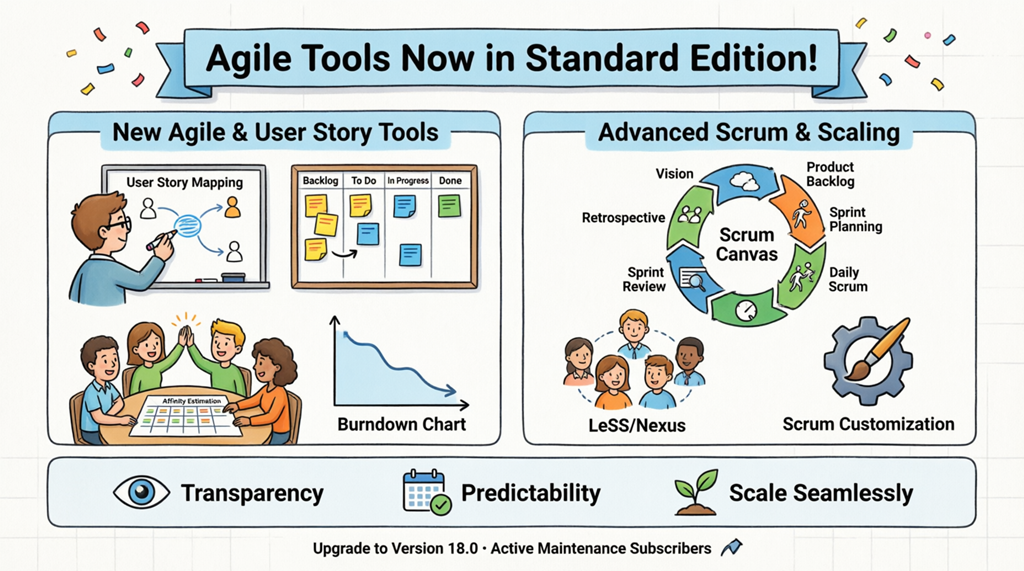
Visual Paradigm has made a significant commitment to democratizing professional-grade agile management tools. In a major realignment of feature tiers, several high-level Agile and Scrum capabilities previously exclusive to the Professional Edition are now officially available in the Visual Paradigm Standard Edition.
This strategic update ensures that teams using Standard Edition software can now leverage a complete suite of enterprise-level tools to streamline their development lifecycle without requiring a higher-tier license. This guide provides a comprehensive overview of these newly available features and how to maximize their potential.
New Agile & User Story Mapping Tools
Standard Edition users now have access to a comprehensive suite of agile planning and execution tools designed to enhance team collaboration, improve visibility, and deliver better outcomes.
1. User Story Map
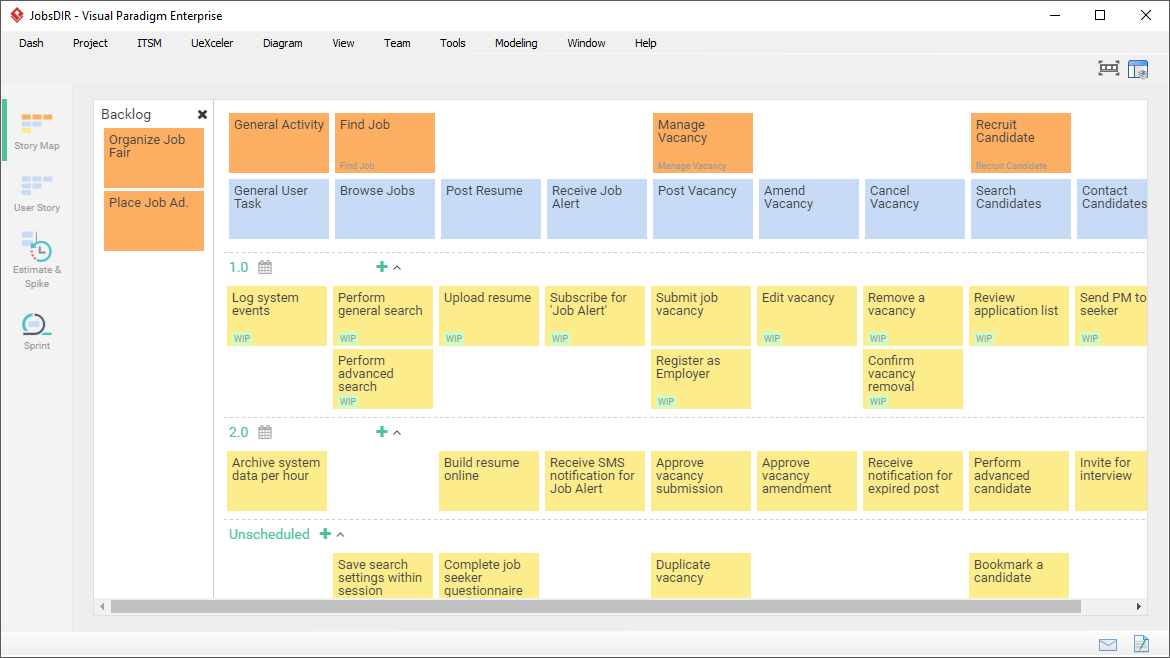
The User Story Mapping tool is a visual editor that enables teams to outline the entire user experience from end to end. This powerful feature helps teams:
-
Visualize User Journeys: Map out complete user workflows and interactions with your product
-
Identify Gaps: Spot missing features or broken flows in your product design
-
Prioritize Effectively: Organize features based on user value and business impact
-
Collaborate Seamlessly: Work together with stakeholders to build shared understanding
Key Use Cases:
-
Product discovery sessions
-
Release planning
-
Backlog refinement
-
Stakeholder alignment meetings
2. Sprint Backlog & Scrumboard
The Scrumboard tool provides a dynamic interface for managing daily agile operations. This feature enables teams to:
-
Track Progress in Real-Time: Visualize work items as they move through your workflow
-
Customize Workflows: Adapt the board to match your team’s unique process
-
Maintain Alignment: Ensure all team members stay synchronized throughout the sprint
-
Manage Work-in-Progress: Limit WIP to improve flow and reduce context switching
Best Practices:
-
Update the board daily during stand-ups
-
Use color coding for different work types
-
Set explicit policies for each column
-
Review board metrics in retrospectives
3. Story Estimation (Affinity Table)
The Affinity Table software simplifies the complex task of sizing user stories and tasks. This collaborative estimation tool helps teams:
-
Estimate Relatively: Compare stories against each other rather than using absolute values
-
Build Consensus: Facilitate team discussions to reach agreement on effort levels
-
Improve Accuracy: Leverage collective wisdom for more reliable estimates
-
Plan Sprints Effectively: Use estimates to create realistic sprint commitments
Estimation Techniques Supported:
-
Planning Poker
-
T-Shirt Sizing
-
Fibonacci Sequence
-
Custom scales
4. Burndown Chart
The Burndown Chart is an essential Agile reporting tool that provides visual insights into your project’s health and progress. This feature enables teams to:
-
Track Work Remaining: Monitor the amount of work left versus time available
-
Identify Trends: Spot patterns that indicate potential delivery risks
-
Make Proactive Adjustments: Take corrective action before deadlines are missed
-
Communicate Status: Share clear, visual progress updates with stakeholders
Key Metrics:
-
Ideal burndown line
-
Actual progress line
-
Scope changes
-
Velocity trends
Advanced Scrum & Scaling Frameworks
As organizations grow, workflow complexity increases. Visual Paradigm has moved specialized scaling canvases into the Standard Edition to support organizational growth and multi-team coordination.
1. Scrum Canvas
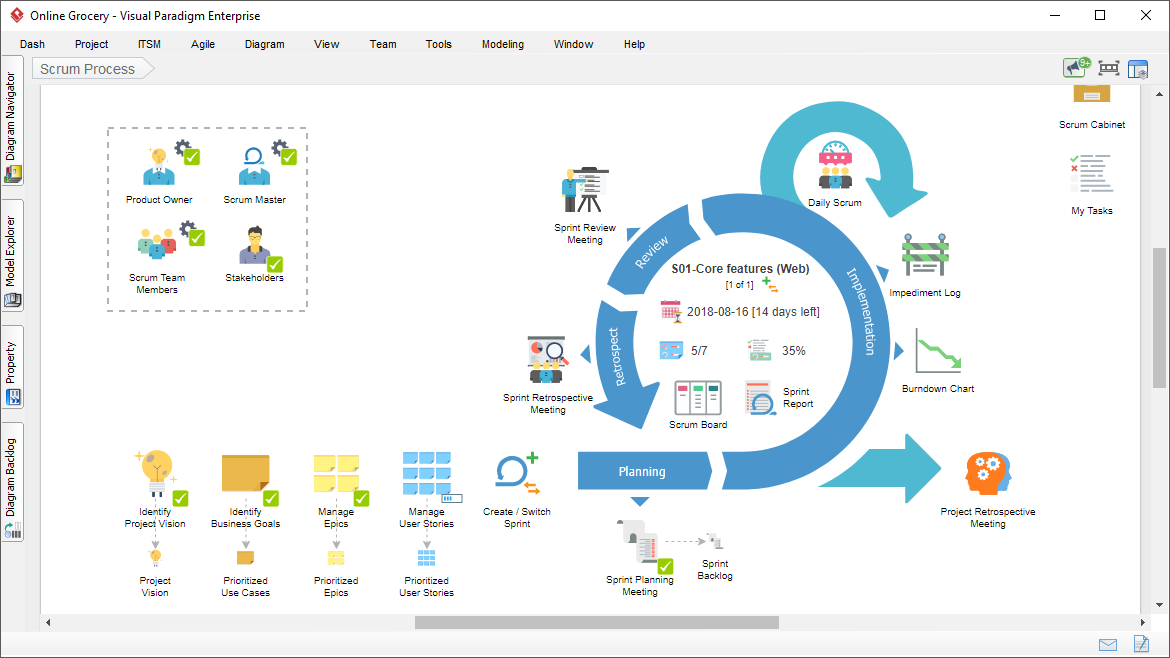
The Scrum Canvas is a comprehensive Scrum management tool that guides teams through the entire Scrum process within a single integrated interface. This all-in-one solution covers:
-
Visioning: Define and communicate product vision
-
Backlog Grooming: Refine and prioritize the product backlog
-
Sprint Planning: Plan effective sprints with clear goals
-
Daily Scrums: Facilitate efficient stand-up meetings
-
Sprint Review: Demonstrate completed work to stakeholders
-
Retrospectives: Continuously improve team processes
Benefits:
-
Single source of truth for all Scrum artifacts
-
Guided process for Scrum newcomers
-
Consistency across multiple teams
-
Audit trail for compliance requirements
2. Large-Scale Scrum (LeSS)
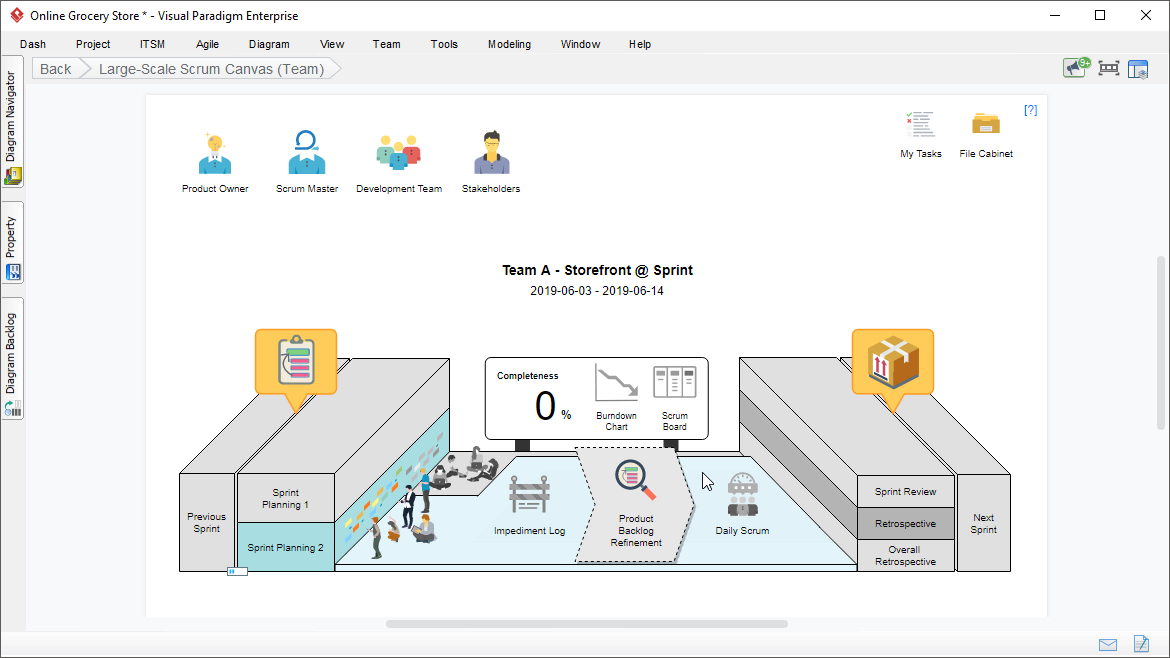
For organizations implementing Large-Scale Scrum (LeSS), the specialized canvas provides the structure needed to coordinate multiple teams working on a single product. LeSS tools help you:
-
Scale Effectively: Apply Scrum principles across multiple teams
-
Maintain Simplicity: Keep processes lean while scaling
-
Coordinate Dependencies: Manage inter-team dependencies efficiently
-
Preserve Agility: Scale without adding unnecessary bureaucracy
LeSS Framework Support:
-
LeSS Huge (for very large products)
-
Standard LeSS (2-8 teams)
-
Multi-team coordination
-
Shared product backlog management
3. Nexus Framework
The Nexus Framework canvas supports organizations using the Nexus scaling framework, which is designed for 3-9 Scrum Teams working together. Key features include:
-
Nexus Integration Team: Coordinate integration activities
-
Cross-Team Dependencies: Identify and resolve dependencies
-
Integrated Increment: Ensure working product at scale
-
Refinement at Scale: Coordinate backlog refinement across teams
4. Scrum Customization
The Scrum Canvas Customization feature allows organizations to tailor the Scrum framework to fit their unique organizational DNA. This flexibility enables you to:
-
Adapt Processes: Modify Scrum events and artifacts to match your context
-
Add Custom Fields: Include organization-specific information
-
Create Templates: Standardize across teams while allowing variation
-
Evolve Over Time: Adjust your process as you learn and grow
Key Benefits of These Features
By bringing these Professional-grade features to the Standard Edition, Visual Paradigm is empowering more teams to achieve agile excellence.
Increase Transparency
-
Visualize the Backlog: Make work visible to all stakeholders
-
Track Sprint Progress: Real-time visibility into team performance
-
Reduce Silos: Break down information barriers between teams
-
Improve Communication: Shared understanding across the organization
Improve Predictability
-
Integrated Estimation: More accurate effort forecasting
-
Burndown Tracking: Early warning system for potential delays
-
Reliable Timelines: Better commitment to delivery dates
-
Data-Driven Decisions: Use metrics to guide planning
Scale Seamlessly
-
LeSS and Nexus Tools: Support for multi-team environments
-
Growth-Ready Software: Tools that evolve with your team
-
Consistent Practices: Standardized approaches across teams
-
Enterprise-Grade: Professional features accessible to all
Cost-Effective Access
-
No License Upgrade Needed: Access Professional features in Standard Edition
-
Maximize ROI: Get more value from your existing subscription
-
Democratize Agile: Make powerful tools available to all teams
-
Reduce Barriers: Lower the cost of agile transformation
How to Upgrade to Version 18.0
Check Your Eligibility
All users with an active maintenance subscription can upgrade to Visual Paradigm Version 18.0 immediately at no additional cost.
Upgrade Steps
-
Verify Maintenance Status: Check if your maintenance subscription is active
-
Download Version 18.0: Access the latest version from your account
-
Install the Update: Follow the installation wizard
-
Activate Features: Access the new Agile tools immediately
-
Explore Documentation: Review guides and tutorials
If Your Maintenance Has Expired
If your maintenance subscription has expired, now is the perfect time to renew:
-
Extend Your Maintenance: Regain access to the latest innovations
-
Security Updates: Ensure your software remains secure
-
Latest Features: Continue building with industry-leading tools
-
Technical Support: Access expert assistance when needed
System Requirements
-
Edition: Standard Edition (Desktop)
-
Version: 18.0 or later
-
Operating System: Windows, macOS, or Linux
-
Active Maintenance: Required for free upgrade
Getting Started with Your New Tools
Quick Start Guide
-
Create Your First User Story Map:
-
Navigate to Agile > User Story Map
-
Define user activities and tasks
-
Prioritize based on value
-
-
Set Up Your Scrumboard:
-
Create a new Scrum project
-
Configure workflow columns
-
Add team members
-
-
Run Estimation Session:
-
Open Affinity Table
-
Import backlog items
-
Facilitate team estimation
-
-
Generate Reports:
-
Access Burndown Charts
-
Review velocity trends
-
Share with stakeholders
-
Training Resources
-
Built-in Tutorials: Access guided tours within the application
-
Online Documentation: Comprehensive guides and how-tos
-
Video Tutorials: Step-by-step visual instructions
-
Community Forum: Connect with other users
Best Practices
-
Start Small: Implement one tool at a time
-
Train Your Team: Ensure everyone understands the tools
-
Gather Feedback: Continuously improve your process
-
Measure Impact: Track improvements in delivery and quality
Conclusion
Visual Paradigm’s decision to make Professional-grade Agile and Scrum tools available in the Standard Edition represents a significant commitment to making enterprise-level agile management accessible to all teams. With User Story Mapping, Scrumboards, estimation tools, burndown charts, and scaling frameworks now included, Standard Edition users have everything they need to drive successful agile transformations.
Whether you’re a small team just starting your agile journey or a growing organization scaling across multiple teams, Visual Paradigm Version 18.0 provides the tools you need to increase transparency, improve predictability, and scale seamlessly.
Upgrade today and unlock the full potential of your agile practice with Visual Paradigm Standard Edition.
Reference Resources
- Agile User Story Mapping Tool: Comprehensive visual editor for outlining user experiences, identifying product flow gaps, and prioritizing features based on user value.
- Scrum Process Canvas: Integrated Scrum management tool that guides teams through the entire Scrum process from visioning and backlog grooming to retrospectives.
- Large-Scale Scrum (LeSS) Software: Specialized framework and tools for implementing Large-Scale Scrum across multiple teams working on a single product.
- Nexus Framework Software: Scaling framework tools designed for 3-9 Scrum Teams working together, featuring Nexus Integration Team coordination and dependency management.
- Customized Scrum Process Canvas: Flexible Scrum customization tools that allow organizations to tailor the Scrum framework to fit their unique organizational needs and processes.
- Renew Software Maintenance: Guide and support for extending your Visual Paradigm maintenance subscription to regain access to the latest features, security updates, and technical support.