
In modern software development, speed and accuracy often feel like opposing forces. Requirements shift overnight, teams race against tight deadlines, and turning a high-level idea into a precise, standards-compliant UML model can consume hours — sometimes days — of manual effort.
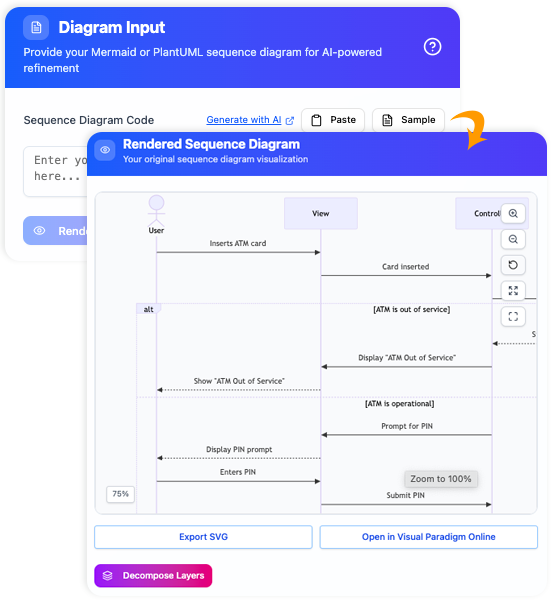
Enter Visual Paradigm’s AI-powered refinement tools for Use Case Diagrams and Sequence Diagrams: intelligent assistants that transform rough sketches or plain-language descriptions into professional, detailed, and production-ready models — in seconds.
These aren’t just flashy features. They’re practical accelerators designed for real-world workflows — whether you’re sprinting through agile planning, documenting system behavior, or aligning enterprise architecture.
1️⃣ AI Use Case Diagram Refinement Tool: From Rough Sketch to Robust Model
Let’s face it — most use case diagrams start as simple sketches: a few actors, a handful of high-level actions, drawn during a quick brainstorming session.
But turning that into a fully structured, UML-compliant model with proper include, extend, generalization, and system boundary relationships? That’s where things get tedious.
Meet the AI Use Case Refinement Tool:
✅ One-click enhancement
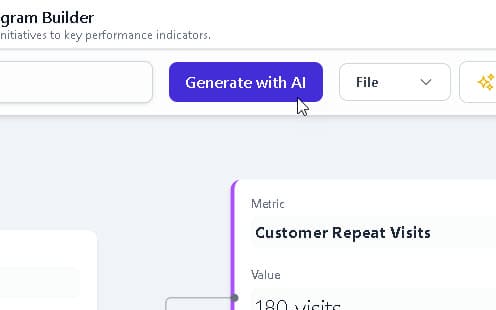
Feed your initial diagram (or generate one from plain text), then hit “Refine with AI”. The tool analyzes semantics and intelligently adds missing relationships — including reusable include behaviors, optional extend paths, and optimized actor–use case associations.
✅ Iterative improvements
Not satisfied with the first suggestion? Click Refine again — the AI cycles through alternative structural configurations, helping you uncover edge cases and alternative flows you might have missed.
✅ UML best-practice compliance
Every suggestion follows industry-standard UML conventions — reducing ambiguity, minimizing review cycles, and ensuring smoother handoffs to development and testing teams.
🎯 Result: What used to take 30–60 minutes of dragging, connecting, and debating now happens in seconds.
You get a richer, more accurate foundation — ready for deeper analysis, activity diagrams, or code generation.
2️⃣ AI Sequence Diagram Refinement Tool: From Basic Flow to Layered Architecture
Sequence diagrams are essential for visualizing object interactions — but starting from scratch (or a simple Mermaid/PlantUML snippet) often leads to flat, incomplete, or overly simplistic views.
Missing layering? No error handling? Inconsistent message types? These gaps can go unnoticed until late in development.
Introducing the AI Sequence Diagram Refinement Tool:
🧠 Smart input flexibility
Start with a natural language description (e.g., “User logs in, system validates credentials, sends token”) or import a basic PlantUML/Mermaid snippet.
⚡ Intelligent expansion
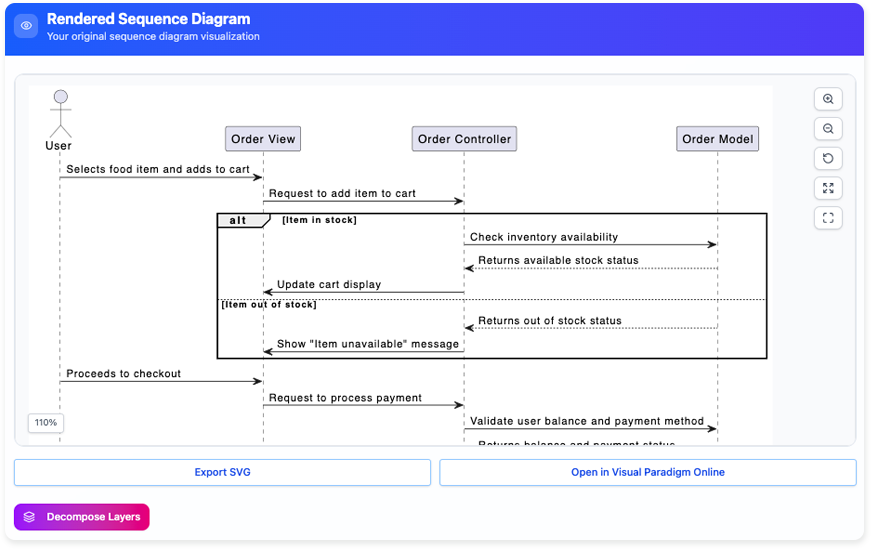
The AI breaks down the flow, identifies architectural layers (like View → Controller → Model in MVC), and auto-adds:
-
Lifelines for each component
-
Activation bars (execution timelines)
-
Loops (
loop) and conditional blocks (alt,optional) -
Synchronous and asynchronous message types
-
Clear, readable layout
🎨 Production-ready output
The result? A multi-layered, visually balanced, and framework-aligned diagram — perfect for design reviews, documentation, or even code generation.
🔧 Real-world impact:
A 5-minute sketch becomes a comprehensive blueprint in under a minute — with clarity that helps catch design flaws early, reduce miscommunication, and accelerate implementation.
💡 Why These Tools Deliver Real Productivity Gains
| Benefit | Impact |
|---|---|
| ⏱️ Time saved | Reclaim hours per week spent on manual diagramming and layout |
| ✅ Higher quality | AI suggests UML-compliant structures and patterns — reducing errors and inconsistencies |
| 🔄 Iterative refinement | Refine multiple times to explore alternatives — ideal for collaborative design |
| 📤 Seamless export | Export to SVG, PNG, or embed directly into reports, wikis, or documentation |
| 🧩 Full integration | Native to Visual Paradigm (desktop, online, and AI apps) — no static images, just editable models |
Whether you’re a solo developer, a business analyst, or an enterprise architect, these tools help you move faster from “good enough” to “great” — without sacrificing rigor.
🛠️ Ready to Supercharge Your Design Workflow?
If you’re tired of wrestling with diagram layout, debating UML semantics, or spending too much time on the how instead of the what, Visual Paradigm’s AI modeling tools are your secret weapon.
They handle the heavy lifting — so you can focus on what truly matters: solving problems, designing elegantly, and shipping better software, faster.
👉 Try them free today:
Explore Visual Paradigm’s AI Toolbox
(Yes — many features are free to use online!)
💬 Join the Conversation
Have you used AI-powered modeling tools to streamline your design process?
What’s your favorite productivity hack for UML diagrams?
Drop a comment below — we’d love to hear your story! 🚀
P.S. The future of software design isn’t just about code — it’s about intelligent design.
Let AI do the heavy lifting. You focus on the vision.
✨ Visual Paradigm – Design Smarter. Code Faster. Ship Sooner.
🔗 www.visual-paradigm.com
-
Visual Paradigm – AI-Powered UML Sequence Diagrams: This resource explains how to generate professional UML sequence diagrams directly from text prompts using an advanced AI modeling suite.
-
AI-Powered Sequence Diagram Refinement in Visual Paradigm: This guide explores a tool that transforms use-case descriptions into precise sequence diagrams with minimal manual effort through AI automation.
-
Mastering Sequence Diagrams with Visual Paradigm: AI Chatbot Tutorial: A beginner-friendly tutorial that uses a real-world e-commerce chatbot use case to teach users how to create sequence diagrams using an AI assistant.
-
AI Sequence Diagram Example: Video Streaming Playback Initiation: This article demonstrates an AI chatbot acting as a modeling partner to interpret intent and refine the logic for a streaming playback sequence in real time.
-
Mastering AI-Driven Use Case Diagrams with Visual Paradigm: A detailed tutorial on leveraging specialized AI features to create intelligent and dynamic use case diagrams for modern software systems.
-
AI-Powered Use Case Diagram Refinement Tool: This feature highlight discusses how AI can suggest improvements, identify missing actors, and optimize the structure of existing use case diagrams.
-
AI Use Case Description Generator by Visual Paradigm: An overview of an AI tool that automatically produces detailed use case descriptions from user inputs, accelerating system analysis.
-
Automating Use Case Development with AI in Visual Paradigm: This article examines how AI description generators reduce manual effort and improve consistency throughout the software development lifecycle.
-
AI PlantUML Use Case Diagram Report Generator: A resource detailing how to automatically generate text-based reports from PlantUML diagrams, including an automated analysis of actors and use cases.
-
AI-Powered Use Case Modeling Studio Release: An announcement regarding a dedicated studio environment that uses AI to enhance use case modeling and broader software design activities.