


Turn Your Class Schedule into Code: AI Table Generator in Action
Struggling to turn your messy class schedule into clean, exportable code? The AI Table Generator from Visual Paradigm makes it effortless — just describe your table, and watch it magically populate with accurate data. Whether you’re organizing a weekly meal plan or tracking project phases, this tool turns your ideas into Markdown, HTML, JSON, or SQL in seconds. No more manual formatting headaches — just smart, fast, and professional results.
Here’s how it works — and why it’s a game-changer for students, developers, and busy professionals alike.
Quick Summary: What You’ll Learn
-
How to turn a class schedule into clean, exportable Markdown code with AI.
-
How to convert your weekly meal plan into HTML with styling ready for your website.
-
How to generate a project roadmap in JSON format for seamless integration into your dev tools.
-
Why this AI-powered table generator is faster, smarter, and more versatile than ever.
Let’s dive in — because who has time for boring tables anymore?
From Class Schedule to Code: AI Magic at Work
Imagine you’re juggling a packed week of classes — Monday’s Math, Tuesday’s History, Wednesday’s Chemistry — and you need to turn that into a clean, exportable schedule. No more scribbling in notebooks or wrestling with messy spreadsheets. Just describe your table, and the AI does the heavy lifting.
The AI Table Generator from Visual Paradigm lets you create your class schedule in seconds — and export it as Markdown, HTML, or even SQL. That means you can paste it directly into your blog, website, or database without any manual formatting.
Here’s how it looks in action:
Image 1 shows a class schedule for Wednesday through Friday — with times, subjects, and even break periods — all neatly organized in a grid. On the right, you see the corresponding Markdown output. No more guessing at pipe characters or alignment — the preview updates live as you edit. It’s like having a personal data assistant who knows exactly what you need.
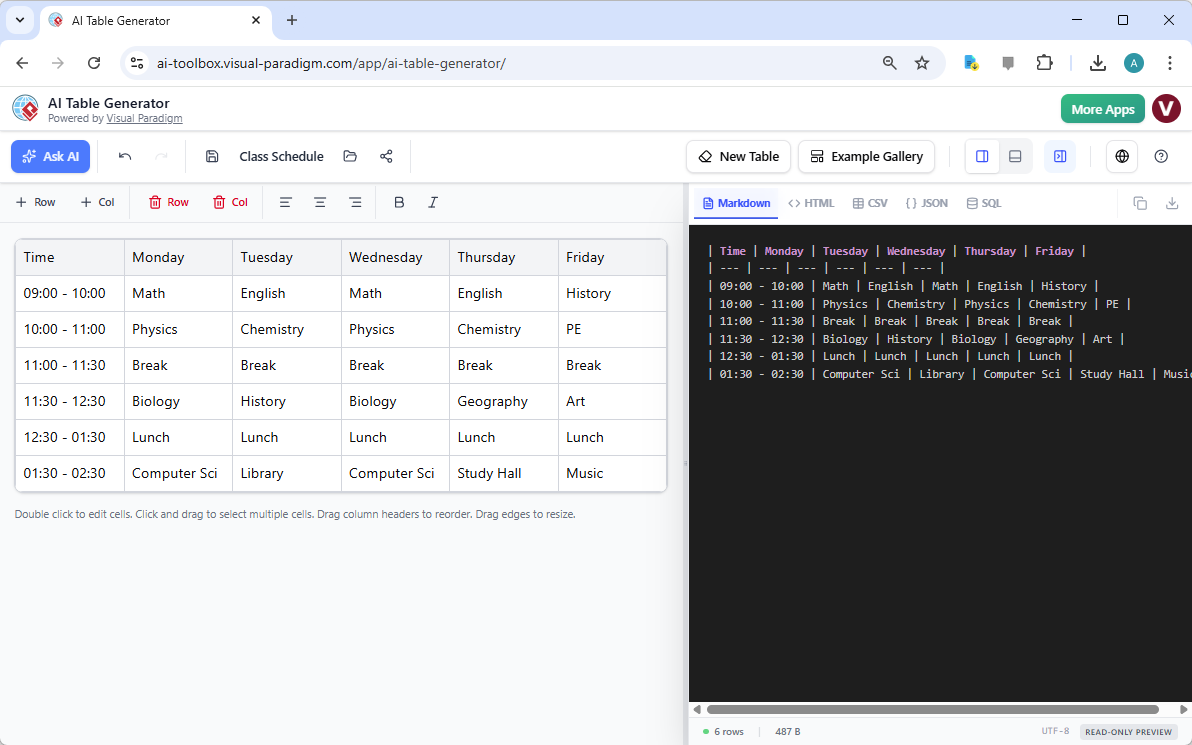
And the best part? You can easily copy this Markdown code and paste it into any documentation, website, or database. No more “how do I format this?” — just plug and play.
Meal Plans, Not Just Schedules: Turn Your Food Log into HTML
Let’s say you’re trying to track your weekly meals — breakfast, lunch, snacks — and you want to share it on your blog or website. The AI Table Generator makes this super easy. Just describe your meal plan, and it’ll generate the perfect HTML table with styling ready to go.
Take a look at the second image — it shows a weekly meal plan with columns for “Day,” “Breakfast,” “Lunch,” and “Snacks.” The HTML preview on the right includes inline CSS styling, so you can customize the look — all without writing a single line of code.
Perfect for food bloggers, fitness enthusiasts, or anyone who wants to make their meal tracking look professional. No more messy tables — just clean, formatted code that looks great on any device.
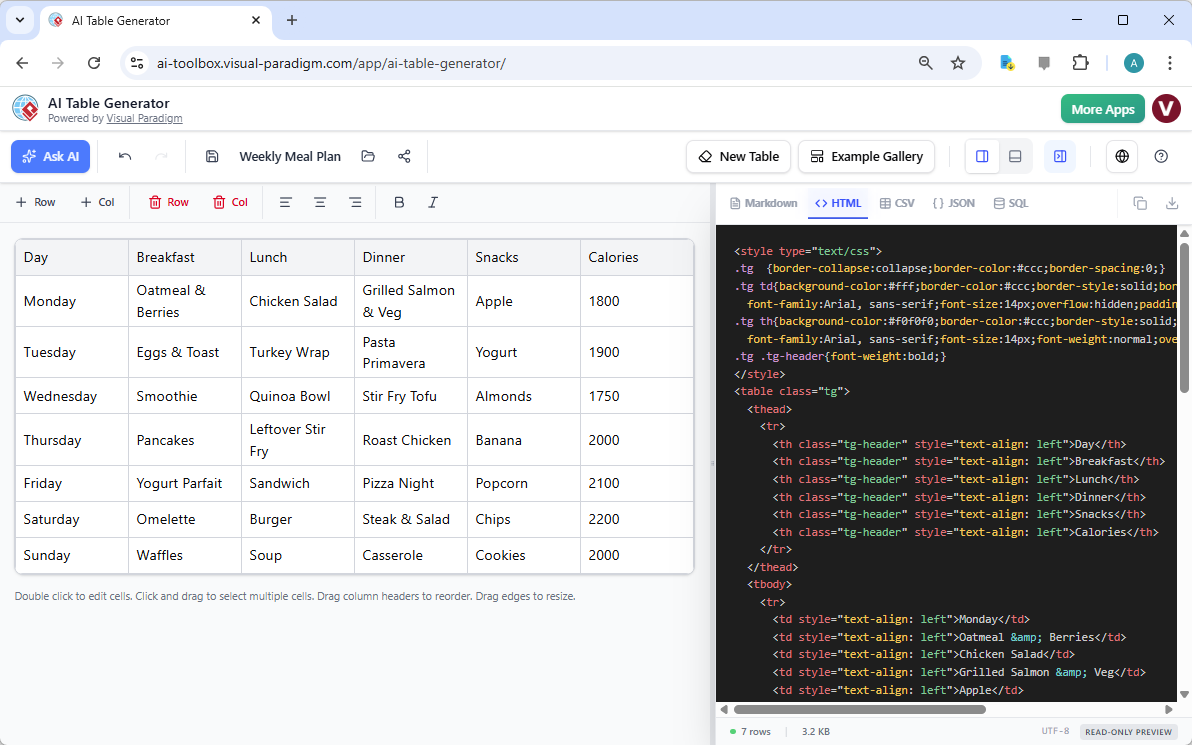
And if you’re a developer, you can even export this as SQL to populate your database — or convert it to JSON for your backend. The AI Table Generator is your personal data wizard, ready to handle any format you need.
Project Roadmaps, Not Just Lists: Generate JSON for Your Dev Team
Now, let’s talk about project management. If you’re tracking your team’s progress — from “Requirements Gathering” to “Frontend Implementation” — you need a table that’s easy to share and integrate. The AI Table Generator makes this simple.
Look at the third image — it shows a project roadmap with columns for “Phase,” “Owner,” and “Status.” The JSON output on the right is ready to be imported into your development tools, APIs, or dashboards. No more manual data entry — just one click to generate clean, structured data.
Whether you’re a product manager, developer, or team lead, this tool helps you keep your team aligned and your data organized. And with live preview, you can see exactly how it’ll look before exporting.
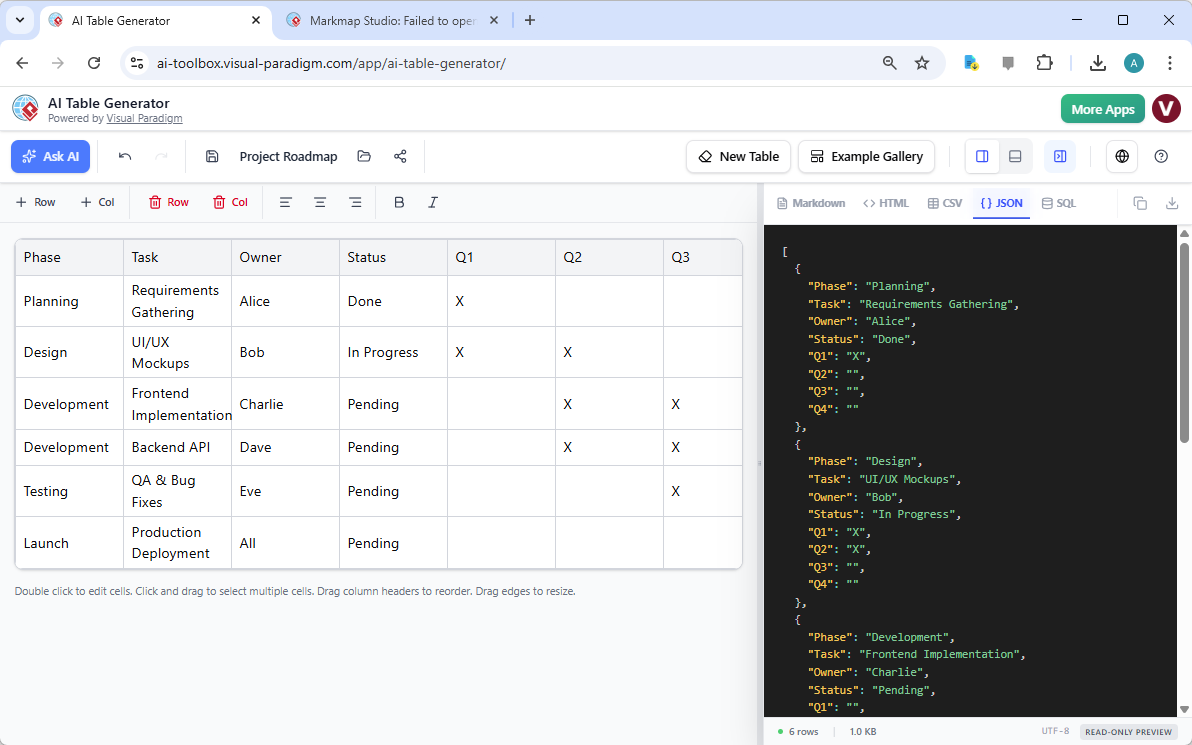
And yes — you can even customize the JSON output with your own keys and values. The AI doesn’t just fill in the blanks — it helps you build the structure you need.
Why This Tool is a Must-Have for Everyone
Whether you’re a student, developer, or business analyst, the AI Table Generator from Visual Paradigm saves you time, reduces errors, and makes your data look professional. It’s not just a tool — it’s a productivity booster.
Here’s what makes it so powerful:
-
Generate from plain text — just describe your table, and the AI does the rest.
-
Live preview — see your table in Markdown, HTML, or SQL as you edit.
-
Export in multiple formats — Markdown, HTML, CSV, JSON, SQL — whatever you need.
-
Save and share — keep your tables in the cloud, and share them with a link.
-
Undo and redo — experiment without fear — you can always go back.
It’s like having a personal assistant who knows exactly what you need — and does it faster than you can type.
Ready to Try It?
Want to turn your class schedule into code? Your weekly meal plan into a website? Or your project roadmap into JSON? The AI Table Generator from Visual Paradigm makes it easy — and fun.
Just click the link below to try it out for yourself:
Try Now → https://ai-toolbox.visual-paradigm.com/app/ai-table-generator/
And remember — you don’t need to be a tech expert to use this. Just describe your table, and let the AI do the rest. Your data, your way.
Related Resources
-
Comprehensive Guide to Visual Paradigm AI Table Generator: From Natural Language to Executable Code: This guide walks users through transforming natural language descriptions into fully functional database tables and executable code using Visual Paradigm AI’s advanced table generation engine.
-
Generate CRUD Tables from JSON with AI-Powered Tool: Create editable CRUD tables directly from JSON input using intelligent automation.
-
New AI Table Generator Launches for Rapid Data Modeling: Introducing a powerful AI-driven tool to generate tables from data inputs in seconds.
This post is also available in Deutsch, Español, فارسی, Français, English, Bahasa Indonesia, 日本語, Polski, Portuguese, Ру́сский, Việt Nam, 简体中文 and 繁體中文.