
Introduction
In today’s rapidly evolving business environment, the difference between success and failure often comes down to how quickly you can adapt your strategy. Traditional business planning methods—lengthy documents that take weeks to create and become outdated before they’re finished—simply can’t keep pace with modern market demands. Enter the Business Model Canvas (BMC), a revolutionary one-page strategic tool that has transformed how companies visualize, design, and pivot their business models.
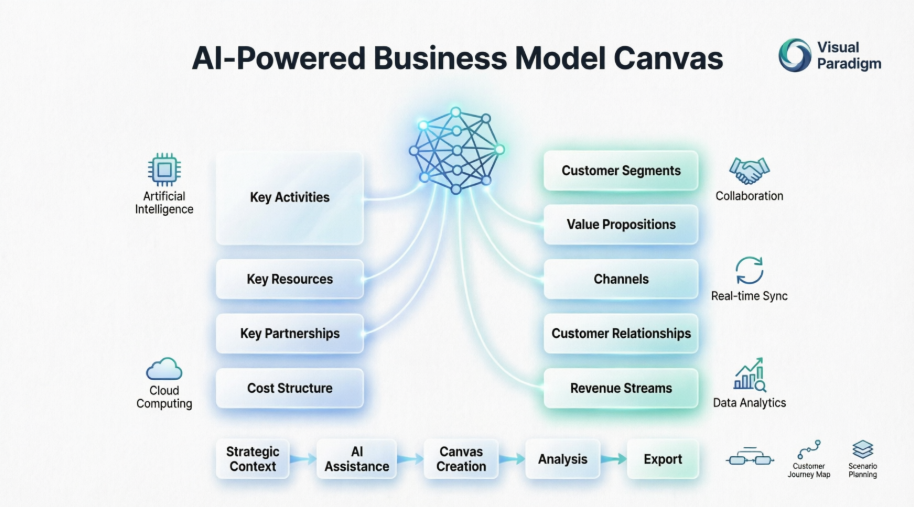
However, even the best framework is only as good as the tools you use to implement it. This is where Visual Paradigm’s AI-powered Business Model Canvas platform changes the game. By combining the proven BMC methodology with artificial intelligence, real-time collaboration, and seamless integration capabilities, Visual Paradigm transforms strategic planning from a static exercise into a dynamic, living process. Whether you’re a startup founder validating your first business idea or an enterprise leader driving digital transformation, this guide will show you how to harness AI-powered modeling to create clearer, more actionable business strategies.
Understanding the Business Model Canvas Framework
What is the Business Model Canvas?
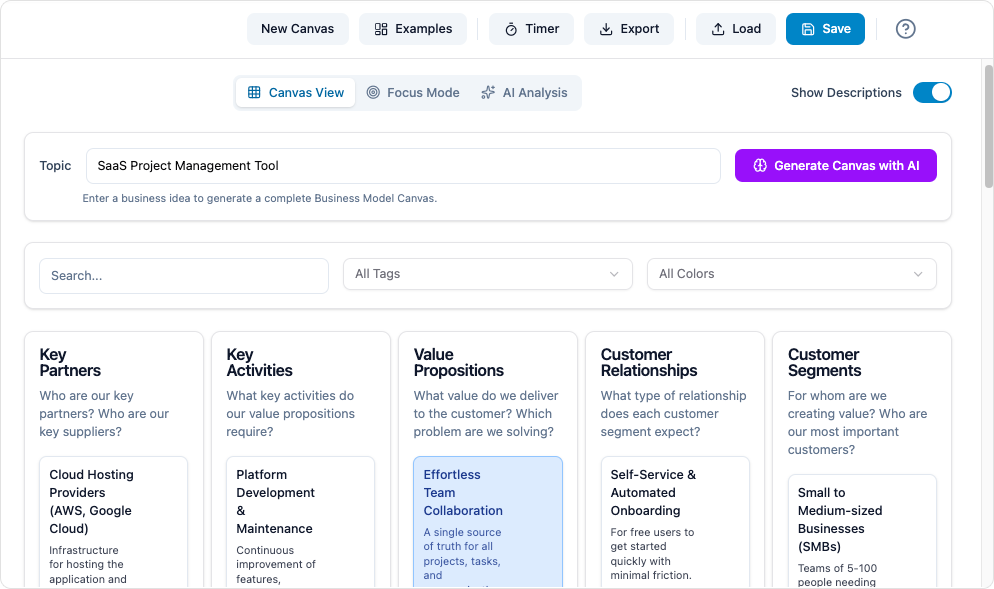
The Business Model Canvas is a strategic management template that revolutionized how organizations approach business model design. Created by Alexander Osterwalder, this visual chart provides a holistic view of a business on a single page, replacing traditional 40-50 page business plans with an agile, iterative framework.
The BMC describes how a firm creates, delivers, and captures value through nine interconnected building blocks. Its visual nature makes it ideal for workshops, strategy sessions, and cross-functional alignment, allowing teams to quickly identify gaps, test assumptions, and pivot when necessary.
The Nine Building Blocks Explained
The Business Model Canvas divides into four main areas—customers, offer, infrastructure, and financial viability—represented by nine essential components:
Customer-Facing Elements:
-
Customer Segments: The distinct groups of people or organizations your business aims to serve. These could range from mass markets to niche segments, or from B2B to B2C audiences.
-
Value Propositions: The unique bundle of products and services that solve customer problems or satisfy needs. This is your reason why customers choose you over competitors.
-
Channels: The touchpoints through which you communicate with and deliver value to customers, including awareness, evaluation, purchase, delivery, and after-sales support.
-
Customer Relationships: The nature of interactions you establish with each segment, from automated services to dedicated personal assistance or community building.
-
Revenue Streams: The mechanisms through which your business generates cash from each customer segment, whether through asset sales, usage fees, subscriptions, or licensing.
Infrastructure Elements:
-
Key Activities: The critical actions your business must perform to deliver your value proposition, maintain customer relationships, and generate revenue.
-
Key Resources: The essential assets—physical, intellectual, human, or financial—required to make your business model operational.
-
Key Partnerships: The network of suppliers, allies, and partners that optimize your business model, reduce risk, or acquire resources.
-
Cost Structure: All expenses incurred to operate your business model, whether cost-driven (leanest cost structure) or value-driven (premium value proposition).
The Canvas as a Generic Framework
One of the BMC’s most powerful features is its adaptability as a generic framework. Visual Paradigm recognizes this versatility, offering the Canvas platform as a foundation for multiple specialized canvases beyond the traditional business model:
-
Lean Canvas: Adapted for startups, focusing on problems, solutions, and metrics
-
Value Proposition Canvas: Deep dive into customer jobs, pains, and gains
-
Strategy Canvas: Visualize competitive positioning and blue ocean opportunities
-
Customer Journey Canvas: Map end-to-end customer experiences
-
Digital Transformation Canvas: Plan technology adoption and change management
This generic framework approach means you’re not locked into one methodology. As your business evolves, you can switch between different canvas types while maintaining consistency in your strategic thinking and documentation.
Visual Paradigm’s AI-Powered Canvas Platform: Features and Capabilities
AI-Enhanced Business Modeling
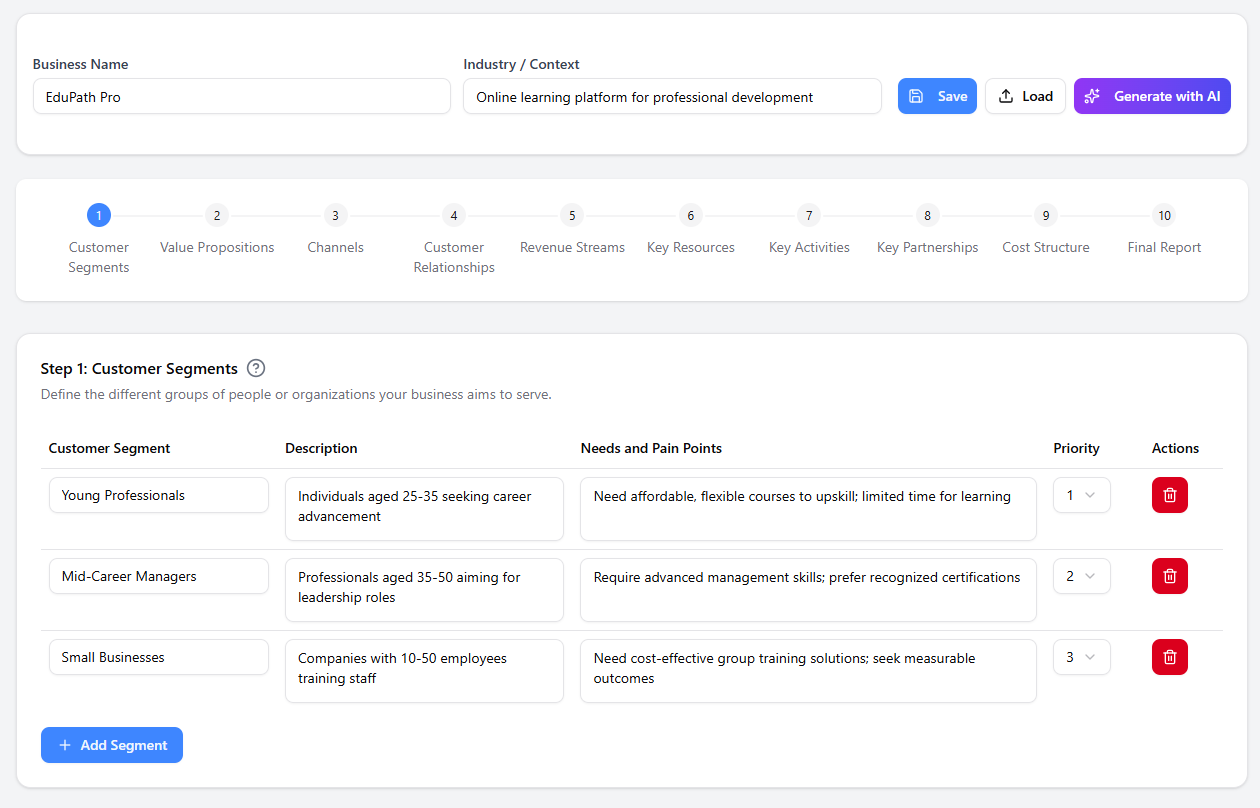
Visual Paradigm’s Business Model Canvas tool stands out in the crowded strategy software market by embedding artificial intelligence directly into the modeling process. This isn’t just a digital version of a paper template—it’s an intelligent assistant that helps you think more strategically.
Key AI Features:
-
Smart Suggestions: The AI analyzes your inputs and suggests relevant elements you might have overlooked, from potential customer segments to revenue opportunities
-
Consistency Checking: Automatically identifies misalignments between building blocks (e.g., a value proposition without a corresponding revenue stream)
-
Pattern Recognition: Leverages best practices from thousands of successful business models to recommend proven strategies for your industry
-
Scenario Modeling: Generate “what-if” analyses to see how changes in one block affect the entire business model
Real-Time Collaboration
Modern business strategy is a team sport, and Visual Paradigm’s cloud-based platform reflects this reality. Multiple stakeholders can work on the same canvas simultaneously, with changes syncing in real-time across all devices.
Collaboration Tools Include:
-
Commenting System: Team members can leave contextual comments on specific blocks, creating an audit trail of strategic discussions
-
Version Control: Track changes over time and revert to previous versions when needed
-
Role-Based Access: Control who can view, edit, or comment on different canvases
-
Presentation Mode: Transform your canvas into a professional presentation for stakeholders
Cross-Diagram Integration
Unlike standalone canvas tools, Visual Paradigm integrates the BMC into a comprehensive modeling ecosystem. This means your business model doesn’t exist in isolation—it connects to detailed operational diagrams and technical specifications.
Integration Capabilities:
-
Link Key Activities to BPMN (Business Process Model and Notation) diagrams for workflow detail
-
Connect Customer Segments to Customer Journey Maps for experience visualization
-
Map Key Resources to enterprise architecture diagrams
-
Export data to project management tools for execution tracking
Step-by-Step Guide: Creating Your AI-Powered Business Model Canvas
Step 1: Accessing the Platform
Visual Paradigm offers flexible deployment options to match your workflow preferences:
Desktop Application:
-
Launch Visual Paradigm
-
Navigate to Tools > Apps
-
Select the Business Model Canvas tool from the library
-
Ideal for offline work and large-scale enterprise deployments
Online Platform:
-
Access directly through your web browser at Visual Paradigm Online
-
No installation required
-
Automatic cloud saving and instant collaboration
-
Perfect for distributed teams and quick strategy sessions
Step 2: Establishing Strategic Context
Before filling in the nine blocks, provide the AI with foundational information to generate relevant suggestions:
-
Company Name: Enter your organization or project name
-
Industry Selection: Choose from predefined industries or create a custom category
-
Strategic Focus: Briefly describe your core business idea, challenge, or objective
This context-setting step is crucial—the AI uses this information to tailor suggestions, identify industry-specific patterns, and flag potential blind spots based on similar business models.
Step 3: Populating the Canvas with AI Assistance
Visual Paradigm guides you through a logical sequence rather than overwhelming you with nine empty blocks. The recommended flow typically starts with Customer Segments and Value Propositions, then expands outward.
The Guided Process:
-
Initial Drafting: Click on a block to begin. Use the built-in tooltips and examples to understand what information belongs in each section. Be specific—instead of “businesses,” write “SMBs with 10-50 employees in the healthcare sector.”
-
AI-Powered Suggestions: Stuck on a particular block? Click the AI assistant icon. The tool will:
-
Analyze your existing inputs
-
Suggest complementary elements
-
Identify potential gaps in your model
-
Provide industry-specific examples
-
-
Iterative Refinement: Review AI suggestions critically. Accept, modify, or reject them based on your unique situation. The goal is to create a model that reflects your actual strategy, not a generic template.
-
Cross-Block Validation: As you fill multiple blocks, the AI checks for consistency. For example, if you list “enterprise clients” as a customer segment but only include “self-service onboarding” as a customer relationship, the system will flag this misalignment.
Step 4: Analysis and Iteration
A completed canvas is just the beginning. Use Visual Paradigm’s analysis tools to stress-test your business model:
-
Connection Visualization: See how blocks interrelate with visual connectors
-
Gap Analysis: Identify missing elements or weak connections
-
Scenario Planning: Duplicate your canvas to test alternative strategies (e.g., “What if we pivot from B2B to B2C?”)
-
Peer Review: Share with mentors or advisors for feedback using the commenting system
Step 5: Generating Professional Reports
Your business model needs to communicate effectively to various stakeholders—investors, team members, partners, or board members. Visual Paradigm’s reporting engine transforms your canvas into polished deliverables.
Export Options:
-
PowerPoint: Create investor-ready presentations with one click. Each building block becomes a slide with detailed explanations.
-
PDF: Generate professional documents for formal reviews or archival purposes.
-
HTML: Publish interactive canvases to share via web link, allowing stakeholders to explore your model dynamically.
-
Markdown: Export to documentation systems or knowledge bases for technical teams.
-
Image Files: Create high-resolution PNG or SVG files for embedding in other documents or presentations.
Report Customization:
-
Choose which blocks to include
-
Add executive summaries or appendices
-
Incorporate branding elements (logos, colors, fonts)
-
Select detail level (high-level overview vs. comprehensive breakdown)
Real-World Application: Subscription-Based Meal Kit Service
To demonstrate how theoretical concepts translate into practical strategy, let’s examine a complete Business Model Canvas for a hypothetical meal kit delivery service.
Complete Canvas Breakdown
| Building Block | Strategic Content |
|---|---|
| Customer Segments | • Busy professionals (25-45) seeking convenient healthy meals • Health-conscious families wanting to reduce food waste • Amateur cooks looking to expand culinary skills • Dual-income households with limited meal planning time |
| Value Propositions | • Time savings: 5+ hours weekly on meal planning and grocery shopping • Health: Pre-portioned, nutritionist-approved ingredients • Sustainability: 30% less food waste vs. traditional grocery shopping • Education: Recipe cards with cooking techniques and cultural context • Convenience: Doorstep delivery with flexible scheduling |
| Channels | • Digital: Social media advertising (Instagram, Facebook, TikTok) • Influencer partnerships with food bloggers and nutritionists • SEO-optimized website with subscription management • Mobile app for order customization and delivery tracking • Referral program with incentives for existing customers • Strategic partnerships with corporate wellness programs |
| Customer Relationships | • Automated onboarding with personalized meal preferences • Dedicated customer support via chat and phone • Community: Private Facebook group for recipe sharing • Loyalty program with tiered rewards • Regular feedback surveys to refine offerings • Proactive notifications about delivery and menu changes |
| Revenue Streams | • Core: Weekly/monthly subscription fees ($60-120/week depending on plan) • Add-ons: Premium ingredients (organic, grass-fed, specialty items) • Cross-sell: Wine pairings, desserts, breakfast options • Upsell: Premium subscription with exclusive recipes and chef consultations • One-time: Gift subscriptions and corporate catering • Affiliate: Kitchen equipment recommendations |
| Key Activities | • Menu development and recipe testing • Supplier sourcing and quality control • Cold chain logistics management • Customer acquisition and retention marketing • Technology platform development and maintenance • Nutritional analysis and dietary customization • Packaging design for freshness and sustainability |
| Key Resources | • Cold chain logistics network (refrigerated trucks, temperature-controlled warehouses) • Proprietary recipe database with 500+ tested recipes • Supplier contracts with local farms and specialty producers • Technology platform (website, mobile app, subscription management) • Brand and customer database • Culinary team and nutritionists • Packaging materials and fulfillment centers |
| Key Partnerships | • Local and regional farms for fresh produce • Meat and seafood suppliers with sustainability certifications • Third-party logistics (3PL) providers for last-mile delivery • Payment processors and subscription management platforms • Packaging suppliers committed to recyclable materials • Corporate wellness programs for B2B sales • Influencers and food media for brand awareness |
| Cost Structure | • Variable costs: Food ingredients (35-40% of revenue), packaging (8-10%), delivery logistics (15-20%) • Fixed costs: Technology infrastructure, warehouse leases, salaried staff • Marketing: Customer acquisition costs ($50-100 per customer) • R&D: Recipe development and testing • Quality control: Food safety certifications and inspections • Customer service: Support team and retention programs • Depreciation: Equipment and technology investments |
Strategic Insights from the Example
This example demonstrates several critical BMC principles:
Alignment: The Value Proposition of “time savings” directly serves the Customer Segment of “busy professionals,” supported by Key Activities like “menu development” and Key Resources like the “recipe database.”
Trade-offs: The Cost Structure reveals that logistics and ingredients consume 50-60% of revenue, necessitating the diverse Revenue Streams (subscriptions, add-ons, premium tiers) to maintain profitability.
Interdependencies: The Channel strategy (digital marketing, influencers) requires the Key Resource of “brand and customer database” and the Key Activity of “customer acquisition marketing” to function effectively.
Scalability Considerations: The partnership model with local farms and 3PL providers allows for geographic expansion without massive capital investment in owned infrastructure.
Best Practices and Advanced Strategies
Leverage Cross-Diagram Integration
Don’t treat your Business Model Canvas as an isolated artifact. Visual Paradigm’s strength lies in connecting strategic models to operational details.
Practical Applications:
-
From Strategy to Execution: Link each Key Activity to a detailed BPMN diagram showing the exact workflow, responsibilities, and decision points. This bridges the gap between “what we need to do” and “how we’ll do it.”
-
Customer-Centric Design: Connect Customer Segments to Customer Journey Maps that visualize every touchpoint, emotion, and pain point throughout the customer lifecycle.
-
Resource Planning: Map Key Resources to enterprise architecture diagrams, ensuring IT infrastructure, human resources, and physical assets align with strategic needs.
-
Risk Management: Create risk registers linked to specific canvas elements, identifying vulnerabilities in your business model.
Master AI-Powered Scenario Planning
The ability to rapidly test different business models is where AI truly shines. Don’t settle for a single canvas—create multiple versions to explore strategic alternatives.
Scenario Planning Techniques:
-
Business Model Variations: Ask the AI, “How would this model change if we shifted from B2C to B2B?” or “What if we moved from subscription to freemium?” Review how Revenue Streams, Customer Relationships, and Cost Structure transform.
-
Market Condition Testing: Model different scenarios—”What if customer acquisition costs increase by 50%?” or “What if a major competitor enters our market?” Identify which elements of your model are most vulnerable.
-
Growth Trajectory Planning: Create canvases for Year 1, Year 3, and Year 5, showing how your business model evolves as you scale. What partnerships become critical? Which activities should be outsourced vs. kept in-house?
-
Pivot Preparation: Maintain “pivot canvases” ready to deploy if market conditions change. This proactive approach reduces reaction time when disruption occurs.
Treat Your Canvas as a Living Document
The biggest mistake organizations make is treating the BMC as a one-time exercise. Your business model should evolve as you learn from customers, competitors, and market dynamics.
Maintenance Best Practices:
-
Quarterly Reviews: Schedule formal canvas reviews every quarter with key stakeholders. What assumptions have been validated or invalidated? What new opportunities or threats have emerged?
-
Event-Triggered Updates: Don’t wait for scheduled reviews if significant events occur—major customer wins/losses, competitive moves, regulatory changes, or technology disruptions should prompt immediate canvas updates.
-
Version History: Use Visual Paradigm’s version control to maintain a historical record. This creates institutional memory and helps identify patterns in your strategic evolution.
-
Metrics Integration: Link each canvas element to specific KPIs. For example, track Customer Acquisition Cost for Channels, Churn Rate for Customer Relationships, and Gross Margin for Revenue Streams.
Foster Collaborative Strategy Development
Strategy is too important to be created in isolation. Use Visual Paradigm’s collaboration features to democratize strategic thinking across your organization.
Collaboration Strategies:
-
Cross-Functional Workshops: Bring together representatives from sales, marketing, product, operations, and finance to co-create the canvas. This breaks down silos and surfaces hidden dependencies.
-
Asynchronous Input: Not everyone can attend live workshops. Use the commenting system to gather input from remote team members, advisors, or customers on their own schedules.
-
Stakeholder-Specific Views: Create tailored versions of the canvas for different audiences—investors care about Revenue Streams and Cost Structure, while operations teams focus on Key Activities and Resources.
-
Decision Transparency: Use the comment history to document why strategic decisions were made. This prevents “strategy amnesia” and helps onboard new team members.
Integrate with Broader Strategic Frameworks
The Business Model Canvas is powerful, but it’s most effective when combined with complementary frameworks.
Framework Combinations:
-
BMC + SWOT Analysis: Use SWOT to identify internal strengths/weaknesses and external opportunities/threats, then map findings to specific canvas blocks.
-
BMC + Balanced Scorecard: Translate canvas elements into strategic objectives across financial, customer, internal process, and learning/growth perspectives.
-
BMC + OKRs: Set Objectives and Key Results for each building block, ensuring your business model translates into measurable outcomes.
-
BMC + Lean Startup: Use the canvas to document hypotheses, then apply build-measure-learn cycles to validate or pivot based on customer feedback.
Conclusion
The Business Model Canvas has fundamentally changed how organizations approach strategy—transforming it from a static, document-heavy exercise into a dynamic, visual, and collaborative process. But the framework is only as powerful as the tools you use to implement it.
Visual Paradigm’s AI-powered Business Model Canvas platform represents the next evolution in strategic planning. By combining the proven BMC methodology with artificial intelligence, real-time collaboration, and seamless integration with operational models, it transforms strategy from an annual ritual into a continuous competitive advantage.
The features we’ve explored—AI-powered suggestions that prevent blind spots, cross-diagram integration that connects strategy to execution, scenario planning that prepares you for uncertainty, and collaboration tools that democratize strategic thinking—aren’t just nice-to-haves. In today’s volatile business environment, they’re necessities.
Whether you’re validating a startup idea, driving digital transformation in an enterprise, or pivoting an existing business model, the combination of the Business Model Canvas framework and Visual Paradigm’s intelligent platform gives you the clarity, agility, and alignment needed to succeed.
The question isn’t whether you can afford to invest time in strategic modeling—it’s whether you can afford not to. Start building your AI-powered Business Model Canvas today, and transform how your organization thinks about strategy.
- References
- Complete Guide to the Business Model Canvas (BMC): Comprehensive resource covering BMC fundamentals, building blocks, and strategic applications.
- Visual Paradigm Online: Cloud-based platform providing access to AI-powered business modeling and diagramming tools.
- AI-Powered Business Model Canvas Tool: Guide to leveraging artificial intelligence for enhanced business model creation and analysis.
- Business Model Canvas Templates: Pre-designed templates to accelerate business model development and strategic planning.
- Business Model Canvas Software: Feature overview of Visual Paradigm’s dedicated BMC software capabilities and tools.
- Business Model Canvas Tool: Desktop application features for creating, analyzing, and sharing business model canvases.
- Business Model Canvas Builder: Guided canvas creation tool with AI assistance and step-by-step strategic development.
- Business Model Canvas Guide with Examples: Practical examples and real-world applications of the Business Model Canvas framework.
- Mastering Visual Paradigm’s BPMN Tool: Tutorial on using BPMN diagrams to detail business processes and workflows.
- What Is the Business Model Canvas? Why Use Visual Paradigm’s AI BMC Tool: Analysis of BMC benefits and advantages of AI-powered canvas tools for strategic planning.
- Business Model Canvas – Visual Paradigm Canvas Platform: Dedicated canvas platform for collaborative business model design and strategic innovation.