


In the fast-paced world of project management, software development, and content creation, the ability to rapidly transform a fleeting thought into a structured plan is invaluable. Staring at a blank page is often the biggest hurdle to innovation. Enter AI-Assisted Brainstorming—a revolutionary approach that leverages artificial intelligence to turn simple prompts into comprehensive, editable mind maps. This guide explores how Visual Paradigm’s AI tools act as your intelligent ideation partner, streamlining the creative process from concept to execution.
The Evolution of Ideation: Why Use AI for Mind Mapping?
Traditional brainstorming often involves sticky notes, whiteboards, or manual diagramming tools that require significant effort to organize. Visual Paradigm’s AI-Assisted Brainstorming app changes this dynamic by automating the structure. Its core purpose is to provide enhanced brainstorming and idea organization, transforming a single thought into a structured, editable mind map that you can refine and export.
Key Benefits of AI-Driven Ideation
- Accelerate Idea Generation: Instantly turn a simple prompt into a fully structured mind map. There is no need to manually build every branch; the AI predicts the logical flow of concepts.
- Enhance Clarity: Organize complex ideas into a clean, hierarchical visual format automatically.
- Improve Workflow: Edit and refine your mind map on the fly with a suite of intuitive tools and hotkeys, allowing you to maintain your flow state.
- Increase Versatility: Whether you are planning a marketing campaign or documenting software architecture, the tool adapts to your needs, offering exports in JSON and Markdown.
- Maintain Focus: Spend more time developing your ideas and less time on manual formatting and organization.
Step-by-Step Guide: How to Brainstorm with AI
Using the AI-Assisted Brainstorming app is designed to be intuitive, following a simple path: Input, Generate, Refine, and Export. Here is how you can revolutionize your workflow.
Step 1: Provide Your Central Idea
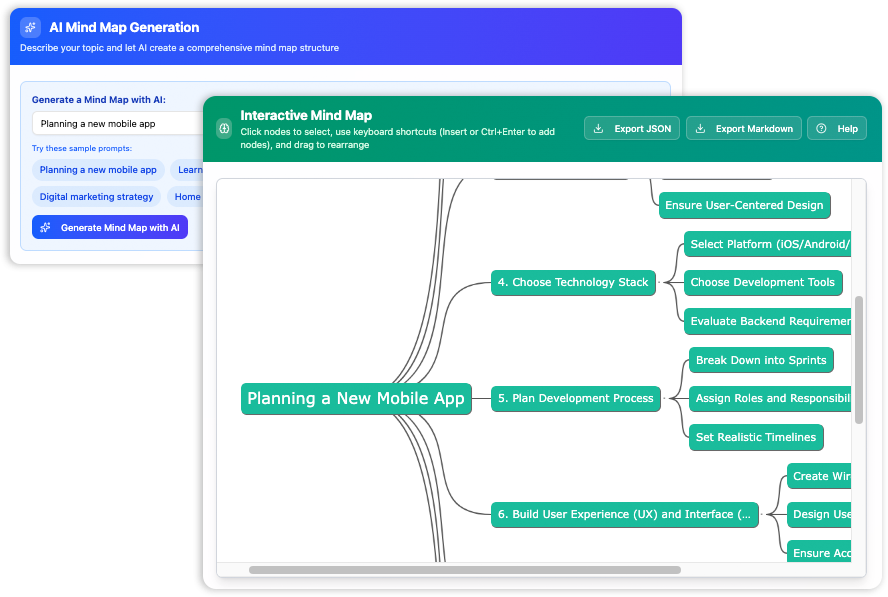
To begin, select Tools > Apps from the main menu in Visual Paradigm and locate the “Brainstorming” app. Start by providing a brief, natural language prompt that describes your topic. The AI uses this context to generate relevant branches and child nodes.
Example Prompts:
“Plan a new marketing campaign”
“Write an outline for a blog post about sustainable gardening”
“Brainstorm features for a mobile app”
Click Generate Mind Map with AI to instantly create a visual representation of your idea.
Step 2: Edit and Refine in Real-Time
Once the mind map is generated, it is not a static image—it is a fully interactive workspace. You can drag, drop, and tweak nodes to fit your specific vision. To speed up the process, the tool supports intuitive keyboard shortcuts:
- Add Child Node: Press
InsertorCtrl + Enter - Add Sibling Node: Press
Enter - Edit Node: Press
F2 - Delete Node: Press
Delete
These commands allow you to power through your edits without navigating complex menus, ensuring effortless rearrangement of nodes and entire branches.
Step 3: Export Your Work
The culmination of the brainstorming process is actionable data. When your mind map is complete, you can save your work in formats that integrate with other systems:
- Export as JSON: Download your mind map’s data in a structured JSON format, perfect for data integration or programmatic use.
- Export as Markdown: Export the mind map as a Markdown document, allowing for easy sharing and inclusion in reports, documentation, and other text-based files.
Beyond Basic Brainstorming: AI for Software Engineering
While general brainstorming is powerful, Visual Paradigm extends this AI capability into the realm of technical modeling. For software engineers and system architects, AI can be used to model specific structural and behavioral diagrams, ensuring that technical documentation is as easy to generate as a mind map.
The platform supports AI-driven generation for a wide variety of UML (Unified Modeling Language) diagrams, including:
- UML Class Diagram: Modeling system structure.
- UML Sequence Diagram: Modeling interactions between objects.
- UML Use Case Diagram: Defining system requirements.
- UML Activity Diagram: Visualizing workflows.
- UML Component Diagram: Designing modular software architectures.
- UML Deployment Diagram: Visualizing infrastructure and hardware.
- UML State Machine Diagram: Modeling object behavior and state changes.
- UML Package Diagram: Structuring codebases.
Conclusion
Whether you are a project manager creating a Work Breakdown Structure, a developer sketching a UML Class Diagram, or a content creator outlining a new article, AI-assisted tools offer a distinct advantage. By automating the initial creation phase, Visual Paradigm allows you to unlock your team’s creativity and organize ideas with unprecedented speed and efficiency.
Stop staring at a blank page. Start building brilliant ideas with the power of AI today.
Resources
- Unleashing Creativity with AI-Assisted Brainstorming – Visual Paradigm Guides
- What is AI-Assisted Brainstorming? A Guide to Unlocking Your Best Ideas – Visual Paradigm Guides
- Boost Creativity & Productivity with AI-Powered Mind Maps – Visual Paradigm Blog
- AI Mind Map Generator | Organize Ideas with AI
- AI-Assisted Brainstorming | Unlock Creativity with Visual Paradigm
- Free Mind Map Tool | Seamless Mind Mapping Tool
- Smart Board – Create and organize your ideas visually
- Brace Maps vs. Other Mind Mapping Techniques – Visual Paradigm Blog
- Online Mind Mapping Software
- Mind Mapping and Brainstorm – Visual Paradigm Community Circle
- About Visual Paradigm International Ltd.
- Mind Mapping and Brainstorm
- Easy-to-Use AI Mind Map Tool | AI Brainstorm
- AI-Powered Mind Map Tools | AI Brainstorm
- Free Mind Map Template: Decision Making for Product Development
This post is also available in Deutsch, Español, فارسی, Français, English, Bahasa Indonesia, 日本語, Polski, Portuguese, Ру́сский, Việt Nam, 简体中文 and 繁體中文.